
1. Product Overview
The iRUNTEK Rechargeable Fabric Shaver is designed to efficiently remove lint, fuzz, and pills from various fabrics, restoring their appearance. It features an LED digital display, multiple speed settings, and a Type-C fast charging port for convenience.
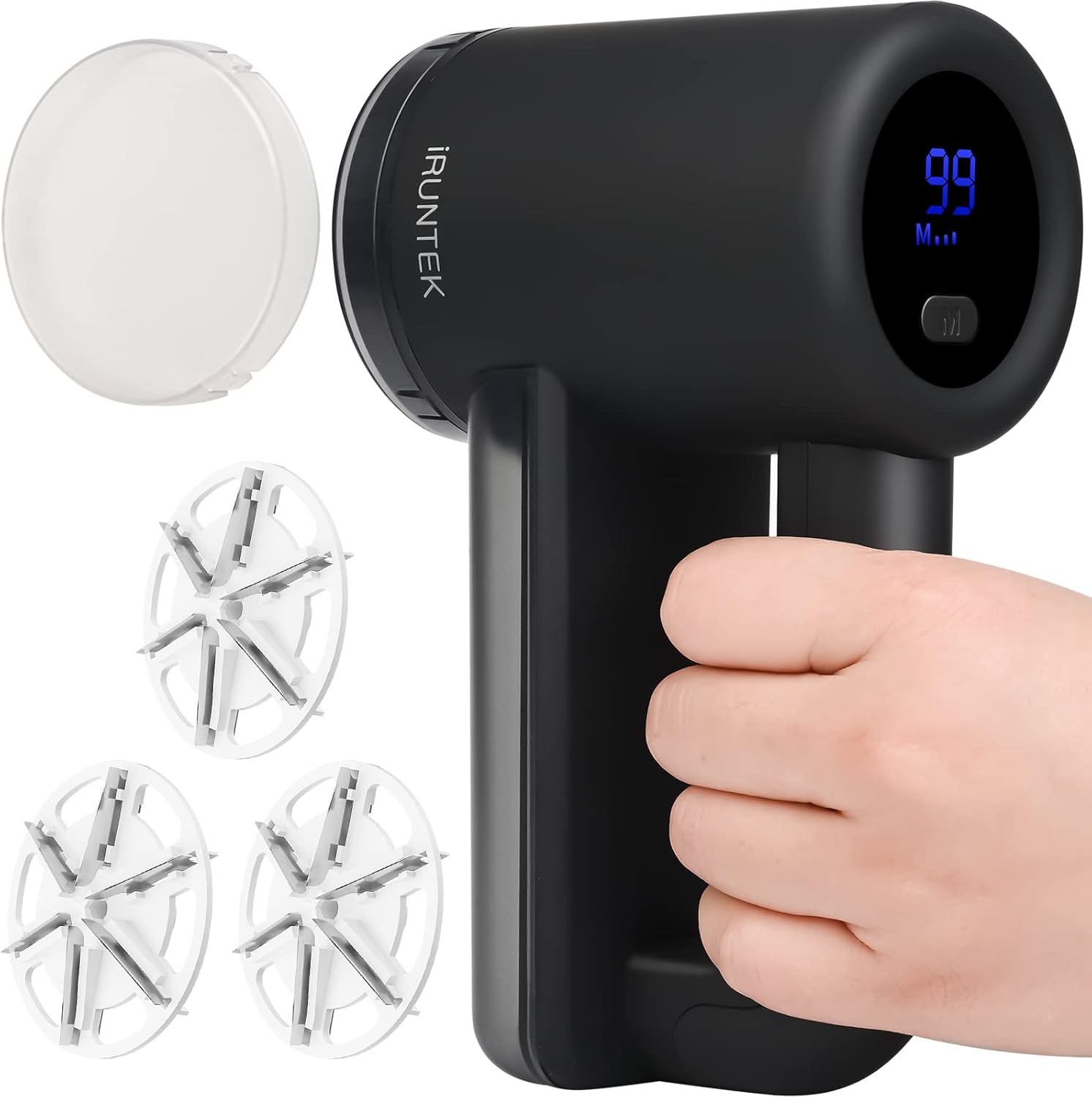
Image 1.1: The iRUNTEK Fabric Shaver, shown with its main unit, three spare blades, and a protective cover for the lint bin. The device is black with a digital display.
2. Package Contents
Verify that all items are present in the package:
- Fabric Shaver x 1
- Extra Blades x 3
- Cleaning Brush x 1
- USB Type-C Charging Cable x 1
- User Manual x 1

Image 2.1: Illustration of the package contents, including the fabric shaver, three replacement blades, a cleaning brush, a USB-C cable, and the user manual.
3. Setup and Charging
3.1 Initial Charging
Before first use, fully charge the fabric shaver. The device features a built-in 2000mAh lithium-ion rechargeable battery and a Type-C fast charging port.
- Connect the provided Type-C USB cable to the charging port on the device.
- Connect the other end of the cable to a 5V/1A USB power adapter (not included), laptop, desktop computer, power bank, or car charger.
- A full charge typically takes approximately 3 hours.
- The LED digital display will show the battery percentage. When the display reaches 100, the device is fully charged. If the display shows below 10, recharging is recommended.

Image 3.1: The fabric shaver connected to a Type-C charging cable, illustrating the charging process. The image also shows various charging options like computer, power adapter, and car charger.
3.2 Blade Installation (if necessary)
The device comes with blades pre-installed. If you need to replace them, follow these steps:
- Ensure the device is turned off.
- Carefully twist and remove the outer protective cover.
- Gently remove the old blade assembly.
- Place a new blade assembly onto the central spindle. The blades are sharp; handle with care.
- Reattach the protective cover, ensuring it is securely fastened. The device will not operate if the cover is loose or open due to a safety switch.
4. Operating Instructions
4.1 Powering On/Off and Speed Adjustment
The fabric shaver features an LED digital display that shows battery power and the selected speed gear. It has three speed settings to accommodate different fabric types.
- Press the power button to turn the device on.
- Press the speed adjustment button (often labeled M) to cycle through the three speed gears:
- M1 Gear (6000r/min): Suitable for delicate items like socks, scarves, and hats.
- M2 Gear (7000r/min): Ideal for sweaters and wool coats.
- M3 Gear (8000r/min): For more robust fabrics such as couch upholstery and pillows.
- The LED display will indicate the current speed setting (M1, M2, or M3) and remaining battery percentage.
- Press the power button again to turn the device off.

Image 4.1: The fabric shaver's LED display indicating battery level and speed setting, with a visual guide to the three available speed gears and their recommended uses.
4.2 Using the Fabric Shaver
To achieve optimal results and prevent damage to fabrics:
- Place the garment or fabric on a flat, firm surface. Ensure the fabric is smooth and free of wrinkles.
- Select the appropriate speed setting for the fabric type.
- Gently glide the shaver head over the pilled area. Avoid pressing too hard or holding the shaver in one spot for an extended period, as this may damage the fabric.
- Move the shaver in small, circular motions or short, even strokes.
- Regularly check the lint bin and empty it when full to maintain optimal performance.
Applicable Fabrics: This fabric shaver is suitable for a wide range of materials, including wool coats, sweaters, scarves, gloves, plush toys, sofas, leggings, and bedding.

Image 4.2: The fabric shaver being used on a dark fabric, demonstrating its effectiveness with "Before" and "After" comparisons of pilled and smooth fabric sections. Icons indicate suitability for socks, sweaters, coats, bedding, and cloth furniture.
5. Maintenance
5.1 Cleaning the Lint Bin
The fabric shaver features a large lint bin to collect removed fuzz. Regular emptying is crucial for consistent performance.
- Ensure the device is turned off.
- Gently slide off the transparent lint bin from the handle.
- Empty the collected lint and fuzz into a waste receptacle.
- Use the provided cleaning brush to remove any remaining lint from the bin and around the blade area.
- Reattach the lint bin securely until it clicks into place.

Image 5.1: The fabric shaver with its components separated for cleaning, including the main body, blade cover, lint bin, and the cleaning brush being used on the blade area. A safety switch is highlighted.
5.2 Blade Replacement
For optimal shaving efficiency, replace the blades when they become dull. The package includes three extra blades.
- Follow the steps for blade installation outlined in Section 3.2.
- Dispose of old blades responsibly.
6. Safety Precautions
- Keep the device out of reach of children.
- Do not use the shaver on wet fabrics.
- Avoid using excessive force when shaving, as this can damage the fabric or the device.
- The device is equipped with a safety protection switch: if the blade net cover is loose or opened, the fabric shaver will stop working immediately. Ensure the cover is securely fastened before operation.
- Exercise caution when handling the blades, as they are sharp.
- Do not immerse the device in water or any other liquid.
7. Troubleshooting
- Device not turning on:
- Ensure the device is fully charged. Check the LED display for battery percentage.
- Verify that the blade net cover is securely attached. The safety switch prevents operation if it's loose.
- Poor shaving performance:
- Check if the lint bin is full and empty it if necessary.
- Clean any lint or debris from around the blades and protective cover using the cleaning brush.
- Consider replacing the blades if they appear dull or damaged.
- Ensure the fabric is laid flat and taut.
- Device stops unexpectedly during use:
- The safety switch may have been triggered if the blade net cover became loose. Re-secure the cover.
- The battery might be low. Recharge the device.
8. Specifications
| Brand | iRUNTEK |
| Model | B08PV2KKJL |
| Material | Plastic, Stainless Steel |
| Color | Black |
| Product Dimensions | 4.45"D x 2.91"W x 7.17"H |
| Item Weight | 14.4 ounces |
| Operation Mode | Automatic |
| Battery Capacity | 2000mAh Lithium-ion |
| Charging Port | Type-C |
| Charging Time | Approx. 3 hours |
| Operating Time | 120-180 minutes |
| Speed Settings | 3 (6000r/min, 7000r/min, 8000r/min) |
| Blades | 6-leaf design |
| Display | LED Digital Display |
9. Warranty and Support
9.1 Product Warranty
This iRUNTEK Fabric Shaver comes with a 1-year product warranty from the date of purchase. Please retain your proof of purchase for warranty claims. The warranty covers manufacturing defects and malfunctions under normal use conditions.
9.2 Customer Service
For any questions, concerns, or technical support, please contact iRUNTEK customer service. We offer 7*24 customer service to assist you.
You can visit the official iRUNTEK store for more information and support: iRUNTEK Store on Amazon

Image 9.1: An image indicating "We Have 7*24 Customer Service" and "1 Year Product Warranty", along with the iRUNTEK logo.