
U`King ZQ-B257
U`King 2 Pack 50W Moving Head Stage Light Instruction Manual
Model: ZQ-B257
Introduction
This manual provides detailed instructions for the safe operation, installation, and maintenance of your U`King 2 Pack 50W Moving Head Stage Lights. Please read this manual thoroughly before using the product to ensure proper function and to prevent damage.

Image: Two U`King 50W Moving Head Stage Lights, black in color, shown with their respective remote controls. The lights feature a compact design with a display panel at the base.
Product Features
- 4 Operating Modes: Supports DMX 512, Master/Slave, Sound Activated, and Auto modes for versatile control.
- Multiple Colors and Patterns: Features 8 mono colors and 8 gobo patterns. The sound sensor allows for color and pattern changes synchronized with music.
- Moving Design: Offers a horizontal scan angle of 540° and a vertical angle of 180°, both with adjustable speeds.
- Easy Installation: Equipped with an adjustable stand for flexible mounting on floors or T-bars using brackets and screws.
- Wide Application: Suitable for various events including DJ disco parties, dance clubs, churches, bars, banquet events, home use, and stage lighting.

Image: A grid displaying eight distinct gobo patterns and two solid color light beams, illustrating the variety of projections available from the moving head stage light.
Safety Information
- Always connect the unit to a grounded circuit to avoid the risk of electrocution.
- Ensure the power voltage matches the specified voltage for the device (240 Volts).
- Do not open the housing. There are no user-serviceable parts inside. Refer all servicing to qualified personnel.
- Avoid direct eye exposure to the light source.
- Ensure adequate ventilation around the unit to prevent overheating. Do not block ventilation openings.
- Keep the device away from rain, moisture, and extreme temperatures.
- Mount the device securely using appropriate clamps and safety cables when suspended.
Setup and Installation
The moving head stage light can be installed in various positions, including standing on a flat surface, mounted on a truss, or attached to a T-bar. Always ensure the mounting surface or structure can support the weight of the fixture.
Physical Dimensions and Movement
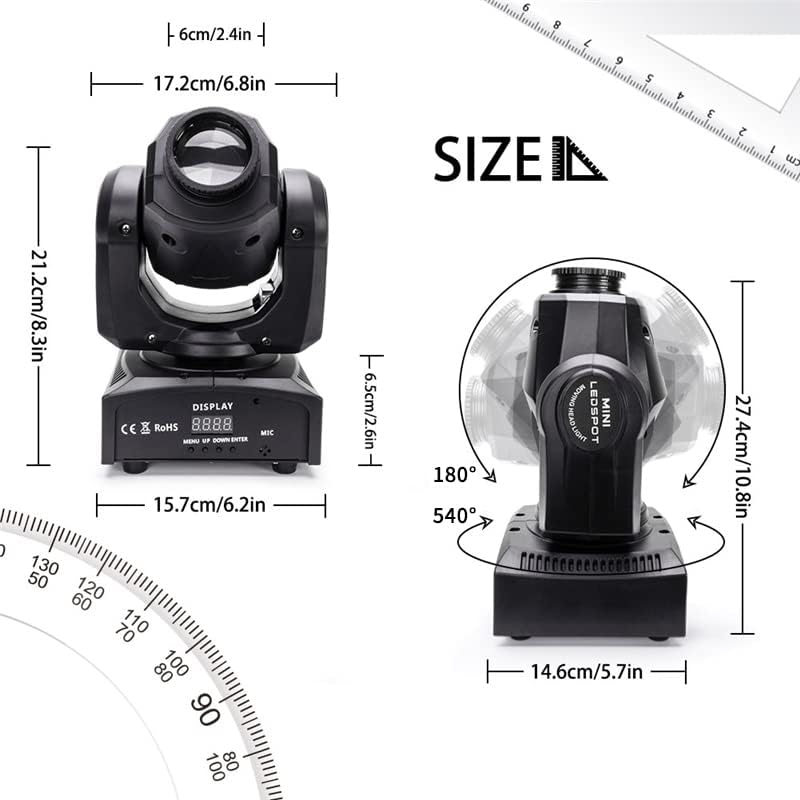
Image: A technical diagram illustrating the physical dimensions of the moving head light (approximately 17.2cm width, 21.2cm height, 15.7cm base width) and its movement capabilities: 540° pan (horizontal) and 180° tilt (vertical).
Mounting Options

Image: A close-up view of the adjustable mounting bracket, designed for securing the stage light to a truss or T-bar.
Connections
Identify the various input and output ports on the rear panel of the device for power and DMX control.

Image: A detailed view of the rear panel of the moving head light. Labels indicate the DMX IN and DMX OUT ports, the POWER IN socket, and the built-in microphone (MIC) for sound-activated modes. A digital display and control buttons (MENU, UP, DOWN, ENTER) are also visible.
- Power Connection: Connect the provided power cable to the POWER IN socket and then to a suitable power outlet (240V).
- DMX Connection (Optional): For DMX control, connect a DMX cable from your DMX controller's output to the DMX IN port of the first light. For multiple lights, daisy-chain them by connecting the DMX OUT of the first light to the DMX IN of the next, and so on.
- Mounting: Use the adjustable stand for floor placement or attach the included brackets for truss or T-bar mounting. Ensure all connections are secure.
Operating Modes
The U`King Moving Head Stage Light offers four primary operating modes:
- DMX 512 Mode: Allows professional control over all functions (color, gobo, pan, tilt, strobe, etc.) using an external DMX controller. Each light will require a unique DMX address.
- Master/Slave Mode: Connect multiple lights via DMX cables. Set one unit as the "Master" and others as "Slave" units. The slave units will mimic the master's movements and effects.
- Sound Activated Mode: The built-in microphone detects sound and music, triggering light patterns and movements that synchronize with the audio rhythm.
- Auto Mode: The light operates through pre-programmed internal shows and patterns without external input.

Image: A U`King moving head stage light positioned next to a DMX controller, illustrating a typical setup for DMX 512 mode operation.

Image: A U`King moving head stage light positioned near a speaker, with musical notes emanating from the speaker towards the light, visually representing the sound-activated operating mode.
Remote Control Operation
The included remote control provides convenient access to various functions of the moving head light.

Image: A detailed diagram of the remote control for the moving head light. Key buttons are labeled, including Power Switch, Stroboscopic, Auto Mode (0/1/2), Sound Mode (0/1/2), Save, Color Change, Color Changing Speed, Manual Positioning Switch, Pattern Switching Speed, Pan Running, and Tilt Running.
- Switch: Power on/off the light.
- Stroboscopic: Activates the strobe effect.
- Auto 0/1/2: Selects different automatic program modes.
- Sound 0/1/2: Selects different sound-activated modes.
- Save: Saves current settings (specific functionality may vary).
- Color +/-: Changes the color.
- RGSP +/-: Adjusts the color changing speed.
- GOBO +/-: Changes the gobo pattern.
- Manual Positioning Switch: Activates manual control for pan and tilt.
- X-/X+: Controls Pan (horizontal) movement.
- Y-/Y+: Controls Tilt (vertical) movement.
Display Panel Operation
The digital display and buttons on the base of the light allow for direct configuration and mode selection.
Image: A detailed view of the control panel at the base of the moving head light, highlighting the digital display and the four control buttons: MENU, UP, DOWN, and ENTER. The microphone input is also visible.
- MENU: Press to cycle through the main menu options (e.g., DMX address, operating mode).
- UP/DOWN: Use these buttons to navigate through menu options or adjust parameter values.
- ENTER: Confirms the selected option or value.
- The DISPLAY shows the current mode or parameter value.
Maintenance
Regular maintenance ensures the longevity and optimal performance of your moving head lights.
- Cleaning: Periodically clean the lens and exterior casing with a soft, lint-free cloth. Do not use abrasive cleaners or solvents.
- Ventilation: Ensure the ventilation openings are clear of dust and debris. Proper airflow is crucial for heat dissipation.
- Cable Inspection: Regularly check power and DMX cables for any signs of damage or wear. Replace damaged cables immediately.
- Storage: When not in use, store the lights in a dry, dust-free environment.

Image: A diagram showing red arrows indicating airflow through the rear ventilation grilles of the moving head light, highlighting the heat dissipation mechanism.
Troubleshooting
| Problem | Possible Cause | Solution |
|---|---|---|
| Light does not power on. | No power supply; faulty cable; unit malfunction. | Check power cable connection and outlet. Test with a different cable. If problem persists, contact support. |
| No DMX control. | Incorrect DMX address; faulty DMX cable; incorrect DMX mode. | Verify DMX address settings. Check DMX cable connections. Ensure light is set to DMX mode. |
| Light not responding to sound. | Sound mode not activated; microphone obstructed; low sound input. | Ensure light is in Sound Activated mode. Check microphone for obstructions. Increase sound volume. |
| Movement is erratic or stuck. | Mechanical obstruction; internal error. | Power cycle the unit. Check for any physical obstructions. If problem persists, contact support. |
Specifications
| Feature | Detail |
|---|---|
| Product Dimensions | 42 x 29 x 21 cm (packaged); 17.2 x 21.2 x 15.7 cm (individual unit) |
| Item Weight | 5.5 kg |
| Model Number | ZQ-B257 |
| Colour | Black |
| Material | Aluminium, Plastic |
| Power Source | Corded Electric |
| Voltage | 240 Volts |
| Light Source Type | Light Emitting Diode (LED) |
| Horizontal Angle (Pan) | 540° (adjustable speed) |
| Vertical Angle (Tilt) | 180° (adjustable speed) |
| Control Modes | DMX 512, Master/Slave, Sound Activated, Auto |
| Colors | 8 mono colors |
| Gobo Patterns | 8 goboes |
| Batteries | 1 CR2 battery required (included for remote control) |
Warranty and Support
For warranty information or technical support, please refer to the seller's policy or contact the manufacturer directly. Keep your purchase receipt as proof of purchase.
For additional visual information on lighting effects, you may refer to this external video: Lighting Effect Video. Please note this is an external link and not an embedded video.
Ask a question about this manual
Ask about setup, troubleshooting, compatibility, parts, safety, or missing instructions. Manuals+ will review the question and use this page’s manual context to help answer it.