
LG DLEX4000B
LG DLEX4000B Electric Dryer User Manual
Model: DLEX4000B
Introduction
This manual provides essential information for the safe and efficient operation, maintenance, and troubleshooting of your LG DLEX4000B 7.4 cu. ft. Ultra Large Capacity Smart wi-fi Enabled Front Load Electric Dryer. Please read this manual thoroughly before using the appliance and keep it for future reference.
Safety Instructions
Always follow basic precautions, including the following:
- Read all instructions before using the appliance.
- Do not dry articles that have been previously cleaned in, washed in, soaked in, or spotted with gasoline, dry-cleaning solvents, or other flammable or explosive substances.
- Do not allow children to play on or in the appliance. Close supervision of children is necessary when the appliance is used near children.
- Do not reach into the appliance if the drum is moving.
- Do not install or store this appliance where it will be exposed to the weather.
- Do not tamper with controls.
- Clean the lint filter before or after each load.
- Keep the area around the exhaust opening and adjacent surrounding areas free from the accumulation of lint, dust, and dirt.
- The interior of the appliance and exhaust duct should be cleaned periodically by qualified service personnel.
- Do not repair or replace any part of the appliance or attempt any servicing unless specifically recommended in this manual.
Setup and Installation
Proper installation is crucial for the performance and safety of your dryer. It is recommended that installation be performed by a qualified technician.
Unpacking
Remove all packaging materials, including the shipping bolts and foam packing. Inspect the dryer for any shipping damage.
Location Requirements
- Ensure the dryer is placed on a solid, level floor.
- Allow adequate clearance for air circulation and utility connections.
- The dryer requires a dedicated 240V electrical outlet.
- For electric dryers, a proper exhaust duct system is essential for efficient drying and safety.
Leveling the Dryer
Use a level and adjust the leveling feet at the bottom of the dryer to ensure it is stable and does not rock. This prevents excessive vibration and noise during operation.
Ducting Connection
Connect the dryer to a rigid metal exhaust duct. Avoid using flexible plastic or foil ducts, as they can restrict airflow and pose a fire hazard. Ensure the duct run is as short and straight as possible.
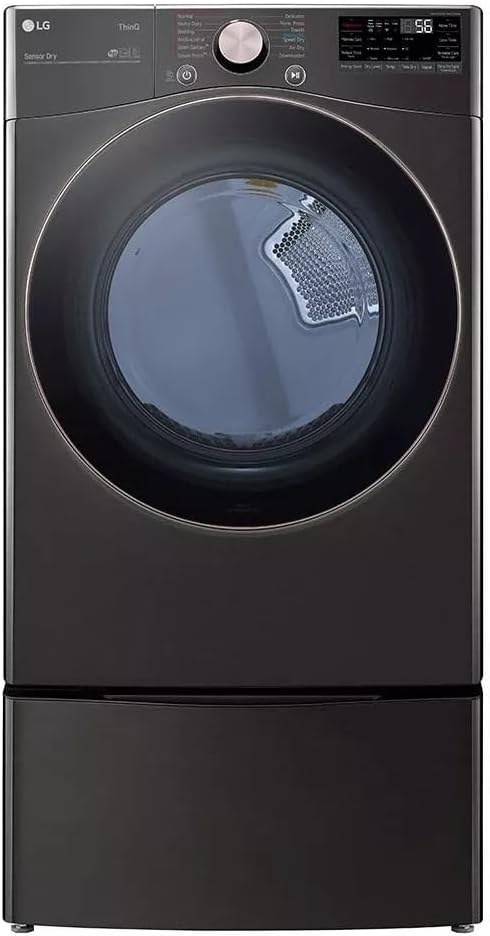
Image: Front view of the LG DLEX4000B electric dryer. This image illustrates the overall design and appearance of the appliance, which is important for identifying the product during setup.
Operating Instructions
This section guides you through the daily operation of your LG DLEX4000B dryer.
Loading the Dryer
- Sort laundry by fabric type and desired dryness level.
- Do not overload the dryer. Clothes should tumble freely.
- Ensure all items are suitable for machine drying.
Control Panel Overview
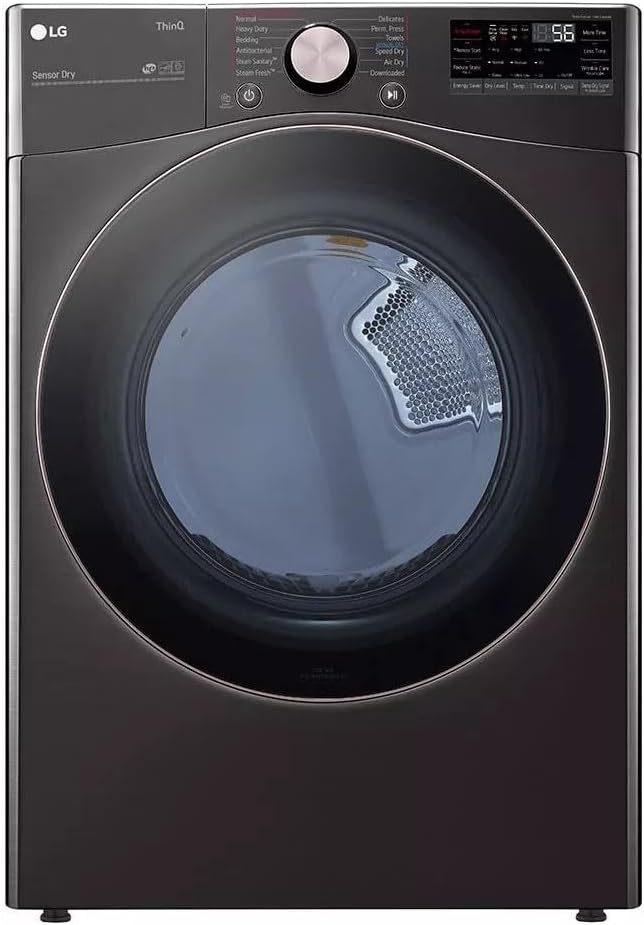
Image: Detailed view of the control panel. This image helps users locate and understand the various buttons, knobs, and display elements for cycle selection and settings.
The control panel features a central dial for cycle selection, an LED display for time and status, and touch buttons for additional options like temperature, dryness level, and special features.
Selecting a Drying Cycle
Turn the cycle selector knob to choose the desired drying cycle. Common cycles include:
- Normal: For most cottons and mixed loads.
- Heavy Duty: For sturdy fabrics like jeans or work clothes.
- Delicates: For fragile items requiring low heat.
- Perm. Press: For wrinkle-resistant fabrics.
- Speed Dry: For small loads that need to dry quickly.
- SteamFresh™ / TurboSteam™: Uses steam to refresh clothes and reduce wrinkles.
- AI Fabric Sensor: Automatically detects fabric type and load size to select optimal drying motions and temperatures.
- Sensor Dry: Automatically adjusts drying time based on moisture levels to prevent over-drying.
Starting a Cycle
- Load the dryer and close the door firmly.
- Select the desired drying cycle.
- Adjust any additional options (e.g., temperature, dryness level) as needed.
- Press the Start/Pause button to begin the cycle.
Smart Features (Wi-Fi Connectivity)
Your LG DLEX4000B dryer is Wi-Fi enabled, allowing for remote control and monitoring via the LG ThinQ app.
- Remote Start and Cycle Monitor: Start or pause cycles and check remaining time from your smartphone.
- SmartDiagnosis™: Troubleshoot issues directly from the app.
- Download Cycles: Access specialized drying cycles not available on the control panel.

Image: LG DLEX4000B dryer demonstrating ThinQ Care app integration. This image highlights the smart features, including remote monitoring and error notifications, enhancing user convenience and troubleshooting capabilities.
Maintenance
Regular maintenance ensures optimal performance and extends the lifespan of your dryer.
Cleaning the Lint Filter
Clean the lint filter before or after every load. A clogged lint filter reduces drying efficiency and can be a fire hazard.
- Open the dryer door.
- Pull the lint filter straight up and out.
- Remove any lint from the filter by hand.
- Insert the filter back into its slot until it clicks into place.

Image: Interior view of the LG DLEX4000B dryer with the door open. This image clearly shows the location of the lint filter, which is crucial for routine cleaning and maintenance.
Cleaning the Exhaust Duct (FlowSense™)
The FlowSense™ Duct Clogging and Lint Filter Indicators alert you to potential airflow restrictions. Periodically inspect and clean the exhaust duct to prevent lint buildup, which can reduce efficiency and pose a fire risk. This should be done by a qualified service technician annually or as needed.
Cleaning the Dryer Exterior
Wipe the exterior surfaces with a soft, damp cloth. Do not use abrasive cleaners or solvents.
Troubleshooting
Before calling for service, review this section for common issues and their solutions.
| Problem | Possible Cause | Solution |
|---|---|---|
| Dryer does not start. | Power cord unplugged; circuit breaker tripped; door not closed completely. | Ensure power cord is securely plugged in; check circuit breaker; close door firmly. |
| Clothes are not drying. | Lint filter clogged; exhaust duct restricted; overloaded dryer; incorrect cycle selected. | Clean lint filter; check and clear exhaust duct; reduce load size; select appropriate cycle. |
| Excessive noise or vibration. | Dryer not level; foreign objects in drum; worn components. | Level the dryer; check drum for loose items; contact service if noise persists. |
| "Door Open Error" message. | Dryer door is not fully closed or latch is obstructed. | Ensure the dryer door is securely latched. Check for any items obstructing the door closure. |
For more complex issues or error codes not listed, refer to the SmartDiagnosis™ feature via the LG ThinQ app or contact LG customer support.
Specifications
Key specifications for the LG DLEX4000B Electric Dryer:
| Feature | Detail |
|---|---|
| Brand | LG |
| Model Number | DLEX4000B |
| Capacity | 7.4 Cubic Feet |
| Color | Black Steel (B) |
| Dimensions (HxWxD) | 40.5 x 31.5 x 29.5 inches |
| Item Weight | 143 pounds |
| Form Factor | Front Load |
| Door Hinges | Reversible |
| Special Features | TurboSteam Technology, AI Fabric Sensor, Sensor Dry, FlowSense Duct Clogging and Lint Filter Indicators, SmartDiagnosis (v3.0), Wi-Fi Enabled |
Warranty Information
Your LG DLEX4000B dryer comes with a manufacturer's warranty. Please refer to the warranty card included with your appliance for specific terms, conditions, and duration of coverage. Keep your purchase receipt as proof of purchase for warranty claims.
Customer Support
For technical assistance, service requests, or further inquiries, please contact LG Customer Support:
- Visit the official LG website for support resources and contact information.
- Utilize the SmartDiagnosis™ feature in the LG ThinQ app for immediate troubleshooting.
- You can also visit the LG Store on Amazon for product information and support links.