
Pyle PPHP1542B
Pyle Portable Bluetooth PA Speaker System User Manual
Model: PPHP1542B
Introduction
Welcome to your new Pyle Portable Bluetooth PA Speaker System. This powerful and versatile audio system is designed for both indoor and outdoor use, offering high-quality sound, multiple connectivity options, and dynamic party lights. Please read this manual thoroughly to ensure proper operation and care of your device.
What's in the Box
- PA Speaker System
- Remote Control
- Power Adapter
- Wired microphone
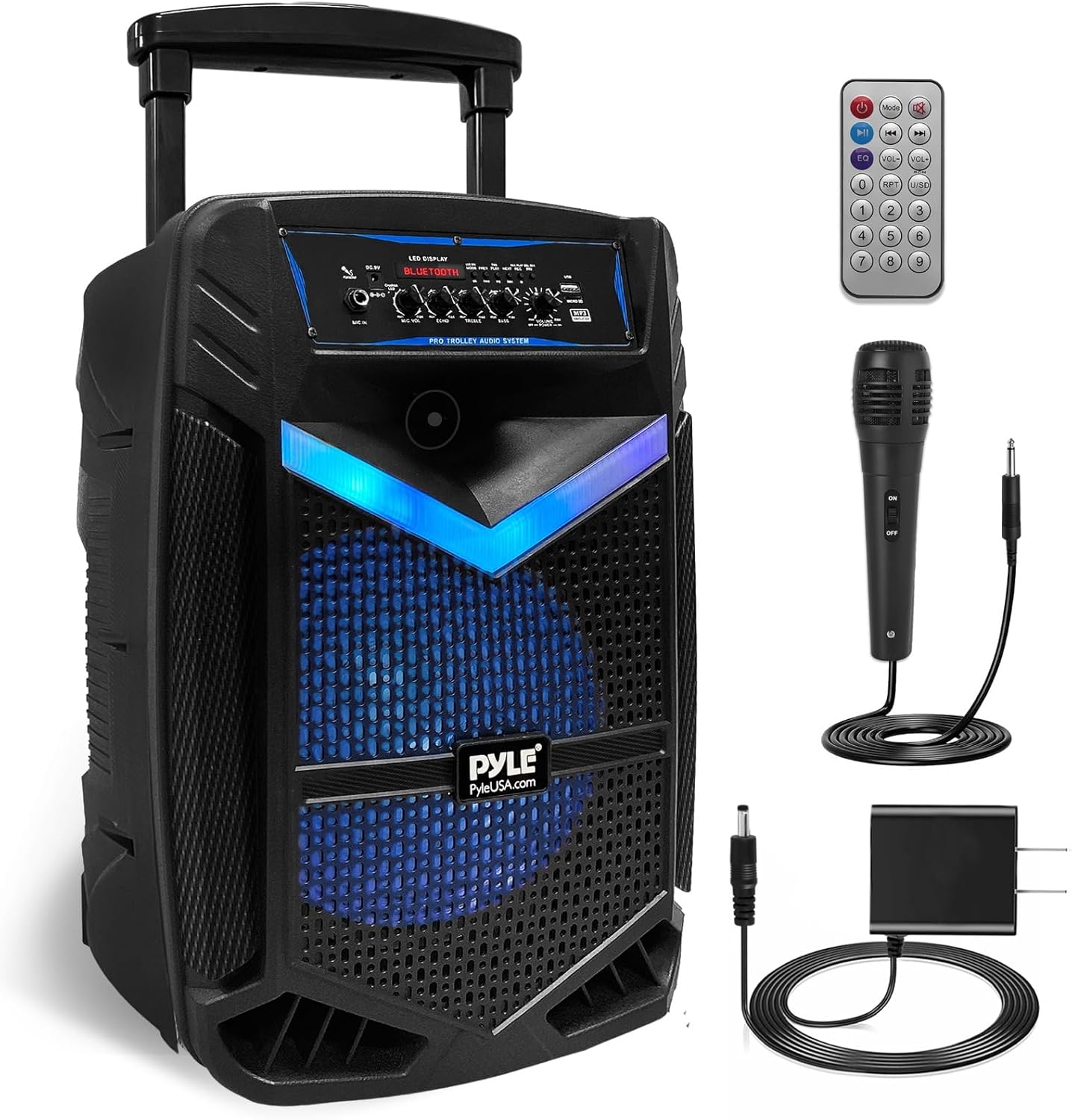
This image displays the Pyle PPHP1542B PA speaker system along with its accessories: a remote control, a power adapter, and a wired microphone, all essential for its operation.
Key Features
- True Wireless Stereo System
- High-Powered PA Loudspeaker Style (1200W Max)
- Bluetooth Wireless Music Streaming
- Multi-Color Flashing LED Party Lights
- Built-in Rechargeable Battery (7.4V, 3600mAh)
- FM Radio with Digital LED Display
- USB Flash Memory Reader & Micro SD Card Reader
- 6.5mm Microphone Input with Recording Function
- Microphone Priority Function, Echo, Bass & Treble Adjust Knobs
- Rugged & Durable Molded Cabinet Design with Trolley & Wheels

This diagram illustrates the internal components responsible for sound output, highlighting the 15-inch subwoofer and 1-inch tweeter for strong stereo audio and bass amplification.

The image shows the speaker's front panel illuminated with dynamic multi-color LED lights, enhancing the party atmosphere.
Setup Guide
Initial Charging
Before first use, fully charge the speaker using the provided power adapter. The "Charge LED" indicator will illuminate during charging.
Power On/Off
Locate the "POWER" switch on the control panel. Flip the switch to the 'ON' position to power on the unit. The LED display will light up.
Microphone Connection
Connect the wired microphone to the "MIC IN" port on the control panel. Ensure the microphone's ON/OFF switch is in the 'ON' position.
This video demonstrates the setup and features of the Pyle PA speaker, including connecting the wired microphone and activating the party lights. It highlights the speaker's portability and various input options.
Operating Instructions
Bluetooth Pairing
1. Power on the speaker. The LED display will show "BT" or "BLUETOOTH" indicating it's in Bluetooth mode.
2. On your mobile device (smartphone, tablet, laptop), enable Bluetooth and search for available devices.
3. Select 'PYLEUSA' from the list of devices. Once connected, the speaker will emit an audible confirmation.
4. You can now stream audio wirelessly from your device.
USB/Micro SD Playback
Insert a USB flash drive or Micro SD card (up to 32GB, MP3 format) into the respective slot. The speaker will automatically switch to USB/SD mode and begin playback. Use the "PREV", "PLAY/PAUSE", and "NEXT" buttons to control playback.
FM Radio
Press the "MODE" button to switch to FM Radio mode. Use the "PREV" and "NEXT" buttons to tune to desired stations.
Microphone Usage
Adjust the "MIC VOL" knob to control the microphone's volume. Use the "ECHO" knob to add echo effects and "MIC PRI" to prioritize microphone audio over music.
Audio Adjustment
Use the "TREBLE" and "BASS" knobs to fine-tune the audio output. The main "VOLUME" knob controls the overall sound level.
LED Party Lights
Toggle the "LED-SW" switch to turn the multi-color flashing LED party lights on or off.
Maintenance and Care
- Keep the speaker in a dry environment, away from direct sunlight and extreme temperatures.
- Clean the exterior with a soft, dry cloth. Do not use harsh chemicals or abrasive cleaners.
- Ensure all ports are free from dust and debris.
- When not in use for extended periods, turn off the power using the ON/OFF switch to prevent battery damage.
Troubleshooting
| Problem | Solution |
|---|---|
| No Power | Check if the power adapter is securely connected and the speaker is fully charged. Ensure the power switch is ON. |
| No Sound | Check volume levels on both the speaker and the connected device. Ensure the correct input mode (Bluetooth, USB, AUX) is selected. |
| Bluetooth Disconnection | Ensure the device is within the 32 ft wireless range. Disconnect and re-pair the device. |
| Microphone Static/Distortion | Adjust the "MIC VOL" and "ECHO" knobs. Ensure the microphone cable is securely connected. |
| USB/SD Not Playing | Ensure the audio files are in MP3 format. Check if the USB drive/SD card is properly inserted and not corrupted. Maximum support is 32GB. |
Technical Specifications
- Max Power Output: 1200 Watt Max
- Sound System: 15-inch Subwoofer + 1-inch Tweeter
- Impedance: 3.6 Ohm
- Bluetooth Version: 4.2
- Wireless Range: Up to 32 ft.
- USB Interface Type: 2.0
- Digital Audio File Support: MP3
- Maximum USB Flash Support: 32GB
- Rechargeable Battery: 7.4V, 3600mAh – 26.64 Wh
- Battery Life: Up to 2.5 Hours (Charge Time: Approx. 5 Hours)
- Power Supply: 120/240V, Switchable (9V/1.5A Power Adapter)
- Construction Material: Polypropylene (PP)
- Product Dimensions (L x W x H): 17.8'' x 13.3'' x 27.4'' -inches
- Item Weight: 17 Pounds
- Model Number: PPHP1542B
- UPC: 842893131535
Warranty and Support
For warranty information and technical support, please refer to the official Pyle website or contact their customer service.
Optional protection plans are available for purchase, including 2-Year and 3-Year plans, as well as a Complete Protect monthly plan.
A digital version of the user manual is available at: Pyle User Manual (PDF)
Related documentsPPHP1542B


Ask a question about this manual
Ask about setup, troubleshooting, compatibility, parts, safety, or missing instructions. Manuals+ will review the question and use this page’s manual context to help answer it.