
STIGA Rucksack Edge XL
STIGA Rucksack Edge XL
Instruction Manual
Brand: STIGA | Model: Rucksack Edge XL
1. Introduction
Thank you for choosing the STIGA Rucksack Edge XL. This manual provides detailed instructions for the proper use, care, and maintenance of your new backpack. Please read this manual thoroughly before using the product to ensure optimal performance and longevity.
The STIGA Rucksack Edge XL is designed for versatility and durability, suitable for various activities from daily commutes to sports and travel. Its thoughtful design ensures comfort and functionality.
2. Product Overview
The STIGA Rucksack Edge XL is a spacious and robust backpack featuring a sleek gray and black design. It is equipped with multiple compartments and adjustable straps to accommodate your belongings and provide a comfortable carrying experience.
Key Features:
- Durable fabric construction for long-lasting use.
- Large main compartment with zipper closure.
- Front zippered pocket for quick access items.
- Adjustable padded shoulder straps for comfort.
- Top grab handle for easy carrying.
- Side pockets for water bottles or small items.
3. Parts Identification
Familiarize yourself with the different components of your STIGA Rucksack Edge XL:
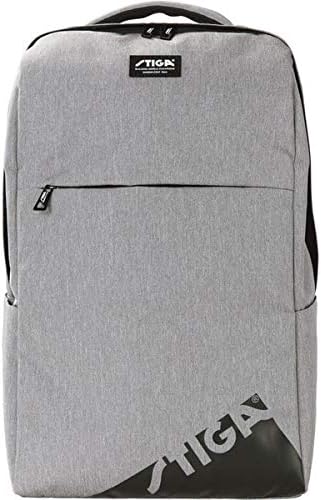
Figure 3.1: Front View
This image displays the front of the STIGA Rucksack Edge XL. It highlights the main zippered compartment, the smaller front zippered pocket, and the STIGA logo prominently displayed on the lower right and a small patch near the top handle.
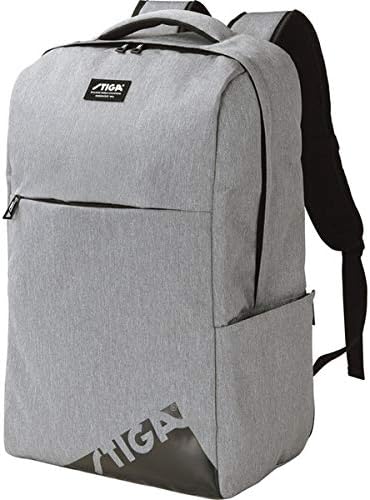
Figure 3.2: Angled Side View
This angled view provides a better perspective of the backpack's depth and shows the side pockets, which are ideal for water bottles or other quick-access items. The padded shoulder straps are also visible from this angle.
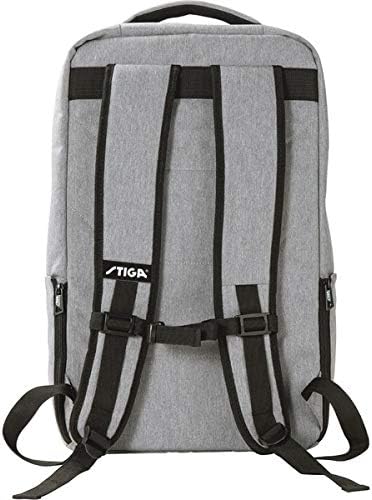
Figure 3.3: Back View
The back view illustrates the ergonomic design of the shoulder straps, which are padded for comfort. It also shows the adjustable buckles for customizing the fit and a small STIGA logo near the top of the back panel.

Figure 3.4: Top View (Open)
This image shows the top opening of the main compartment, revealing the spacious interior. The zipper closure for the main compartment is clearly visible, demonstrating how the bag opens for packing.
4. Setup
4.1 Initial Inspection
Upon receiving your backpack, carefully inspect it for any signs of damage during shipping. Check all zippers, seams, and buckles to ensure they are in proper working order.
4.2 Adjusting Shoulder Straps
- Put on the backpack and ensure it sits comfortably on your back.
- Locate the adjustment buckles at the bottom of each shoulder strap.
- Pull the loose ends of the straps downwards to tighten the backpack, bringing it closer to your back.
- Pull the buckles upwards to loosen the straps, allowing the backpack to sit lower.
- Adjust both straps evenly until the backpack feels secure and balanced, with the weight distributed comfortably across your shoulders and upper back.
5. Operating Instructions
5.1 Using Compartments
- Main Compartment: Use for larger items such as books, clothing, or a laptop. Open and close using the dual zippers.
- Front Pocket: Ideal for smaller items that require quick access, like pens, keys, or a phone.
- Side Pockets: Suitable for water bottles, umbrellas, or other slim items.
5.2 Packing Your Backpack
To maintain balance and comfort, pack heavier items closer to your back and lighter, bulkier items further away. Distribute weight evenly between both sides of the backpack.
5.3 Carrying the Backpack
Always use both shoulder straps to distribute weight evenly and prevent strain on one side of your body. For short distances, the top grab handle can be used.
6. Maintenance and Care
6.1 Cleaning
- For minor dirt, wipe the surface with a damp cloth and mild soap.
- Do not machine wash or tumble dry, as this may damage the fabric and structure.
- For stubborn stains, a soft brush can be used gently.
- Allow the backpack to air dry completely before storing.
6.2 Storage
Store your backpack in a cool, dry place away from direct sunlight when not in use. Ensure it is empty and clean to prevent mold or mildew growth.
6.3 Zipper Care
Keep zippers clean and free of debris. If a zipper becomes stiff, apply a small amount of zipper lubricant or wax.
7. Troubleshooting
| Problem | Possible Cause | Solution |
|---|---|---|
| Zipper stuck or difficult to move. | Fabric caught in zipper; dirt/debris; lack of lubrication. | Gently pull fabric away; clean zipper teeth; apply zipper lubricant or wax. |
| Shoulder straps feel uncomfortable. | Improper adjustment; uneven weight distribution; too much weight. | Re-adjust straps evenly; redistribute contents; reduce load if too heavy. |
| Backpack appears dirty or stained. | Accumulated dirt from use. | Refer to Section 6.1 Cleaning for instructions. |
8. Specifications
| Feature | Detail |
|---|---|
| Brand | STIGA |
| Model Name | Rucksack Edge XL |
| ASIN | B08PF2KQCL |
| Style | Rucksack |
| Closure Type | Zipper |
| Pattern | Plain |
| Shell Type | Soft |
| Color | Gray/Black |
9. Warranty and Support
9.1 Warranty Information
STIGA products are manufactured to high-quality standards. For specific warranty details, please refer to the warranty card included with your purchase or visit the official STIGA website. Keep your proof of purchase for warranty claims.
9.2 Customer Support
If you encounter any issues or have questions not covered in this manual, please contact STIGA customer support. Contact information can typically be found on the product packaging or the official STIGA website.
Note: Product specifications and features are subject to change without prior notice.
Ask a question about this manual
Ask about setup, troubleshooting, compatibility, parts, safety, or missing instructions. Manuals+ will review the question and use this page’s manual context to help answer it.