
1. Introduction
This manual provides comprehensive instructions for the WINFLIKE ERF3B69S replacement remote control. This remote is designed to function as a direct replacement for original Sharp and Hisense Smart TV remotes, offering easy access to all standard functions and dedicated app buttons. Please read this manual carefully to ensure proper use and longevity of your remote control.
2. Product Overview
The WINFLIKE ERF3B69S remote control is a high-quality replacement unit featuring sensitive keys and a comfortable design. It provides full functionality for compatible Sharp and Hisense Smart TV models, including dedicated buttons for popular streaming services and smart features.
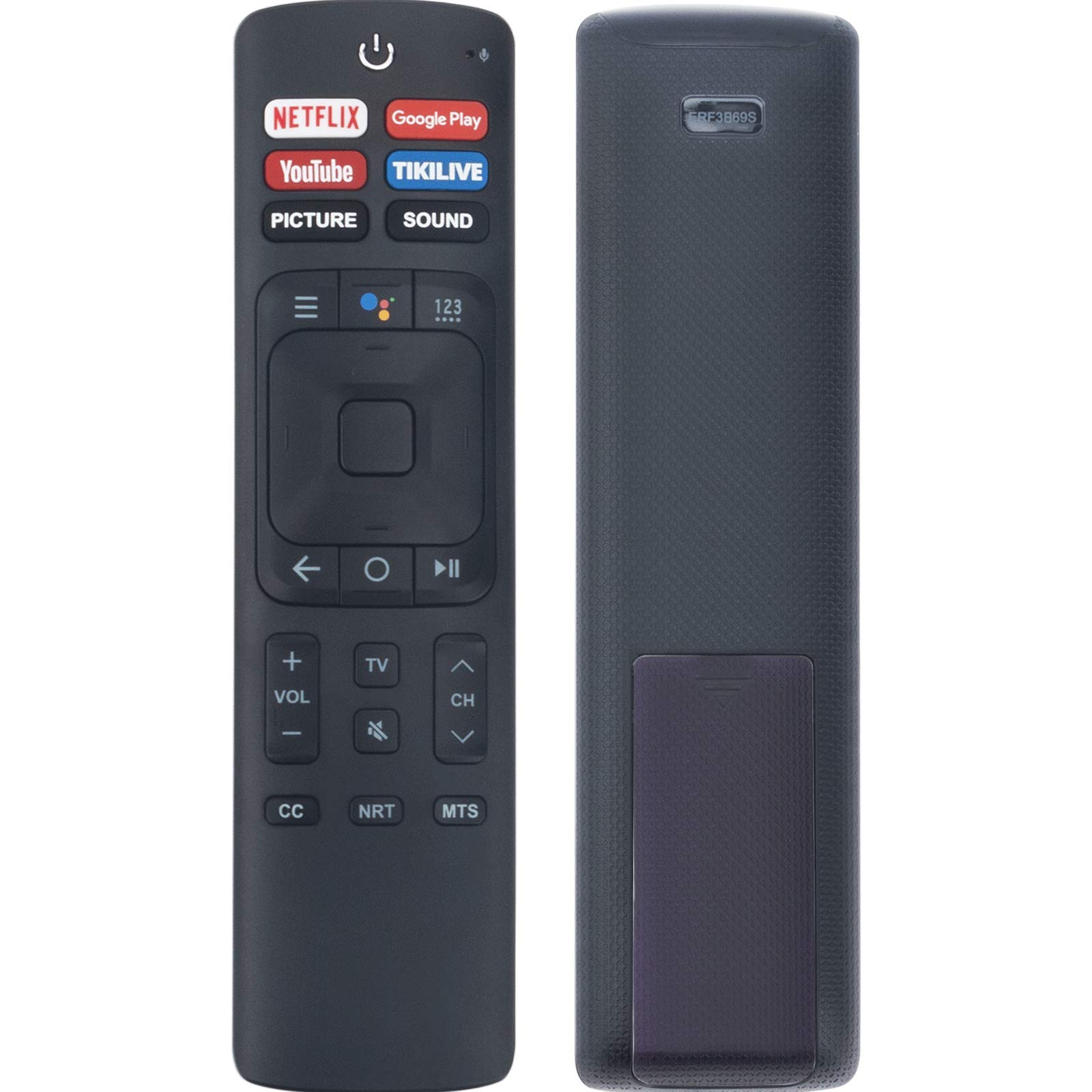
Image 1: Front view of the WINFLIKE ERF3B69S Replacement Remote Control. It features a power button at the top, dedicated buttons for Netflix, Google Play, YouTube, TIKILIVE, PICTURE, and SOUND. Below these are navigation controls, volume, channel, and other function buttons.
3. Setup
3.1 Battery Installation
The remote control requires two (2) AAA batteries (not included). Follow these steps to install the batteries:
- Locate the battery compartment cover on the back of the remote control.
- Press down on the tab and slide the cover off.
- Insert two AAA batteries, ensuring the positive (+) and negative (-) terminals match the diagrams inside the compartment.
- Slide the battery compartment cover back into place until it clicks securely.
Once batteries are installed, the remote control is ready for use with compatible Sharp and Hisense Smart TVs. No additional pairing is typically required for this replacement model.
4. Operating Instructions
This remote control provides direct access to various TV functions. Below is a general guide to common button functions:
- Power Button (⏻): Turns the TV on or off.
- Netflix, Google Play, YouTube, TIKILIVE Buttons: Direct access to these streaming applications.
- PICTURE, SOUND Buttons: Access picture and sound settings menus.
- Navigation Pad (Up, Down, Left, Right, OK): Used to navigate menus and select options.
- Back (←): Returns to the previous screen or menu.
- Volume Up/Down (VOL +/-): Adjusts the TV volume.
- Channel Up/Down (CH ▲/▼): Changes TV channels.
- Mute (🔇): Mutes or unmutes the TV sound.
- CC (Closed Caption): Toggles closed captions on or off.
- NRT (Next Recording Time): Functionality may vary by TV model.
- MTS (Multi-channel Television Sound): Selects audio modes (e.g., Stereo, SAP).
5. Maintenance
5.1 Cleaning
To clean the remote control, use a soft, dry cloth. Do not use liquid cleaners or abrasive materials, as they may damage the remote's surface or internal components.
5.2 Battery Replacement
Replace the batteries when the remote control becomes unresponsive or its range decreases significantly. Always replace both batteries at the same time with new AAA batteries. Do not mix old and new batteries, or different types of batteries.
6. Troubleshooting
If you experience issues with your remote control, please refer to the following common problems and solutions:
- Remote is not working:
- Ensure the batteries are inserted correctly with the correct polarity (+/-).
- Replace the batteries with fresh AAA batteries.
- Check for any obstructions between the remote control and the TV's infrared sensor.
- Point the remote directly at the TV's sensor.
- Buttons are unresponsive:
- Clean the remote control, especially around the buttons, to remove any dirt or debris.
- If specific buttons are not working, it might indicate a fault with the remote.
- Limited range:
- Replace the batteries.
- Ensure there are no strong light sources (like direct sunlight) interfering with the IR signal.
If these steps do not resolve the issue, please contact customer support.
7. Specifications
| Model Number | WL-ERF3B69S-ORI-DHF (ERF3B69S) |
| Product Dimensions | 5 x 1 x 0.5 inches |
| Item Weight | 0.7 ounces |
| Batteries Required | 2 AAA batteries |
| Connectivity Technology | Bluetooth |
| Compatible Devices | Television |
| Special Features | Ergonomic, Lightweight, Voice Search |
8. Compatible TV Models
The WINFLIKE ERF3B69S replacement remote control is compatible with a wide range of Sharp and Hisense Smart TV models, including but not limited to:
- Hisense Models: 50H5C, 50H6B, 50H7GB, 50H8C, 55H5C, 55H6B, 55H7B, 55H8C, 55H9B, 65H10B, 65H7B, 43H5C, 43H7C
- Sharp/Hisense Remote Models: ERF3I69H, ERF3A69S, ERF3B69, ERF3I69H, ERF3B69S
- Sharp TV Models: LC-40N5000, LC-43N5000, LC-43N610, LC-43N6100, LC-43N7000, LC-50N5000, LC-50N6000, LC-50N7000, LC-55Q7530U, LC-55N6000, LC-55N8003U, LC-55N7000, LC-58N7503U, LC-60N6200, LC-65N5200, LC-65N7000, LC-65N9000, LN-60N7000, LN-75N8000, LC-75N8003U, LC-75Q7570U
- Other Compatible Models: LC55N8003U, LC55Q7530U, LC58N7503U, LC65N8003U, LC75N8003U, LC75Q7570U, LC40N5000, LC43N5000, LC43N610, LC43N6100, LC43N7000, LC50N5000, LC50N6000, LC50N7000, LC55N6000, LC55N7000, LC60N6200, LC65N5200, LC65N7000, LC65N9000, LN60N7000, LN75N8000, LC75N8003U
If your TV model is not listed, but your original remote control matches the ERF3B69S or similar models, this replacement remote may still be compatible.
9. Support
For any questions regarding the remote control or if you encounter any problems with its operation, please contact WINFLIKE customer support for further assistance. We are committed to providing support for our products.