
Introduction
This manual provides essential instructions for the safe and efficient operation, maintenance, and troubleshooting of your Brother LB7000 Computerized Embroidery and Sewing Machine. Please read this manual thoroughly before using the machine to ensure proper function and to prevent damage.
The Brother LB7000 is a versatile machine designed for both sewing and embroidery tasks, offering a range of features to enhance your creative projects.

Image: The Brother LB7000 Computerized Embroidery and Sewing Machine in its standard configuration.
1. Setup
1.1 Unpacking and Placement
- Carefully remove the machine from its packaging. Retain all packaging materials for future transport or storage.
- Place the machine on a stable, level surface. Ensure adequate space around the machine for comfortable operation and ventilation.
- Connect the power cord to the machine and then to a suitable electrical outlet.
1.2 Attaching the Embroidery Unit
For embroidery functions, the embroidery unit must be attached.
- Ensure the machine is turned off.
- Slide the embroidery unit onto the machine's free arm until it clicks securely into place.
- Turn on the machine. The display will show embroidery mode options.

Image: The Brother LB7000 machine with the embroidery unit and hoop attached, ready for embroidery.
1.3 Threading the Machine
Proper threading is crucial for optimal sewing and embroidery performance.
- Place the spool of thread on the spool pin.
- Follow the numbered threading path indicated on the machine, guiding the thread through all tension discs and guides.
- Use the automatic needle threader for convenience, or manually thread the needle from front to back.
1.4 Winding the Bobbin
- Place an empty bobbin onto the bobbin winder shaft.
- Guide the thread from the spool through the bobbin winding tension disc.
- Wrap the thread around the bobbin a few times, then push the bobbin winder shaft to the right.
- Press the Start/Stop button to begin winding. The machine will stop automatically when the bobbin is full.
2. Operating Instructions
2.1 Basic Sewing Operations
- Selecting Stitches: Use the touch screen display to navigate and select desired utility or decorative stitches.
- Adjusting Settings: Modify stitch length and width using the dedicated buttons or touch screen controls.
- Starting to Sew: Place fabric under the presser foot, lower the presser foot, and press the Start/Stop button or use the foot controller.
- Reverse Stitching: Press and hold the reverse stitch button to sew in reverse for securing seams.
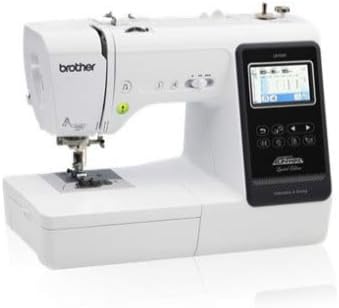
Image: Close-up view of the Brother LB7000's control panel and LCD screen, showing sewing stitch selection.
2.2 Embroidery Operations
- Hooping Fabric: Securely place your fabric and stabilizer within the embroidery hoop. Ensure the fabric is taut and wrinkle-free.
- Selecting Designs: Choose from built-in embroidery designs or load designs via USB (if applicable).
- Positioning: Use the touch screen to adjust the design's position, rotation, and size within the hoop area.
- Starting Embroidery: Attach the hooped fabric to the embroidery unit. Confirm thread color and press the Start/Stop button. The machine will prompt for thread changes as needed.
3. Maintenance
3.1 Cleaning the Machine
- Regular Cleaning: After each use, or every few hours of operation, remove the needle plate and bobbin case. Use the provided brush to remove lint and dust from the feed dogs and bobbin area.
- Exterior Cleaning: Wipe the exterior of the machine with a soft, dry cloth. Do not use harsh chemicals or abrasive cleaners.
3.2 Needle Replacement
Replace the needle regularly (approximately every 8-10 hours of sewing) or if it becomes bent, dull, or damaged.
- Turn off the machine.
- Loosen the needle clamp screw.
- Remove the old needle and insert a new needle with the flat side facing the back of the machine, pushing it up as far as it will go.
- Tighten the needle clamp screw securely.
3.3 Oiling
The Brother LB7000 is designed to be largely maintenance-free regarding oiling. Do not oil any part of the machine unless specifically instructed by Brother service personnel or an authorized service center. Improper oiling can damage the machine.
4. Troubleshooting
| Problem | Possible Cause | Solution |
|---|---|---|
| Machine does not power on. | Power cord not properly connected. | Check power cord connection to machine and outlet. Ensure outlet is functional. |
| Upper thread breaks. | Incorrect threading, needle bent/dull, tension too high, poor quality thread. | Re-thread the machine correctly. Replace needle. Adjust upper thread tension. Use good quality thread. |
| Skipped stitches. | Incorrect needle type/size, bent needle, improper threading. | Use appropriate needle for fabric. Replace needle. Re-thread machine. |
| Fabric jams. | Incorrect presser foot, feed dogs not engaged, fabric too thick/thin. | Use correct presser foot. Ensure feed dogs are up. Use appropriate needle and stabilizer for fabric. |
| Poor embroidery quality. | Improper hooping, wrong stabilizer, incorrect tension, dull needle. | Re-hoop fabric tautly. Use correct stabilizer for fabric and design. Adjust tension. Replace needle. |
5. Specifications
| Feature | Detail |
|---|---|
| Brand | Brother |
| Model Number | LB7000 |
| Power Source | Corded Electric |
| Is Electric | Yes |
| UPC | 012502649830 |
| GTIN | 012502649830 |
6. Warranty and Support
For detailed warranty information, please refer to the warranty card included with your product or visit the official Brother website. Keep your proof of purchase for warranty claims.
If you encounter issues not covered in this troubleshooting section or require technical assistance, please contact Brother Customer Support. You can find contact information on the official Brother website or through the Brother Store on Amazon.