1. Product Overview
The Shark AI Robot VACMOP PRO (RV2001WDCA) is an advanced robotic cleaning system designed to provide a complete clean by combining powerful vacuum suction with sonic mopping capabilities. It is engineered to clean hard floors and carpets, intelligently navigating your home to ensure thorough coverage.

Image: Top view of the Shark AI Robot VACMOP PRO alongside a smartphone displaying its control app.
Key Features:
- AI Laser Vision: Intelligently detects and avoids objects, eliminating the need to tidy up before cleaning.
- IQ Navigation: Cleans row by row, room to room, for up to 50% better coverage compared to traditional random bounce robots.
- VACMOP Mode: Simultaneously vacuums and mops hard floors, with in-app carpet detection to avoid mopping carpets.
- Sonic Mopping: Agitates the mopping pad at 100 scrubs per minute to effectively break down messes on hard floors.
- Self-Cleaning Brushroll: Designed to pull in all types of hair without tangling, ensuring continuous cleaning performance.
- PowerFins Brushroll: Digs deep into carpets and directly engages hard floors for superior cleaning.
2. Initial Setup
Unpacking and Placement:
- Carefully remove the robot, charging dock, and accessories from the packaging.
- Place the charging dock on a level surface against a wall in an open area, ensuring at least 3 feet of clearance on either side and 5 feet in front.
- Plug the charging dock into a power outlet.
First Charge:
- Place the robot onto the charging dock, aligning its charging contacts with those on the dock.
- Allow the robot to fully charge before its first use. The battery indicator lights will show charging progress.
Connecting to the App:
- Download the SharkClean app from your smartphone's app store.
- Follow the in-app instructions to connect your robot to your home Wi-Fi network. This enables advanced features like scheduling, zone cleaning, and remote control.

Image: A user interacting with the SharkClean mobile application to control the robot vacuum.
3. Operating Instructions
Cleaning Modes:
- VACMOP Mode: For hard floors, the robot will vacuum and mop simultaneously. Ensure the VACMOP reservoir is filled with water and Shark VACMOP cleaning solution, and a clean mopping pad is attached. The robot will automatically avoid carpets in this mode if detected.
- Vacuum Only Mode: For both hard floors and carpets, the robot will only vacuum. Ensure the VACMOP reservoir is removed or empty, and the mopping pad is detached.
Intelligent Navigation:
The robot utilizes IQ Navigation and AI Laser Vision to map your home and clean efficiently. It cleans in neat rows, ensuring comprehensive coverage of each room.

Image: The robot vacuum creating a digital map of a multi-room home environment.
Object Avoidance:
Thanks to AI Laser Vision, the robot can detect and avoid common household objects like shoes and slippers, reducing the need for pre-cleaning.
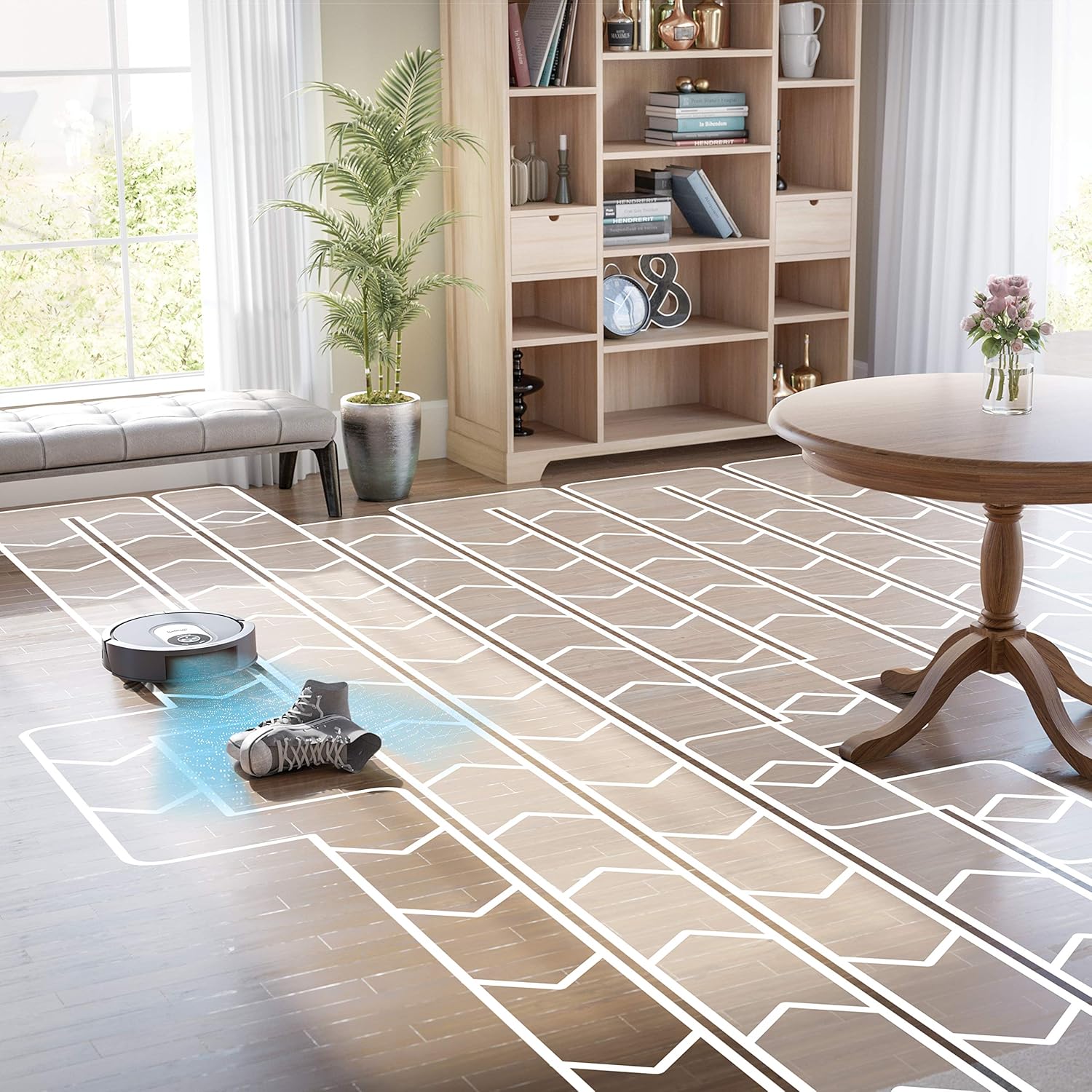
Image: The robot vacuum navigating around a pair of shoes on a hard floor, demonstrating its object avoidance capability.
Using the SharkClean App:
The app provides full control over your robot, allowing you to:
- Start or stop cleaning cycles.
- Schedule future cleanings.
- View and edit your home's map.
- Set up No-Go Zones to restrict the robot from certain areas (e.g., pet bowls, delicate items).
- Define high-traffic zones for targeted cleaning.
4. Maintenance
Regular maintenance is crucial for optimal performance of your Shark AI Robot VACMOP PRO.
Self-Cleaning Brushroll:
The robot features a self-cleaning brushroll designed to prevent hair wrap. Periodically check the brushroll for any debris and remove if necessary.

Image: Visual comparison highlighting the effectiveness of the self-cleaning brushroll in preventing hair entanglement.
Dust Bin and Filter Cleaning:
- Empty the dust bin after each cleaning cycle or as needed.
- The filter is washable. Rinse it with water and allow it to air dry completely before reinserting. Do not use soap.
Mopping Pad and Reservoir Care:
- Remove and clean the mopping pad after each mopping session. The pads are reusable and machine washable.
- Empty any remaining solution from the VACMOP reservoir and rinse it thoroughly. Allow it to air dry.
5. Troubleshooting
If you encounter issues with your robot, refer to the table below for common problems and solutions.
| Problem | Possible Cause | Solution |
|---|---|---|
| Robot gets stuck frequently | Clutter on floor, low clearance furniture, loose cables. | Clear obstacles. Use No-Go Zones in the app for problematic areas. Ensure charging dock is in an open area. |
| Poor vacuuming performance | Full dust bin, clogged filter, tangled brushroll. | Empty dust bin. Clean or replace filter. Clear any debris from brushroll. |
| Mopping not effective or no water dispensed | Empty reservoir, clogged nozzle, dirty mopping pad, incorrect mode. | Refill reservoir. Clean mopping pad. Ensure robot is in VACMOP mode. Check for any blockages in the dispensing nozzle. |
| Robot cannot find charging dock | Dock moved, obstacles near dock, low battery. | Ensure dock is in its original, clear location. Manually place robot on dock if battery is critically low. |
| Mapping issues or incorrect room recognition | Significant changes in environment, robot picked up during cleaning. | Allow robot to complete a full mapping run without interruption. Avoid moving the robot manually during a cleaning cycle. Re-map if necessary via the app. |
6. Specifications
| Feature | Detail |
|---|---|
| Model Name | Robotic Vaccum (RV2001WDCA) |
| Brand | Shark |
| Item Weight | 3.45 kg |
| Form Factor | Robotic |
| Surface Recommendation | Hard Floor (and Carpet for vacuuming) |
| Special Features | Sonic Mopping, Bagless, Smart (App Control) |
| Colour | Black/Grey |
| Controller Type | App Control |
| Filter Type | Cloth (Washable fabric filter) |
| Battery Life | 90 minutes |
| Battery Cell Composition | Lithium Ion |
| Included Components | (1) Filter, (4) Mopping pads, (1) Shark® AI Robot VACMOP™, (1) 12oz VACMOP™ starter solution, (4) Side brushes, (1) Charging dock |
| Manufacturer | SharkNinja |
7. Warranty and Support
Warranty Information:
The Shark AI Robot VACMOP PRO (RV2001WDCA) comes with a 1-Year Limited Warranty from the date of purchase. This warranty covers defects in material and workmanship under normal household use. Please retain your proof of purchase for warranty claims.
Customer Support:
For further assistance, technical support, or warranty inquiries, please contact SharkNinja customer service. Refer to the contact information provided in your product packaging or visit the official Shark website for the most up-to-date support details.


