
Important Safety Information
Before operating the TECNOFIT TFX 3.6 Y Slim Treadmill, please read and understand all safety instructions. Failure to follow these instructions may result in injury or damage to the product.
- Always consult a physician before starting any new exercise program.
- Ensure the treadmill is placed on a flat, stable surface with adequate clearance around it.
- Keep children and pets away from the treadmill during operation.
- Always attach the safety key clip to your clothing before starting the treadmill. In case of emergency, pulling the safety key will immediately stop the machine.
- Do not operate the treadmill if it is damaged or malfunctioning.
- Wear appropriate athletic footwear during use.
- The maximum user weight capacity for this treadmill is 130 kg (286 lbs).
Setup and Assembly
The TECNOFIT TFX 3.6 Y Slim Treadmill is designed for easy setup. Some assembly may be required upon initial unpacking.
Unpacking
Carefully remove all components from the packaging. Verify that all included components are present: user manual, power cable, tablet holder, and any necessary tools for assembly.
Placement
Choose a location with a stable, level floor. Ensure there is at least 2 meters (6.5 feet) of clear space behind the treadmill and 0.5 meters (1.6 feet) on each side for safe operation and access.
Assembly (if required)
Follow the detailed instructions in the included user manual for specific assembly steps. Typically, this involves unfolding the frame and securing the console/handlebars. Use the provided crank tool if needed for adjustments.

Image: Unfolded and folded dimensions of the treadmill. Unfolded: 150 cm (L) x 74 cm (W) x 144 cm (H). Folded: 150 cm (L) x 74 cm (W) x 25 cm (H).
Power Connection
Connect the power cable to the treadmill and then to a grounded electrical outlet. Ensure the power switch is in the 'OFF' position before plugging in.
Operating Instructions
Familiarize yourself with the control panel and functions before beginning your workout.
Control Panel Overview

Image: Treadmill control panel with LCD display, buttons, and tablet holder.

Image: Labeled diagram of treadmill components including LCD screen, safety key, heart rate sensor, and running surface.
The LCD display shows key workout metrics: Calories burned, Distance, Incline, Time, and Speed. Buttons allow for starting/stopping, adjusting speed, and changing incline.
Starting a Workout
- Ensure the safety key is properly inserted into the console and the clip is attached to your clothing.
- Step onto the treadmill, placing your feet on the side rails.
- Press the 'START' button. The belt will begin moving at a low speed.
- Gradually increase the speed using the '+' button on the console or handlebars.
Adjusting Speed and Incline
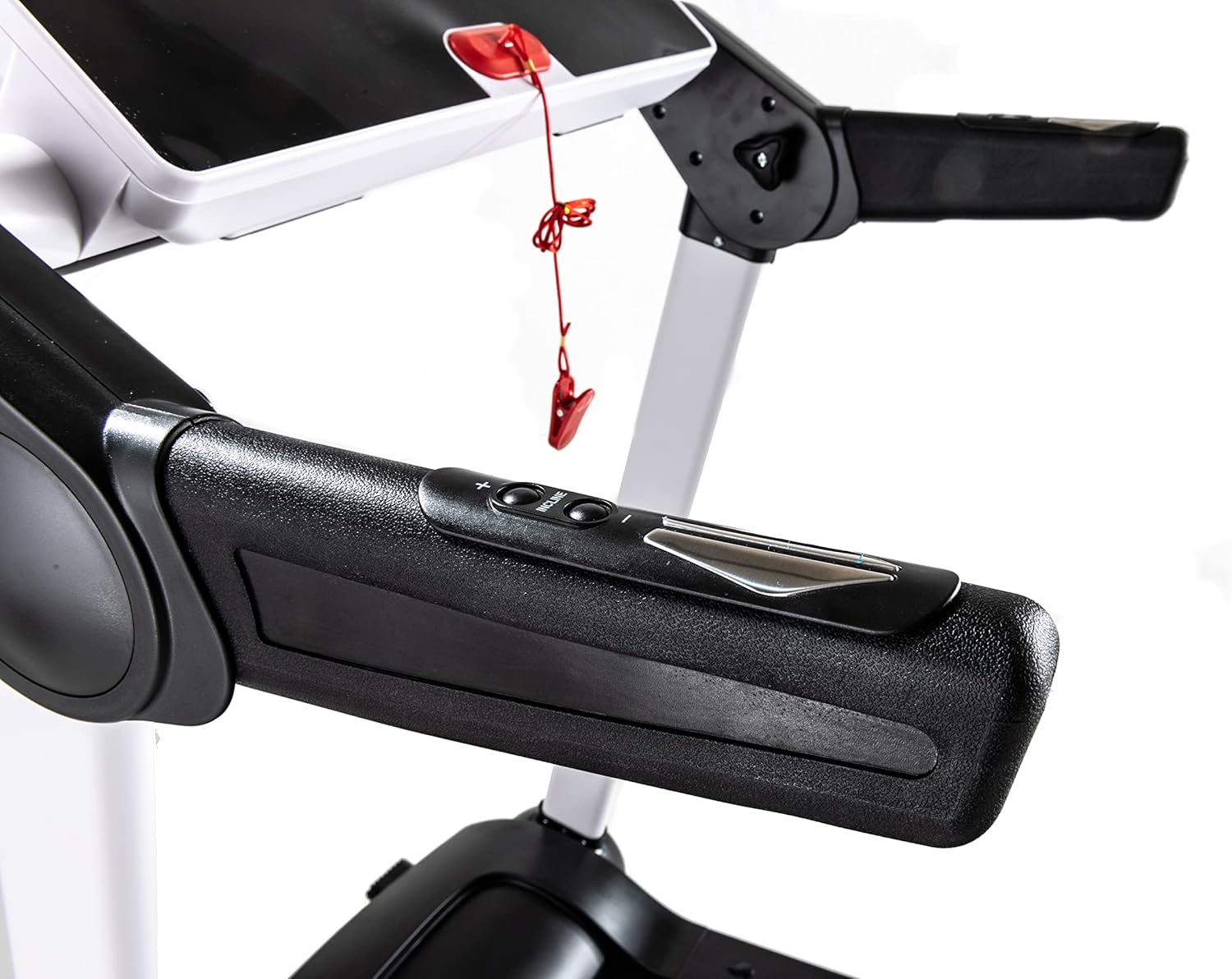
Image: Handlebars with integrated speed and incline controls.

Image: Automatic incline feature, adjustable from 0 to 15 degrees.
- Speed: Use the '+' and '-' buttons on the console or handlebars to adjust the running speed. The treadmill offers a range suitable for walking, jogging, and running.
- Incline: The treadmill features automatic incline adjustment from 0 to 15 degrees. Use the incline buttons on the console to change the gradient, simulating uphill walking or running.
Workout Programs
The treadmill includes 12 pre-set workout programs. Refer to the full user manual for details on each program. To select a program, press the 'PROGRAM' button and cycle through the options. Press 'START' to begin the selected program.
Using Bluetooth and Fitness Apps

Image: Compatible fitness applications such as Zwift and Kinomap.
The integrated Bluetooth connectivity allows you to connect your treadmill to compatible fitness applications like Zwift and Kinomap. This enables tracking your workout data, accessing personalized training programs, and engaging in virtual running experiences.
- Download the desired fitness app to your smartphone or tablet.
- Ensure Bluetooth is enabled on your device and the treadmill.
- Open the app and follow its instructions to pair with your TECNOFIT TFX 3.6 Y Slim Treadmill.
- Place your device securely in the tablet holder on the console.
Stopping the Treadmill
- Press the 'STOP' button on the console. The belt will gradually slow down and stop.
- In an emergency, pull the safety key from the console. The treadmill will stop immediately.
Maintenance
Regular maintenance ensures the longevity and optimal performance of your treadmill.
Auto-Lubrication
The TECNOFIT TFX 3.6 Y Slim Treadmill features an auto-lubrication system, reducing the need for manual lubrication. Consult the full user manual for any specific instructions regarding this system or if manual intervention is ever required.
Cleaning
- Disconnect the power cord before cleaning.
- Wipe down the console and exterior surfaces with a soft, damp cloth. Avoid abrasive cleaners or solvents.
- Periodically vacuum under the treadmill to prevent dust and debris buildup.
Running Belt Adjustment and Inspection

Image: Running belt with cushioning elements.
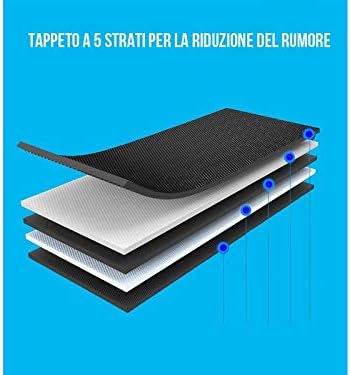
Image: Cross-section of the 5-layer running belt for noise reduction.
Inspect the running belt regularly for wear and tear. If the belt feels loose or slips, it may require adjustment. Refer to the detailed instructions in your user manual for proper belt tensioning and centering procedures.
Storage

Image: Treadmill in folded, upright storage position.
Thanks to its foldable design, the treadmill can be easily stored in an upright position to save space. Ensure the folding mechanism is securely locked before moving or storing the unit.
Troubleshooting
This section addresses common issues you might encounter with your treadmill.
| Problem | Possible Cause | Solution |
|---|---|---|
| Treadmill does not power on. | Power cord not connected; power switch off; circuit breaker tripped. | Check power cord connection; ensure power switch is ON; reset circuit breaker. |
| Running belt stops unexpectedly. | Safety key dislodged; motor overload. | Re-insert safety key; reduce speed/incline; allow motor to cool. |
| Running belt slips or hesitates. | Belt too loose; belt requires lubrication; user weight exceeds capacity. | Adjust belt tension (refer to manual); check auto-lubrication system; ensure user weight is within limits. |
| Unusual noise during operation. | Loose components; belt misalignment; motor issue. | Inspect for loose parts and tighten; adjust belt alignment (refer to manual); if noise persists, contact support. |
| Bluetooth connection issues. | Bluetooth off on device/treadmill; app not properly paired. | Ensure Bluetooth is active on both devices; re-pair through the fitness app settings. |
For issues not listed here or if troubleshooting steps do not resolve the problem, please contact TECNOFIT customer support.
Specifications

Image: 2.6 HP motor for stable and quiet operation.
- Model: TECNOFIT TFX 3.6 Y Slim
- Motor Horsepower: 2.6 HP
- Maximum Weight Capacity: 130 Kilograms (286 lbs)
- Running Surface Dimensions: Approximately 43.7 inches x 15.7 inches (111 cm x 40 cm)
- Incline Range: 0-15 degrees (Automatic)
- Display Type: LCD
- Console Metrics: Calories burned, Distance, Incline, Time, Speed
- Number of Programs: 12
- Special Features: Bluetooth connectivity, Foldable design, Auto-lubrication, Cushioning system
- Frame Material: Aluminum
- Product Dimensions (Unfolded): 150 cm (L) x 74 cm (W) x 144 cm (H) / 59.1 in (L) x 29.1 in (W) x 56.7 in (H)
- Product Dimensions (Folded): 150 cm (L) x 74 cm (W) x 25 cm (H) / 59.1 in (L) x 29.1 in (W) x 9.8 in (H)
- Item Weight: 57 Kilograms (125.7 lbs)
- Power Type: Electric cable
- Included Components: User manual, power cable, tablet holder, crank
Warranty and Support
For warranty information, please refer to the specific warranty card included with your product or visit the official TECNOFIT website. Keep your proof of purchase for warranty claims.
For technical support, spare parts, or service inquiries, please contact TECNOFIT customer service through their official channels. Contact details are typically found in the user manual or on the manufacturer's website.