
Introduction
This manual provides detailed instructions for the safe and efficient operation of your DLC Portable Bluetooth Radio, Model 32216B. Please read this manual thoroughly before using the product and retain it for future reference. This multi-colored portable radio features a compact design and offers high practicality for various audio needs.
Safety Information
- Do not expose the unit to rain or moisture to prevent fire or electric shock.
- Do not disassemble the unit. Refer servicing to qualified personnel only.
- Avoid extreme temperatures. Do not place near heat sources or in direct sunlight.
- Keep the unit away from strong magnetic fields.
- Ensure proper ventilation; do not block ventilation openings.
- Use only the specified power adapter and battery type.
Product Overview
The DLC Portable Bluetooth Radio 32216B is a versatile audio device offering multiple playback options. It features a classic design with modern connectivity.
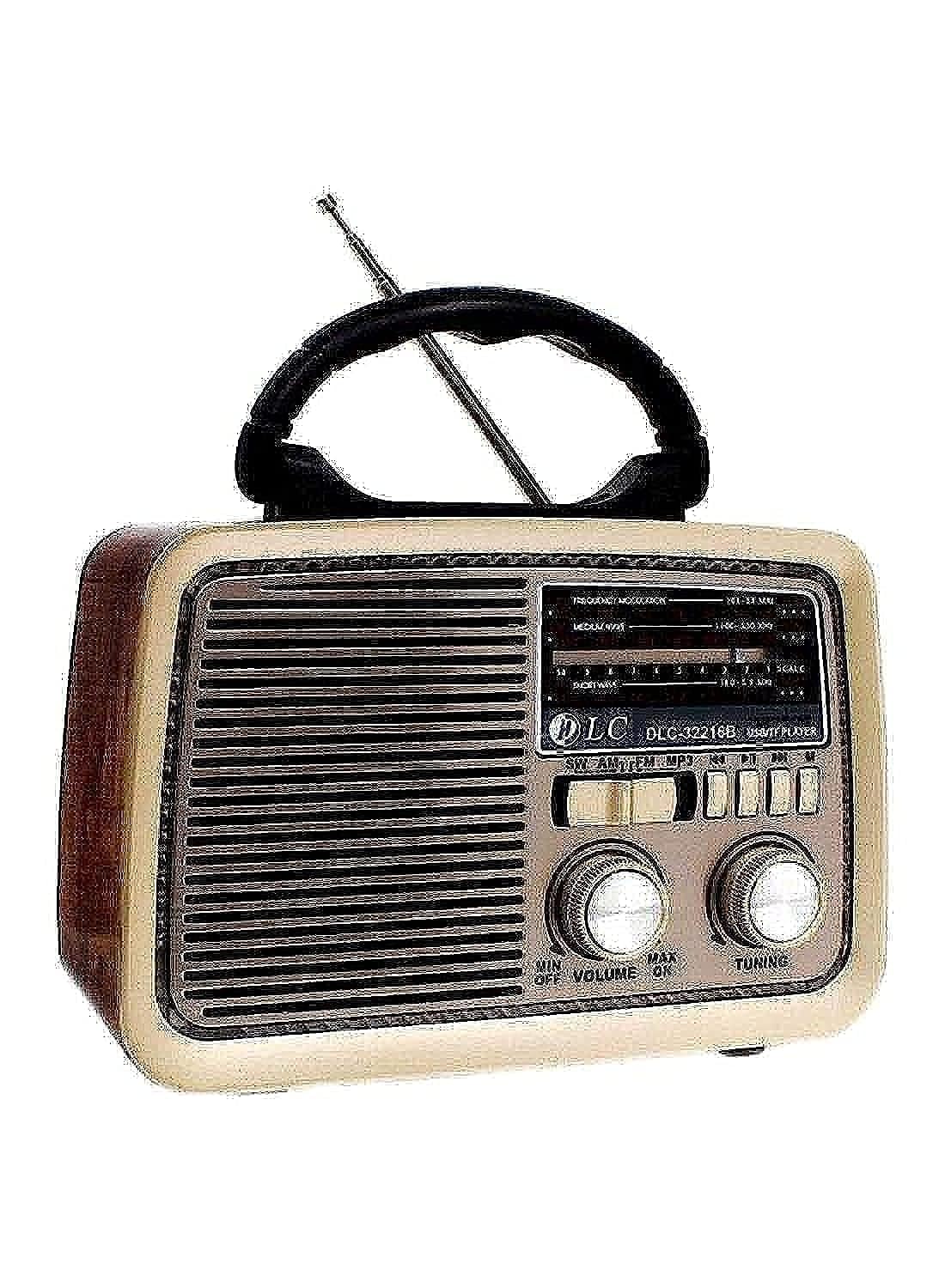
Figure 1: Front view of the DLC Portable Bluetooth Radio 32216B. The image displays the radio's front panel, including the speaker grille, frequency display, mode selection buttons (SW, AM, FM, MP3, USB/TF Player), volume knob, and tuning knob. An extended antenna is visible at the top, and a carrying handle is also present.
Key Features:
- Multi-band radio (SW, AM, FM)
- Bluetooth connectivity for wireless audio streaming
- USB and TF card playback
- Portable design with a carrying handle
- Battery-operated for convenience
Setup
1. Unpacking
Carefully remove the radio from its packaging. Verify that all included components are present:
- DLC Portable Bluetooth Radio 32216B
- Battery
- Power Adapter
- Antenna (integrated or detachable, if applicable)
2. Powering the Unit
The radio can be powered by its internal battery or via the included power adapter.
- Battery Installation/Charging: If the battery is not pre-installed, insert it into the designated compartment. Connect the power adapter to the radio's DC input and then to a standard wall outlet to charge the battery. The charging indicator (if present) will illuminate.
- AC Power: To operate directly from AC power, connect the power adapter to the radio and a wall outlet. The radio can be used while charging.
3. Antenna Adjustment
For optimal radio reception, extend the telescopic antenna fully. Adjust its direction for the best signal clarity.
Operating Instructions
1. Power On/Off and Volume Control
Locate the VOLUME knob on the front panel. Rotate it clockwise to turn the radio ON and increase the volume. Rotate it counter-clockwise to decrease the volume and turn the radio OFF.
2. Mode Selection
Use the mode selection buttons (SW, AM, FM, MP3) to switch between different audio sources:
- SW (Shortwave): For shortwave radio broadcasts.
- AM (Amplitude Modulation): For AM radio broadcasts.
- FM (Frequency Modulation): For FM radio broadcasts.
- MP3 (USB/TF Player): For playing audio from a USB drive or TF (MicroSD) card.
3. Radio Tuning (SW, AM, FM)
After selecting the desired radio band (SW, AM, or FM):
- Rotate the TUNING knob to scan for available stations.
- Adjust the antenna position for optimal reception.
- The frequency display will show the current tuned frequency.
4. Bluetooth Pairing
To connect a Bluetooth-enabled device (e.g., smartphone, tablet):
- Switch the radio to Bluetooth mode (often indicated by 'MP3' or a dedicated Bluetooth mode). The radio will enter pairing mode, usually indicated by a flashing light or an audible prompt.
- On your device, enable Bluetooth and search for available devices.
- Select "DLC-32216B" or a similar name from the list of devices.
- Once paired, you will hear a confirmation sound, and you can now stream audio from your device to the radio.
5. USB/TF Card Playback
To play audio files from a USB drive or TF card:
- Insert a USB drive into the USB port or a TF card into the TF card slot.
- Switch the radio to MP3 mode. The radio should automatically detect and begin playing audio files (e.g., MP3 format).
- Use the playback control buttons (e.g., Play/Pause, Next/Previous Track) on the radio to manage your audio.
Maintenance
1. Cleaning
Wipe the exterior of the radio with a soft, dry cloth. Do not use abrasive cleaners, waxes, or solvents as they may damage the finish.
2. Battery Care
- Charge the battery fully before first use.
- If the radio will not be used for an extended period, charge the battery at least once every three months to maintain its lifespan.
- Do not expose the battery to excessive heat or direct sunlight.
3. Storage
Store the radio in a cool, dry place away from direct sunlight and extreme temperatures when not in use.
Troubleshooting
| Problem | Possible Cause | Solution |
|---|---|---|
| No power | Battery depleted; Power adapter not connected or faulty. | Charge the battery; Ensure power adapter is securely connected and functional. |
| No sound | Volume too low; Incorrect mode selected; Device not paired (Bluetooth). | Increase volume; Select correct mode (FM, AM, SW, MP3); Re-pair Bluetooth device. |
| Poor radio reception | Antenna not extended/adjusted; Weak signal area. | Extend and adjust the telescopic antenna; Reposition the radio for better signal. |
| Bluetooth connection issues | Radio not in pairing mode; Device too far; Interference. | Ensure radio is in Bluetooth pairing mode; Move device closer; Avoid interference sources. |
| USB/TF card not playing | Incorrect file format; Card/drive not inserted correctly; Corrupted files. | Ensure files are in compatible format (e.g., MP3); Re-insert card/drive; Try a different card/drive. |
Specifications
| Feature | Detail |
|---|---|
| Brand | Generic |
| Model Number | 32216B |
| Color | Multi-colored |
| Special Feature | Portable |
| Connectivity Technology | Bluetooth |
| Product Dimensions (L x W x H) | 20 cm x 20 cm x 15 cm |
| Tuner Technology | FM waves |
| Style | Multi |
| Power Source | Battery operated |
| Supported Radio Bands | FM |
| Included Components | Battery, Power Adapter, Antenna |
| Frequency | 108 MHz |
| Compatible Devices | Smartphone and Tablet |
| Audio Output Mode | Stereo |
| Display Type | LCD |
| Hardware Interface | Bluetooth |
| Water Resistance Level | Not Water Resistant |
| Item Weight | 6335.19 pounds (approx. 2873 kg) |
| Recommended Uses | For Smartphones or Tablets |
| Manufacturer | China |
| Part Number | HBA51003101 |
Note: The listed item weight of 6335.19 pounds appears to be an error in the source data. Please refer to product packaging for accurate weight information.
Warranty and Support
For warranty information and customer support, please refer to the documentation provided with your purchase or contact the retailer where the product was acquired. Specific warranty terms and conditions may vary by region and retailer.
If you require technical assistance or have questions not covered in this manual, please reach out to the manufacturer's customer service department or your local distributor.