
CAPITAL SPORTS FITN7-EvoComfortBike
CAPITAL SPORTS Evo Comfort Exercise Bike User Manual
Model: FITN7-EvoComfortBike
Introduction
Thank you for choosing the CAPITAL SPORTS Evo Comfort Exercise Bike. This manual provides essential information for the safe and effective use of your new fitness equipment. Please read this manual thoroughly before assembly and operation, and keep it for future reference.
The Evo Comfort Exercise Bike is designed to transform home training into a multimedia and interactive experience, featuring integrated tablet support and full Kinomap app compatibility with Bluetooth feedback for virtual cycling routes.
Important Safety Instructions
To reduce the risk of serious injury, read the following safety instructions before using the Evo Comfort Exercise Bike:
- Consult your physician before beginning any exercise program.
- Keep children and pets away from the equipment.
- Place the exercise bike on a level surface.
- Ensure all parts are securely tightened before each use.
- Wear appropriate exercise clothing and footwear.
- Do not exceed the maximum user weight of 110 kg.
- If you feel faint, dizzy, or experience pain, stop exercising immediately.
Assembly
The CAPITAL SPORTS Evo Comfort Exercise Bike requires some assembly. Please follow these steps carefully. All necessary tools are included in the package.
Unpacking and Component Check
Carefully remove all components from the packaging. Verify that all parts listed in the packing list are present and undamaged. If any parts are missing or damaged, contact customer support immediately.
Step-by-Step Assembly
- Attach the Stabilizers: Secure the front and rear stabilizers to the main frame using the provided bolts and washers. Ensure the leveling feet on the rear stabilizer are adjusted for stability.
- Install the Pedals: Identify the left (L) and right (R) pedals. The left pedal screws counter-clockwise, and the right pedal screws clockwise. Tighten them firmly.
- Mount the Seat Post and Seat: Insert the seat post into the main frame and secure it with the adjustment knob. Attach the seat to the seat post.
- Attach the Handlebar Post and Handlebar: Connect the handlebar post to the main frame. Then, attach the handlebar to the handlebar post, ensuring the heart rate sensors are correctly aligned.
- Connect Console Cables: Carefully connect the sensor cables from the main frame to the console. Ensure a secure connection.
- Install the Console: Mount the console onto the handlebar post.

Image: Fully assembled CAPITAL SPORTS Evo Comfort Exercise Bike, ready for use. This image shows the overall structure of the bike, including the seat, handlebars, pedals, and console.
Operation
Getting Started
- Power Connection: Connect the power adapter (220-240 V | 50/60 Hz) to the exercise bike and a suitable power outlet.
- Adjusting the Seat: Adjust the seat height to ensure your leg is slightly bent at the knee when the pedal is at its lowest point. The low access threshold provides easy mounting and dismounting.
- Adjusting Resistance: The MagResist system offers 32 levels of magnetic resistance. Adjust the resistance using the console controls to match your desired workout intensity.
Console Functions
The integrated training computer provides comprehensive data and program options:

Image: Close-up of the exercise bike's console, showing the digital display and control buttons. The display shows metrics like time, speed, distance, calories, and heart rate, along with program selection options.
- Display Metrics: The console displays duration, pedal revolutions (RPM), speed, distance, calories burned, and heart rate (via handlebar sensors).
- Training Programs: Choose from 14 pre-set training programs: 4 for beginners, 4 for advanced users, 4 for experts, plus cardio and watts modes.
- Heart Rate Monitoring: Grip the handlebar sensors to monitor your heart rate during your workout.
Kinomap App Integration
The Evo Comfort Exercise Bike fully supports the Kinomap application for an interactive training experience:
- Tablet Holder: Place your tablet securely in the integrated holder.
- Bluetooth Connection: Connect your device to the exercise bike via Bluetooth.
- Virtual Routes: Experience thousands of kilometers of virtual cycling routes. The app provides real-time feedback, adjusting the virtual camera movement based on your performance (speed, heart rate, distance).
- Multiplayer Events: Participate in multiplayer events and compare your fitness with other users.
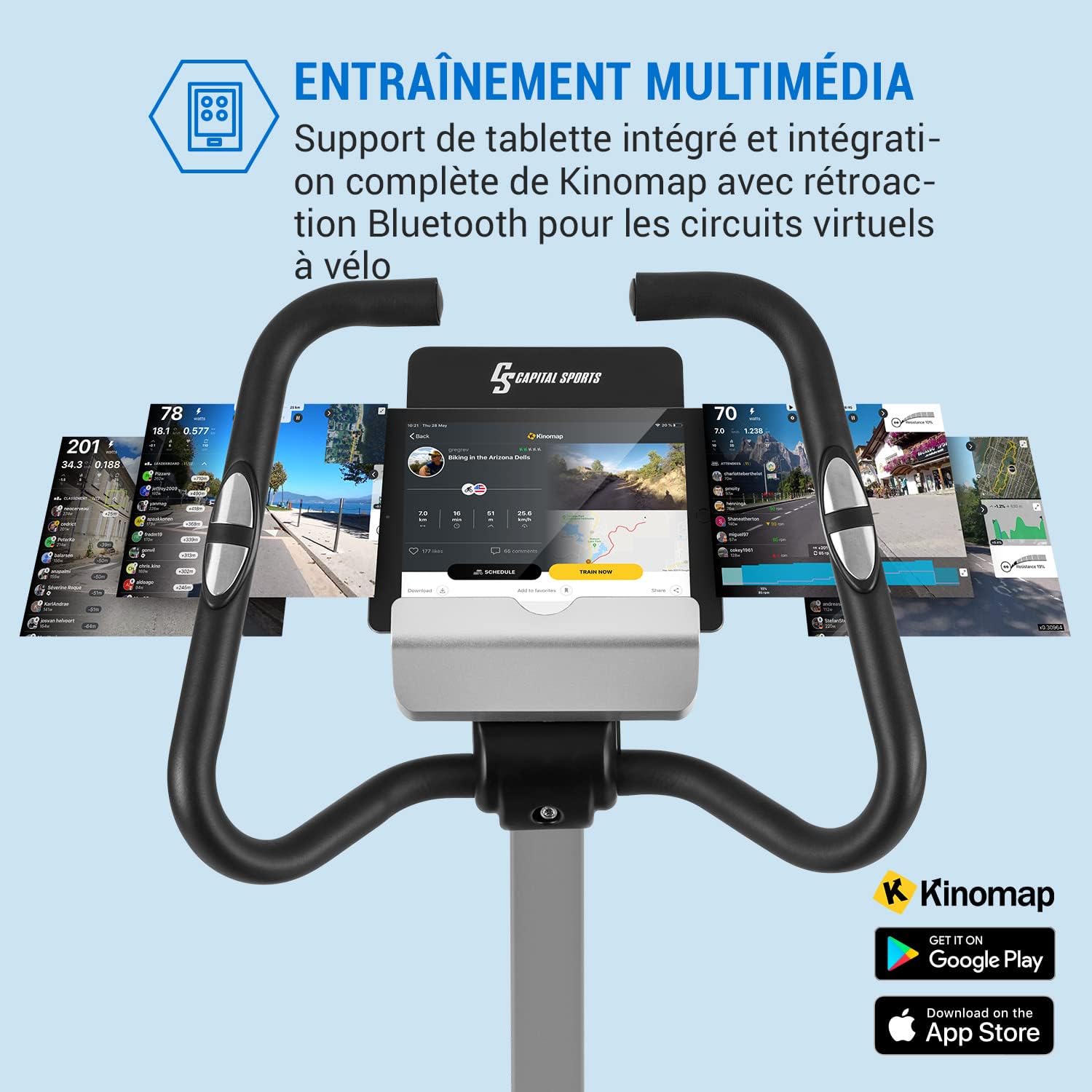
Image: The exercise bike's console with a tablet displaying the Kinomap application. This illustrates the multimedia training experience with virtual routes and interactive features.
Maintenance
Regular maintenance ensures the longevity and safe operation of your exercise bike.
- Cleaning: Wipe down the bike with a damp cloth after each use to remove sweat and dust. Do not use abrasive cleaners.
- Inspecting Bolts and Connections: Periodically check all bolts, nuts, and connections to ensure they are secure. Tighten if necessary.
- Lubrication: The magnetic resistance system is generally maintenance-free. No lubrication is required for the belt drive.
- Storage: Store the exercise bike in a dry, cool place away from direct sunlight and extreme temperatures. The integrated transport wheels allow for easy relocation.
Troubleshooting
| Problem | Possible Cause | Solution |
|---|---|---|
| Console not turning on. | Power adapter not connected or faulty. Loose cable connection. | Ensure power adapter is securely plugged into the bike and wall outlet. Check all cable connections to the console. |
| No resistance change. | Resistance mechanism issue or console malfunction. | Check if the resistance cable is properly connected. Restart the console. If the problem persists, contact customer support. |
| Inaccurate heart rate reading. | Hands not firmly on sensors. Dry hands. | Ensure both hands are firmly gripping the heart rate sensors. Slightly moisten your hands if they are too dry. |
| Bike is unstable or wobbles. | Uneven floor. Loose stabilizers. | Adjust the leveling feet on the rear stabilizer. Ensure all stabilizer bolts are tightened. |
Specifications
| Feature | Detail |
|---|---|
| Model | Evo Comfort (FITN7-EvoComfortBike) |
| Flywheel Weight | 15 kg |
| Resistance System | MagResist Magnetic Resistance |
| Resistance Levels | 32 |
| Drive System | Belt Drive |
| Programs | 14 (Beginner, Advanced, Expert, Cardio, Watts) |
| Max. User Weight | 110 kg |
| Power Supply | 220-240 V | 50/60 Hz |
| Dimensions (L x H x D) | Approx. 54 x 136 x 107 cm |
| Weight | Approx. 30 kg |
| Connectivity | Bluetooth (Kinomap compatible) |

Image: Diagram showing the dimensions of the CAPITAL SPORTS Evo Comfort Exercise Bike, with height (136 cm), depth (107 cm), and width (54 cm) indicated.
Warranty and Support
For warranty information, technical support, or replacement parts, please contact CAPITAL SPORTS customer service. Refer to your purchase documentation for specific warranty terms and contact details.
You can often find support information on the official CAPITAL SPORTS website or through your retailer.
Ask a question about this manual
Ask about setup, troubleshooting, compatibility, parts, safety, or missing instructions. Manuals+ will review the question and use this page’s manual context to help answer it.