
1. Introduction
This manual provides essential information for the safe and efficient operation of your Pyle PPHP844B Portable Bluetooth Speaker System. Please read this manual thoroughly before using the product and retain it for future reference. The Pyle PPHP844B is designed to deliver portable audio with versatile connectivity options, including Bluetooth wireless streaming, FM radio, USB, AUX input, and microphone support. It features integrated LED party lights and a rechargeable battery for extended use.

Image 1.1: The Pyle PPHP844B Portable Bluetooth Speaker System, showcasing its compact design with a front speaker grille and control panel.
2. Safety Instructions
To ensure safe operation and prevent damage, observe the following precautions:
- Power Source: Use only the provided power adapter. Ensure the power supply voltage matches the requirements specified on the unit.
- Water and Moisture: Do not expose the unit to rain, moisture, or immerse it in water. Keep liquids away from the unit. This product is not waterproof.
- Heat Sources: Do not place the unit near heat sources such as radiators, heat registers, stoves, or other heat-producing appliances.
- Ventilation: Do not block any ventilation openings. Ensure adequate airflow around the unit.
- Cleaning: Unplug the unit from the power outlet before cleaning. Use a dry cloth for cleaning. Do not use liquid cleaners or aerosol cleaners.
- Servicing: Do not attempt to service this product yourself. Refer all servicing to qualified service personnel. Opening the unit may expose you to dangerous voltage or other hazards.
- Battery Safety: The unit contains a rechargeable battery. Do not expose the battery to excessive heat or direct sunlight. Do not attempt to replace the battery yourself. Dispose of batteries according to local regulations.
- Volume Levels: Avoid prolonged listening at high volume levels to prevent hearing damage.
- Placement: Place the unit on a stable, flat surface to prevent it from falling.
3. Package Contents
Carefully unpack the box and ensure all items listed below are present and in good condition:
- Pyle PPHP844B PA Speaker System
- Wireless Microphone
- Remote Control
- Power Adaptor

Image 3.1: The Pyle PPHP844B speaker system shown with its retail packaging, remote control, and power adapter, illustrating the items included in the box.
4. Product Features
The Pyle PPHP844B Portable Bluetooth Speaker System offers a range of features for versatile audio playback:
- High-Performance Audio: Equipped with dual 8-inch woofers and a 400-watt maximum power output for clear and powerful sound.
- Bluetooth Wireless Streaming: Connects wirelessly to smartphones, tablets, and other Bluetooth-enabled devices (Bluetooth version 4.0, up to 32-feet range).
- Integrated LED Lights: Features multi-color LED flashing lights on the speaker grille for visual effects.
- Multiple Input Options: Includes FM radio with digital LCD display, Aux (3.5mm) input, USB flash drive reader, and a 0.25-inch microphone input.
- Rechargeable Battery: Built-in battery provides up to 2 hours of playback on a 4-hour charge.
- Portability: Designed with a convenient telescoping handle and rolling caster wheels for easy transport.
- Remote Control: Full-function remote control for convenient operation.

Image 4.1: The Pyle PPHP844B speaker demonstrating its portability with an extendable carry handle and rolling wheels, being moved by a person.
5. Controls and Connections
Familiarize yourself with the control panel and connection ports:

Image 5.1: Detailed view of the Pyle PPHP844B's control panel, highlighting the USB port, AUX input, microphone input, and the digital LCD display for FM radio.
- Power Switch: Turns the unit ON or OFF.
- Volume Control Knob: Adjusts the master volume level.
- Mode Button: Cycles through input modes: Bluetooth, FM Radio, USB, AUX.
- Play/Pause Button: Controls playback in Bluetooth and USB modes. In FM mode, short press to auto-scan.
- Previous/Next Track Buttons: Navigates tracks in Bluetooth and USB modes. In FM mode, changes radio stations.
- USB Port: Connect a USB flash drive for MP3 playback.
- AUX Input (3.5mm): Connect external audio devices using a 3.5mm audio cable.
- MIC Input (0.25-inch): Connect a wired microphone.
- DC 5V Input: Power adapter connection for charging the internal battery.
- LED Display: Shows current mode, FM frequency, or track information.
- Battery Level Indicator: LED lights indicating the current battery charge status.
6. Setup
Follow these steps for initial setup:
- Unpacking: Remove the speaker system and all accessories from the packaging. Inspect for any damage.
- Initial Charge: Before first use, fully charge the speaker's internal battery. Connect the provided power adapter to the DC 5V input on the speaker and plug it into a wall outlet. The battery indicator LEDs will show charging status. A full charge takes approximately 4 hours.
- Power On: Once charged, disconnect the power adapter. Locate the Power Switch on the control panel and switch it to the "ON" position. The LED display will illuminate.
- Placement: Position the speaker on a stable, flat surface. For optimal sound projection, ensure it is not obstructed.
7. Operating Instructions
7.1. Bluetooth Mode
Connect your Bluetooth-enabled device to the speaker for wireless audio streaming.
- Turn on the speaker.
- Press the MODE button repeatedly until "BLUE" or "BLUETOOTH" appears on the LED display. The speaker will enter pairing mode, indicated by a flashing Bluetooth icon or sound.
- On your smartphone, tablet, or computer, enable Bluetooth and search for available devices.
- Select "PYLE PPHP844B" from the list of devices.
- Once paired, the speaker will emit a confirmation tone, and the Bluetooth indicator on the display will stop flashing.
- You can now play audio from your device, controlling playback and volume via your device or the speaker's controls.

Image 7.1: A user interacting with a smartphone, demonstrating the wireless Bluetooth connectivity feature of the Pyle PPHP844B speaker system.
7.2. FM Radio Mode
Listen to your favorite FM radio stations.
- Turn on the speaker.
- Press the MODE button repeatedly until "FM" appears on the LED display.
- To auto-scan and save available stations, press and hold the Play/Pause button. The speaker will scan and store stations automatically.
- Use the Previous/Next Track buttons to navigate through the saved stations.
7.3. USB/AUX Mode
Play audio from a USB flash drive or an external device via the AUX input.
- USB Playback: Insert a USB flash drive containing MP3 audio files into the USB port. The speaker will automatically switch to USB mode and begin playback. Use the Play/Pause and Previous/Next Track buttons to control playback.
- AUX Input: Connect an external audio device (e.g., MP3 player, smartphone) to the 3.5mm AUX input using an audio cable. Press the MODE button until "AUX" appears on the display. Control playback from your connected device.
7.4. Microphone Use
Use the included wireless microphone or connect a wired microphone for vocal amplification.
- For the wireless microphone, ensure it has batteries and is powered on. It should automatically connect to the speaker.
- For a wired microphone, plug it into the 0.25-inch MIC INPUT.
- Adjust the microphone volume using the dedicated microphone volume control (if available) or the master volume.
7.5. LED Party Lights
The speaker features integrated multi-color LED lights that illuminate the woofer. These lights typically activate automatically when the speaker is powered on and playing audio. There is no specific control mentioned for these lights; they are designed to enhance the audio experience.
8. Charging the Battery
The Pyle PPHP844B features a built-in rechargeable battery for portable use.
- Connect the provided power adapter to the DC 5V INPUT port on the speaker.
- Plug the power adapter into a standard wall outlet.
- The battery indicator LEDs on the control panel will show the charging status.
- A full charge takes approximately 4 hours.
- Once fully charged, the battery provides up to 2 hours of continuous playback, depending on volume level and usage.
- It is recommended to fully charge the battery before first use and whenever the battery is low to prolong its lifespan.
9. Maintenance
Proper care and maintenance will ensure the longevity of your speaker system.
- Cleaning: Disconnect the power adapter before cleaning. Use a soft, dry cloth to wipe the exterior surfaces of the speaker. Do not use abrasive cleaners, waxes, or solvents.
- Storage: If storing the speaker for an extended period, ensure the battery is partially charged (around 50%) and store it in a cool, dry place away from direct sunlight and extreme temperatures. Recharge the battery every few months to prevent deep discharge.
- Battery Care: Avoid completely draining the battery frequently. Recharge it when the low battery indicator appears.
- Avoid Impacts: Protect the speaker from strong impacts or drops, which can damage internal components.
10. Troubleshooting
If you encounter issues with your Pyle PPHP844B, refer to the following common problems and solutions:
| Problem | Possible Cause | Solution |
|---|---|---|
| No power | Battery is drained; Power switch is OFF; Power adapter not connected properly. | Charge the battery; Ensure power switch is ON; Check power adapter connection and wall outlet. |
| No sound | Volume is too low; Incorrect input mode selected; Audio cable not connected properly (AUX); Bluetooth not paired. | Increase master volume; Press MODE button to select correct input; Ensure audio cable is fully inserted; Re-pair Bluetooth device. |
| Bluetooth not pairing | Speaker not in pairing mode; Bluetooth disabled on device; Device too far from speaker. | Ensure speaker is in Bluetooth mode and flashing; Enable Bluetooth on your device; Move device closer to speaker (within 32 feet). |
| FM radio static | Weak signal; Interference. | Reposition the speaker; Try auto-scanning again; Avoid placing near other electronic devices. |
| Microphone not working | Microphone not connected; Microphone switch OFF; Microphone volume low. | Ensure microphone is securely plugged into MIC input; Check if wireless microphone is powered on; Adjust microphone volume. |
11. Specifications
Technical specifications for the Pyle PPHP844B Portable Bluetooth Speaker System:
- Model: PPHP844B
- Power Output: 400 Watts Max
- Speaker Type: Portable PA Speaker System
- Woofer Size: Dual 8-inch
- Impedance: 4 Ohm
- S/N Ratio: 60dB +/-3dB
- SPL: 94dB
- Frequency Response: 55-20kHz
- Bluetooth Version: 4.0
- Wireless Range: Up to 32 feet (10 meters)
- Battery Type: Rechargeable
- Battery Life: Up to 2 hours (at moderate volume)
- Charge Time: Approximately 4 hours
- Power Source: DC 5V (via power adapter)
- Dimensions (L x W x H): 12.0'' x 13.0'' x 20.0'' inches
- Weight: 9.42 lbs.
- Included Components: PA Speaker, Wireless Microphone, Remote Control, Power Adaptor
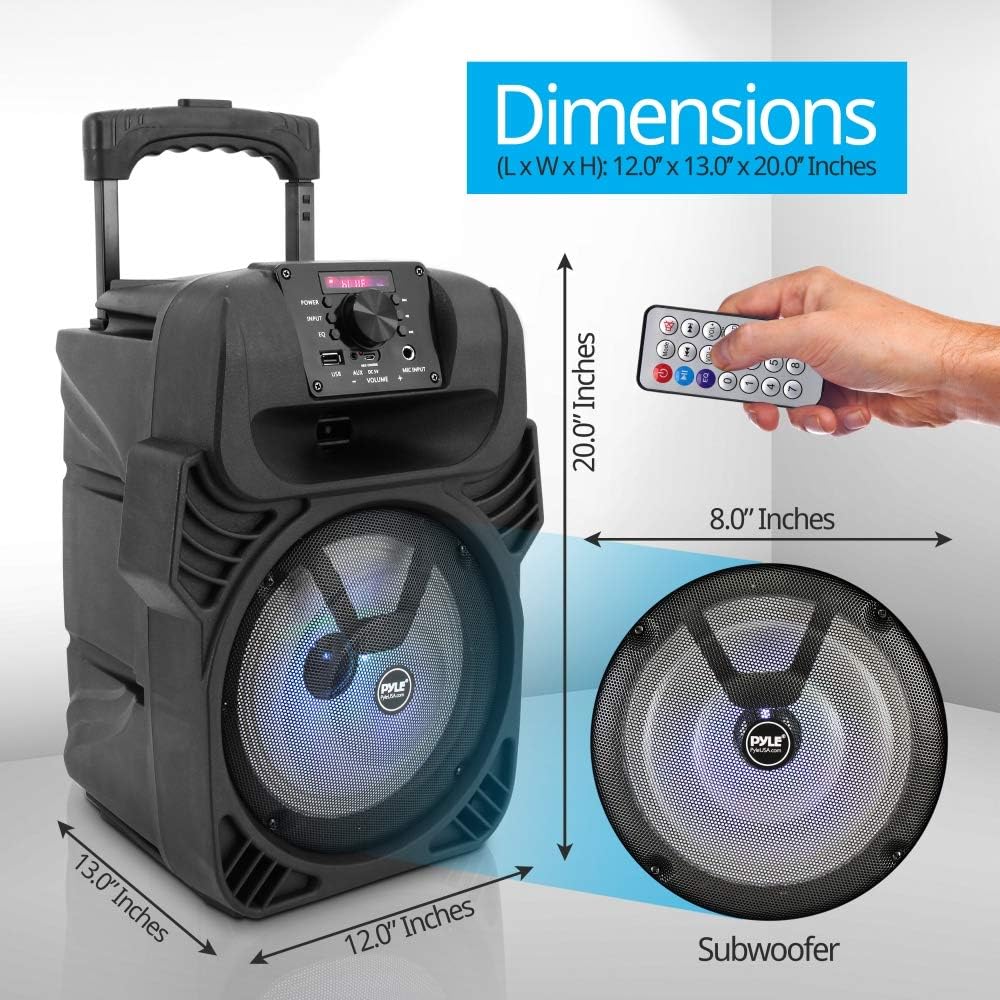
Image 11.1: A visual representation of the Pyle PPHP844B speaker's dimensions, indicating its length, width, height, and the size of its 8-inch subwoofer.
12. Warranty and Support
This Pyle PPHP844B Portable Bluetooth Speaker System is covered by a 1-year limited manufacturer warranty from the date of purchase.
The warranty covers defects in materials and workmanship under normal use. It does not cover damage caused by misuse, accident, unauthorized modification, or external causes such as power surges.
For warranty service, technical support, or further inquiries, please contact Pyle customer service or visit the official Pyle website:
- Pyle Official Website: www.pyleusa.com
Please have your model number (PPHP844B) and proof of purchase available when contacting support.


