
1. Introduction
This manual provides detailed instructions for the setup, operation, and maintenance of your AIYIMA D05 Bluetooth 5.1 DAC Power Amplifier. The D05 is a versatile digital audio amplifier designed to deliver high-fidelity stereo sound with multiple input options and subwoofer support for a 2.1 channel audio experience. Please read this manual thoroughly before using the product to ensure proper function and safety.
2. Product Overview
2.1. Front Panel Controls
The front panel features essential controls and an OLED display for easy operation.
- ON/OFF Button: Powers the unit on or off.
- SELECT Button: Cycles through available input sources (RCA, Bluetooth, PC-USB, Optical, Coaxial).
- Volume/Tone Knob: Rotates to adjust volume. Press to mute/unmute audio.
- OLED Display: Shows current input, volume level, sampling rate, and EQ settings.
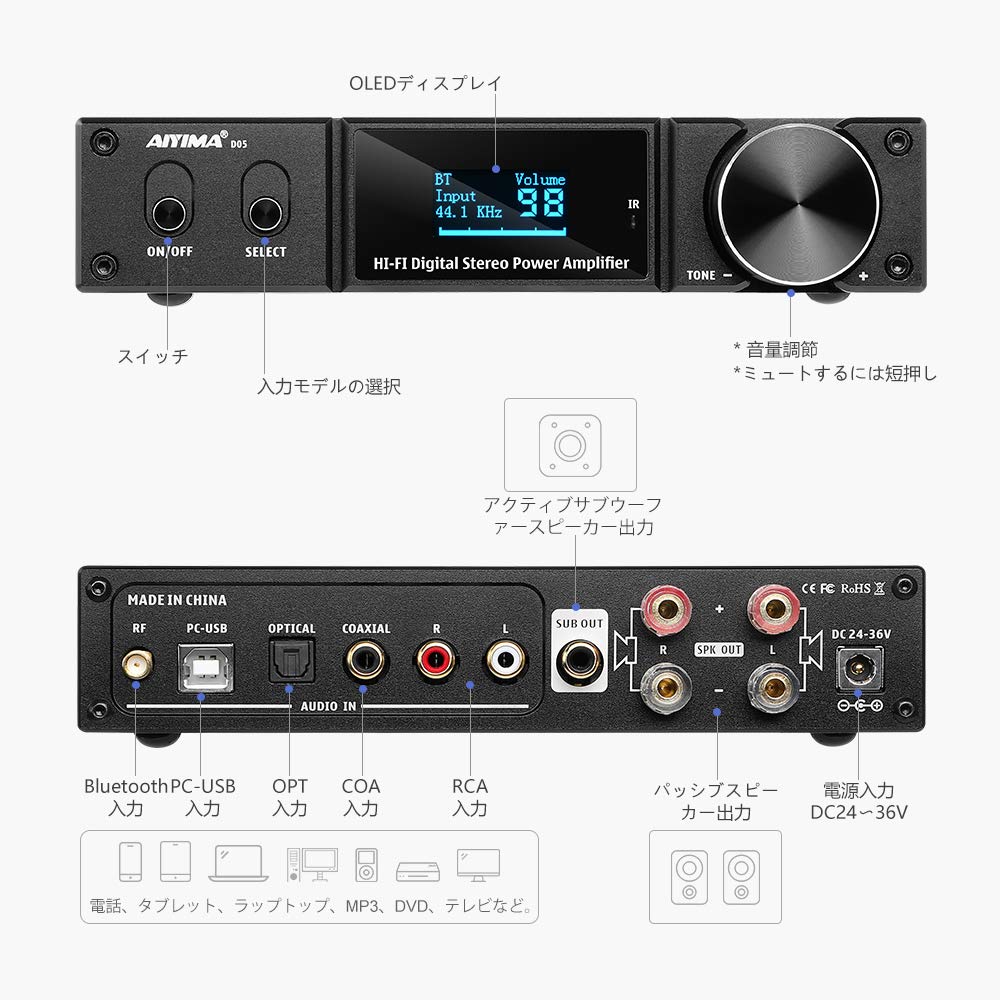
Image: Front and rear panel layout of the AIYIMA D05 amplifier, showing controls and input/output ports.
2.2. Rear Panel Connections
The rear panel provides various input and output ports for connecting your audio devices.
- RF Antenna: For Bluetooth signal reception.
- PC-USB Input: Connects to a computer for digital audio playback (supports up to 24bit/192kHz).
- OPTICAL Input: Digital optical audio input (supports up to 24bit/192kHz).
- COAXIAL Input: Digital coaxial audio input (supports up to 24bit/192kHz).
- RCA Input (L/R): Analog stereo audio input.
- SUB OUT: Output for connecting an active subwoofer to create a 2.1 channel system.
- SPK OUT (L/R): Speaker terminals for passive stereo speakers (supports 4Ω speakers, up to 120W+120W output).
- DC 24-36V Power Input: Connects the included power adapter.

Image: Detailed view of AIYIMA D05 amplifier dimensions, internal chipset, and subwoofer output.
2.3. Package Contents
Verify that all items are present in the package:
- AIYIMA D05 Amplifier x 1
- 32V 5A Power Adapter x 1
- Remote Control x 1 (Batteries not included; requires 2x AAA batteries)
- PC-USB Cable x 1
- Optical Cable x 1
- Bluetooth Antenna x 1
- User Manual x 1
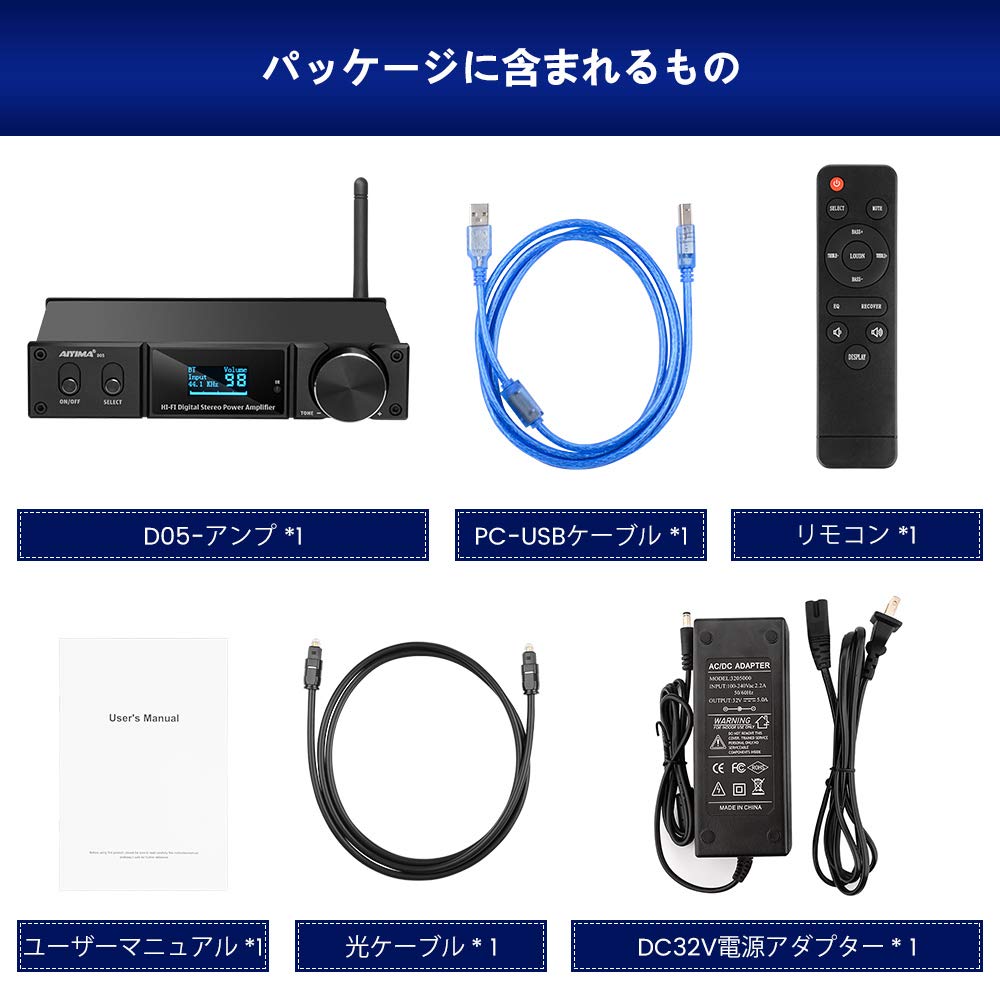
Image: Contents of the AIYIMA D05 package, including amplifier, cables, remote, and user manual.
3. Setup
3.1. Connecting Speakers
- Connect your passive stereo speakers to the SPK OUT (L/R) terminals on the rear panel. Ensure correct polarity (+ to + and - to -).
- If using an active subwoofer, connect it to the SUB OUT port.
3.2. Connecting Audio Sources
Choose one of the following methods to connect your audio source:
- RCA Input: Use an RCA cable to connect your analog audio source (e.g., CD player, turntable with pre-amp) to the RCA Input ports.
- PC-USB Input: Connect the provided PC-USB cable from your computer to the PC-USB Input port. Your computer should automatically detect the amplifier as an audio device.
- Optical Input: Use the provided optical cable to connect your digital audio source (e.g., TV, game console) to the OPTICAL Input port.
- Coaxial Input: Use a coaxial cable (not included) to connect your digital audio source to the COAXIAL Input port.
- Bluetooth: Ensure the Bluetooth antenna is securely attached to the RF connector.
3.3. Power Connection
- Connect the provided 32V 5A power adapter to the DC 24-36V Power Input on the rear panel.
- Plug the power adapter into a suitable wall outlet.
- Important Safety Note: Some users have reported issues with the included power adapter, including sparking or failure. For safety and optimal performance, consider using a certified, high-quality 32V-36V 5A power adapter from a reputable manufacturer.
4. Operating Instructions
4.1. Power On/Off
Press the ON/OFF button on the front panel or the power button on the remote control to turn the amplifier on or off.
4.2. Input Selection
Press the SELECT button on the front panel or the remote control to cycle through the available input sources: RCA, Bluetooth, PC-USB, Optical, and Coaxial. The selected input will be displayed on the OLED screen.
4.3. Volume Control
Rotate the Volume/Tone Knob on the front panel or use the Volume +/- buttons on the remote control to adjust the audio volume. Press the knob or the MUTE button on the remote to mute or unmute the sound.
4.4. Tone Control and EQ Effects
The D05 features ±12dB bass/treble adjustment and various EQ effects for sound customization.
- Use the BASS +/- and TREBLE +/- buttons on the remote control to adjust the bass and treble levels.
- Press the EQ button on the remote to cycle through different equalization presets (e.g., Country, Jazz, Rap, LiteRock, HeavyRock).
- The LOUDNESS button on the remote can enhance bass and treble at low volumes.
- The RECOVER button on the remote resets EQ settings to default.
- Long press the DISPLAY button on the remote to change the gain setting.

Image: AIYIMA D05 remote control with various EQ modes displayed on the amplifier screen.
4.5. Bluetooth Pairing
- Ensure the Bluetooth antenna is connected.
- Select Bluetooth as the input source using the SELECT button. The OLED display will show "BT" and indicate pairing mode.
- On your mobile device or computer, search for Bluetooth devices and select "AIYIMA D05" to pair.
- Once paired, the display will show "BT" and the sampling rate.

Image: AIYIMA D05 amplifier showcasing Bluetooth 5.1 connectivity with a computer setup.
5. Maintenance
- Keep the unit in a dry, well-ventilated area, away from direct sunlight, heat sources, and moisture.
- Clean the exterior with a soft, dry cloth. Do not use harsh chemicals or abrasive cleaners.
- Ensure proper ventilation around the unit to prevent overheating.
- When not in use for extended periods, disconnect the power adapter.
6. Troubleshooting
| Problem | Possible Cause | Solution |
|---|---|---|
| No power | Power adapter not connected or faulty. | Check power connections. Ensure the power adapter is functional. Consider using a certified replacement if suspected faulty. |
| No sound output | Incorrect input selected; volume too low; speakers not connected; muted. | Verify input source. Increase volume. Check speaker connections. Ensure unit is not muted. |
| Sound skipping or intermittent audio (especially Bluetooth) | Weak Bluetooth signal; interference; source device issue. | Ensure Bluetooth antenna is securely attached. Move source device closer to the amplifier. Reduce interference from other wireless devices. Try a different audio source. |
| Clicking or popping noise when switching inputs/sampling rates | Normal operation for some digital audio processing. | This may be inherent to the device's design during input or sampling rate changes. If excessive, contact support. |
| Faint abnormal noise during silence | Ground loop; electrical interference; internal component noise. | Ensure all connections are secure. Try plugging the amplifier into a different power outlet. Disconnect all inputs to see if the noise persists. |
| Remote control unresponsive or erratic | Low or dead batteries; obstructed IR sensor; remote malfunction. | Replace AAA batteries in the remote. Ensure no obstacles between remote and amplifier's IR sensor. Point remote directly at the amplifier. |
| Sound disappears after a while with USB connection, cycling SELECT restores it | USB driver issue; compatibility issue; temporary software glitch. | Ensure your computer's USB drivers are up to date. Try a different USB port or cable. Cycling the SELECT input can temporarily resolve this. |
7. Specifications
| Feature | Detail |
|---|---|
| Brand | AIYIMA |
| Model | D05 |
| Chipset | CM6642+TAS5508+TAS5352A+QCC3031+CS8422+WM8782 |
| Bluetooth Version | 5.1 (Supports ACC, SBC, aptX, aptX-LL) |
| Input Modes | RCA, Bluetooth, PC-USB, Optical, Coaxial |
| Digital Input Sampling Rate | 24bit/192kHz (PC-USB, Optical, Coaxial) |
| Output Modes | Passive Speakers, Active Subwoofer (2.1ch support) |
| Max Power Output | 120W + 120W (into 4Ω speakers) |
| Tone Control | Bass/Treble adjustment (±12dB) |
| Display | OLED |
| Power Supply | DC 24-36V (32V 5A adapter included) |
| Item Weight | 1.53 Kilograms |
| Dimensions (L x W x H) | Approx. 182 x 128.5 x 37 mm |
| Color | Black |
| UPC | 711731344690 |
8. Warranty and Support
The AIYIMA D05 amplifier comes with a 24-month warranty from the date of purchase. This warranty covers manufacturing defects and ensures technical support for any issues encountered during normal use.
For warranty claims, technical assistance, or any product-related inquiries, please contact AIYIMA customer support through your purchase platform or the official AIYIMA website. Please retain your proof of purchase for warranty validation.


