
1. Introduction
Thank you for choosing the QUOYA QL600 Smart Electric Curtain Track. This motorized system offers convenient control over your curtains, integrating with various smart home platforms. This manual provides essential information for proper installation, operation, and maintenance to ensure optimal performance and longevity of your product.
2. Safety Information
Please read all safety instructions carefully before installation and use. Failure to follow these instructions may result in injury or damage to the product.
- Always follow installation instructions carefully.
- Keep the motorized curtain track out of reach of children and pets.
- Do not attempt to repair or modify the product yourself. Contact customer support for assistance.
- Unplug the product from the power source before cleaning or performing any maintenance.
- Ensure the power cable is not pinched or damaged during installation or operation.
3. Product Overview
The QUOYA QL600 features a hidden bracket design for a sleek appearance and offers various customization options for track length and opening styles.
Key Features:
- Newest Design: Upgraded hidden ceiling bracket system for easy clip-on installation.
- Elegant Design: Hidden track joiners and concealed motor using gearbox hooks.
- Customizable: Adjustable track length up to 3m (118 inches). Options for right or left motor location, and one-way or two-way central opening.
- Smart Home Compatibility: Works with Tuya App, Alexa, Google, Siri, and Apple Watch for voice and remote control. No additional hub required.
- Remote Control: Includes a 63-channel remote controller with extended range, capable of controlling up to 63 sets simultaneously.
- Smart Functions: Touch motion activation, powercut overdrive, schedule setting, sunset and sunrise automation, app control, remote control, and voice control.
Product Components:
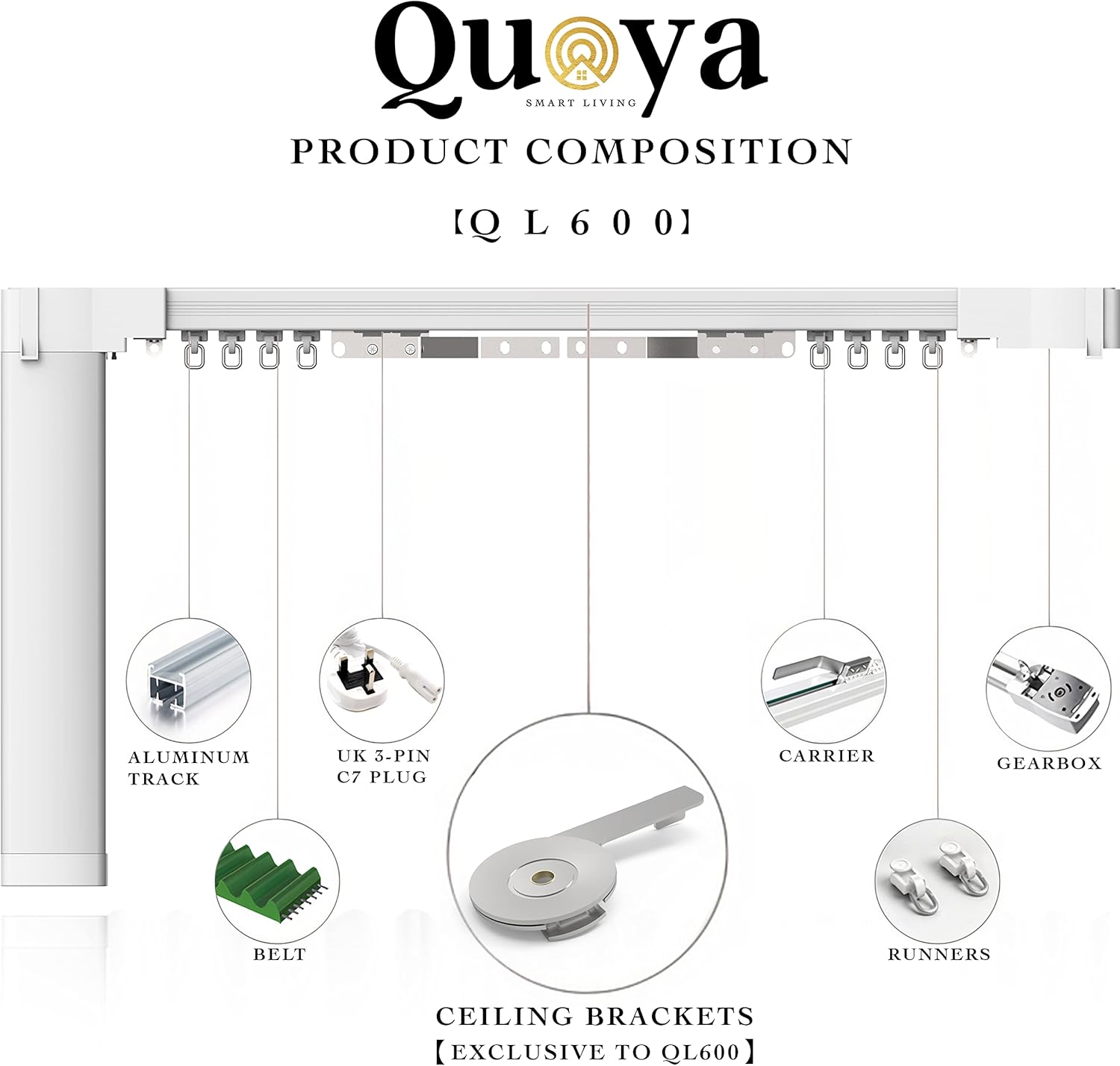


4. Setup and Installation
The QUOYA QL600 is designed for straightforward installation. Detailed video guides are available to assist you through each step, from track assembly to smart home integration. Wall brackets are not included and must be purchased separately if needed (Search 'B08RXD4ZB5' on Amazon).
Installation Steps Overview:
- Track Assembly: Assemble the aluminum track sections, ensuring the belt and carriers are correctly positioned.
- Bracket Installation: Secure the hidden ceiling brackets to your ceiling.
- Track Mounting: Clip the assembled track onto the installed ceiling brackets.
- Motor Connection: Connect the motor to the track and power supply.
- Curtain Attachment: Attach your curtains to the runners.
- Calibration: Follow the instructions in the app or video guides to calibrate the curtain limits.
Helpful Installation Videos:
5. Operating Instructions
The QUOYA QL600 offers multiple ways to control your curtains:
Remote Control:
Use the included 63-channel remote to open, close, or pause your curtains. The remote can control individual tracks or groups of tracks.
App Control (Tuya/SmartLife App):
Download the Tuya or SmartLife app to your smartphone or tablet. Follow the in-app instructions to connect your QL600 track. The app allows for:
- Opening and closing curtains remotely.
- Setting custom schedules for automatic operation (e.g., opening at sunrise, closing at sunset).
- Adjusting curtain position by percentage.
- Creating smart scenes and automations.

Voice Control:
The QL600 is compatible with Alexa, Google Assistant, and Siri. Once integrated with your smart home system, you can use voice commands to operate your curtains. For example:
- "Alexa, open the living room curtains."
- "Hey Google, close the bedroom blinds."
- "Hey Siri, set curtains to 50%."
Touch Motion Activation:
Gently pull your curtains, and the motor will automatically activate, gliding them open or closed.
6. Maintenance
To ensure the smooth and long-lasting operation of your QUOYA QL600 Smart Electric Curtain Track, follow these maintenance guidelines:
- Cleaning: Regularly wipe the track and motor housing with a soft, dry cloth. Do not use abrasive cleaners or solvents. Ensure the power is disconnected before cleaning.
- Track Inspection: Periodically check the track for any obstructions or debris that might hinder the movement of the carriers.
- Belt and Runner Check: Inspect the drive belt and runners for any signs of wear or damage. Replace components if necessary.
- Power Cable: Ensure the power cable remains undamaged and securely connected.
7. Troubleshooting
If you encounter issues with your QUOYA QL600, refer to the following common troubleshooting steps:
| Problem | Possible Cause | Solution |
|---|---|---|
| Curtains not moving | No power; Remote battery low; Obstruction in track; Motor not calibrated. | Check power connection; Replace remote batteries; Clear track obstructions; Recalibrate motor limits via app. |
| Motor making unusual noise | Obstruction; Worn components; Incorrect installation. | Inspect track for obstructions; Check belt and runners for wear; Review installation videos for correct assembly. |
| App/Voice control not working | Wi-Fi connectivity issue; Incorrect app setup; Smart home integration error. | Ensure stable Wi-Fi connection; Verify app settings and device pairing; Re-link with Alexa/Google/Siri if necessary. |
| Curtains not closing/opening fully | Limits not set correctly; Obstruction. | Recalibrate the open/close limits using the app; Check for any physical obstructions. |
If the problem persists after attempting these solutions, please contact QUOYA customer support.
8. Specifications
| Feature | Detail |
|---|---|
| Brand | Quoya |
| Model Number | QL600 |
| Color | White |
| Product Dimensions | 40"L x 1.5"W (Track length customizable up to 118 inches) |
| Material | QL600 (Aluminum Track) |
| Mounting Type | Ceiling Mounted (Wall brackets sold separately) |
| Item Weight | 3 Kilograms |
| Maximum Weight Recommendation | 50 Kilograms |
| Power | 40W |
| Voltage | AC100-240V |
| Motor Strength | 2Nm Torque |
| Ingress Protection (IP) | IP20 |
| Smart Home Compatibility | Tuya App, Alexa, Google, Siri, Apple Watch (No Hub required) |
| Included Components | Smart electric curtain track, 63-channel remote controller, 118-inch C7 to US plug power cable, Ceiling brackets. |
| UPC | 782290130390 |
9. Warranty and Support
QUOYA provides comprehensive support for its products:
- 3 Year Warranty: All QUOYA products come with a 3-year warranty.
- 24/7 Customer Support: Full customer support is available 24/7 via text, phone, email, Facebook Messenger, and WhatsApp.
- Installation Promise: If installation is unsuccessful, contact QUOYA customer support for replacement parts or an instant refund.
For further assistance, please refer to the official QUOYA website or contact customer support directly.
