
1. Introduction
This manual provides instructions for the VINABTY SH-1LC Universal Replacement Remote Control. This remote is designed to be compatible with a wide range of Sharp LCD, LED, Aquos, and Smart TV models, offering a direct replacement or an additional control option. It features a learning function for expanded compatibility and personalized control.
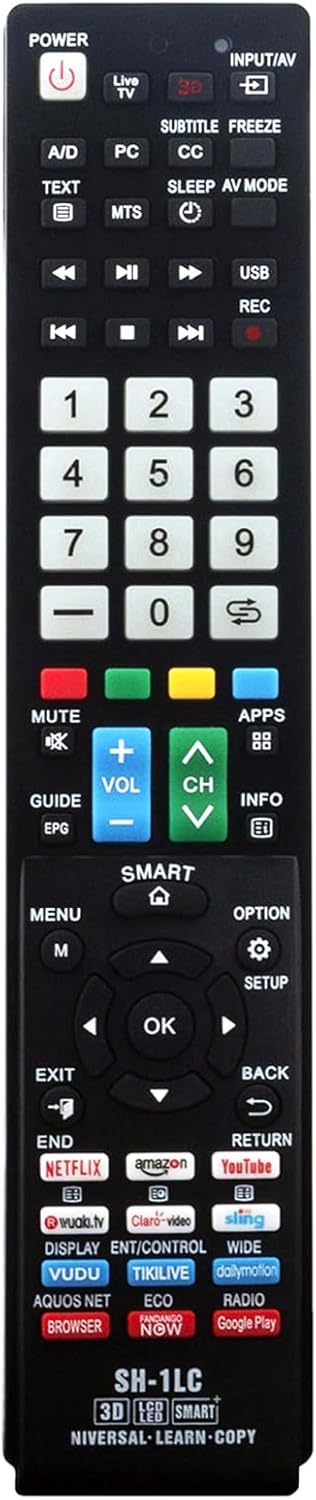
Image 1.1: Front view of the VINABTY SH-1LC Universal Replacement Remote Control.
2. Setup and Initial Use
2.1 Battery Installation
The remote control requires two AAA batteries (not included). To install:
- Open the battery compartment cover on the back of the remote control.
- Insert two AAA batteries, ensuring the correct polarity (+ and -) as indicated inside the compartment.
- Close the battery compartment cover securely.
The remote is a basic IR remote and typically does not require programming for compatible Sharp TVs. It should function directly upon battery installation.
2.2 Learning Function
The remote includes a learning function to copy commands from your original remote control, allowing for expanded functionality or compatibility with specific buttons not pre-programmed.

Image 2.1: Visual guide for the remote's learning function.
- Press and hold the MUTE and VOL+ keys simultaneously for approximately 5 seconds. The LED indicator on the remote will illuminate, indicating it is ready to learn.
- Point your original remote control directly at the VINABTY SH-1LC remote. The distance between the two remotes should be between 1-3 cm.
- Press any key on your original remote control that you wish to copy. The LED indicator on the SH-1LC remote will flash upon receiving the code. Release the key on the original remote.
- Immediately press the corresponding key on the SH-1LC remote where you want to store the learned function. The indicator light will flash twice and remain on.
- Repeat Step 3 and 4 for any other function keys you wish to learn.
- To exit the learning mode, press any key that is not part of the learning process (e.g., the Power button) or wait for the LED to turn off automatically after a period of inactivity.
3. Operating Instructions
The VINABTY SH-1LC remote control provides standard functions for Sharp TVs. Below is a general overview of common button functions:
- POWER: Turns the TV on or off.
- INPUT/AV: Selects video input sources (HDMI, AV, Component, etc.).
- NUMBER BUTTONS (0-9): Direct channel selection.
- VOL +/-: Adjusts volume up or down.
- CH +/-: Changes channels up or down.
- MUTE: Mutes or unmutes the TV audio.
- SMART (Home Icon): Accesses the Smart TV home screen or menu.
- NAVIGATION PAD (Up, Down, Left, Right, OK): Navigates through menus and confirms selections.
- BACK / RETURN: Returns to the previous screen or menu.
- EXIT: Exits the current menu or application.
- APP BUTTONS (Netflix, Amazon, YouTube, etc.): Direct access to streaming applications.

Image 3.1: User operating the remote control with a television in the background.
4. Compatibility
This universal replacement remote control is compatible with a wide range of Sharp LCD, LED, Aquos, and 3D Smart TV models. Some compatible models include, but are not limited to:
- Remote Models: EN2A27S, EN2A27ST, EN3R39S, GA667WJSA, GJ221, GB004WJSA, GB005WJSA, GA890WJSA, GB105WJSA, GA935WJSA, W9HBRCB0006, ERF3A69, GB118WJSA, GA840WJSA, GA806WJSA, GA480WJSB, GB172WJSA, ERF3A69S.
- Sharp TV Models: LC-50Q7030U, LC-55Q7030U, LC-43Q7000U, LC-43Q7020U, LC-43Q7050U, LC-43Q7060U, LC-43Q7070U, LC-43Q7080U, LC-43Q7003U, LC-50Q7000U, LC-50Q7020U, LC-55N8003U, LC-65N8003U, LC-75N8003U, LC-42SV49, LC-42SV49U, LC-46SV50, LC-46SV50U, LC-50LE440, LC-50LE440U, LC-26SV490U, LC52C6400U, LC52LE640U, LC60C6400U, LC60LE640U, LC70C6400U, LC70LE640U, LC80LE633U, LC60C6400U, LC60LE640UA, LC80LE633UB, LC52LE640, LC60C6500U, LC60LE640, LC60LE650U, LC70C6500U, LC70LE640, LC70LE650U, LC52C6400, LC52C6400U, LC52LE640, LC60C640, LC52LE640U0, LC60C6400U, LC60C6500, LC60C6500U, LC60C7500, LC60C7500U, LC60LE550, LC60LE550U, LC60LE640, LC60LE640U, LC60LE640UA, LC60LE640UB, LC60LE640UC, LC60LE640UD, LC60LE650, LC60LE650U, LC-75N620U, LC-75N8000U, LC40N5000U, LC43N5000U, LC43N6100U, LC43N7000U, LC50N5000U, LC50N6000U, LC50N7000U, LC55N620U, LC55N5300U, LC55N6000U, LC55N7000U, LC60N5100U, LC60N6200U, LC-32P5000U, LC-40P5000U, LC-43P5000U, LC-50P5000U, LC-55P5000U, LC-60P6000U.

Image 4.1: The remote control positioned with a Sharp Smart TV, highlighting its universal compatibility.
5. Maintenance
5.1 Battery Replacement
When the remote control's range decreases or buttons become unresponsive, it is time to replace the batteries. Always replace both batteries at the same time with new AAA alkaline batteries. Do not mix old and new batteries, or different types of batteries.
5.2 Cleaning
To clean the remote control, use a soft, dry cloth. For stubborn dirt, slightly dampen the cloth with water or a mild cleaning solution. Avoid using harsh chemicals or abrasive cleaners, as these can damage the remote's surface or internal components.
6. Troubleshooting
- Remote not responding:
- Ensure batteries are correctly installed with the proper polarity.
- Replace old batteries with new ones.
- Check for any obstructions between the remote and the TV's IR receiver.
- Verify that the remote is pointed directly at the TV.
- Specific buttons not working:
- If you used the learning function, ensure the button was programmed correctly. Repeat the learning process for that specific button.
- Some advanced functions may not be universally supported by all TV models.
- Learning function not working:
- Ensure the original remote has sufficient battery power.
- Maintain a close distance (1-3 cm) between the two remotes during the learning process.
- Ensure there are no strong light sources interfering with the IR signal.
7. Specifications
| Model Number | SH-1LC |
| Brand | VINABTY |
| Product Dimensions | 9 x 2 x 0.7 inches |
| Item Weight | 3 ounces |
| Power Source | 2 x AAA Batteries (not included) |
| Compatible Devices | Sharp Televisions (LCD, LED, Aquos, 3D Smart TV) |
| Special Features | Universal compatibility, Learning function |

Image 7.1: Dimensions of the VINABTY SH-1LC remote control.
8. Warranty and Support
Specific warranty information is not provided in the product details. For support or warranty inquiries, please refer to the product packaging or contact the manufacturer, VINABTY, directly through their official channels.