
Introduction
This user manual provides comprehensive instructions for the installation, operation, and maintenance of your FirstPower 5000mAh V8 Replacement Battery. Designed to be fully compatible with various V8 series vacuum cleaners, including V8 Animal, V8 Absolute, V8 Fluffy, V8 Motorhead, and V8 Carbon Fiber models, this battery ensures your cordless handheld vacuum operates efficiently. Please read this manual thoroughly before use to ensure proper function and longevity of your battery.
Product Features
- High Capacity: 5.0Ah / Lithium-ion / 21.6V, providing extended running time.
- Full Compatibility: Works seamlessly with all V8 series vacuum cleaners (V8 Animal, V8 Absolute, V8 Fluffy, V8 Motorhead, V8 Carbon Fiber vacuum, SV10). Note: ONLY FOR V8 series.
- Longer Running Time: Offers approximately 35-40 minutes in normal mode and 8 minutes in max mode, surpassing other 5.0Ah/6.0Ah batteries.
- Easy Installation: Designed for quick and straightforward replacement, typically taking about 2 minutes.
- Advanced Safety Features: Built-in multiple protection systems including over-voltage, over-charge, over-discharge, short-circuit, and over-current protection to ensure battery longevity and vacuum safety.
- No Memory Effect: Ensures consistent performance over time.

Figure 1: Compatibility with V8 series vacuum cleaners.

Figure 2: Li-ion cell technology and capacity.
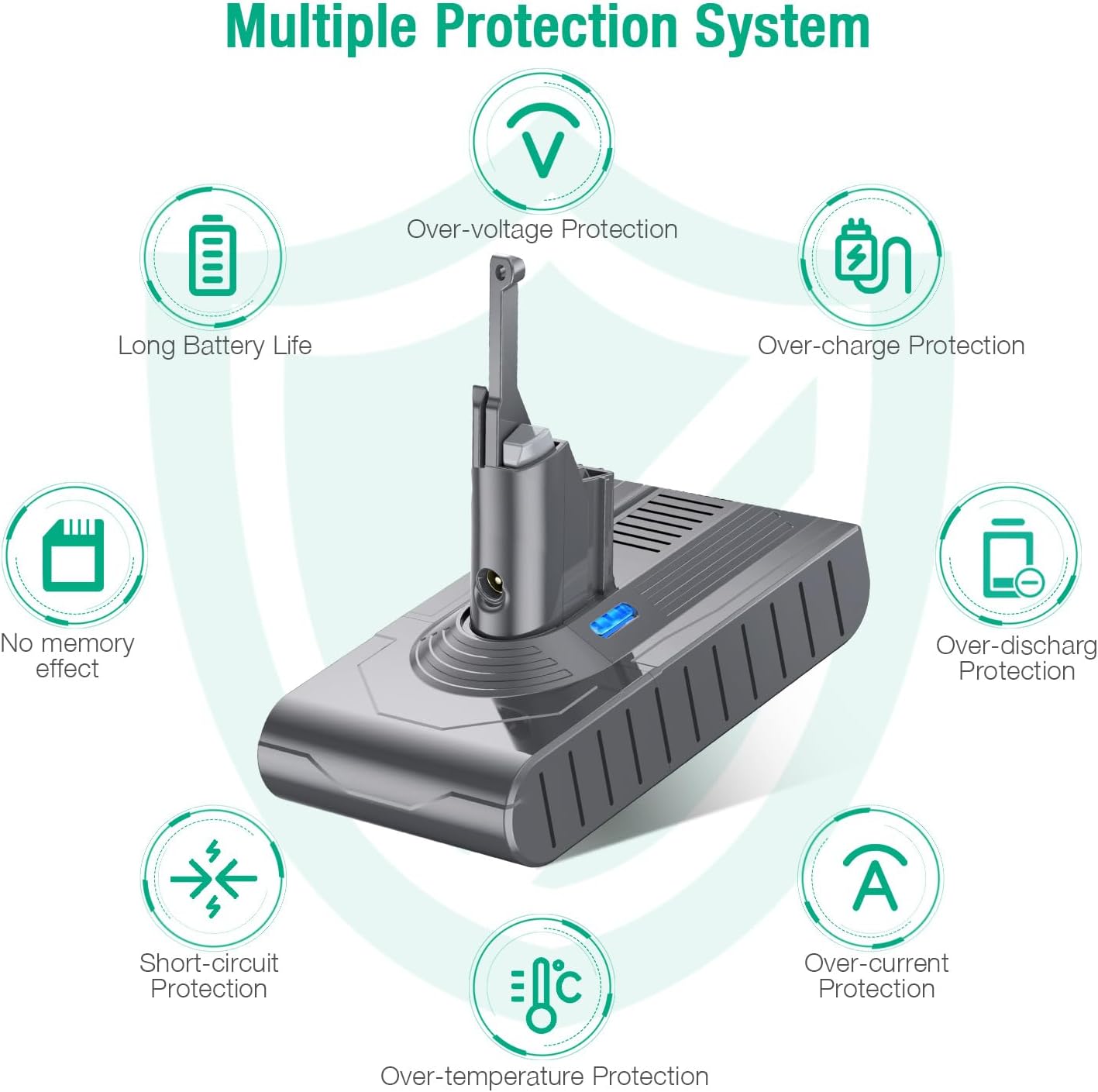
Figure 3: Built-in multiple protection system for enhanced safety.
What's in the Box
- 1 x FirstPower 21.6V Replacement Battery for V8 Vacuum Cleaners
Setup and Installation
Follow these steps to safely replace the battery in your V8 series vacuum cleaner:
- Prepare the Vacuum: Ensure the vacuum cleaner is switched off and unplugged from any charging source.
- Remove Rear Screw: Locate the screw at the rear of the vacuum's handle. Use an appropriate screwdriver to unscrew and remove it.
- Remove Underside Screws: Identify the two screws on the underside of the battery pack. Unscrew these to release the old battery.
- Remove Old Battery: Carefully detach and remove the old battery from the vacuum cleaner.
- Install New Battery: Align the new FirstPower replacement battery with the vacuum's battery slot. Gently push it into place until it clicks securely.
- Secure New Battery: Reinsert and tighten the two screws on the underside of the new battery. Then, reinsert and tighten the screw at the rear of the handle.
- Verify Installation: Ensure the new battery is firmly seated and all screws are tightened.
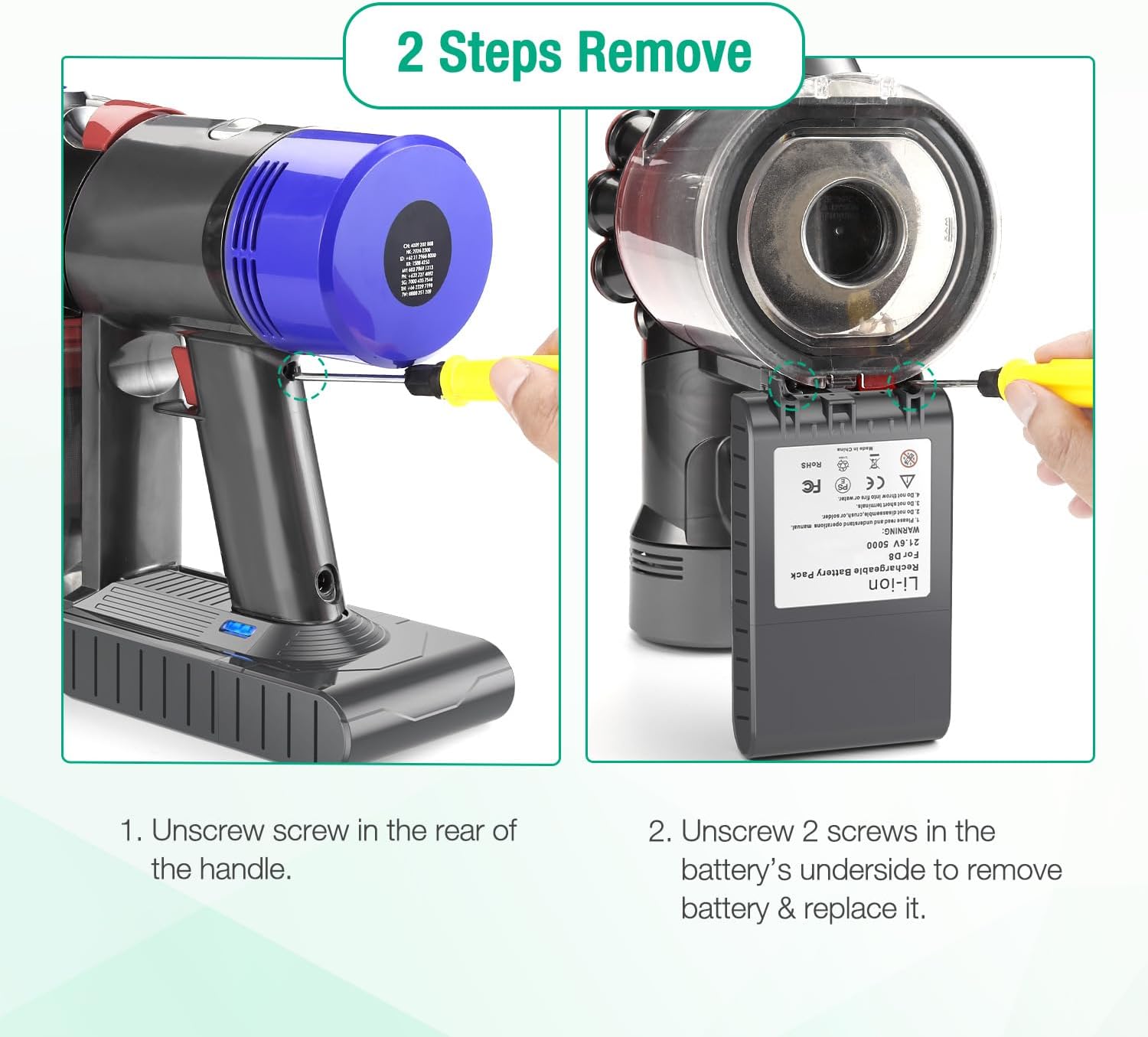
Figure 4: Step-by-step guide for battery replacement.
For a visual guide, please watch the official installation video below:
Video 1: How to replace the V8 battery. This video demonstrates the complete battery replacement process, from unplugging the device to securing the new battery.
Operating Instructions
Once the new battery is installed, your vacuum cleaner is ready for use. The FirstPower V8 Replacement Battery is designed to work with your original charger station and wall charger.
Charging the Battery:
- Connect your vacuum cleaner with the installed FirstPower battery to your original V8 charger or wall-mounted charging dock.
- A full charge typically takes approximately 4 hours.
- Important Note: Always allow the battery to cool down before recharging it to ensure optimal performance and battery life.

Figure 5: Charging the FirstPower V8 battery using original V8 chargers.
Maintenance
To maximize the lifespan and performance of your FirstPower V8 Replacement Battery, consider the following maintenance tips:
- Cool Down Before Charging: As mentioned, always allow the battery to cool down completely after heavy use before placing it on the charger. This prevents overheating and extends battery health.
- Regular Use: For optimal battery health, use your vacuum regularly rather than letting the battery sit fully discharged or fully charged for extended periods.
- Proper Storage: If storing the vacuum for a long period, ensure the battery is partially charged (around 50%) and stored in a cool, dry place. Avoid extreme temperatures.
- Clean Contacts: Periodically inspect and clean the battery contacts on both the battery and the vacuum cleaner to ensure a good connection.
Troubleshooting
If you encounter issues with your FirstPower V8 Replacement Battery, consider the following common solutions:
- Battery Not Charging:
- Ensure the charger is properly connected to both the wall outlet and the vacuum.
- Verify that the wall outlet is functional.
- Check if the battery is securely installed in the vacuum.
- Allow the battery to cool down if it was recently used.
- Reduced Run Time:
- Ensure the battery is fully charged before use.
- Check for blockages in the vacuum cleaner that might be causing the motor to work harder, thus draining the battery faster.
- Confirm the battery has been allowed to cool before charging.
- Vacuum Not Turning On:
- Ensure the battery is fully charged.
- Re-install the battery to ensure proper connection.
- Check for any visible damage to the battery or vacuum.
If problems persist, please refer to the Warranty and Support section for further assistance.
Specifications
| Attribute | Value |
|---|---|
| Brand | FirstPower |
| Model Number | V8 |
| Battery Type | Lithium Ion |
| Voltage | 21.6V |
| Battery Capacity | 5.0 Ah (5000mAh) |
| Product Dimensions | 6.3 x 5.5 x 3.7 inches |
| Item Weight | 1.03 pounds |
| Manufacturer | Shenzhen Lepower Electronic Co.,Ltd. |
| Date First Available | November 16, 2020 |
| Recommended Uses | Vacuum Cleaner (V8 Series) |
Warranty and Support
FirstPower provides a 12-month product quality service from the date of purchase for your replacement battery. This warranty covers manufacturing defects and ensures the quality of your product.
For any inquiries, technical assistance, or warranty claims, please contact our customer service. We offer 24 hours' friendly customer service to assist you with any issues or questions you may have.
Please retain your proof of purchase for warranty validation.