
Introduction
This instruction manual provides essential information for the safe and effective use of your Emanjor 19.5V AC Adapter Charger. Please read this manual thoroughly before using the product and retain it for future reference.

Image: The Emanjor 19.5V AC Adapter Charger, including the main adapter unit, the detachable AC power cord, and the DC output cable with its barrel connector.
Safety Information
Please observe the following safety guidelines:
- Store the charger in a dry and cool place.
- Do not dispose of the charger in fire or water.
- Avoid exposing the adapter to extreme temperatures or humidity.
- Do not disassemble or attempt to repair the adapter. Refer servicing to qualified personnel.
- Ensure the adapter is used with compatible devices only.
Specifications
| Feature | Detail |
|---|---|
| DC Output | 19.5V 4.7A (compatible with 19.5V-2A/2.3A/3A/3.3A/3.9A/4.1A) |
| Input | 100-240V ~ 50-60Hz |
| Power Max | 90 Watt |
| Connector Barrel Size | OD*ID 6.5*4.4mm (with pin inside) |
| Prongs | 2 Prongs |
| Product Dimensions | 5.1 x 2.1 x 1.1 inches |
| Item Weight | 10.5 ounces |
| Total Cord Length | Approximately 7.87 ft (AC Cord 3.94ft, DC Cord 3.94ft) |

Image: A diagram illustrating the physical dimensions of the adapter unit.

Image: A detailed view of the DC connector, highlighting its outer diameter (6.0mm) and inner diameter (4.4mm) with a central pin.
Compatibility
This adapter is designed for use with a wide range of Sony Bravia TVs and Sony VAIO laptop series. Please verify your device's power requirements and connector type before use.
Compatible Sony Bravia TV Models:
- KDL-24 Series: KDL-24W600A, KDL-24W60xA
- KDL-32 Series: KDL-32R300B, KDL-32R300C, KDL-32R304B, KDL-32R410B, KDL-32R413B, KDL-32R415B, KDL-32R420B, KDL-32R430B, KDL-32R435B, KDL-32R500C, KDL-32R505C, KDL-32W600A, KDL-32W600D, KDL-32W603A, KDL-32W605A, KDL-32W607A, KDL-32W650A, KDL-32W654A, KDL-32W655A, KDL-32W656A, KDL-32W658A, KDL-32W65xA, KDL-32W670A, KDL-32W674A, KDL-32W700, KDL-32W700B, KDL-32W705B, KDL-32W705C, KDL-32W706B, KDL32R300B, KDL32R413BBU, KDL32R415BBAEP, KDL32R420B, KDL32R435BBAEP, KDL32R500C, KDL32R505CBAEP, KDL32W600D, KDL32W650A, KDL32W654ASAEP, KDL32W655ABAEP, KDL32W700B, KDL32W705BBAEP, KDL32W705CBAEP, KDL32W706BSU
- KDL-40 Series: KDL-40R350B, KDL-40R450A, KDL-40R470, KDL-40R480B, KDL-40R510C, KDL-40R550C, KDL-40W580B, KDL-40W590B, KDL-40W600B, KDL-40W650D, KDL40R350B, KDL40R450A, KDL40R510C, KDL40R550C, KDL40W600B, KDL40W650D
- KDL-42 Series: KDL-42W650A, KDL-42W657A, KDL-42W658A, KDL-42W65xA, KDL-42W674A, KDL-42W700B, KDL-42W800B, KDL-42W807B
- KDL-48 Series: KDL-48R470B, KDL-48R510C, KDL-48W580B, KDL-48W590B, KDL-48W600B, KDL-48W650D, KDL48R470B, KDL48R510C, KDL48W580B, KDL48W590B, KDL48W600B, KDL48W650D
- KDL-55 Series: KDL55W650D, KDL-55W650D
NOTE: This item is NOT compatible with Sony Bravia 50'' and 55'' SMART TVs.
Compatible Sony VAIO Laptop Series:
- PCG-F, PCG-FR, PCG-FX, PCG-FXA, PCG-GRS, PCG-GRV, PCG-GRX, PCG-GRZ, PCG-K, PCG-NV, PCG-QR, PCG-R505, PCG-R600, PCG-X, PCG-XE, PCG-XG, PCG-XR-Z505, PCG-Z600
- VGN-A, VGN-AX, VGN-BX, VGN-AR, VGN-BZ, VGN-CR, VGN-CS, VGN-E, VGN-FW, VGN-FZ, VGN-K, VGN-NR, VGN-NS, VGN-NW, VGN-SR, VGN-TX, VGN-Z
- VPCB, VPCCA, VPCCB, VPCE, VPCEA, VPCEB, VPCEC, VPCEE, VPCEF, VPCEG, VPCEH, VPCEJ, VPCEL, VPCS, VPCZ
- SVE11, SVE14, SVE15, SVE17, SVF14, SVS13, SVS15, SVT14, SVT15
- VPCSA, VPCSB, VPCSE

Image: A guide on how to select the correct replacement charger, emphasizing matching output voltage (V) and current (A) to determine power (W), and verifying the DC connector's shape and size.
Setup
- Connect the AC Power Cord: Insert the 2-prong end of the AC power cord into the corresponding port on the adapter unit.
- Connect the DC Output Cable: Plug the barrel connector of the DC output cable into the power input port of your compatible Sony Bravia TV or VAIO laptop. Ensure a secure fit.
- Plug into Power Outlet: Insert the 2-prong plug of the AC power cord into a standard 100-240V wall outlet.
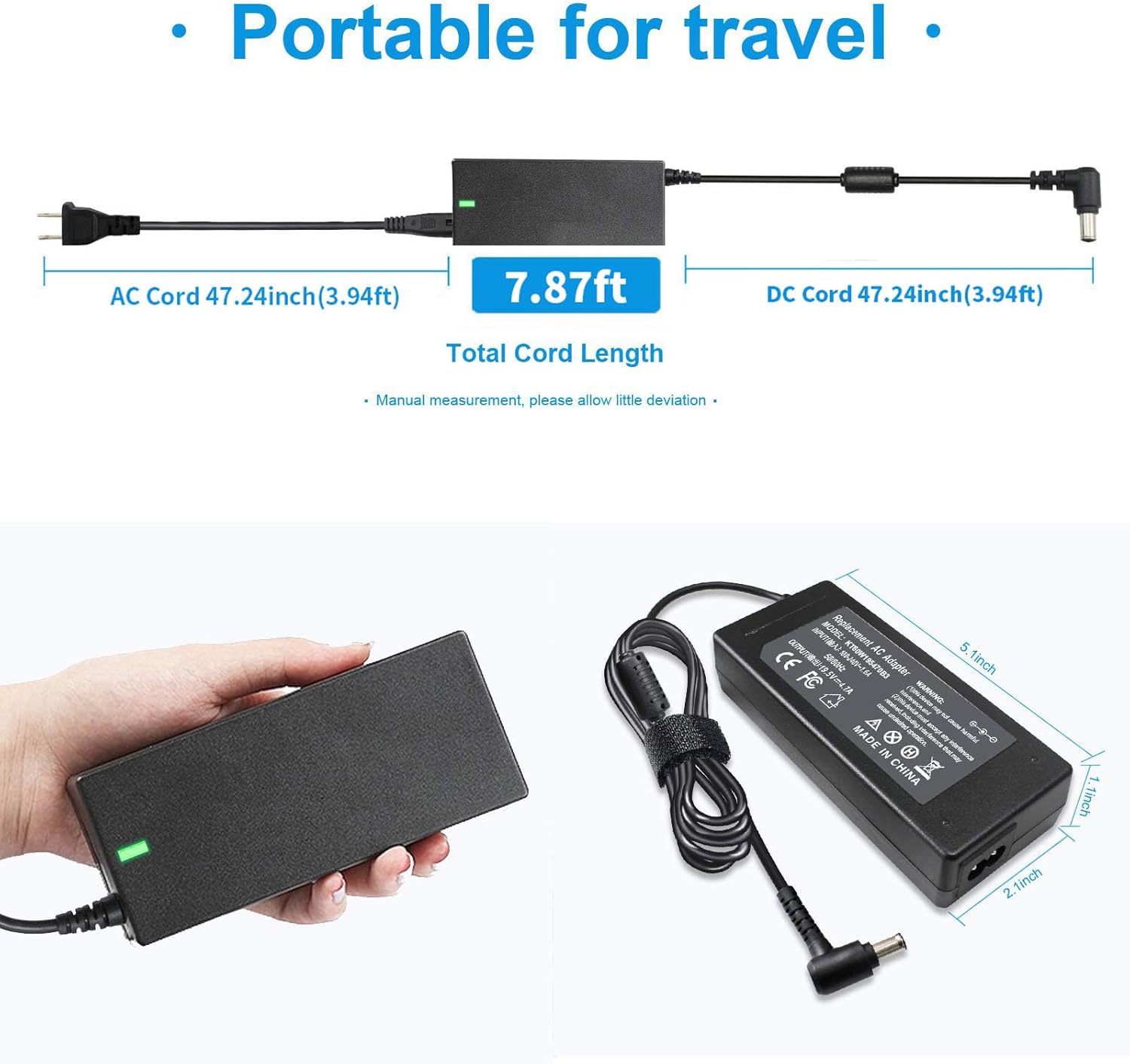
Image: The adapter unit fully assembled with both the AC input cord and DC output cord attached, illustrating the overall length.

Image: The adapter in use, connected to a laptop and a wall socket, demonstrating a typical setup.
Operating
Once properly connected, the adapter will begin supplying power to your device. A green LED indicator on the adapter unit will illuminate to confirm power is being supplied.

Image: A close-up of the adapter unit displaying the illuminated green LED, indicating operational status.
Maintenance
- Cleaning: Use a soft, dry cloth to clean the adapter. Do not use liquid cleaners or aerosols.
- Storage: When not in use, store the adapter in a cool, dry place. Utilize the included magic tape strap to keep cables neatly organized and prevent tangling.
- Handling: Avoid bending or crimping the cables excessively, as this can damage internal wires. Do not pull the cable to disconnect; always grasp the plug.

Image: The adapter's cable bundled with a magic tape strap, demonstrating a method for tidy storage and transport.
Troubleshooting
- Device Not Powering On:
- Ensure all connections (AC cord to adapter, DC cable to device, AC plug to wall outlet) are secure.
- Try plugging the adapter into a different wall outlet to rule out an issue with the power source.
- Verify that the adapter's specifications (voltage, amperage, connector size) precisely match your device's requirements. Refer to your device's original power adapter or manual.
- Check if the green LED indicator on the adapter is illuminated. If not, the adapter may not be receiving power or may be faulty.
- Adapter Making Unusual Noises (e.g., Buzzing):
- A low buzzing sound could indicate an internal component issue. Discontinue use immediately and contact customer support for assistance.
- Adapter Stops Working After Short Use:
- This may indicate an internal fault or overheating. Unplug the adapter and allow it to cool. If the issue persists, contact customer support.

Image: An illustration detailing the adapter's built-in safety mechanisms, such as protection against high temperature, short circuits, overcurrent, high voltage, and moisture, ensuring stable and safe operation.
Warranty and Support
Emanjor stands behind its products. Your purchase includes:
- 60-Day Money Refund: If you encounter any issues within 60 days of purchase, you are eligible for a full refund.
- 12-Month Replacement: For any issues arising within 12 months of purchase, a replacement unit will be provided.
- 24/7 Email Support: For technical assistance or warranty claims, please contact our customer support team via email. We are committed to offering solutions to our customers.