
1. Introduction
Thank you for choosing the FANDBO Motion Sensor Outdoor Wall Lantern, Model HH401. This outdoor lighting fixture is designed to provide enhanced security and convenience for your exterior spaces. It features a motion sensor, a dusk-to-dawn sensor, and a remote control for versatile lighting modes. This manual provides detailed instructions for installation, operation, and maintenance to ensure optimal performance and longevity of your product.
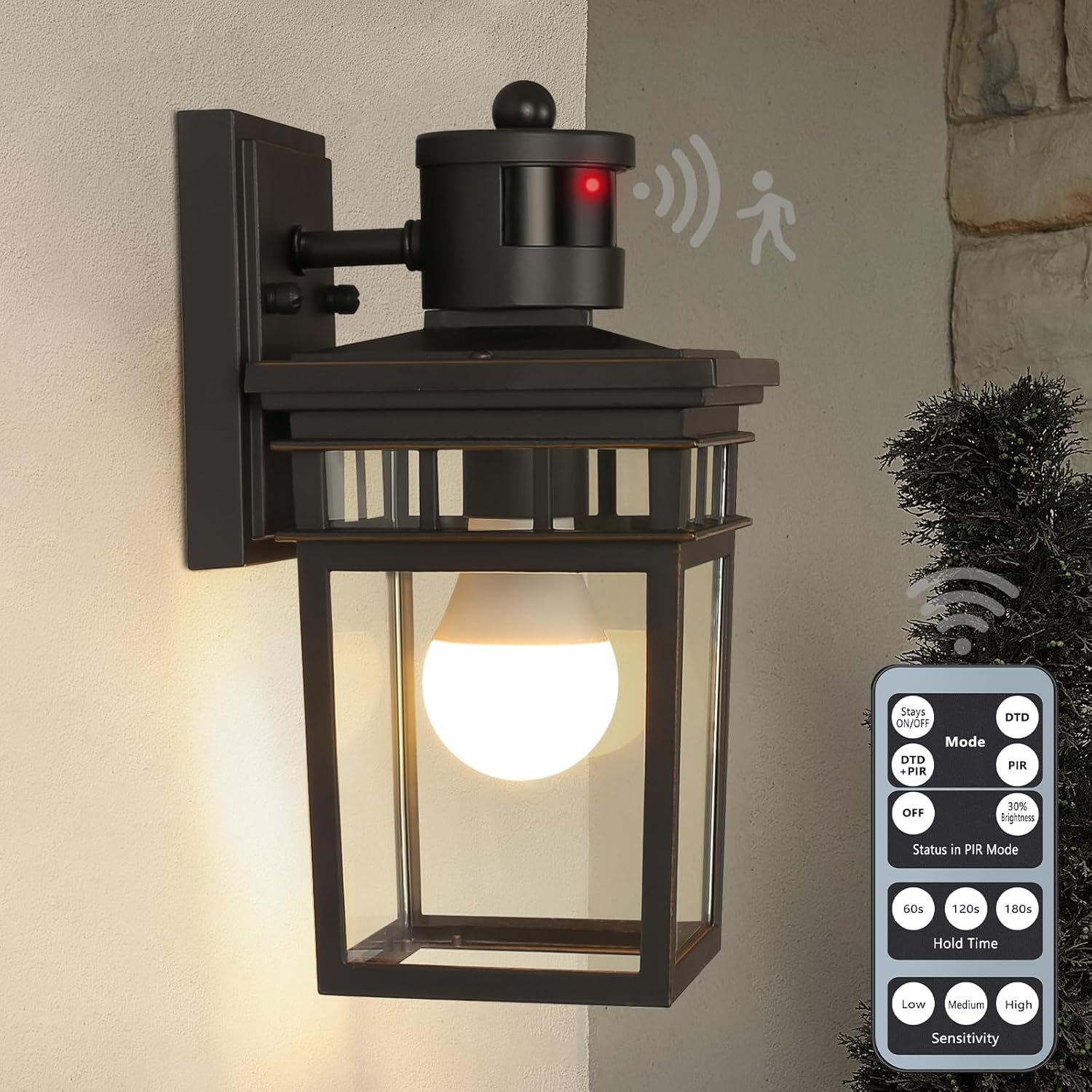
Figure 1.1: FANDBO Motion Sensor Outdoor Wall Lantern with included remote control.
2. Safety Information
- WARNING: Risk of Electric Shock. Disconnect power at the fuse or circuit breaker before installing or servicing.
- All electrical connections must be in accordance with local codes, ordinances, or the National Electric Code (NEC). Consult a qualified electrician if you are unfamiliar with proper electrical wiring installations.
- Ensure the fixture is properly grounded.
- Do not install this fixture on surfaces that are not structurally sound.
- Use only the specified bulb type and wattage.
- Keep the remote control away from water and extreme temperatures.
3. Package Contents
Verify that all components are present before beginning installation:
- Outdoor Wall Lantern Fixture
- Dimmable 9W LED Bulb (E26 base)
- Remote Control
- Installation Accessories Package (mounting bracket, screws, wire nuts)

Figure 3.1: Overview of key features and included components.
4. Specifications
| Feature | Specification |
|---|---|
| Brand | FANDBO |
| Model Number | HH401 |
| Color | Oil-Rubbed Bronze |
| Material | Aluminum, Glass |
| Product Dimensions | 5.5"L x 6.38"W x 10.8"H |
| Power Source | Hard-wired |
| Voltage | 120 Volts |
| Light Source Type | LED |
| Bulb Base | E26 |
| Included Bulb Wattage | 9 Watts (Dimmable LED) |
| Maximum Compatible Wattage | 100 Watts (Incandescent) / 25 Watts (Dimmable LED) |
| Brightness | 800 Lumens |
| Color Temperature | 3000 Kelvin (Warm White) |
| Control Method | Remote Control, Motion Sensor, Dusk to Dawn Sensor |
| Water Resistance Level | IP65 Water Resistant |
| Motion Sensor Detection Range | Up to 40 feet, 150-degree detection |

Figure 4.1: Product dimensions and bulb information.

Figure 4.2: Lighting Facts for the included LED bulb.
5. Installation
This fixture is designed for easy installation. Follow these steps carefully:
- Turn off Power: Before starting, ensure the power to the junction box is turned off at the circuit breaker.
- Prepare Mounting: Attach the mounting bracket to your electrical junction box using the provided screws.
- Wiring: Connect the fixture's wires to your house wiring. Typically, black to black (live), white to white (neutral), and green/bare copper to green/bare copper (ground). Secure connections with wire nuts.
- Mount Fixture: Carefully align the fixture with the mounting bracket and secure it with the provided screws.
- Install Bulb: Screw the included E26 LED bulb into the socket.
- Restore Power: Turn the power back on at the circuit breaker.
Recommended Installation Height: For optimal motion sensor performance, install the lantern at a height of no more than 6.56 feet (2 meters) from the ground. The motion sensor has a detection range of up to 40 feet and a 150-degree angle.

Figure 5.1: Motion sensor detection range and recommended installation height.
6. Operating Instructions
The FANDBO Motion Sensor Outdoor Wall Lantern can be controlled using the included remote. The remote allows you to select various lighting modes and adjust sensor settings.
6.1 Remote Control Functions
The remote control operates up to 23 feet away and provides access to all lighting modes and sensor adjustments.

Figure 6.1: Remote control layout and functions.
- Stay ON/OFF: Manually turns the light on or off, bypassing sensor functions.
- Mode (DTD, PIR, DTD+PIR): Selects the desired operating mode.
- Status in PIR Mode (OFF, 30% Brightness): Sets the light behavior when no motion is detected in PIR or DTD+PIR modes.
- Hold Time (60s, 120s, 180s): Adjusts how long the light stays at 100% brightness after motion is detected.
- Sensitivity (Low, Medium, High): Adjusts the motion sensor's detection sensitivity.
6.2 Lighting Modes
The lantern offers four distinct lighting modes:

Figure 6.2: Overview of the four lighting modes.
- Stay ON/OFF Mode:

Figure 6.3: Stay ON/OFF Mode.
- Manually turn the light ON or OFF.
- Sensor functions are disabled in this mode.
- Dusk to Dawn (DTD) Mode:

Figure 6.4: Dusk to Dawn Mode.
- The light automatically turns off during the day.
- Automatically turns on at 100% brightness at night.
- Motion sensor function is disabled in this mode.
- Dusk to Dawn + Motion Sensor (DTD+PIR) Mode:

Figure 6.5: Dusk to Dawn + Motion Sensor Mode.
- Operates only at night.
- When no motion is detected, the light can be set to either OFF or 30% brightness (adjustable via remote).
- Upon detecting motion, the light illuminates at 100% brightness for the set 'Hold Time'.
- After the 'Hold Time' expires, it returns to the pre-set OFF or 30% brightness state.
- Motion Sensor (PIR) Mode:

Figure 6.6: Motion Sensor Mode.
- Operates both during the day and at night.
- When no motion is detected, the light can be set to either OFF or 30% brightness (adjustable via remote).
- Upon detecting motion, the light illuminates at 100% brightness for the set 'Hold Time'.
- After the 'Hold Time' expires, it returns to the pre-set OFF or 30% brightness state.
6.3 Motion Sensor Settings
Customize the motion sensor's behavior using the remote control:
- Status in PIR Mode: Choose between OFF or 30% brightness when no motion is detected in PIR or DTD+PIR modes.

Figure 6.7: Status in PIR Mode options.
- Hold Time: Select how long the light remains at 100% brightness after motion is detected: 60 seconds, 120 seconds, or 180 seconds.

Figure 6.8: Hold Time settings.
- Sensitivity: Adjust the motion sensor's detection range and responsiveness: Low, Medium, or High.

Figure 6.9: Motion sensor sensitivity adjustment.
7. Maintenance
Regular maintenance ensures the longevity and optimal performance of your outdoor wall lantern.
- Cleaning: To clean the fixture, ensure power is off. Wipe with a soft, damp cloth. Do not use abrasive cleaners or solvents, as they may damage the finish or glass.
- Bulb Replacement: If the included LED bulb needs replacement, ensure power is off. Use an E26 base incandescent bulb (max 100W) or a dimmable E26 LED bulb (max 25W) to maintain compatibility with the fixture's dimming and mode functions.

Figure 7.1: The product includes a bulb for immediate use.
8. Troubleshooting
If you encounter issues with your FANDBO Motion Sensor Outdoor Wall Lantern, refer to the following common problems and solutions:
| Problem | Possible Cause | Solution |
|---|---|---|
| Light does not turn on. | No power, loose wiring, faulty bulb, incorrect mode. | Check circuit breaker. Verify wiring connections. Replace bulb. Ensure correct mode is selected via remote. |
| Motion sensor not detecting or light stays on/off unexpectedly. | Incorrect sensitivity setting, obstruction, ambient light interference, 'Hidden Switch' setting. | Adjust sensitivity (Low, Medium, High) via remote. Ensure sensor is clear of obstructions. For DTD modes, ensure no strong ambient light is affecting the sensor. Important: Some units have a 'Hidden Switch' under the top cap of the light sensor. Remove the top cap and ensure this switch is set to 'High' for proper dusk-to-dawn functionality. If set to 'Low', the 30% accent lighting may not function. |
| Remote control not working. | Dead battery, out of range, obstruction. | Replace remote battery. Ensure you are within 23 feet of the fixture. Remove any obstructions between the remote and the fixture. |
| Light flickers or dims incorrectly. | Incompatible bulb, loose connection. | Ensure you are using a dimmable LED or incandescent bulb. Check all wiring connections. |
9. Warranty and Support
This FANDBO Motion Sensor Outdoor Wall Lantern (Model HH401) comes with a 2-year warranty from the date of purchase, covering defects in materials and workmanship.
For technical support, warranty claims, or any questions regarding your product, please contact FANDBO customer service through the retailer's platform where the product was purchased or refer to the contact information provided with your purchase documentation.