Introduction
This manual provides comprehensive instructions for the assembly, operation, and maintenance of your Tribesigns 96.9" Double Computer Desk. Designed for two users, this versatile workstation combines two spacious desks with a central storage shelf, creating an efficient and comfortable home office environment. Its robust construction ensures stability and durability, making it suitable for various uses including computer work, studying, writing, or gaming.
Safety Information
WARNING:
- Ensure the desk is properly anchored to prevent tipping.
- Do not exceed the weight limit stated in the assembly instructions.
- Use appropriate tools and follow assembly instructions carefully to avoid injury.
Product Overview
The Tribesigns Double Computer Desk is crafted from 0.59" thick MDF board with a waterproof and anti-scratch finish, supported by a heavy-duty powder-coated steel frame. It features adjustable foot pads for stability on uneven floors.

Figure 1: Tribesigns 96.9" Double Computer Desk with Printer Shelf in a modern office setting.
Key Features:
- 2-Person Sharing Design: Allows two individuals to work side-by-side, sharing resources while maintaining individual space.
- Ample Storage: Includes an extra printer shelf and three open storage shelves for documents, stationery, and decor.
- Durable Construction: Made with thick MDF board and a powder-coated steel frame for long-lasting use.
- Easy to Clean: Waterproof and anti-scratch surface ensures simple maintenance.

Figure 2: Detailed dimensions of the desk, showing overall length of 96.9 inches, width of 19.7 inches, and height of 29.5 inches. Each desktop section is 39.4 inches long.
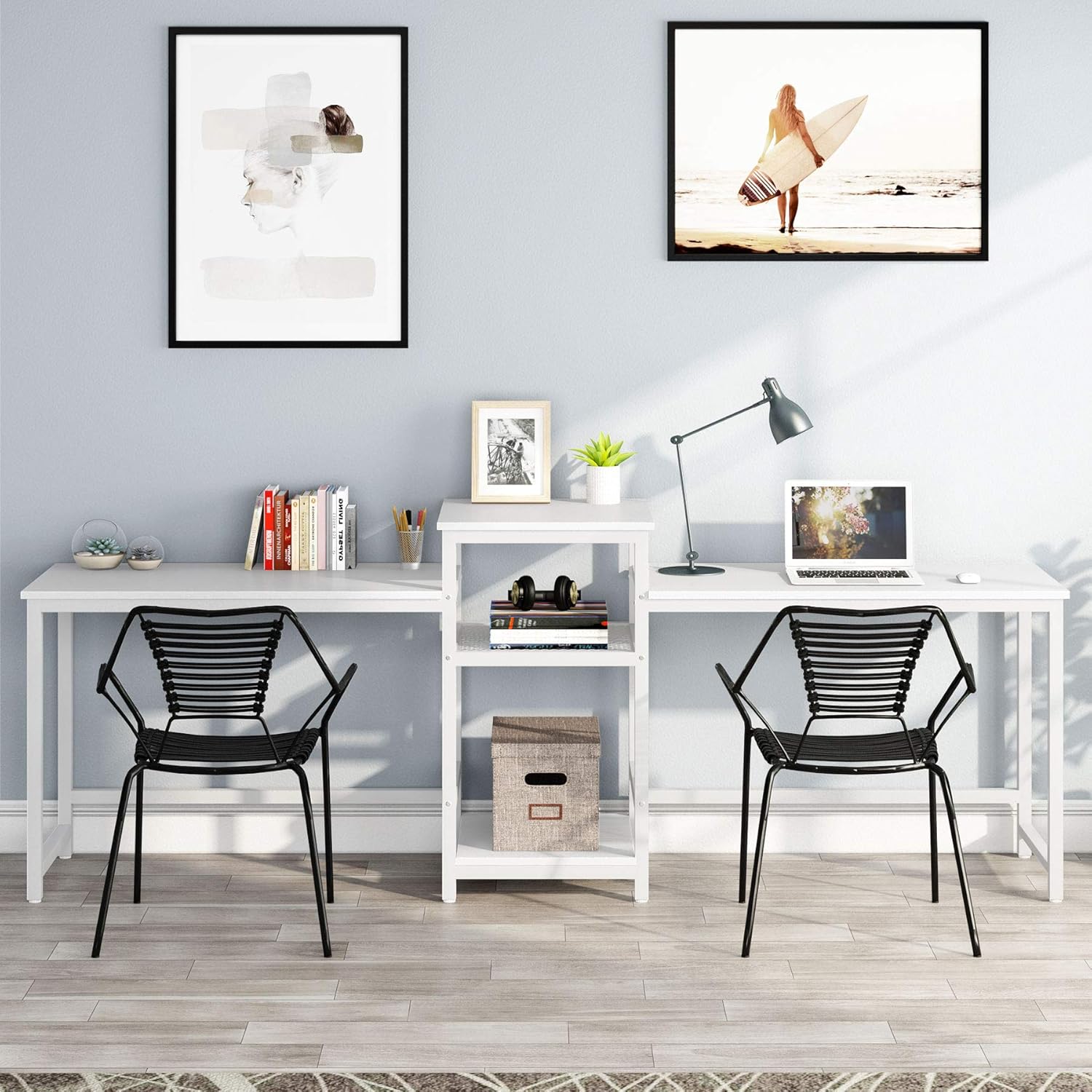
Figure 3: Close-up view of the central 3-tier storage shelves, designed to hold a printer, files, books, and a computer tower.
Setup Instructions
Your Tribesigns Double Computer Desk comes with all necessary parts, tools, and instructions for assembly. It is recommended to have two people for easier and quicker setup, especially when moving the assembled unit.
Assembly Steps:
- Unpack all components and verify against the parts list provided in your package.
- Identify the metal frame pieces and wooden desktop sections.
- Begin by assembling the central storage unit, ensuring all screws are tightened securely.
- Attach the two desktop sections to the central unit, aligning the pre-drilled holes.
- Install the adjustable foot pads on all legs to ensure stability.
- Place the desk in your desired location. While lightweight, moving the fully assembled desk is easier with two people.
Video 1: Official product video demonstrating the assembly process and various configurations of the Tribesigns Two Person Computer Desk with Printer Stand.
Operating Instructions
This desk is designed for versatile use in various settings, including home offices, study rooms, and classrooms. Its dual-person design allows for collaborative work or individual focused tasks.
Usage Tips:
- Utilize the spacious desktops for monitors, laptops, keyboards, and other work essentials.
- Place your printer on the dedicated printer shelf for easy access.
- Organize documents, books, and office supplies on the open storage shelves to maximize workspace efficiency.
- Adjust the foot pads as needed to ensure the desk remains stable on any surface.

Figure 4: The desk configured for two users, showcasing ample space for individual setups and shared central storage.
Maintenance
To ensure the longevity and appearance of your Tribesigns Double Computer Desk, follow these simple maintenance guidelines:
- Cleaning: Wipe the MDF board surfaces with a damp cloth and mild detergent. Avoid abrasive cleaners that may damage the finish.
- Dusting: Regularly dust the desk surfaces and metal frame with a soft, dry cloth.
- Protection: While the surface is anti-scratch, using coasters for drinks and mouse pads can further protect the desktop.
- Inspection: Periodically check all screws and connections to ensure they remain tight. Retighten if necessary.
Troubleshooting
If you encounter any issues with your desk, refer to the following common troubleshooting tips:
| Problem | Possible Cause | Solution |
|---|---|---|
| Desk wobbles or is unstable. | Uneven floor; loose connections. | Adjust the foot pads on the bottom of the legs. Ensure all screws are tightened. |
| Minor scuffs or chips on the surface. | Normal wear and tear; impact during assembly/use. | For minor scuffs, a wood repair marker or touch-up paint matching the finish can be used. |
| Difficulty during assembly. | Incorrect part orientation; screws not aligning. | Refer to the assembly instructions carefully. Ensure pieces are oriented correctly before tightening screws. Sometimes switching pieces can help with alignment. |
Specifications
| Attribute | Detail |
|---|---|
| Brand | Tribesigns |
| Model Number | HOGA-W0077 |
| Product Dimensions | 96.9" (L) x 19.7" (W) x 29.5" (H) |
| Desktop Length (each) | 39.4" |
| Color | White |
| Top Material Type | Engineered Wood (0.59" thick MDF board) |
| Base Material | Heavy Duty Powder Coated Steel |
| Special Feature | Scratch Resistant, Waterproof, Adjustable Foot Pads |
| Number of Shelves | 3 (open storage) |
| Item Weight | 61.61 Pounds |
| Required Assembly | Yes |
Warranty & Support
Tribesigns provides an 18-month limited warranty for this product. For any questions, concerns, or support needs, please contact Tribesigns customer service. All parts, tools, and instructions needed for assembly are included in your package.
For further assistance, please refer to the official Tribesigns store or contact their customer support directly.
Note: Warranty terms may vary. Please refer to the official product documentation for the most accurate and up-to-date warranty information.


