Avolusion PRO-5X 4TB USB 3.0 External Gaming Hard Drive User Manual
Model: HDDGU3-PRO5X-4TB-XBOX
1. Introduction
The Avolusion PRO-5X 4TB External Gaming Hard Drive provides an easy solution to expand the storage capacity of your Xbox One game console. This device features a plug-and-play USB 3.0 interface, offering a portable storage solution for game data, music, pictures, and videos. It is fully compatible with Xbox One X, S, and Original (1st Gen) consoles and operates quietly with a fan-less design.
What's in the Box:
- Avolusion PRO-5X 4TB External Gaming Storage (White)
- USB 3.0 Cable
- Power Adapter
- User Manual (this document)

Image: Contents of the Avolusion PRO-5X 4TB External Gaming Hard Drive package, including the drive, USB 3.0 cable, power adapter, and user manual.
2. Setup Instructions
2.1 Connecting the Hard Drive
- Connect the provided USB 3.0 cable from the Avolusion PRO-5X hard drive to an available USB 3.0 port on your Xbox One console.
- Connect the power adapter to the hard drive's power input and then plug it into a wall outlet.
- Turn on your Xbox One console. The hard drive's indicator lights should illuminate.

Image: The Avolusion PRO-5X external hard drive connected to an Xbox One console via USB.
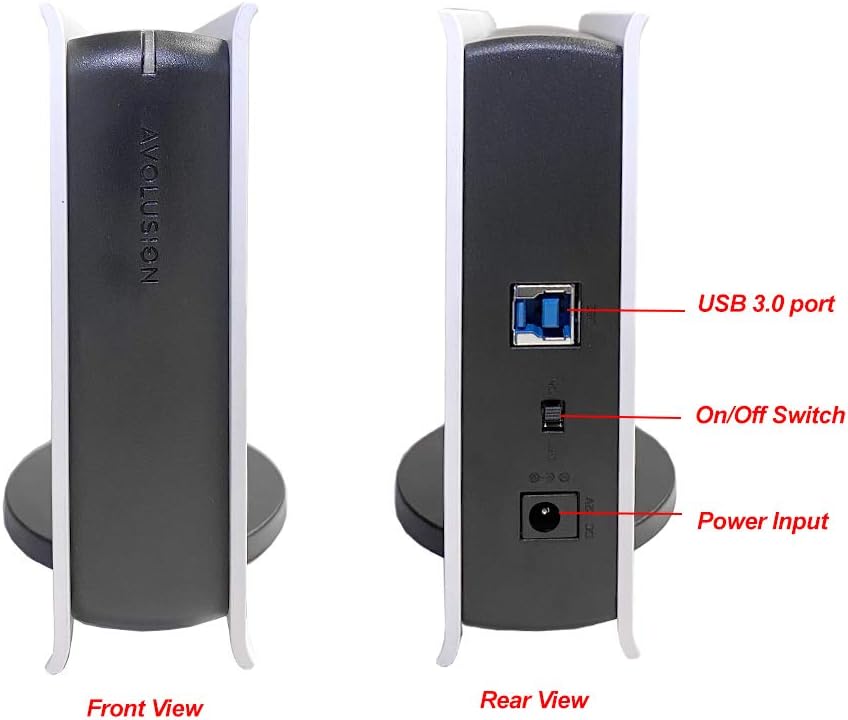
Image: A close-up of the rear of the Avolusion PRO-5X, highlighting the USB 3.0 port, On/Off switch, and power input.
2.2 Initial Formatting for Xbox
Upon connecting the hard drive, your Xbox console should detect it and prompt you to format it for games and apps. Follow the on-screen instructions to complete the formatting process. If the prompt does not appear automatically, you may need to navigate to the storage settings manually.
Note: If the drive is not detected or the format prompt does not appear, try unplugging and re-connecting the USB cable.
Video: Instructions on how to format an external USB hard drive for an Xbox console. This video demonstrates the steps to prepare your Avolusion PRO-5X for game storage.
3. Operating Instructions
3.1 Transferring Games to the External Drive
Once formatted, the Avolusion PRO-5X can be used to store Xbox games and apps. You can transfer existing games from your console's internal storage to the external drive to free up space.
- From the Xbox Home screen, navigate to Settings.
- Select System, then Storage devices.
- Select your console's internal storage or the Avolusion PRO-5X drive.
- Choose View contents.
- Select the games or apps you wish to move.
- Choose Move or copy and select the destination drive (either internal or external).
Important Note for Xbox Series X|S Games: Games optimized for Xbox Series X|S often require storage on the console's internal SSD or a compatible Seagate Storage Expansion Card to be playable. While these games can be stored on the Avolusion PRO-5X for archival purposes, they may need to be moved back to the internal storage or expansion card to be played.
Video: Avolusion Gaming HDD - How to move games from a USB HDD to an Xbox console. This video guides you through the process of transferring games between your external drive and the Xbox's internal storage.
Video: Avolusion Gaming HDD - How to move Xbox Series X|S games to a USB HDD. This video explains how to manage Xbox Series X|S optimized games with your external hard drive, including storage and transfer considerations.
4. Maintenance
4.1 General Care
- Keep the hard drive in a cool, dry place away from direct sunlight and extreme temperatures.
- Avoid dropping or subjecting the drive to physical shocks.
- Clean the exterior with a soft, dry cloth. Do not use liquid cleaners.
- Ensure proper ventilation around the drive to prevent overheating.
4.2 Software Updates
Regularly update your Xbox console's system software to ensure optimal compatibility and performance with external storage devices.
5. Troubleshooting
5.1 Drive Not Detected or Not Formatting
- Check Connections: Ensure the USB 3.0 cable and power adapter are securely connected to both the hard drive and the Xbox console/power outlet.
- Restart Console: Power cycle your Xbox console. Turn it off completely, unplug it for a minute, then plug it back in and restart.
- Try Different USB Port: Connect the hard drive to a different USB 3.0 port on your Xbox.
- PC Formatting (Advanced): If the Xbox still doesn't recognize the drive, you may need to connect it to a PC and ensure it's partitioned as GPT (GUID Partition Table) and formatted as NTFS. Note: This step is typically not required as the drive is pre-formatted for Xbox, but can resolve rare detection issues.
5.2 Bright LED Indicator
Some users may find the blue LED indicator light on the front of the drive to be excessively bright, especially in dark environments. This is a design characteristic and does not affect functionality. If desired, a small piece of electrical tape can be placed over the LED to dim or cover it.
6. Specifications
| Feature | Detail |
|---|---|
| Digital Storage Capacity | 4 TB |
| Hard Drive Type | Mechanical Hard Disk (7200 RPM Enterprise HDD) |
| Hard Drive Interface | USB 3.0 |
| Connectivity Technology | USB |
| Compatible Devices | Xbox One X, S, Original (1st Gen) |
| Color | White |
| Item Dimensions (LxWxH) | 8 x 5 x 1.6 inches |
| Item Weight | 2 pounds |
| Power Input | 100V ~ 240V (50-60Hz 0.8A) |
| Power Output | 12V 2.0A |

Image: The Avolusion PRO-5X external hard drive with its dimensions labeled: 8 inches (length), 5 inches (width), and 1.6 inches (height).

Image: The Avolusion PRO-5X external hard drive shown in both vertical and horizontal orientations, demonstrating its versatile design.
7. Warranty and Support
7.1 Return Policy
This product is eligible for a 90-day refund or replacement return policy from the date of purchase.
7.2 Data Recovery Plans
Optional data recovery plans are available for purchase:
- 2-Year Data Recovery Plan
- 3-Year Data Recovery Plan
For further assistance or inquiries, please refer to the contact information provided by the seller, goHardDrive.