
BT BODYTONE DTF
BT BODYTONE DTF Folding Treadmill User Manual
Model: DTF
Important Safety Information
Please read this manual carefully before operating the BT BODYTONE DTF Folding Treadmill. Retain this manual for future reference. Failure to follow these instructions could result in injury or damage to the product.
- Maximum User Weight: Do not exceed the maximum user weight of 120 kg (264 lbs).
- Placement: Place the treadmill on a flat, stable surface. Ensure adequate clear space around the treadmill for safe operation and emergency dismount.
- Children and Pets: Keep children and pets away from the treadmill during operation. This equipment is not a toy.
- Emergency Stop: Familiarize yourself with the emergency stop mechanism before use.
- Power Connection: Connect the treadmill to a grounded electrical outlet. Do not use extension cords or adapters.
- Maintenance: Perform regular maintenance as described in this manual to ensure safe and optimal performance.
- Medical Conditions: Consult a physician before starting any exercise program, especially if you have pre-existing medical conditions.
Product Overview
Key Features
- Powerful Motor: Equipped with a 2.5 HP motor, reaching speeds up to 14 km/h.
- Adjustable Incline: Features 15 electronic inclination positions for varied workout intensity.
- Spacious Running Surface: Provides a comfortable running area of 120 x 46 cm.
- Folding Design (SPACE-SAVE): Automatic hydraulic folding system allows for vertical and horizontal storage, saving up to 80% of space. Includes transport wheels for easy movement.
- Advanced Cushioning (DTF & REACT Technology): Reduces noise and joint impact by absorbing shock with each step, adapting to your stride.
- Interactive Console: Minimalist LCD display with 4 windows, MP3 connection, and integrated High Definition speakers.
- App Compatibility: Compatible with the HK-Treadmill APP (available for Android & iOS) for enhanced training.
- Pre-installed Workouts: Includes 14 pre-set training programs.
- Heart Rate Monitoring: Integrated heart rate sensors (Handpulse) for tracking your workout intensity.
- Self-Lubricating Belt (AUTOLUBRICATE BELT): Anti-static running belt with a self-lubricating system to prevent motor damage and static discharge.
- Convenience Features: Includes a bottle holder and front leveling wheels for stability.
- Plug&Train System: Machine comes pre-assembled for quick setup.
Components Overview
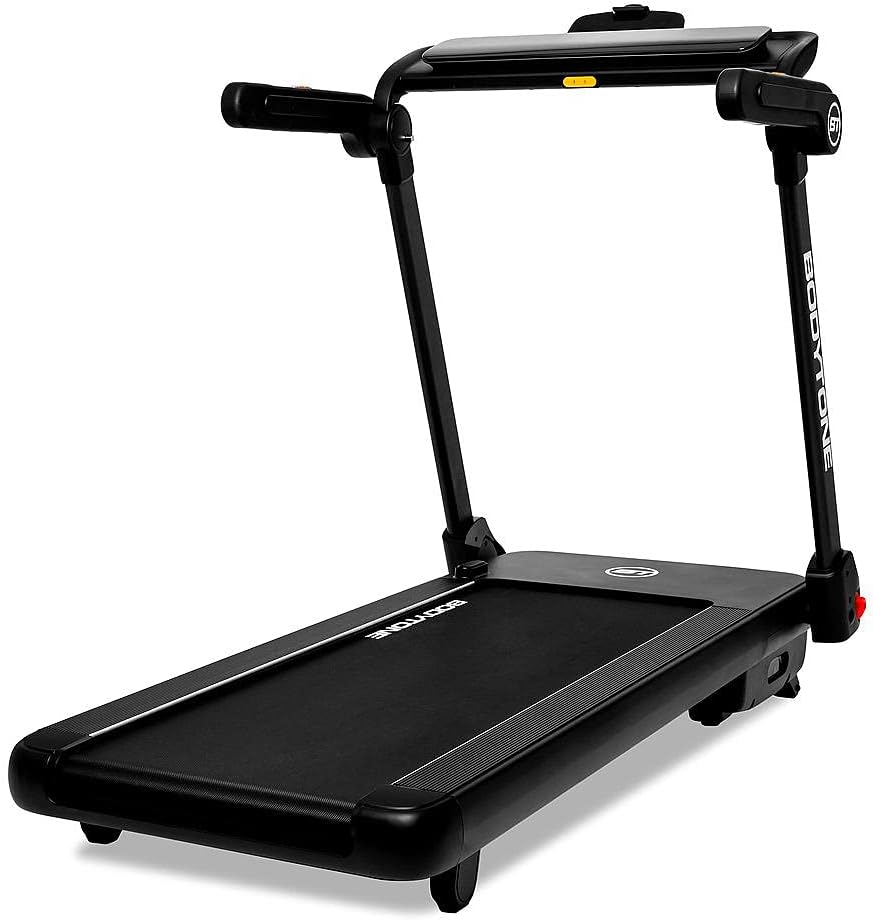
Figure 1: Overall view of the BT BODYTONE DTF Folding Treadmill, showcasing its compact design and main components.

Figure 2: Side profile of the treadmill, highlighting the uprights and running deck.

Figure 3: Front view of the treadmill, focusing on the control console and handlebars.

Figure 4: The treadmill in its folded position, demonstrating the space-saving design for storage.

Figure 5: The treadmill console with icons indicating compatibility with Zwift, Kinomap, and the BODYTONE app, along with Bluetooth connectivity.
Setup
1. Unpacking
Carefully remove the treadmill from its packaging. It is recommended to have two people for this process due to the weight (76 kg). Inspect all components for any damage during transit. Report any damage to your retailer immediately.
2. Assembly (Plug&Train)
The BT BODYTONE DTF Treadmill features a "Plug&Train" system, meaning it comes largely pre-assembled. Minimal assembly is required, primarily unfolding the unit and securing the console. Refer to the quick start guide included in the box for specific unfolding steps.
- Carefully lift the running deck from its folded position until it locks into place.
- Raise the console mast and secure it with the provided locking pins or knobs.
- Ensure all connections are secure and stable before proceeding.
3. Placement
Choose a location with a solid, level floor. Ensure there is at least 2 meters (6.5 feet) of clear space behind the treadmill and 0.5 meters (1.6 feet) on each side for safety. Avoid placing the treadmill in direct sunlight or near heat sources.
4. Leveling
The treadmill is equipped with front leveling wheels. If the treadmill wobbles or is not stable, adjust these wheels by rotating them until the unit is level and stable on the floor.
Operating Instructions
1. Control Panel Overview
The minimalist LCD display provides essential workout data. Buttons on the console allow for speed, incline, program selection, and audio control.
- Display: Shows time, distance, speed, calories, and heart rate.
- Start/Stop: Initiates and pauses/stops the workout.
- Speed +/-: Adjusts the running belt speed.
- Incline +/-: Adjusts the incline level.
- Program (P): Selects pre-set workout programs.
- Mode: Changes display modes or confirms selections.
- MP3/Audio Jack: Connects external audio devices.
2. Starting and Stopping a Workout
- Ensure the safety key is properly inserted into the console.
- Step onto the side rails of the treadmill.
- Press the START button. The belt will begin to move at a low speed.
- Carefully step onto the running belt.
- To stop, press the STOP button. The belt will gradually slow down and stop. For emergency stops, pull the safety key.
3. Adjusting Speed and Incline
- Speed: Use the SPEED +/- buttons to increase or decrease the belt speed. Quick speed buttons may also be available for instant adjustments.
- Incline: Use the INCLINE +/- buttons to adjust the incline level. The treadmill offers 15 electronic inclination positions.
4. Using Pre-set Programs
The treadmill includes 14 pre-installed workout programs designed for various fitness goals.
- From standby mode, press the PROGRAM button to cycle through the available programs (P1-P14).
- Once your desired program is displayed, press START to begin the program. The treadmill will automatically adjust speed and incline according to the program's profile.
5. Heart Rate Monitoring
Grasp the heart rate sensors on the handlebars with both hands. Your heart rate will be displayed on the console after a few seconds. Ensure your hands are clean and firmly placed for accurate readings.
6. Connecting to Apps (HK-Treadmill)
Enhance your workout experience by connecting your treadmill to the HK-Treadmill APP via Bluetooth. The app is available for Android and iOS devices.
- Download the "HK-Treadmill" app from your device's app store.
- Enable Bluetooth on your mobile device.
- Open the HK-Treadmill app and follow the on-screen instructions to pair with your DTF treadmill.
- Once connected, you can control the treadmill and track your workout data through the app.
7. Audio Connection
Connect your MP3 player or smartphone to the treadmill's audio jack using a standard 3.5mm audio cable. Play your favorite music through the integrated High Definition speakers.
8. Folding and Storage
To save space, the DTF treadmill can be easily folded using its hydraulic system.
- Ensure the treadmill is stopped and unplugged.
- Gently lift the running deck. The hydraulic cylinder will assist in the folding process.
- Once fully folded, it can be stored vertically or horizontally. Use the transport wheels to move the treadmill to your desired storage location.
Maintenance
Regular maintenance ensures the longevity and safe operation of your treadmill.
1. Cleaning
- After Each Use: Wipe down the console and other surfaces with a damp cloth to remove sweat and dust. Avoid abrasive cleaners.
- Weekly: Vacuum under the treadmill to prevent dust and debris from accumulating in the motor area.
2. Lubrication (AUTOLUBRICATE BELT)
The DTF treadmill features an AUTOLUBRICATE BELT system, which automatically lubricates the running belt. This significantly reduces the need for manual lubrication. However, it is recommended to periodically check the lubrication level and ensure the system is functioning correctly. Refer to the specific instructions provided with your treadmill's lubrication system for details on refilling or checking.
3. Belt Adjustment
Over time, the running belt may become misaligned or loose. If the belt is slipping or drifting to one side, it may need adjustment.
- Centering the Belt: If the belt drifts to one side, use the provided Allen wrench to turn the corresponding rear roller bolt a quarter turn clockwise. Run the treadmill for a minute and check. Repeat until centered.
- Tightening the Belt: If the belt slips during use, turn both rear roller bolts a quarter turn clockwise. Do not overtighten, as this can damage the motor and belt.
4. General Inspection
Periodically check all bolts and nuts for tightness. Ensure the power cord is not damaged. If you notice any unusual noises or performance issues, stop using the treadmill and consult the troubleshooting section or contact customer support.
Troubleshooting
This section addresses common issues you might encounter with your DTF treadmill.
| Problem | Possible Cause | Solution |
|---|---|---|
| Treadmill does not start. | Power cord not plugged in; Safety key not inserted; Circuit breaker tripped. | Ensure power cord is securely plugged in. Insert safety key fully. Check household circuit breaker. |
| Running belt slips. | Belt too loose; Belt needs lubrication. | Tighten the running belt (refer to Maintenance section). Check AUTOLUBRICATE BELT system. |
| Running belt drifts to one side. | Belt is misaligned. | Adjust the running belt (refer to Maintenance section). |
| Unusual noise from treadmill. | Loose components; Motor issue; Belt friction. | Check all bolts and nuts for tightness. Ensure belt is properly lubricated. If noise persists, contact customer support. |
| Heart rate reading is inaccurate or not displayed. | Hands not firmly on sensors; Sensors are dirty. | Ensure firm and consistent contact with both sensors. Clean sensors with a soft, dry cloth. |
If the problem persists after attempting these solutions, please contact BT BODYTONE customer support.
Specifications
| Model Number | DTF |
| Brand | BT BODYTONE |
| Dimensions (Assembled) | 161 cm (Length) x 90 cm (Width) x 128 cm (Height) |
| Dimensions (Folded) | 161 cm (Length) x 90 cm (Width) x 35 cm (Height) |
| Product Weight | 76 kg (167.5 lbs) |
| Maximum User Weight | 120 kg (264 lbs) |
| Motor Power | 2.5 Horsepower (HP) |
| Maximum Speed | 14 km/h |
| Running Surface | 120 cm x 46 cm |
| Incline Positions | 15 electronic positions |
| Pre-set Programs | 14 |
| Special Features | Folding (SPACE-SAVE), DTF & REACT Cushioning, AUTOLUBRICATE BELT, HK-Treadmill APP compatibility, MP3 & HD Speakers, Handpulse sensors. |
Warranty and Support
BT BODYTONE is committed to providing high-quality fitness equipment. For information regarding the warranty period and terms for your DTF Folding Treadmill, please refer to the warranty card included with your purchase or the official BT BODYTONE website.
If you require technical assistance, have questions about operation, or need to report a defect, please contact BT BODYTONE customer support. Have your model number (DTF) and purchase information ready when contacting support.
You can visit the official BT BODYTONE store for more information: BT BODYTONE Store
Ask a question about this manual
Ask about setup, troubleshooting, compatibility, parts, safety, or missing instructions. Manuals+ will review the question and use this page’s manual context to help answer it.