

Introduction
This manual provides comprehensive instructions for the setup, operation, maintenance, and troubleshooting of your Systor Multi Media Flash Backup Center + 1 to 8 DVD Duplicator, Model PMBC-8. This standalone device is designed for efficient data backup and disc duplication from various flash memory drives (USB, SD, CF, MS, MMC) to CD/DVD, as well as disc-to-disc copying.
Safety Information
- Always connect the duplicator to a grounded power outlet.
- Do not expose the device to moisture or extreme temperatures.
- Ensure proper ventilation around the unit to prevent overheating.
- Avoid opening the casing; refer servicing to qualified personnel.
- Use only compatible media (CD-R, DVD-R, USB drives, SD/CF/MS/MMC cards) as specified.
What's in the Box
Upon unpacking, please ensure all items are present:
- Systor Multi Media Flash Backup Center + 1 to 8 DVD Duplicator (PMBC-8) unit
- Power Cable
- User Manual (this document)
Product Overview
The Systor PMBC-8 is a standalone duplicator that requires no computer or software. It features multiple flash memory slots and optical disc drives for versatile data handling.
Key Features:
- Complete Standalone Operation: No computer or software is needed for any duplication task.
- Flash Media to Optical Disc Duplication: Copy data from USB drives, SD/microSD cards, or CF compact flash cards onto blank CD or DVD discs.
- Optical Disc to Disc Duplication: Copy data from a single CD onto blank CD discs, or a single DVD onto blank DVD discs.
- Multi-Session Technology: Consolidate data from multiple smaller flash memory cards onto a single blank CD or DVD.
- Disc Spanning: Copy data from a single, large capacity flash media onto multiple blank optical discs.
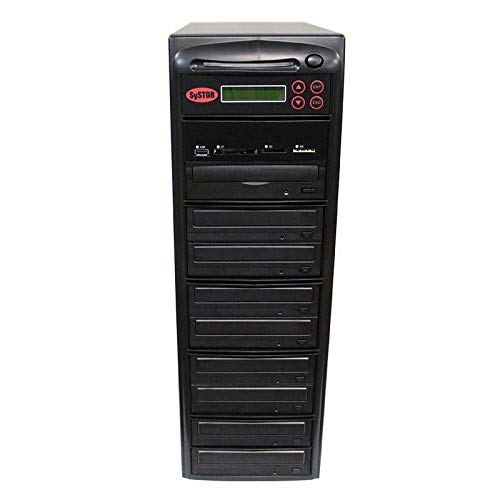
Front view of the Systor Multi Media Flash Backup Center + 1 to 8 DVD Duplicator (PMBC-8).
Setup
- Unpack the Duplicator: Carefully remove the unit from its packaging.
- Placement: Place the duplicator on a stable, flat surface with adequate ventilation.
- Power Connection: Connect the power cable to the duplicator's power input and then to a grounded electrical outlet.
- Power On: Press the power button located on the front or rear of the unit. The LCD display should illuminate.

The duplicator operates standalone, requiring no PC, and features a simple one-touch duplication interface.
Operating Instructions
The duplicator features an intuitive control panel for all operations.
1. Flash Media to Optical Disc Duplication
This function allows you to copy data from a single flash memory card (USB, SD, CF, MS, MMC) to multiple blank CD or DVD discs.
- Insert the source flash media into the appropriate slot on the duplicator.
- Load blank CD-R or DVD-R discs into the optical drives.
- Navigate the menu using the control buttons to select the "Flash to Disc" option.
- Confirm your selection and start the duplication process. The duplicator will copy the content from the flash media to all loaded blank discs.

Illustration of flash media content being duplicated to multiple optical discs.
2. Optical Disc to Disc Duplication
This function allows you to copy data from a single source CD or DVD to multiple blank CD or DVD discs.
- Insert the source CD or DVD into the top optical drive (master drive).
- Load blank CD-R or DVD-R discs into the remaining optical drives (target drives).
- Navigate the menu to select the "Disc to Disc" option.
- Confirm your selection and start the duplication process. The duplicator will copy the content from the master disc to all loaded blank discs.

Illustration of one optical disc content being duplicated to multiple optical discs.
3. Multi-Session Technology
Multi-Session technology enables you to combine data from several smaller flash memory cards onto a single blank CD or DVD. This is useful for archiving multiple small projects onto one disc.
- Select the "Multi-Session" option from the menu.
- Insert the first flash media. The duplicator will read its content.
- When prompted, remove the first flash media and insert the next. Repeat this process for all desired flash media.
- Once all flash media have been read, insert a blank CD-R or DVD-R into an optical drive.
- Start the burning process. The duplicator will compile all collected data onto the single disc.

Multi-Session technology allows combining data from various sources onto a single disc.
4. Disc Spanning
Disc Spanning allows you to copy data from a single, large capacity flash media onto multiple blank optical discs. This is ideal when the source data exceeds the capacity of a single CD or DVD.
- Insert the large capacity flash media into the appropriate slot.
- Select the "Disc Spanning" option from the menu.
- Load blank CD-R or DVD-R discs into the optical drives.
- Start the process. The duplicator will automatically span the data across multiple discs as needed.

Disc Spanning distributes large data sets across multiple optical discs.
Maintenance
- Cleaning: Use a soft, dry cloth to clean the exterior of the duplicator. Do not use liquid cleaners or solvents.
- Disc Drives: Keep disc drives free of dust and debris. Use a specialized disc drive cleaning kit if necessary.
- Storage: When not in use for extended periods, store the duplicator in a cool, dry place.
Troubleshooting
| Problem | Possible Cause | Solution |
|---|---|---|
| Duplicator does not power on. | Power cable not connected, power outlet faulty. | Check power cable connection. Try a different power outlet. |
| Disc burning fails. | Faulty blank disc, incompatible disc type, dirty drive lens, source media error. | Try a new blank disc. Ensure disc type matches source. Clean drive lens. Check source flash media or disc for errors. |
| Flash media not recognized. | Improperly inserted, incompatible format, faulty media. | Ensure media is fully inserted. Check media format compatibility. Try a different flash media. |
| Duplication is slow. | Low-speed media, high data volume. | Use higher speed rated blank discs. This is normal for large data transfers. |
For issues not listed here, please contact Systor customer support.
Specifications
| Feature | Detail |
|---|---|
| Model Number | PMBC-8 |
| Brand | Systor |
| Hardware Interface | USB |
| Compatible Devices | USB, SD, CF, MMC, MS, Optical Disc (CD, DVD) |
| Optical Storage Read Speed | 24X DVD, 56X CD |
| Data Transfer Rate | 128 Megabits Per Second |
| Connectivity Technology | Serial ATA |
| Form Factor | All-in-one |
| Color | Black |
| Special Feature | Hot Swappable |
Warranty and Support
Your Systor Multi Media Flash Backup Center + 1 to 8 DVD Duplicator (PMBC-8) comes with the following warranty:
- Parts: 1 year manufacturer warranty
- Labor: 3 years labor warranty
- Technical Support: Lifetime technical support
For technical assistance, warranty claims, or further inquiries, please visit the official Systor website or contact their customer service department. Contact information can typically be found on the manufacturer's website or product packaging.