
1. Introduction
The CLOUDVOCAL ISOLO PRIME is a wireless system designed for wind instruments, integrating advanced wireless and audio technology for recording and live performance. This compact device aims to deliver studio-grade sound quality with intuitive controls. It supports multiple audio inputs and features a range of built-in effects to enhance your sound.
2. Product Overview
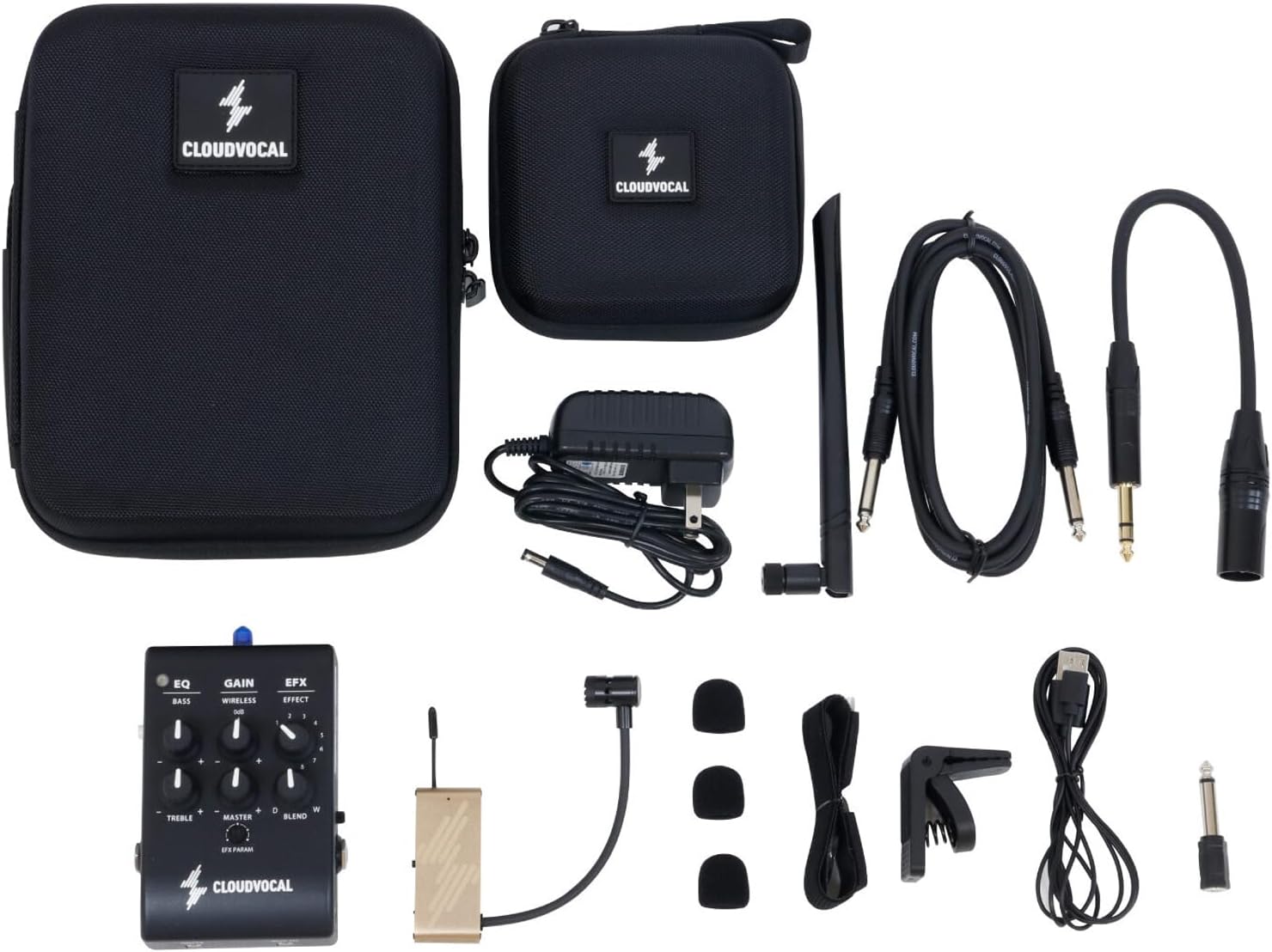
The ISOLO PRIME system includes a Prime Receiver and an XL wind microphone, along with various accessories for versatile use.
2.1. Components
- Prime Receiver
- XL Wind Microphone
- Battery
- Power Cable
- Various mounting accessories for wind instruments
- Carrying cases

3. Setup
3.1. Powering the Receiver
The Prime Receiver can be powered in three ways:
- Using the provided adapter.
- Via a 5V 2A power bank (using a USB power cable).
- Through a pedal power supply.
3.2. Connecting the Wireless Microphone
To connect the wireless microphone to the receiver, simply press the connect button. The system is designed for quick and easy pairing.
3.3. Attaching the Microphone to Instruments
The XL wind microphone comes with specifically designed mounts for easy and firm installation on various wind instruments. Ensure the microphone is securely attached and positioned correctly for optimal sound capture.


4. Operating Instructions
The Prime Receiver functions like a simple mixer, allowing control over various audio parameters.


For a comprehensive demonstration of the receiver's basic functions and effects, please watch the video below:
4.1. EQ Controls (Bass & Treble)
Two EQ knobs are available to adjust the bass and treble frequencies of your wireless microphone signal.
- Bass: Controls the wireless mic signal at +/- 6dB @ 200Hz (shelf type). Turn clockwise to boost bass for a fuller sound, or counter-clockwise to cut bass if the sound is too boomy.
- Treble: Controls the wireless mic signal at +/- 6dB @ 2KHz (shelf type). Turn clockwise to boost treble for a brighter sound, or counter-clockwise to cut treble if the sound is too harsh.
Refer to Video 4.0 at 0:44 for a demonstration of EQ adjustments.
4.2. Gain Controls
The receiver features individual gain controls for different inputs:
- Wireless: Controls the gain of the wireless microphone signal (+/- 6dB).
- Line/Mic In: A dedicated gain knob for the 6.3mm TRS/TS input.
- Aux In: The gain for the 3.5mm TRS input is controlled directly from your external audio player.

Refer to Video 4.0 at 1:50 for a demonstration of Wireless Gain adjustment.
4.3. Master Volume
The Master knob controls the overall output volume of the receiver, ranging from mute to 0dB.
Refer to Video 4.0 at 2:17 for a demonstration of Master Volume adjustment.
4.4. Effects (EFX)
The ISOLO PRIME features 8 built-in digital effects that apply to the wireless signal. These effects can be selected and fine-tuned using the EFX and EFX PARAM knobs.
- EFX Knob: Selects one of the 8 available effects.
- Blend Knob: Controls the balance between the dry (unaffected) and wet (effected) signal. Turn fully counter-clockwise for dry signal only, and clockwise to add more effect.
- EFX PARAM Knob: Fine-tunes a specific parameter of the selected effect. The function of this knob changes depending on the chosen effect.
Refer to Video 4.0 at 2:34 for an overview of the EFX controls.
Available Effects:
- Room Reverb (1): Simulates the reverb sound in a room. The EFX PARAM knob adjusts the decay time (shortest to longest). (Video 4.0 at 3:22)
- Hall Reverb (2): Simulates the reverb sound in a hall. The EFX PARAM knob adjusts the decay time (shortest to longest). (Video 4.0 at 3:40)
- Arena Reverb (3): Simulates the reverb sound in an arena. The EFX PARAM knob adjusts the decay time (shortest to longest). (Video 4.0 at 4:12)
- Delay (4): Causes a delay and playback after a certain interval. The EFX PARAM knob adjusts the playback time (shortest to longest). (Video 4.0 at 4:42)
- Delay+Reverb (5): Combines delay and reverb effects. The EFX PARAM knob adjusts the playback time and reverb intensity. (Video 4.0 at 5:09)
- Shimmer (6): Creates an ethereal, string-like reverb. The EFX PARAM knob adjusts the lasting time and the level of the shimmer effect. (Video 4.0 at 5:37)
- Harmonizer A (7): Adds an assigned interval to your pitch. The EFX PARAM knob adjusts the interval (e.g., octaves, 4ths, 5ths). Refer to the manual for specific interval mappings. (Video 4.0 at 6:05)
- Harmonizer B (8): Adds a different assigned interval to your pitch. The EFX PARAM knob adjusts the interval. Refer to the manual for specific interval mappings. (Video 4.0 at 6:37)
5. Maintenance
- Cleaning: Use a soft, dry cloth to clean the device. Avoid liquid cleaners or abrasive materials.
- Storage: Store the system in its protective carrying case in a cool, dry place when not in use.
- Battery Care: For optimal battery life, avoid fully discharging the microphone's battery frequently. Recharge regularly.
- Antenna Care: Handle the antenna with care to prevent damage. Avoid excessive force or bending.
6. Troubleshooting
- No Sound:
- Check all cable connections (microphone to transmitter, receiver to amplifier/mixer).
- Ensure both the microphone and receiver are powered on and charged.
- Verify the wireless connection is established (indicator lights).
- Adjust gain and master volume knobs.
- Check if the MUTE button is engaged.
- Poor Sound Quality/Interference:
- Ensure the microphone is correctly positioned on the instrument.
- Check for obstructions between the transmitter and receiver.
- Move away from other 2.4GHz wireless devices that might cause interference.
- Adjust EQ settings (Bass/Treble) to optimize sound.
- Microphone Not Charging:
- Ensure the charging cable is securely connected to both the microphone and a power source.
- Verify the power source is active.
- If issues persist, contact customer support.
7. Specifications
| Feature | Detail |
|---|---|
| Prime Receiver Dimensions | 115mm(L) x 75mm(W) x 50mm(H) |
| Prime Receiver Net Weight | 310g |
| Prime Receiver Power Supply | 7V-9V DC, 400mA (Requires 5V 2A power bank or adapter when using USB power cable) |
| Prime Receiver Input | 6.3mm TRS/TS x1 (for dynamic mic or other line instrument), 3.5mm TRS x1 (external audio) |
| Prime Receiver Output | Balanced 6.3mm -> XLR, Unbalanced 6.3mm TRS -> 6.3mm TS |
| Transmit Bandwidth (Near Mode) | 15 meters |
| Transmit Bandwidth (Far Mode) | 15 - 30 meters (distance may alter in different environments) |
| XL Wind Microphone Dimensions | 60mm(L) x 25mm(W) x 10mm(H) |
| XL Wind Microphone Net Weight | 38g |
| Sound Source | Condenser mic |
| Mic Polar Pattern | Cardioid (Unidirectional) |
| Transmit Bandwidth | 2.4GHz global ISM Smart automatic frequency hopping |
| Frequency Response (Near Mode) | 10Hz ~ 20KHz +1dB/-3dB |
| Frequency Response (Far Mode) | 10Hz ~ 16KHz +1dB/-3dB |
| Max SPL | 140dB |
| THD+N | Less than 0.05% (1KHz@-10dB FS) |
| Battery Life | 5-7 hours (Retains 80% of maximum capacity after 200 recharging cycles) |
| Audio Sensitivity | 140 Decibels |
| Number of Batteries | 1 Lithium Polymer battery required (included) |
| Material | Metal alloys or high-quality plastics |
| Signal-to-Noise Ratio | 10 dB |
| Number of Channels | 3 |
| Connectivity Technology | Auxiliary, USB, XLR |
| Connector Type | 3.5 mm Jack |
| Color | Black |
| Recommended Uses | Wind Instruments |
8. Warranty and Support
For warranty information, technical support, or service inquiries, please refer to the official CLOUDVOCAL website or contact their customer service directly. Keep your purchase receipt for warranty claims.
CLOUDVOCAL Store: Visit the CLOUDVOCAL Store on Amazon