
1. Introduction
The FDM Keurig K-3500 Commercial Coffee Maker is designed for continuous use in busy environments, offering a wide selection of coffee, cocoa, and tea varieties. This brewer features intuitive technology, a modern design, and a high-resolution color touchscreen for ease of use.
Key features include:
- Five cup sizes, including a 12 oz. brew size.
- Strong Brew option for a more intense cup.
- Intuitive hi-res color touchscreen interface.
- Automatic K-cup pod ejection functionality.
- Dedicated on-demand hot water dispense.
2. Setup
2.1 Unpacking
Carefully remove all packaging materials from the box. Ensure all components are present and undamaged. Retain packaging for future transport or service needs.
2.2 Placement
Place the coffee maker on a stable, level surface. Ensure there is adequate clearance around the unit for ventilation and access. Position the brewer near a grounded electrical outlet and a water source if connecting directly to a water line (consult a professional for direct plumbing installation).
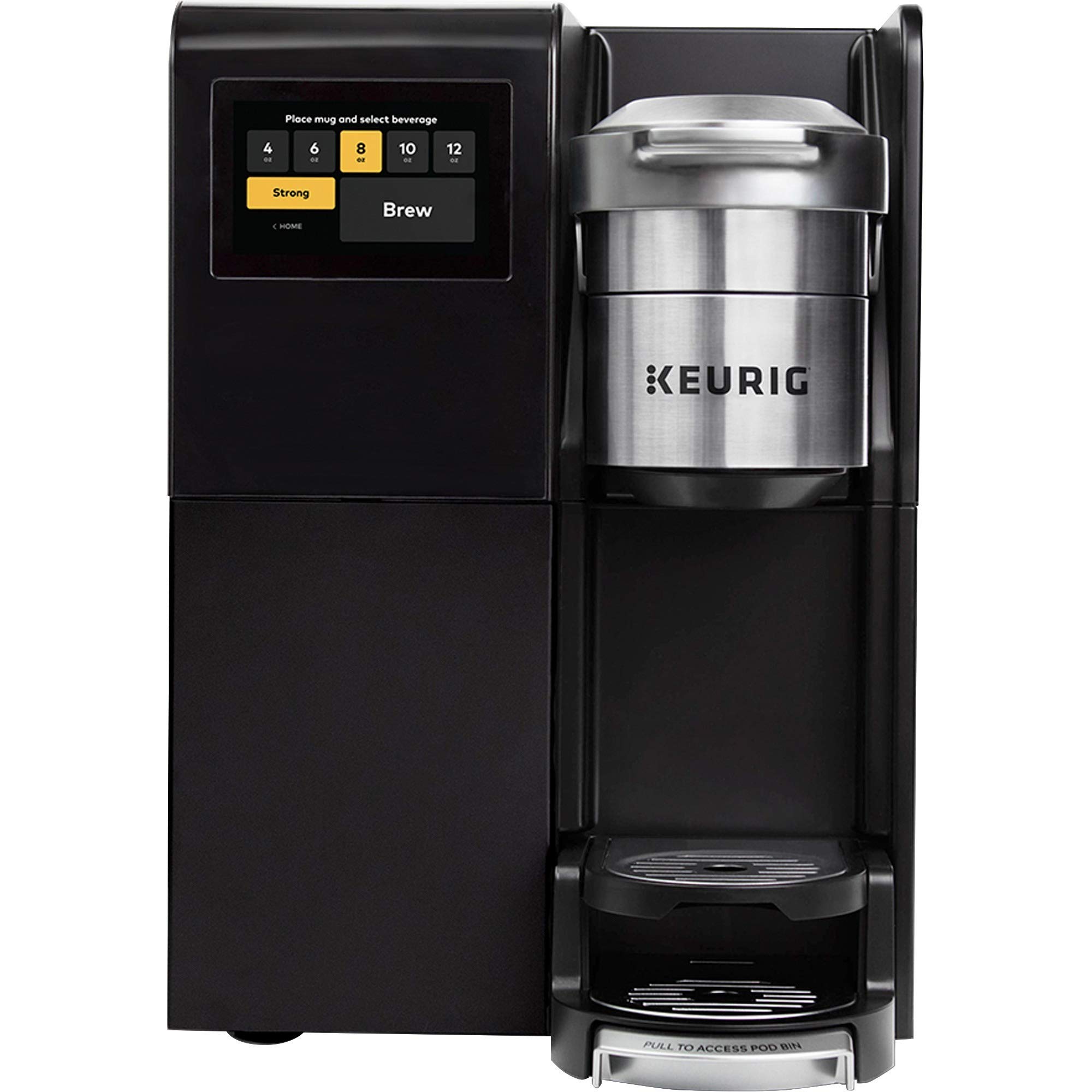
Image: The Keurig K-3500 Commercial Coffee Maker, ready for use on a countertop, alongside K-cup pod organizers.
2.3 Initial Rinse Cycle
- Fill the water reservoir with fresh, clean water to the MAX fill line.
- Power on the brewer.
- Place a large mug on the drip tray.
- Select a large brew size (e.g., 12 oz.) and initiate a brew cycle without inserting a K-cup pod.
- Discard the hot water. Repeat this process once more to ensure the system is clean.
3. Operating Instructions
3.1 Brewing Coffee, Tea, or Cocoa
- Ensure the water reservoir is filled.
- Lift the handle and insert a K-cup pod into the pod holder. Close the handle firmly.
- Place a mug on the drip tray.
- On the touchscreen, select your desired brew size (e.g., 6 oz, 8 oz, 10 oz, 12 oz).
- To brew a stronger cup, select the Strong Brew option on the touchscreen before starting the brew cycle.
- Press the brew button on the touchscreen to start. The brewer will automatically eject the used K-cup pod after brewing.
3.2 Dispensing Hot Water
The K-3500 offers a dedicated on-demand hot water dispense function.
- Ensure the water reservoir is filled.
- Place a mug on the drip tray.
- Select the 'Hot Water' option on the touchscreen.
- Choose the desired amount of hot water to dispense.
4. Maintenance
4.1 Cleaning the Exterior
Wipe the exterior surfaces of the brewer with a damp, soft cloth. Do not use abrasive cleaners or immerse the brewer in water.
4.2 Cleaning the Drip Tray
The drip tray can be removed for easy cleaning. Wash with warm, soapy water, rinse thoroughly, and dry before reattaching.
4.3 Descaling
Over time, mineral deposits can build up in the brewer. Regular descaling is recommended to maintain optimal performance. Refer to the full Keurig K-3500 descaling guide on the manufacturer's website for detailed instructions and recommended descaling solutions.
5. Troubleshooting
If you encounter issues with your Keurig K-3500, please review the following common problems and solutions:
- Brewer Not Powering On: Ensure the power cord is securely plugged into a grounded outlet. Check the circuit breaker.
- Coffee Not Brewing: Verify the water reservoir is filled. Ensure a K-cup pod is properly inserted and the handle is fully closed.
- Weak Brew: Try selecting the Strong Brew option. Ensure the K-cup pod is fresh and not expired.
- Water Leaking: Check that the water reservoir is correctly seated. Inspect the K-cup pod for damage before insertion.
- Touchscreen Unresponsive: Try unplugging the brewer for 30 seconds and then plugging it back in to reset the system.
For more detailed troubleshooting, please visit the FDM or Keurig support website.
6. Specifications
| Feature | Detail |
|---|---|
| Brand | FDM |
| Model Number | K-3500 |
| Special Feature | Adjustable Brew Strength |
| Coffee Maker Type | Drip Coffee Machine |
| Style | Modern |
| Specific Uses For Product | Americano |
| Included Components | Filter |
| Operation Mode | Fully Automatic |
| Human Interface Input | Touchscreen |
| Coffee Input Type | K-cup pods |
| Product Dimensions | 1 x 1 x 1 inches |
| Item Weight | 36.7 pounds |
| Date First Available | November 10, 2020 |
6.1 Compatible Accessories
The Keurig K-3500 is compatible with various K-cup pod organizers and storage solutions to keep your breakroom tidy.

Image: A K-cup pod organizer, shown with a variety of coffee pods.

Image: Front view of a K-cup pod organizer, displaying different K-cup varieties.

Image: An empty K-cup pod organizer, ready to be filled.
7. Warranty and Support
7.1 Product Warranty
For detailed information regarding the product warranty, please refer to the official FDM or Keurig website, or the warranty card included with your purchase. Warranty terms and conditions may vary.
7.2 Customer Support
If you require further assistance, have questions not covered in this manual, or need to report a service issue, please contact FDM or Keurig customer support. Contact information can typically be found on the manufacturer's website or on the product packaging.