
Kenwood DMX9720XDS
Kenwood DMX9720XDS User Manual
10.1-inch HD Digital Media Moniceiver
Introduction
This manual provides detailed instructions for the installation, operation, and maintenance of your Kenwood DMX9720XDS 10.1-inch HD Digital Media Moniceiver. Please read this manual thoroughly before using the unit to ensure proper and safe operation. Keep this manual for future reference.
The Kenwood DMX9720XDS is a state-of-the-art car audio system featuring a high-resolution 10.1-inch capacitive touchscreen, advanced audio processing, and comprehensive smartphone integration capabilities including Wireless Apple CarPlay and Android Auto.
Safety Information
Always observe the following safety precautions to prevent injury or damage to the unit and vehicle:
- Do not operate the unit in a way that distracts you from driving. Always prioritize road safety.
- Ensure all wiring is correctly connected to prevent short circuits or electrical hazards.
- Do not disassemble or modify the unit. This may cause malfunction or damage.
- Keep the unit away from moisture and extreme temperatures.
- For detailed installation, it is highly recommended to have the unit professionally installed by a qualified technician.
What's in the Box
Verify that all items are present before beginning installation:
- Mounting bracket
- ISO adapter cable
- USB cable
- GPS antenna
- Hands-free microphone (3 m cable)
- Various screws and covers
- Kenwood DMX9720XDS Moniceiver Unit
Setup and Installation
The Kenwood DMX9720XDS features a robust floating mechanism for its 10.1-inch display, allowing for flexible installation in various vehicle dashboards. Due to the complexity of vehicle integration and electrical systems, professional installation is strongly recommended.
Display Position Adjustment
The display can be adjusted in three ways to optimize viewing angle and fit within your vehicle's dashboard:
- Tilt Adjustment: Adjust the vertical angle of the screen.
- Depth Adjustment: Move the screen closer or further from the dashboard.
- Height Adjustment: Raise or lower the screen position.
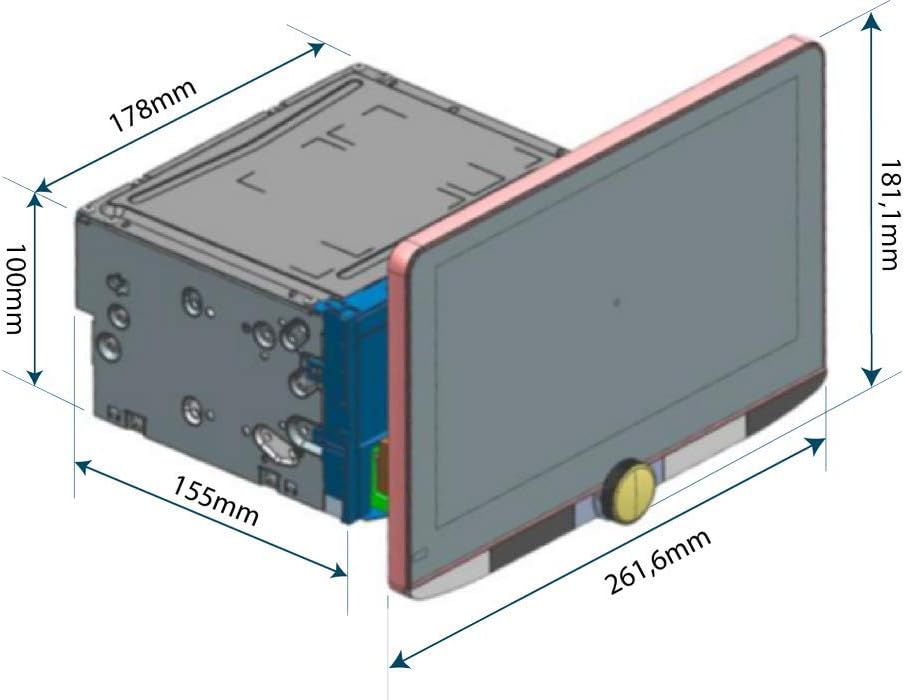
Figure 1: Kenwood DMX9720XDS dimensions and floating panel mechanism. This diagram illustrates the physical dimensions of the unit and the adjustable nature of the display panel, highlighting its adaptability for various vehicle installations.

Figure 2: Kenwood DMX9720XDS installed in a vehicle. This image demonstrates the unit's appearance when professionally integrated into a car's dashboard, showcasing its large display and user interface.
Wiring and Connections
Refer to the detailed wiring diagram provided with your unit for specific connections. Key connections include:
- Power Supply: Connect to vehicle's constant 12V, accessory, and ground.
- Speaker Outputs: Connect to vehicle's speakers (4x 50 Watt output).
- Preamp Outputs: Front, Rear, and Subwoofer (5 Volt).
- USB Ports: For media playback, smartphone connection, and charging (up to 1.5A).
- Camera Inputs: Four dedicated inputs for front, rear, and blind view cameras.
- GPS Antenna: For navigation features (if applicable with connected smartphone apps).
- Microphone Input: For hands-free calling and voice commands.
- Steering Wheel Remote Control Input: For integration with vehicle's steering wheel controls.
Operating Instructions
The DMX9720XDS features an intuitive interface designed for ease of use while driving.
User Interface and Display
The 10.1-inch HD display (1280 x 720 pixels) provides a clear and vibrant visual experience. The electrostatic capacitive touch panel ensures responsive and accurate control.

Figure 3: Kenwood DMX9720XDS main user interface. This image displays the home screen with active music playback, navigation compass, and quick access icons for various functions.

Figure 4: Kenwood DMX9720XDS display quality. This image highlights the high-definition display's ability to render vibrant and detailed visuals, suitable for media playback or camera feeds.
Audio Features
- Hi-Res Audio Playback: Supports WAV and FLAC files from USB with up to 192 kHz/24 bit resolution.
- Sound Processor: Includes a 13-band graphic equalizer, runtime correction, and digital crossover for precise audio tuning.
- Digital Radio (DAB+): Enjoy cleaner, crisper sound with DAB+ and seamless blending between DAB+ and FM.
- Bluetooth Audio Streaming: Stream music from Android & iOS devices. Supports LDAC for High-Resolution Audio over Bluetooth.
- Kenwood Music Mix: Connect up to three Bluetooth audio streaming devices simultaneously.
Smartphone Integration
- Wireless Apple CarPlay: Connect your iPhone wirelessly to access calls, maps, music, and messages. Supports 3rd party navigation apps (iOS 12.0+).
- Wireless Android Auto: Connect your Android phone wirelessly for Google Maps, music, and voice control.
- Wireless Mirroring for Android: Seamlessly display and control compatible Android smartphone apps on the receiver screen without cables or network connection.
- Spotify Control: Manage your Spotify playback directly through CarPlay or Android Auto.
Camera System
The DMX9720XDS features 4 camera inputs for enhanced safety and convenience:
- Front Camera Input: Connect an optional front camera.
- Rear Camera Input: Connect an optional rear camera (e.g., CMOS-740HD for HD display). Adjustable parking lines are available.
- Blind View Cameras: Inputs for left and right blind spot cameras.
- Dash Cam Integration: Compatible with KENWOOD dash cams (e.g., DRV-N520, sold separately).
Switching between camera views can be easily done via the large touchscreen.
Bluetooth Hands-Free
- HFP 1.7 Support: High-quality hands-free calling.
- A2DP (incl. AVRCP 1.5): Advanced audio distribution profile for streaming.
- Dual Phone Pairing: Connect two phones in parallel for hands-free operation.
- Includes a wired microphone for clear voice pickup.
Maintenance
- Cleaning the Display: Use a soft, dry cloth to wipe the screen. For stubborn smudges, lightly dampen the cloth with water or a screen-safe cleaner. Avoid abrasive materials or harsh chemicals.
- Software Updates: Periodically check the Kenwood website for firmware updates to ensure optimal performance and access to new features. Follow the instructions provided with the update files carefully.
- General Care: Keep the unit free from dust and debris. Ensure proper ventilation around the unit to prevent overheating.
Troubleshooting
| Problem | Possible Cause | Solution |
|---|---|---|
| No power | Incorrect wiring; Blown fuse | Check power connections; Replace fuse if necessary. Consult a professional installer. |
| No sound | Speaker wires disconnected; Volume too low; Mute activated | Check speaker connections; Increase volume; Deactivate mute function. |
| Bluetooth connection issues | Device not paired; Bluetooth off on phone/unit; Interference | Ensure Bluetooth is enabled on both devices; Re-pair the device; Move closer to the unit. |
| CarPlay/Android Auto not connecting | Incorrect USB cable; Phone not compatible; Software glitch | Use a high-quality USB data cable; Ensure phone OS is up to date; Restart phone and unit. |
| Touchscreen unresponsive | Temporary software issue; Screen dirty | Restart the unit; Clean the screen thoroughly. If issue persists, contact support. |
For persistent issues, please contact Kenwood customer support or your authorized dealer.
Specifications
| Model | DMX9720XDS |
| Display Size | 10.1 inches |
| Display Resolution | 1280 x 720 pixels (HD) |
| Display Type | Capacitive Touch Panel with Optical Bonding |
| Audio Output | 4 x 50 Watt (Max) |
| Preamp Outputs | 3 (Front, Rear, Sub) with 5 Volt |
| Equalizer | 13-band Graphic Equalizer |
| Supported Audio Formats (USB) | FLAC, WAV (up to 192 kHz/24 bit), AAC, WMA, MP3 |
| Supported Video Formats (USB) | MPEG1/2/4, H.264, WMV |
| Radio Tuner | DAB+, FM |
| Bluetooth | HFP 1.7, A2DP (AVRCP 1.5), LDAC, Kenwood Music Mix |
| Smartphone Integration | Wireless Apple CarPlay, Wireless Android Auto, Wireless Mirroring (Android) |
| Camera Inputs | 4 (Front, Rear, Left Blind, Right Blind) |
| Dimensions (Product) | 6.1 x 10.3 x 7.13 inches |
| Weight | 9.83 pounds |
Warranty and Support
For warranty information, please refer to the warranty card included with your product or visit the official Kenwood website. Keep your proof of purchase for warranty claims.
For technical support, troubleshooting assistance, or service inquiries, please contact Kenwood customer support or your authorized Kenwood dealer. You can find contact information on the official Kenwood website:
You can also visit the Kenwood Store on Amazon for product information: Kenwood Amazon Store