Product Overview
The Caldwell E-MAX Link is an advanced Bluetooth communication device designed to facilitate communication between multiple users over distances up to 12 miles (line of sight). It seamlessly integrates with your existing hearing protection, offering both wireless Bluetooth connectivity for compatible muffs and plugs, and a 3.5mm audio cord option for non-Bluetooth hearing protection. Powered by a rechargeable battery (with optional 3xAA use) and including a USB-C charging cord, the E-MAX Link ensures clear communication whether in the field or at the range. It is compatible with various Caldwell electronic hearing protection models, including E-MAX Power Cords, E-MAX Pro, E-MAX Shadows, and E-MAX Shadows Pro.

Figure 1: The Caldwell E-MAX Link electronic talking device.
Setup and Pairing
To begin using your E-MAX Link, you must first pair it with your Caldwell E-MAX hearing protection. Ensure both the E-MAX Link and your hearing protection device are powered off before starting the pairing process.
Pairing Procedure:
- Prepare Hearing Protection: Place your E-MAX hearing protection into pairing mode. For E-MAX Shadow Pro earbuds, remove them from their case. A flashing light on the earbuds indicates they are searching for a device to pair with.
- Power On E-MAX Link: Turn on your E-MAX Link device.
- Activate Bluetooth Pairing on Link: Press and hold the Bluetooth (BT) button on the E-MAX Link for approximately two seconds until it beeps and the Bluetooth light begins to flash. This indicates the Link is now in pairing mode.
- Allow Pairing: Allow both devices to remain in pairing mode. Pairing may take a few seconds. The E-MAX Link will beep and confirm when it is successfully paired, and your hearing protection will also indicate a successful connection.
Video 1: Instructions for pairing the Caldwell E-MAX Link with hearing protection.
Important Pairing Notes:
- Minimize Interference: If you have multiple Bluetooth devices in pairing mode nearby, it may interfere with the pairing process. Ensure only the E-MAX Link and your intended hearing protection are in pairing mode during setup.
- Compatibility: The E-MAX Link is compatible with Caldwell E-MAX Shadows Pro, E-MAX Power Cords, E-MAX Shadows, and E-MAX Pro BT Lithium via Bluetooth.
- Wired Connection: For E-MAX Pro earmuffs or other non-Bluetooth hearing protection, you can connect the E-MAX Link using a 3.5mm audio cable.
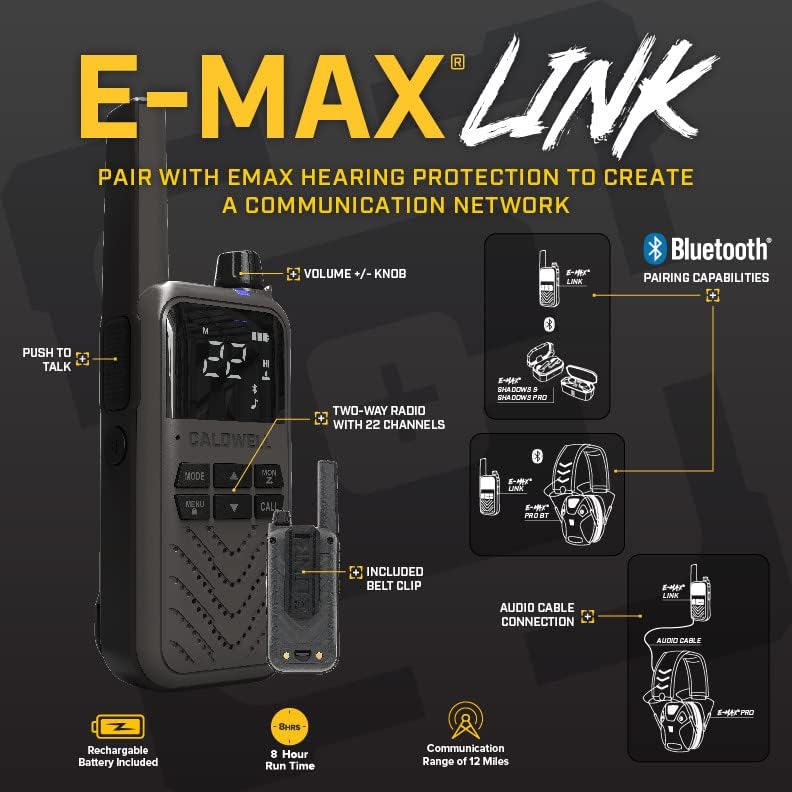
Figure 2: Diagram illustrating Bluetooth pairing and audio cable connection options for the E-MAX Link.
Operating the E-MAX Link
The E-MAX Link functions as a two-way radio, enabling clear communication among users at the range or in the field. All individuals you wish to communicate with must also possess an E-MAX Link device.
Communication Modes:
- Hands-Free Communication (Bluetooth): When connected via Bluetooth to compatible Caldwell E-MAX hearing protection (such as E-MAX Shadow Pro or E-MAX Power Cords), you can utilize the hands-free mode on your headset to talk and listen. This allows for seamless communication with other E-MAX Link users who are also connected via hands-free mode.
- Radio Communication (Built-in Speaker/Mic): For users connected via a 3.5mm audio cable (e.g., with E-MAX Pro earmuffs) or for general use without a headset, the E-MAX Link features a built-in speaker for listening to transmissions and a built-in microphone for speaking. Simply use the radio's push-to-talk (PTT) button or voice-activated communication (VOX) mode to transmit.
Video 2: Demonstrating communication methods with the Caldwell E-MAX Link.
Key Features:
- 12-Mile Range: Communicate effectively up to 12 miles in line-of-sight conditions.
- 22 Channels: Utilize 22 available channels for clear and private communication.
- Push-to-Talk (PTT): Engage the side button to transmit your voice.
- Voice Activated (VOX): Speak without pressing a button (requires activation in settings).
- Volume Control: Adjust the volume using the knob on top of the device.

Figure 3: The E-MAX Link shown alongside E-MAX Shadows earbuds, demonstrating a typical setup.

Figure 4: The E-MAX Link conveniently attached to a belt using its included belt clip.
Maintenance
Proper maintenance ensures the longevity and optimal performance of your Caldwell E-MAX Link.
- Cleaning: Use a soft, dry cloth to wipe down the device. Avoid using harsh chemicals or abrasive cleaners.
- Storage: Store the E-MAX Link in a cool, dry place away from direct sunlight and extreme temperatures. When not in use for extended periods, ensure the battery is partially charged (around 50%) to preserve battery health.
- Battery Care: The device is powered by a rechargeable battery. Use the included USB-C charging cord for recharging. Avoid overcharging or completely draining the battery frequently to maximize its lifespan. If using optional AA batteries, ensure they are new and inserted correctly and replace them when power is low.
Troubleshooting
If you encounter issues with your E-MAX Link, refer to the following common troubleshooting tips:
- Pairing Issues:
- Ensure both the E-MAX Link and your hearing protection are fully charged.
- Verify that both devices are in pairing mode as described in the "Setup and Pairing" section.
- Move away from other active Bluetooth devices that might be attempting to pair, as this can cause interference.
- Try restarting both the E-MAX Link and your hearing protection device.
- No Audio/Poor Audio Quality:
- Check the volume levels on both the E-MAX Link and your hearing protection.
- If using a wired connection, ensure the 3.5mm audio cable is securely plugged into both devices.
- Confirm that the devices are within the effective communication range (up to 12 miles line of sight). Obstacles like buildings or dense foliage can reduce range.
- Ensure both devices are on the same channel if communicating via radio.
- Device Not Powering On:
- Connect the E-MAX Link to the USB-C charging cord and allow it to charge for at least 30 minutes.
- If using AA batteries, ensure they are new and inserted with correct polarity.
Specifications
| Feature | Detail |
|---|---|
| Model Name | E-MAX Link |
| Part Number | 1142645 |
| Dimensions (L x W x H) | 6.5" x 2.5" x 1.5" |
| Weight | 0.5 lbs (0.23 kg) |
| Color | Black and Tan |
| Material | Plastic |
| Communication Range | Up to 12 miles (line of sight) |
| Power Source | Rechargeable battery (USB-C charging), optional 3xAA batteries |
| Included Components | 1 Caldwell E-MAX Link |
Warranty and Support
The Caldwell E-MAX Link is covered by a limited lifetime warranty provided by Caldwell. For specific details regarding the terms and conditions of this warranty, please refer to the official Caldwell website or contact their customer service. Note that some documentation may refer to a 1-year manufacturer warranty; however, the product is guaranteed with a limited lifetime warranty.
For any questions, technical assistance, or warranty claims, please contact Caldwell customer service. You can find their contact information on the official Caldwell website: Visit the Caldwell Store.


