
1. Product Overview
The Vipxyc PS-3K is a multi-function hybrid inverter/charger designed to provide uninterruptible power support. It integrates the functions of an inverter, solar charger, and battery charger into a compact unit. The comprehensive LCD display allows users to configure various settings, including battery charging current, AC/solar charger priority, and acceptable input voltage ranges for different applications.
This inverter is capable of powering a wide range of home and office appliances, including motor-type loads such as tube lights, fans, refrigerators, and air conditioners.
Key Features:
- Pure sine wave output.
- Configurable input voltage range for home appliances and personal computers via LCD settings.
- Adjustable battery charging current based on application via LCD settings.
- Configurable AC/Solar Charger priority via LCD settings.
- Compatibility with mains voltage or generator power.
- Automatic restart function when AC power recovers.
- Integrated protection against overload, over-temperature, and short circuits.
- Smart battery charger design for optimized battery performance.
- Cold start function.

Image 1.1: Overview of the Vipxyc PS-3K Hybrid Inverter's key features, including pure sine wave output, built-in solar charging controller, and configurable input voltage range.
2. Safety Information
Please read all instructions and warnings carefully before installation and operation. Failure to follow these instructions may result in electric shock, fire, or severe injury. Keep this manual for future reference.
- Ensure proper grounding of the inverter.
- Do not disassemble the inverter. Refer all servicing to qualified personnel.
- Avoid installing the inverter in direct sunlight, near heat sources, or in areas with excessive moisture or dust.
- Ensure adequate ventilation around the inverter to prevent overheating.
- Use appropriate circuit breakers and wiring sizes as specified in local electrical codes.
- Always disconnect all power sources (AC, DC, and solar) before performing any maintenance or wiring.
3. Installation and Setup
Proper installation is crucial for the safe and efficient operation of your hybrid inverter. Follow these steps carefully.
3.1 Unpacking and Inspection
Upon receiving the inverter, carefully unpack it and inspect for any damage that may have occurred during transit. Ensure all components listed in the package contents are present.
- Hybrid Inverter Unit (1)
- User Manual (1)
3.2 Mounting the Inverter
Select a suitable location for mounting the inverter. The location should be dry, well-ventilated, and protected from direct sunlight and extreme temperatures. Ensure there is sufficient clearance around the unit for proper airflow.

Image 3.1: Recommended clearance for mounting the inverter. Maintain at least 50cm (top/bottom) and 20cm (sides) for optimal ventilation.
3.3 Wiring Connections
All wiring should be performed by a qualified electrician. Ensure all connections are secure and correctly polarized.
- Battery Connection: Connect the battery bank to the DC INPUT terminals. Ensure correct polarity (positive to positive, negative to negative). The inverter is designed for a 24V battery system.
- Solar PV Input: Connect your solar panel array to the PV INPUT terminals. Observe correct polarity and ensure the PV array voltage and current are within the inverter's specifications.
- AC Input (Mains/Generator): Connect the AC input from your utility grid or generator to the AC INPUT terminal. This allows the inverter to charge batteries and pass through AC power when available.
- AC Output: Connect your household or office appliances to the AC OUTPUT terminals.

Image 3.2: Diagram showing how to connect two 12V batteries in series to achieve a 24V system for the inverter.

Image 3.3: Rear panel of the Vipxyc PS-3K inverter showing AC Input, AC Output, PV Input, DC Input, and communication ports.

Image 3.4: General system diagram illustrating connections for solar power, generator/utility, external battery packs, and home appliances to the inverter.

Image 3.5: Detailed diagram showing the connection of solar panels (PV array) to the inverter, which then supplies power to the battery and home appliances.

Image 3.6: An off-grid system diagram demonstrating how the inverter integrates solar panels, utility/generator, battery, and various home appliances.
4. Operating Instructions
Once installed, the inverter can be configured and operated via its LCD display and buttons.
4.1 Initial Power-Up
After all connections are made and verified, switch on the DC power from the battery bank first, then the AC input (if applicable), and finally the solar input. The inverter's LCD display will illuminate, showing system status.
4.2 LCD Display and Settings
The LCD display provides real-time information about the inverter's operation, including input/output voltage, battery status, and charging current. Use the buttons adjacent to the LCD to navigate through menus and adjust settings.
- Input Voltage Range: Configure the acceptable input voltage range for connected devices (e.g., home appliances or personal computers).
- Battery Charging Current: Adjust the battery charging current to match your battery bank's specifications and desired charging speed.
- AC/Solar Charger Priority: Set the priority for charging sources (e.g., prefer solar charging over AC utility).
4.3 Cold Start Function
The inverter features a cold start function, allowing it to power on directly from the battery even without an AC or solar input, useful in emergency situations or off-grid setups.
5. Maintenance
Regular maintenance ensures the longevity and optimal performance of your Vipxyc PS-3K inverter.
- Cleaning: Periodically clean the inverter's exterior with a dry cloth. Ensure ventilation openings are free from dust and debris. Do not use liquid cleaners.
- Connections: Annually check all electrical connections for tightness and corrosion. Loose connections can cause overheating and damage.
- Battery Health: Monitor your battery bank's health and ensure it is properly maintained according to the battery manufacturer's guidelines.
- Environment: Ensure the installation environment remains within the specified temperature and humidity ranges.
6. Troubleshooting
This section provides solutions to common issues you might encounter with your inverter. For more complex problems, contact customer support.
Common Issues and Solutions:
- No Power Output:
- Check battery connections and voltage. Ensure batteries are charged.
- Verify AC input and output connections.
- Check for tripped circuit breakers or blown fuses.
- Ensure the inverter is switched on.
- Overload Warning:
- Reduce the load connected to the inverter.
- Check if any connected appliances are drawing excessive power.
- Over-Temperature Warning:
- Ensure adequate ventilation around the inverter. Clear any obstructions from air vents.
- Check ambient temperature; if too high, relocate the inverter or improve cooling.
- Short Circuit Protection:
- Immediately disconnect all loads.
- Inspect wiring for any short circuits.
- Reconnect loads one by one to identify the faulty appliance or wiring.
- Battery Not Charging:
- Verify solar panel connections and ensure sufficient sunlight.
- Check AC input connection if charging from utility/generator.
- Ensure battery charging current settings are correctly configured on the LCD.
- Check battery health.
7. Specifications
Detailed technical specifications for the Vipxyc PS-3K Hybrid Pure Sine Wave Inverter.
| Parameter | Specification (PS-3K) |
|---|---|
| Model | PS-3K |
| Rate Power | 3KVA / 2400W |
| Battery Voltage | 24VDC |
| Output Voltage | 220V (AC) |
| Input Voltage Range (Personal Computers) | 170V~280VAC |
| Input Voltage Range (Home Appliances) | 90~280VAC |
| Frequency Range | 50 Hz/60 Hz (Auto detection) |
| AC Voltage Regulation (Battery Mode) | 230VAC ± 5% |
| Surge Power | 6000VA |
| Efficiency (Peak) | 95% |
| Transfer Time (Personal Computers) | 10ms |
| Transfer Time (Home Appliances) | 20ms |
| Waveform | Pure Sine Wave |
| Float Charging Voltage | 27VDC |
| Overcharge Protection | 30VDC |
| Maximum AC Charge Current | 30A |
| Solar Charge Current | 50A |
| Solar Charge Mode | PWM |
| Max PV Array Open Circuit Voltage/Power | 80VDC / 1200W |
| Operating Voltage Range | 30~32Vdc |
| Standby Power Consumption | 2W |
| Dimensions (D*W*H) | 27.5 x 36 x 10 cm |
| Item Weight | 6.02 kg |
| Power Source Type | Solar Powered |
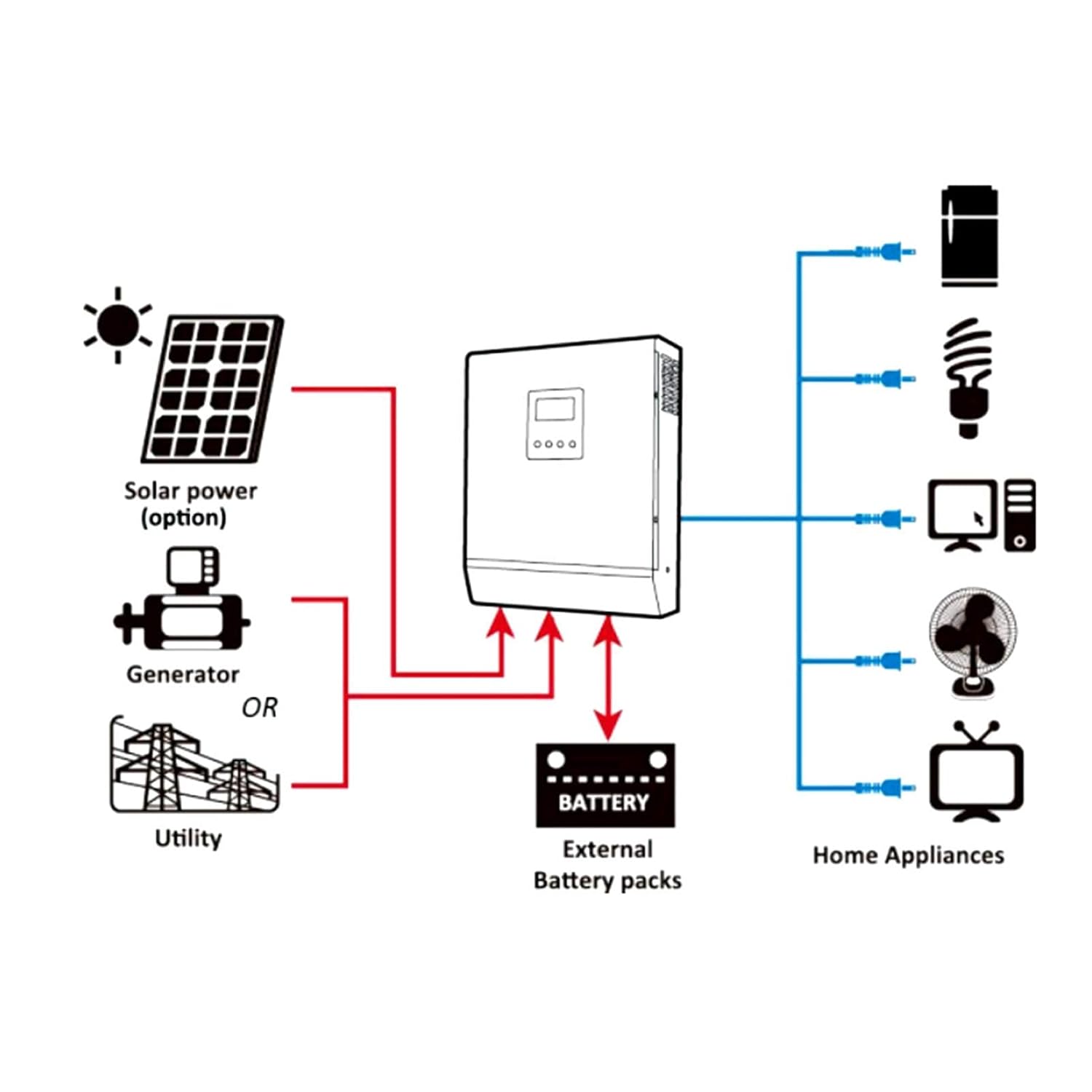
Image 7.1: Front view of the Vipxyc PS-3K inverter, showcasing its design and LCD display, suitable for various environments.

Image 7.2: The main product image of the Vipxyc PS-3K Hybrid Solar Inverter.
8. Warranty and Support
Vipxyc is committed to providing quality products and customer satisfaction. If you encounter any issues or are not satisfied with your product, please contact our customer service team for assistance.
- For technical support or warranty claims, please refer to the contact information provided with your purchase or visit the official Vipxyc website.
- Keep your purchase receipt as proof of purchase for warranty services.
9. Related Videos
The following video demonstrates the low-temperature protection feature of a compatible LiFePO4 battery, which is essential for optimal performance in cold environments when used with your inverter.
Video 9.1: This video from ECO-WORTHY CA demonstrates the low-temperature protection test for a 12V 100Ah LiFePO4 battery. It shows how the battery stops charging when the temperature drops below -7°C (19.4°F) and resumes charging when the temperature rises above 0°C (32°F), ensuring battery safety and longevity in cold conditions. This feature is important for battery compatibility with your solar inverter system.