Introduction
This manual provides comprehensive instructions for the setup, operation, and maintenance of your RCECAOSHAN Replacement Remote Control for Samsung Air Conditioners. This remote is designed to be compatible with various Samsung AC models, offering essential functions for comfortable climate control.
Setup
1. Battery Installation
The remote control requires two AAA 1.5V batteries (not included). Follow these steps to install them:
- Locate the battery compartment cover on the back of the remote control.
- Slide the cover downwards or press the latch to open it.
- Insert two AAA batteries, ensuring the positive (+) and negative (-) terminals align correctly with the markings inside the compartment.
- Slide the battery compartment cover back into place until it clicks securely.

Figure 1: Battery compartment with cover removed, ready for AAA battery insertion.
2. Initial Use
Once batteries are installed, the remote is ready for use. No programming is typically required for this replacement remote; it should function directly with compatible Samsung Air Conditioner models.
Operating Instructions
Familiarize yourself with the buttons and their functions for optimal control of your air conditioner.
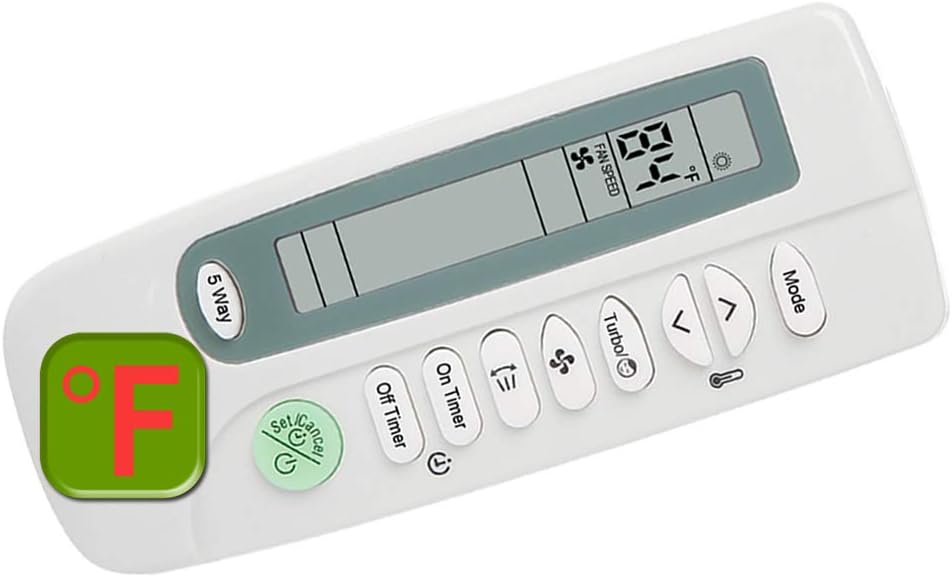
Figure 2: Overview of the remote control with its display and buttons.
Button Functions:
- Power Button ($): Turns the air conditioner On or Off.
- Mode Button: Cycles through operating modes (e.g., Cool, Heat, Fan, Dry, Auto).
- Temperature Up (▲) / Down (▼) Buttons: Adjusts the desired temperature setting.
- Fan Speed Button: Adjusts the fan speed (e.g., Low, Medium, High, Auto).
- Turbo Button: Activates or deactivates the rapid cooling/heating function.
- On Timer Button: Sets a time for the air conditioner to turn on automatically.
- Off Timer Button: Sets a time for the air conditioner to turn off automatically.
- Set/Cancel Button: Used to confirm or cancel timer settings.
- 5 Way Button: Likely for navigating menus or specific functions on certain AC models.
Temperature Display (Fahrenheit/Celsius):
This remote control supports display in both Fahrenheit (°F) and Celsius (°C). To switch between temperature units, typically press and hold the "Mode" button or a combination of "Temperature Up" and "Down" buttons simultaneously for a few seconds. Refer to your specific air conditioner's manual if the remote's method is not immediately apparent.

Figure 3: The remote's display showing both Fahrenheit and Celsius temperature readings.


Figure 4: Examples of Fahrenheit (left) and Celsius (right) temperature displays.
Maintenance
Cleaning the Remote Control:
- Wipe the remote control with a soft, dry cloth.
- Do not use liquid cleaners, sprays, or abrasive materials, as they may damage the remote's surface or internal components.
Battery Replacement:
- Replace batteries when the remote's range decreases or the display becomes dim.
- Always replace both batteries at the same time with new AAA 1.5V batteries.
- Remove batteries if the remote will not be used for an extended period to prevent leakage.
Troubleshooting
| Problem | Possible Cause | Solution |
|---|---|---|
| Remote control not working. |
|
|
| Display is dim or flickering. | Low battery power. | Replace batteries. |
| Remote does not control the AC unit. | Incompatibility or remote not sending signal. |
|
Specifications
- Brand: RCECAOSHAN
- Model Number: 20201104-A1-76
- Compatible Air Conditioner Brands: Samsung
- Compatible Samsung AC Models (Partial List): AS1206ERSEI, AS1206ERSIM, AS1206ERSMR, AS1206ERSPL, AS1206ERSUK, AS1207DR, AS1207DRSA, AS-0707DR, AS-0707DR-DSM, AS-0707ER, AS-0906DR, AS-0906ER, AS-0916ER, AS-0917ER, AS-1106BR, AS-1205ER, AS-1206DR, AS-1206ER, AS-1206ERH. (For a complete list, refer to the product description or contact customer support.)
- Power Source: 2 x AAA 1.5V Batteries (not included)
- Display: LCD with Fahrenheit (°F) and Celsius (°C) temperature options.
- Manufacturer: Home Appliances Inc Of ShenZhen