
1. Product Overview
The FitDesk Portable Laptop Desk, Model 2070, is a versatile and mobile workstation designed for various environments, including home offices, classrooms, and personal use. It features adjustable height, rolling wheels for easy movement, and a compact design to fit into smaller spaces. This desk supports both sitting and standing work postures, promoting an active and ergonomic workspace.
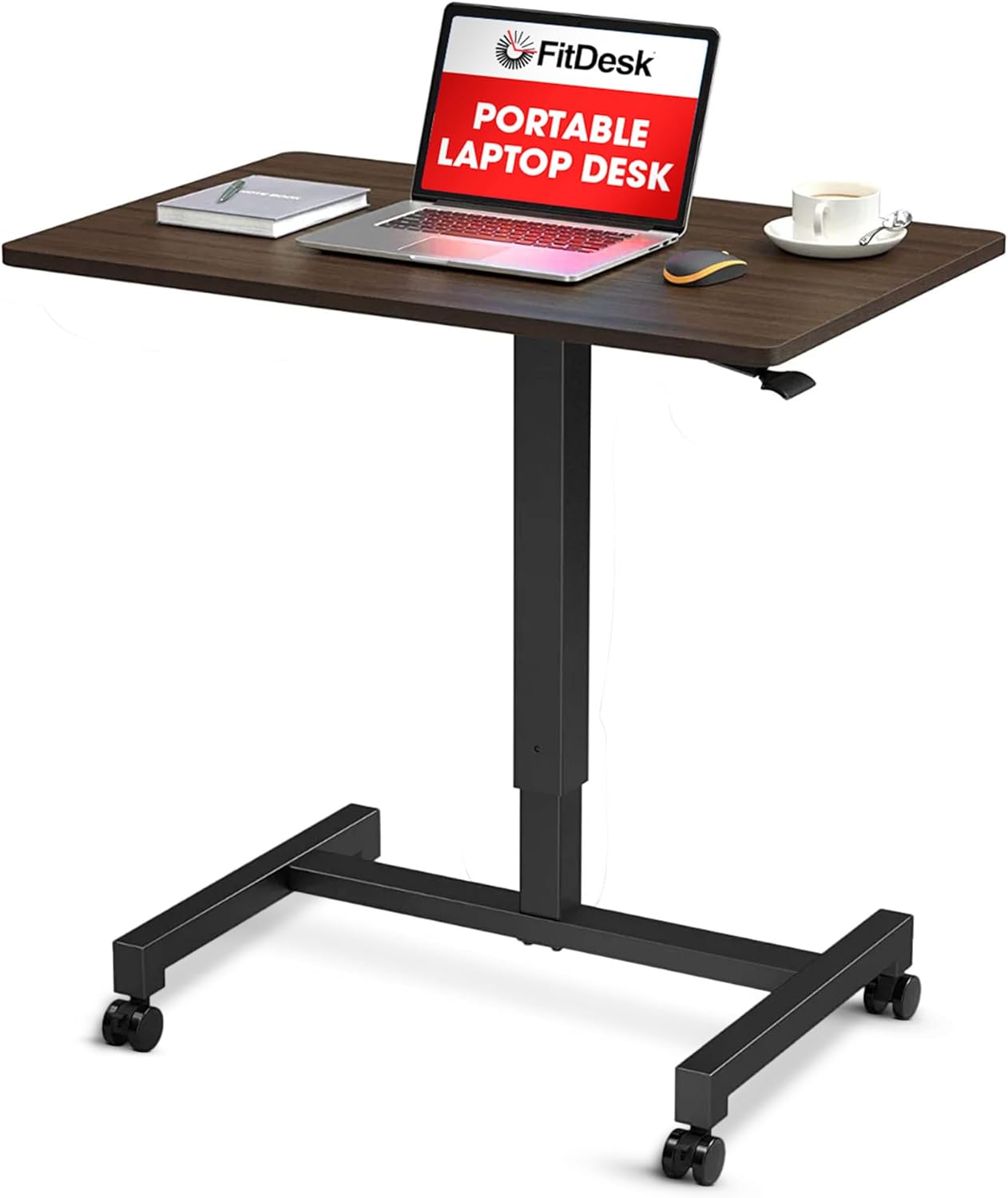
Image 1.1: FitDesk Portable Laptop Desk, Model 2070.
2. Safety Information
Please read and understand all safety instructions before assembling and using the FitDesk Portable Laptop Desk. Failure to follow these instructions may result in injury or damage to the product.
- Always use the lockable wheels when the desk is in a fixed position to prevent unintended movement.
- Be cautious when adjusting the height to prevent injury. Ensure hands and fingers are clear of moving parts.
- Ensure the desk is properly assembled and all fasteners are securely tightened before use.
- Do not exceed the maximum weight capacity of 30 lbs (13.6 kg) on the desktop.
- Keep the work area clear of obstacles to prevent accidents during movement or height adjustment.
- Avoid placing hot items directly on the desktop surface without adequate protection.
3. Package Contents
Verify that all components are present before beginning assembly. If any parts are missing or damaged, please contact customer support.
- Desktop Surface (Walnut finish)
- Adjustable Height Column
- H-shaped Base
- Swivel Wheels (4, with 2 lockable)
- Assembly Hardware (screws, bolts, washers)
- Assembly Tools (e.g., Allen wrench)
- User Manual
4. Assembly Instructions
Assembly is required for this product. All necessary tools are included. Please follow these general steps for assembly:
- Attach Wheels to Base: Secure the four swivel wheels to the H-shaped base using the provided hardware. Ensure the two lockable wheels are positioned on the same side for easier access.
- Connect Column to Base: Attach the adjustable height column to the center of the H-shaped base. Tighten all bolts firmly to ensure stability.
- Mount Desktop to Column: Carefully align the desktop surface with the top of the adjustable height column. Secure it using the designated screws.
- Final Check: Once assembled, gently shake the desk to ensure all connections are secure and the desk is stable.

Image 4.1: Key components including desktop, steel base, and swivel wheels with lock mechanism.
5. Operating Instructions
5.1 Height Adjustment
The FitDesk Portable Laptop Desk features a pneumatic height adjustment mechanism, allowing for smooth transitions between sitting and standing positions. The desk can be adjusted from a minimum height of 29.7 inches (75.4 cm) to a maximum height of 45.2 inches (114.8 cm).
- To Raise: Locate the adjustment lever typically found under the right side of the desktop. Lift the lever while gently pulling the desktop upwards. Release the lever at the desired height.
- To Lower: Lift the adjustment lever while applying gentle downward pressure on the desktop. Release the lever at the desired height.

Image 5.1: Illustration of the desk's height adjustment range.
5.2 Mobility and Locking
The desk is equipped with four swivel wheels for easy movement. Two of these wheels are lockable to secure the desk in place.
- To Move: Ensure the wheel locks are disengaged. Gently push or pull the desk to its desired location.
- To Lock: Once the desk is in position, press down on the levers of the two lockable wheels until they click into place. This will prevent the desk from rolling.
- To Unlock: Lift the levers on the two lockable wheels until they click upwards. The wheels are now free to roll.

Image 5.2: Demonstrates sit and stand options, along with the steel base and lockable wheels.
5.3 Usage Examples
The FitDesk Portable Laptop Desk can be used in various settings:
- As a mobile workstation in a home office.
- As a compact standing desk for treadmill use.
- As an adjustable podium or teaching station in classrooms.
- For casual use with a laptop or tablet while seated on a couch or bed.

Image 5.3: Desk in a home setting, suitable for working from anywhere.

Image 5.4: Desk in a classroom setting, demonstrating its adaptability.
Video 5.1: Official product video demonstrating the features and adjustability of the FitDesk Adjustable Mobile Desk.
6. Maintenance
Regular maintenance helps ensure the longevity and proper function of your FitDesk Portable Laptop Desk.
- Cleaning: Wipe the desktop surface and metal frame with a soft, damp cloth. Avoid abrasive cleaners or harsh chemicals that could damage the finish.
- Inspection: Periodically check all screws and bolts to ensure they remain tight. Retighten if necessary.
- Wheel Care: Keep the wheels free of debris to ensure smooth rolling.
7. Troubleshooting
If you encounter any issues with your FitDesk Portable Laptop Desk, refer to the following common problems and solutions:
- Desk is wobbly: Ensure all assembly screws and bolts are securely tightened. Check that the desk is on a flat, even surface.
- Height adjustment is stiff or not working: Ensure the adjustment lever is fully engaged or disengaged. Check for any obstructions in the pneumatic column. Do not exceed the weight capacity.
- Wheels are not rolling smoothly: Check for debris (hair, lint) caught in the wheels. Ensure wheel locks are fully disengaged.
If the issue persists, please contact FitDesk customer support for further assistance.
8. Specifications
| Feature | Detail |
|---|---|
| Brand | FitDesk |
| Model Number | 2070 |
| Product Dimensions (D x W x H) | 18.9"D x 27.6"W x 45.2"H (48cm D x 70cm W x 114.8cm H) |
| Minimum Height | 29.7 inches (75.4 cm) |
| Maximum Height | 45.2 inches (114.8 cm) |
| Tabletop Thickness | 0.71 inches (1.8 cm) |
| Maximum Weight Recommendation | 30 Pounds (13.6 kg) |
| Color | Walnut (also available in White) |
| Top Material Type | MD Fiberboard |
| Base Material | Metal (Steel Frame) |
| Special Feature | Adjustable Height, Rolling, Compact Design |
| Assembly Required | Yes (Tools Included) |
9. Warranty and Support
For warranty information, product support, or to inquire about replacement parts, please contact FitDesk customer service directly. Refer to the product packaging or the official FitDesk website for current contact details.
Manufacturer: FitDesk