
Vipxyc FM-120-2
Vipxyc FM-120-2 Digital Diesel Fuel Oil Flow Meter User Manual
Model: FM-120-2
Introduction
This manual provides comprehensive instructions for the installation, operation, and maintenance of the Vipxyc FM-120-2 Digital Diesel Fuel Oil Flow Meter. This device is designed for accurate measurement of diesel and gasoline flow in non-commercial applications. Please read this manual thoroughly before using the product to ensure proper function and safety.

Image: The Vipxyc FM-120-2 Diesel Flow Meter, highlighting its application for fuel measurement with an oil droplet in the background.
Safety Information
- Always ensure the meter is installed by qualified personnel in accordance with local regulations and safety standards.
- Do not use this meter for commercial transactions or applications requiring certified accuracy. It is intended for non-commercial use only.
- Verify that the medium being measured (diesel, gasoline) is compatible with the meter's materials to prevent damage or leaks.
- Ensure all connections are secure and leak-free before operating.
- Do not exceed the maximum operating pressure of 50psi / 3.5bar.
- Wear appropriate personal protective equipment (PPE) when handling fuels.
- Keep the meter away from open flames, sparks, and other ignition sources.
Product Overview
The FM-120-2 is a mechanical flow meter designed for accurate measurement of fuel flow. It features a large digital display for easy readability and a mechanical hand-wheel for resetting the current batch total.

Image: Front view of the FM-120-2 flow meter, displaying the 4-digit subtotal and 8-digit total counters, along with "HIGH ACCURACY" label.
Key Features:
- High Quality Construction: Made of durable aluminum (back side) and plastic material for long operational life.
- Digital Display: Large, easy-to-read display with 4-digit subtotal (resettable) and 8-digit cumulative total (non-resettable).
- Accuracy: ±1% accuracy for reliable measurements.
- Flexible Installation: Can be installed horizontally or vertically.
- Manual Reset: Hand-wheel allows for manual resetting of the batch total.

Image: Detailed views showing the side connection port and the manual reset knob of the FM-120-2 flow meter.
Specifications
| Parameter | Value |
|---|---|
| Model | FM-120-2 |
| Unit | Liter / US gallon / UK gallon |
| Flow Range | 5-30 GPM / 20-120 L/Min |
| Accuracy | ± 1% |
| Nominal Diameter | 25mm (1" internal thread) |
| Medium | Diesel, Gasoline |
| Product Type | Mechanical |
| Count Display | 4-digit (resettable), 8-digit (cumulative, non-resettable) |
| Shell Material | Aluminum (back side), Plastic |
| Mounting Direction | Vertical or Horizontal |
| Working Pressure | > 0.04 Mpa |
| Max Operating Pressure | 50psi / 3.5bar |
| Dimensions (L x W x H) | 18 x 15 x 13.5 cm / 7.09 x 5.91 x 5.31 inches |
| Weight | 1984g / 4.37 lbs |

Image: The FM-120-2 flow meter with its key dimensions (length, width, height) clearly indicated.
Setup and Installation
Proper installation is crucial for the accurate and safe operation of the FM-120-2 flow meter.
- Unpacking: Carefully remove the flow meter from its packaging and inspect for any signs of damage.
- Mounting Direction: The meter can be installed either vertically or horizontally. Choose the orientation that best suits your application.
- Connection: Connect the 1-inch internal threaded ports to your fuel lines. Ensure all connections are sealed properly to prevent leaks. Use appropriate thread sealant if necessary.
- Flow Direction: Observe the flow direction arrow on the meter body to ensure correct installation relative to the fuel flow.
- Pressure Check: Before full operation, perform a low-pressure check to confirm there are no leaks in the system. Gradually increase pressure to the working level, ensuring it does not exceed 50psi / 3.5bar.

Image: Side view of the FM-120-2 flow meter, illustrating the design of its inlet and outlet ports for connection to fuel lines.
Operating Instructions
The FM-120-2 flow meter is designed for straightforward operation.
- Starting Flow: Once installed and checked for leaks, begin the flow of diesel or gasoline through the meter.
- Reading the Display:
- The upper 4-digit display shows the current batch total, which can be reset to zero.
- The lower 8-digit display shows the cumulative total, which cannot be reset.
- Resetting the Batch Total: To reset the 4-digit batch total to zero, rotate the hand-wheel located on the side of the meter. This is typically done after each measurement or dispensing operation.
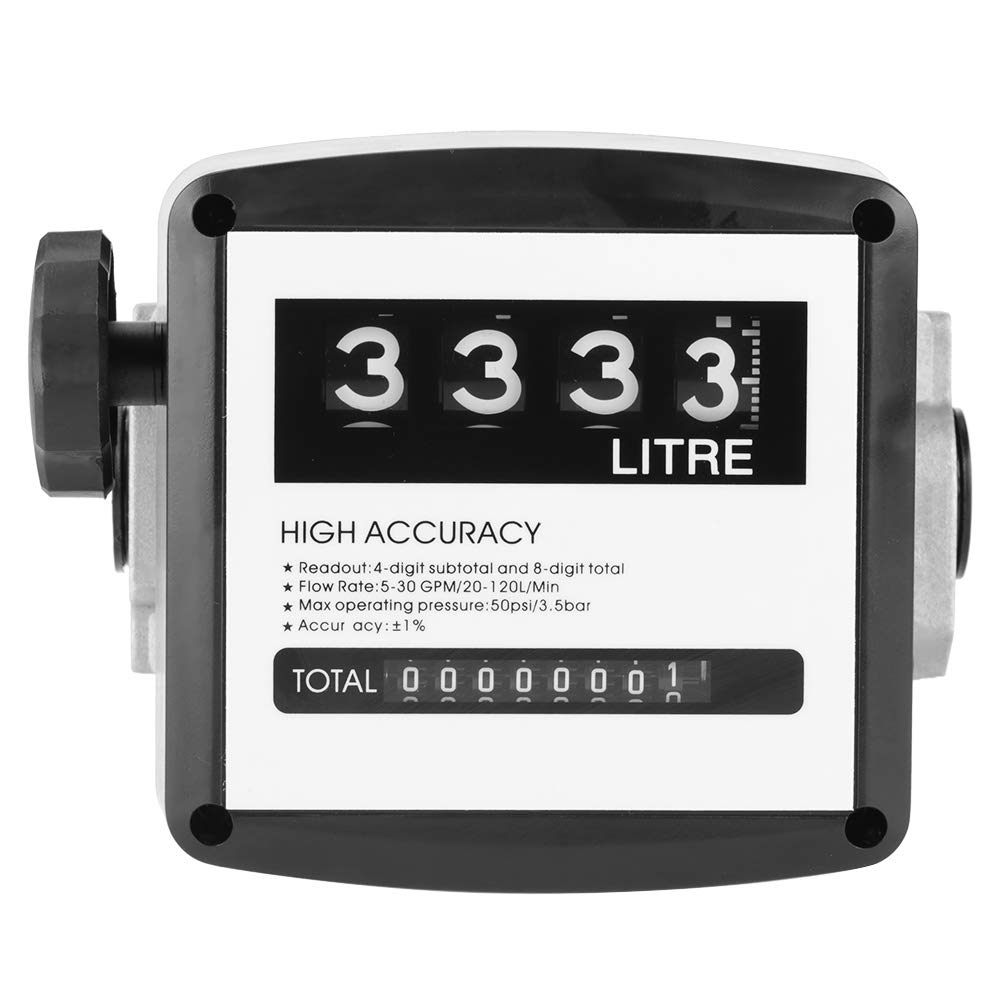
Image: The FM-120-2 flow meter's display showing a reading of "3333 LITRE" on the resettable counter, with the cumulative total below.

Image: A close-up view of the black manual reset knob on the side of the FM-120-2 flow meter, used to clear the batch total.
Maintenance
The Vipxyc FM-120-2 flow meter is designed for low maintenance. However, regular checks can ensure its longevity and accuracy.
- Regular Inspection: Periodically inspect the meter for any signs of physical damage, leaks, or corrosion.
- Cleaning: Keep the exterior of the meter clean. Use a soft, damp cloth. Do not use harsh chemicals or abrasive cleaners.
- Connection Integrity: Ensure all pipe connections remain tight and free of leaks.
- Storage: If storing the meter for an extended period, ensure it is drained of any fuel and stored in a dry, protected environment.
Troubleshooting
| Problem | Possible Cause | Solution |
|---|---|---|
| Meter not counting or inaccurate readings |
|
|
| Fuel leakage from connections |
|
|
| Batch total not resetting |
|
|
Warranty and Support
For warranty information or technical support regarding your Vipxyc FM-120-2 Digital Diesel Fuel Oil Flow Meter, please refer to the documentation provided at the time of purchase or contact your retailer.
Please have your model number (FM-120-2) and purchase details ready when contacting support.
Ask a question about this manual
Ask about setup, troubleshooting, compatibility, parts, safety, or missing instructions. Manuals+ will review the question and use this page’s manual context to help answer it.