1. Introduction
This instruction manual provides essential information for the R22 Genuine OEM Power Supply Board, model LL3UF657692210233. This component is designed as a replacement power supply unit for the LG 50UN6950ZUF television model. It is crucial to verify the part numbers and visual appearance of your existing board against the information provided in this manual to ensure compatibility before installation.
2. Safety Information
Working with electronic components, especially power supply units, involves risks of electric shock and damage to equipment. Adhere to the following safety guidelines:
- Disconnect Power: Always unplug the television from the main power outlet before attempting any installation, removal, or maintenance.
- Professional Installation Recommended: Installation of this power supply board should ideally be performed by a qualified technician. Incorrect installation can lead to damage to the TV or personal injury.
- Static Discharge Precautions: Electronic components are sensitive to electrostatic discharge (ESD). Use an anti-static wrist strap and work on an anti-static mat to prevent damage to the board and other TV components.
- Handle with Care: Avoid touching components unnecessarily. Hold the board by its edges.
- Verify Compatibility: Ensure the part numbers on your existing board precisely match those listed in this manual and shown in the product images. Matching by TV model alone is insufficient as multiple board versions may exist for a single TV model.
3. Product Overview
The R22 Genuine OEM Power Supply Board (Model LL3UF657692210233) is a critical component responsible for converting AC power from the wall outlet into various DC voltages required to operate the LG 50UN6950ZUF TV. It features multiple connectors for power input, output to other TV boards (e.g., main board, LED drivers), and various electronic components such as transformers, capacitors, and integrated circuits.
Key Identification Numbers:
- Model Number: LL3UF657692210233
- Board Model: LGP50T-20U1
- PCB Part Number: EAX69057001
- LG Part Number: EAY65769221
- Other Identifiers: 3PCR02656A
- Other Identifiers: CCP-3400ST

Figure 3.1: Top view of the R22 Power Supply Board, showing various components and connectors. This perspective helps in identifying the overall layout and component placement.

Figure 3.2: Another angled top view of the power supply board, providing a different perspective for component identification and connector locations.

Figure 3.3: Bottom view of the power supply board, illustrating the circuit traces and solder points. This view is important for understanding the board's internal connections.

Figure 3.4: Close-up image of the barcode label, clearly displaying the model number LL3UF657692210233. This label is critical for verifying the exact part.
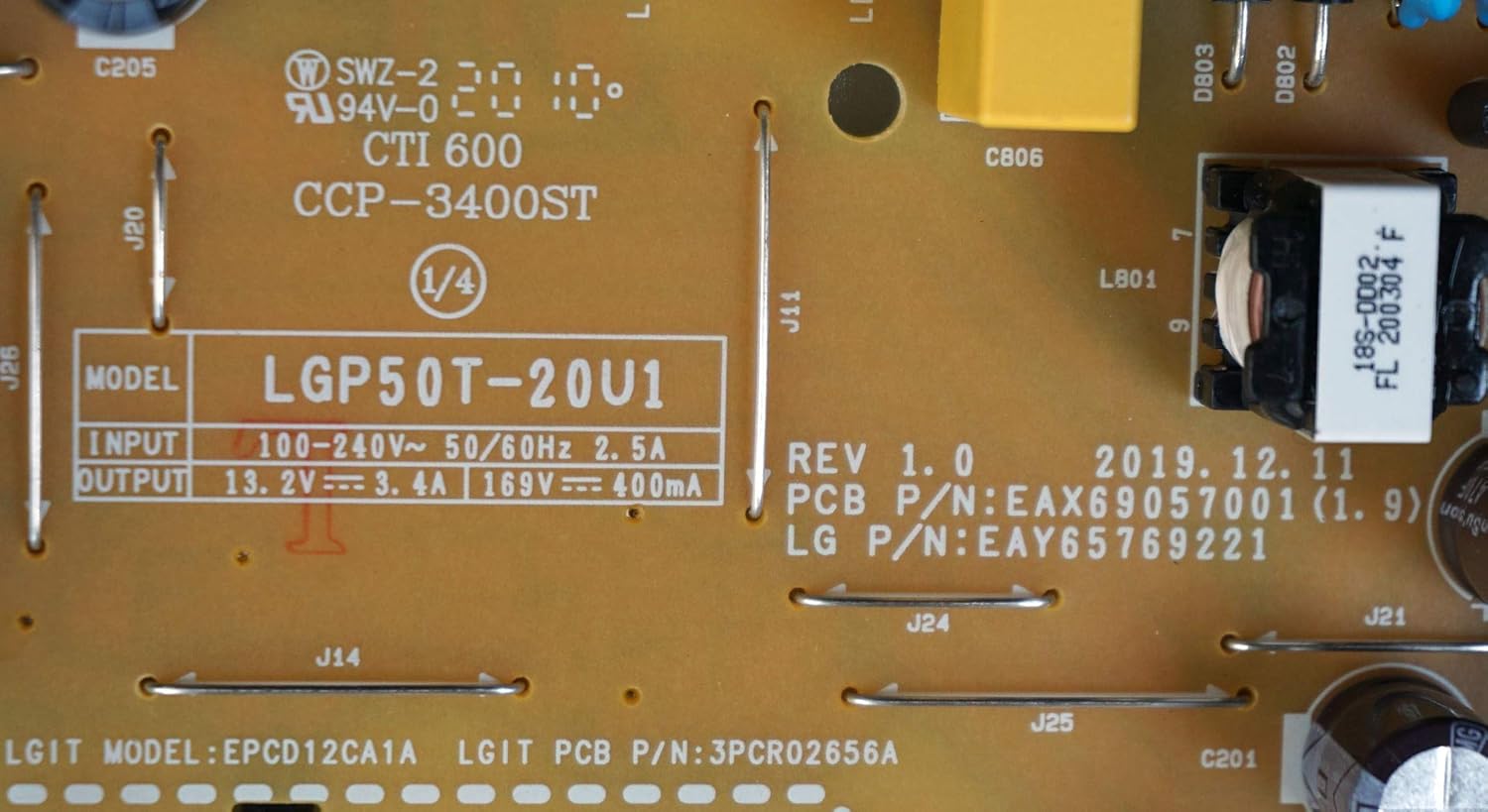
Figure 3.5: Detailed view of the board's markings, including the model LGP50T-20U1, PCB P/N EAX69057001, LG P/N EAY65769221, and other identifiers like 3PCR02656A and CCP-3400ST. These numbers are essential for correct part identification.

Figure 3.6: Close-up of the input and output specifications printed on the board, confirming the model LGP50T-20U1 and its electrical characteristics.

Figure 3.7: View of the UL reference markings and another instance of the barcode for model number LL3UF657692210233, indicating compliance and aiding in part verification.
4. Setup and Installation
The installation of a power supply board requires careful handling and technical knowledge. It is strongly recommended that this procedure be carried out by a certified electronics technician.
- Preparation: Ensure the television is completely disconnected from all power sources and external devices. Place the TV face down on a soft, clean surface to protect the screen.
- Access the Board: Carefully remove the back cover of the television. This usually involves unscrewing multiple screws around the perimeter and sometimes in the center.
- Locate the Existing Power Supply Board: Identify the current power supply board within the TV chassis. It is typically a large board with numerous connectors and often has a prominent heat sink.
- Disconnect Cables: Before removal, take clear photos of all cable connections to serve as a reference for reassembly. Carefully disconnect all cables connected to the existing power supply board. Use appropriate tools to release locking mechanisms on connectors.
- Remove Old Board: Unscrew the mounting screws securing the old power supply board to the TV chassis. Gently lift and remove the board.
- Install New Board: Position the new R22 power supply board (Model LL3UF657692210233) into the chassis, aligning it with the screw holes. Secure it with the mounting screws.
- Reconnect Cables: Refer to your previously taken photos and carefully reconnect all cables to their correct ports on the new power supply board. Ensure all connections are firm and secure.
- Initial Test: Before replacing the back cover, connect the TV to power and perform a brief test to ensure it powers on and functions correctly. If issues arise, immediately disconnect power and re-check all connections.
- Reassemble: Once functionality is confirmed, disconnect power, replace the TV's back cover, and secure all screws.
Important Note: Incorrect installation can cause irreversible damage to the television. If you are unsure about any step, consult a professional technician.
5. Operating Instructions
The R22 Power Supply Board is an internal component that operates automatically once correctly installed within the LG 50UN6950ZUF TV. There are no user-adjustable settings or operational controls directly on the board itself. Its function is to provide stable and correct power to the television's other components. Once installed, the TV should operate as intended, assuming all other components are functional.
If the TV does not power on or exhibits unusual behavior after installation, refer to the Troubleshooting section.
6. Maintenance
The power supply board is designed for long-term, maintenance-free operation under normal conditions. To ensure its longevity and optimal performance:
- Keep Dry: Ensure the television is operated in a dry environment, free from moisture and humidity, which can damage electronic components.
- Dust Control: Periodically, and with the TV unplugged, gently clean the interior of the TV (including the power supply board) using compressed air to remove dust accumulation. Excessive dust can lead to overheating and component failure.
- Ventilation: Ensure the TV's ventilation openings are not blocked to allow for proper airflow and heat dissipation.
- Avoid Physical Shock: Protect the television from impacts or drops, which can dislodge or damage internal components.
7. Troubleshooting
If your LG 50UN6950ZUF TV experiences issues after replacing the power supply board, consider the following common troubleshooting steps. Always ensure the TV is unplugged before inspecting internal components.
- No Power / TV Does Not Turn On:
- Verify all cables connected to the power supply board are securely seated.
- Check the main power cable connection to the wall outlet and the TV.
- Ensure the wall outlet is functional by testing with another device.
- Confirm the new power supply board's part numbers match your original board exactly.
- Intermittent Power / TV Turns Off Randomly:
- Inspect for any loose connections on the power supply board or other internal boards.
- Check for signs of overheating (e.g., burnt smell, unusually hot areas on the board).
- No Picture, But Sound is Present:
- While this is often related to the LED backlight driver or main board, a power supply issue could indirectly affect it. Ensure all power connections to the LED driver board are secure.
Advanced Troubleshooting: If basic checks do not resolve the issue, it is recommended to consult a professional technician. Diagnosing power supply issues often requires specialized tools and expertise to measure voltages and identify faulty components safely.
8. Specifications
| Feature | Specification |
|---|---|
| Brand | R22 |
| Model Number | LL3UF657692210233 |
| Compatible TV Model | LG 50UN6950ZUF TV |
| Board Model | LGP50T-20U1 |
| PCB Part Number | EAX69057001 |
| LG Part Number | EAY65769221 |
| Input Voltage | 100-240V~ |
| Input Frequency | 50/60Hz |
| Input Current | 2.5A |
| Output 1 | 13.2V === 3.4A |
| Output 2 | 169V === 400mA |
| Item Weight | 331 g |
| Package Dimensions | 28.4 x 21.3 x 3.8 cm |
| UPC | 640746337963 |
9. Warranty and Support
Specific warranty details for this R22 power supply board are typically provided by the seller at the time of purchase. Please refer to your purchase documentation or contact the retailer directly for information regarding warranty coverage, return policies, and technical support.
For technical assistance or professional installation services, it is recommended to contact a qualified television repair technician.


