
Introduction
Thank you for choosing the Adamantiun Yari AF-1001 Wired Gaming Headset. This manual provides essential information for setting up, operating, maintaining, and troubleshooting your new headset. Please read these instructions carefully to ensure optimal performance and longevity of your device.
Product Overview
The Adamantiun Yari AF-1001 is a wired in-ear gaming headset designed for quality audio and comfort. It features a high-quality, adjustable, and removable omnidirectional microphone for clear voice communication. The anatomical earbuds provide a secure fit, making them suitable for extended use during chats, live streams, and gaming sessions. The headset includes 10mm dynamic drivers and comes with three pairs of ear tips for a customized fit. Its P2 plug, combined with a 2-way adapter, ensures broad compatibility with various devices such as PCs, notebooks, PS4, PS5, smartphones, and tablets. The headset also incorporates an in-line remote with a sliding volume button and a call answering function, all connected via a durable 1.2m PVC-coated cable.
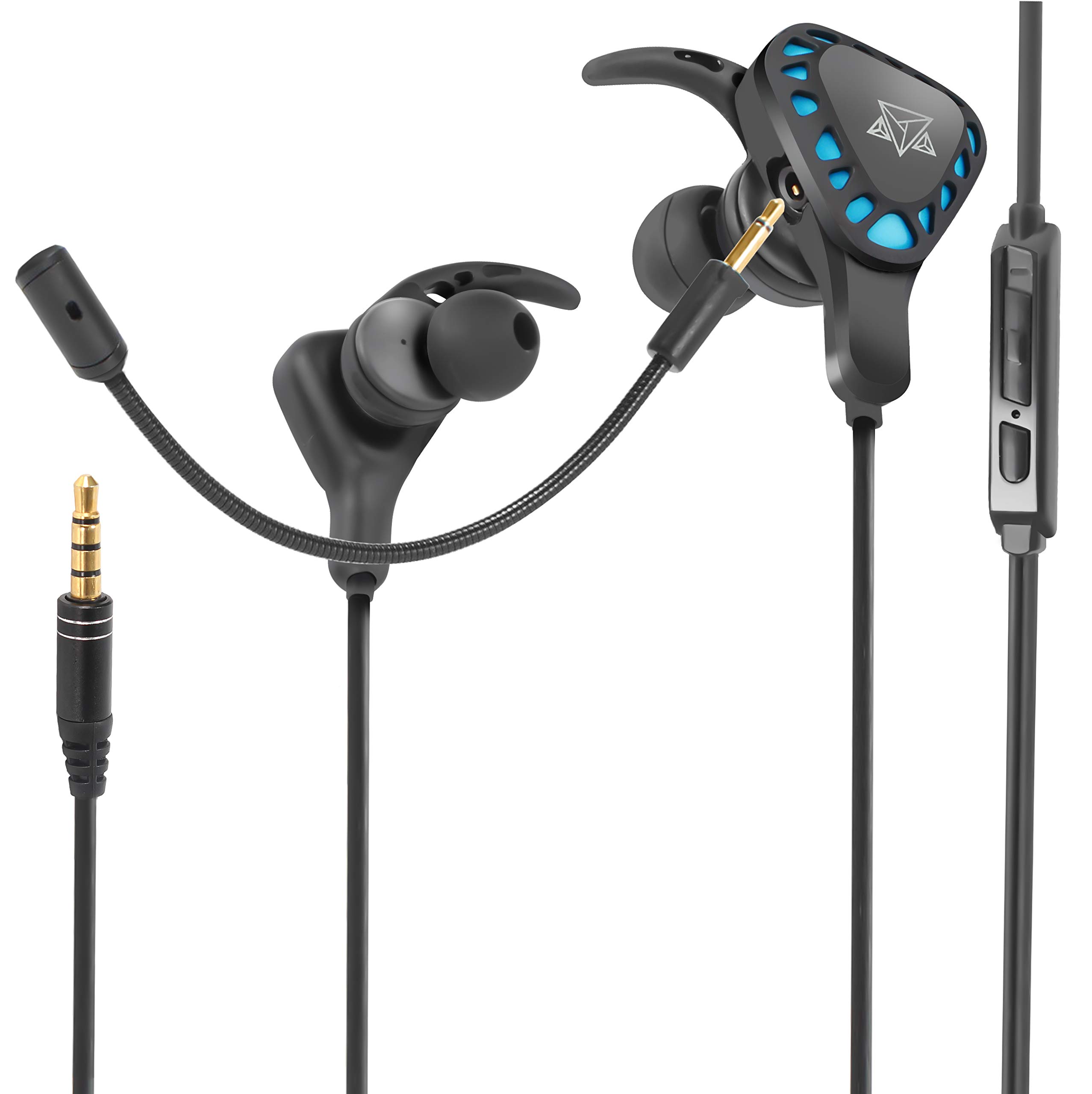
Adamantiun Yari AF-1001 Wired Gaming Headset with detachable microphone and P2 adapter.
Setup
- Attach the Microphone: Carefully insert the detachable omnidirectional microphone into the designated port on the left earbud until it clicks securely into place.
- Select Ear Tips: Choose the ear tips that provide the most comfortable and secure fit for your ears from the three included pairs. Gently attach them to the earbuds.
- Connect to Device:
- For devices with a single 3.5mm TRRS jack (e.g., smartphones, PS4, PS5, some notebooks): Plug the headset's main 3.5mm P2 connector directly into your device's audio jack.
- For devices with separate audio and microphone jacks (e.g., PCs, older notebooks): Connect the headset's main 3.5mm P2 connector to the included 2-way P2 adapter. Then, plug the green connector of the adapter into your device's audio output jack and the pink connector into your device's microphone input jack.

Detailed view of how the detachable omnidirectional microphone connects to the Adamantiun Yari AF-1001 headset.

Included ear tips for the Adamantiun Yari AF-1001 headset, showing different sizes for a customized fit.

Adamantiun Yari AF-1001 headset showing the main unit, detachable microphone, and the P2 adapter for split audio/mic connections.
Operating Instructions
- Volume Control: Use the sliding volume button located on the in-line remote to adjust the audio output level. Slide up to increase volume, slide down to decrease.
- Microphone Usage: The detachable omnidirectional microphone is designed to capture your voice clearly. Position it appropriately near your mouth for best results. Ensure it is securely connected.
- Call Answering: Press the button on the in-line remote to answer or end phone calls when connected to a smartphone.

Side view of the Adamantiun Yari AF-1001 headset connected to a smartphone, illustrating the cable and in-line controls.
Maintenance
- Cleaning Ear Tips: Regularly remove the ear tips and clean them with a soft, damp cloth. Ensure they are completely dry before reattaching.
- Cable Care: Avoid sharp bends, twists, or excessive pulling on the cable to prevent internal damage. Store the headset neatly to prevent tangling.
- Storage: When not in use, store the headset in a clean, dry place away from extreme temperatures and direct sunlight.
Troubleshooting
| Problem | Possible Cause | Solution |
|---|---|---|
| No sound from headset | Incorrect connection, low volume, device audio settings | Ensure the P2 connector (and adapter if used) is fully inserted. Check the in-line volume slider and your device's volume settings. Verify device audio output is set to the headset. |
| Microphone not working | Microphone not attached, incorrect connection, device microphone settings | Ensure the detachable microphone is securely attached. If using the adapter, confirm the pink connector is in the microphone input. Check your device's microphone input settings and ensure it's not muted. |
| Poor fit or discomfort | Incorrect ear tip size | Try different sizes of ear tips provided to find the most comfortable and secure fit. |
Specifications
- Model Number: AF-1001
- Connectivity: Wired
- Headphone Type: In-ear
- Driver Size: 10mm
- Microphone: Detachable Omnidirectional, Integrated (on cable)
- Connector: 3.5mm Jack (P2)
- Cable Length: 1.2m
- Material: Plastic, Silicone
- Weight: 60 g
- Compatible Devices: Mobile phones, Notebooks, PS4, PS5, PCs
- Control Method: In-line Remote (Volume Slider, Call Button)
- Included Components: Headset, detachable microphone, 2-way P2 adapter, 3 pairs of ear tips
Warranty and Support
For warranty information, technical support, or further assistance, please refer to the official Adamantiun website or contact your retailer. Keep your proof of purchase for warranty claims.