
1. Introduction
The EWEIMA HTY-02 Blackhead Remover is a vacuum suction device designed for facial skin care. It effectively removes blackheads, whiteheads, dead skin cells, grease, and makeup residue, contributing to cleaner and firmer skin. This manual provides detailed instructions for safe and effective use of the device.

This image illustrates the vacuum technology used by the device to extract impurities from pores, along with visual examples of skin improvement before and after use.
2. Safety Information
- Read all instructions before use.
- Do not use the device on broken, irritated, or inflamed skin.
- Avoid using the device on the same area for more than 3 seconds to prevent skin redness or bruising. Move the device continuously.
- Start with the lowest suction level and gradually increase as your skin tolerates it.
- Keep out of reach of children.
- Do not immerse the device in water.
- Consult a dermatologist if you have sensitive skin conditions or concerns.
3. Product Components
The EWEIMA HTY-02 Blackhead Remover comes with the main device and several interchangeable suction heads.

This image displays the main components of the device, including the power button, suction level indicator, and USB charging port.
Interchangeable Suction Heads
The device includes 4 interchangeable suction heads, each designed for specific skin types and treatment areas:
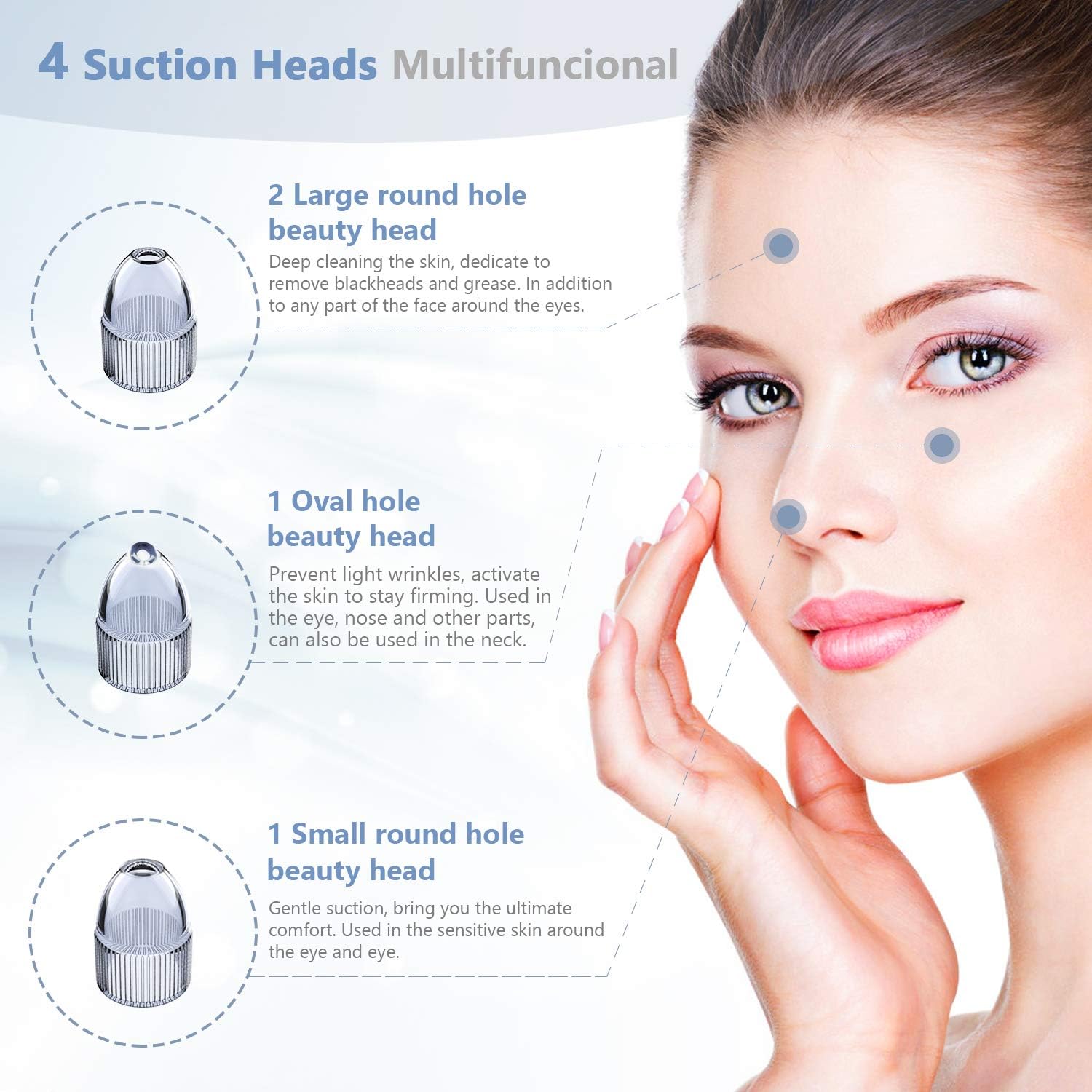
This image shows the four different suction heads and their recommended applications.
- 2 Large Round Hole Beauty Heads: For deep cleaning, suitable for oily skin and stubborn blackheads. Can be used on most parts of the face, avoiding the eye area.
- 1 Small Round Hole Beauty Head: Provides gentle suction, ideal for sensitive and delicate skin, and for removing blackheads and acne. Suitable for areas around the eyes.
- 1 Oval Hole Beauty Head: Primarily used for firming the skin and reducing fine lines. Can be used around the eyes, nose, mouth, and neck.
4. Setup
Initial Charging
- Before first use, ensure the device is fully charged.
- Connect the provided USB data cable to the charging port on the device and to a USB power source (e.g., PC, wall charger, power bank).
- The LED screen will indicate the charging status. A full charge typically takes approximately 50 minutes.
- Once fully charged, the device provides approximately 1 hour and 30 minutes of continuous use.
5. Operating Instructions
Follow these steps for optimal results and to ensure skin safety:

This image outlines the recommended steps for using the blackhead remover.
Preparation
- Cleanse Your Face: Wash your face thoroughly with a facial cleanser to remove surface dirt and oils.
- Open Pores: Use a hot towel or a facial steamer for 3-5 minutes to help open your pores. This step is crucial for effective blackhead removal. (Optional: Apply a blackhead extractor liquid for enhanced results).
Using the Device
- Select Suction Head: Choose the appropriate suction head based on your skin type and the area you intend to treat (refer to Section 3).
- Power On: Press and hold the power button to turn on the device.
- Adjust Suction Level: The device offers 5 adjustable suction levels. Start with Level 1 for sensitive skin and gradually increase to a comfortable level. The LED screen displays the current suction level and battery status.

This image provides guidance on selecting the appropriate suction level for various skin types.
- Levels 1-2: Recommended for sensitive skin and initial blackhead removal.
- Levels 3-4: Suitable for neutral skin and deeper blackheads.
- Level 5: Designed for mixed/oily skin and stubborn, deep blackheads.
- Apply to Skin: Gently place the suction head onto your skin. Move the device continuously in one direction. Do not keep the device in one spot for more than 3 seconds to avoid redness or bruising.
Post-Treatment
- Cleanse and Moisturize: After using the device, clean your face with cool water to close pores. Apply a moisturizing cream, face mask, or toner to soothe and hydrate your skin.
6. Maintenance
Cleaning the Device and Suction Heads
- After each use, remove the suction head from the device.
- Clean the suction head with warm, soapy water. Rinse thoroughly and allow it to air dry completely before reattaching or storing.
- Wipe the main body of the device with a soft, damp cloth. Do not use abrasive cleaners or immerse the device in water.
- Ensure the device and all components are dry before storing.
7. Troubleshooting
- Device not turning on: Ensure the device is fully charged. If the battery is low, charge it for at least 50 minutes.
- No suction or weak suction: Check if the suction head is properly attached. Ensure there are no blockages in the suction head or the device's nozzle. Clean the head if necessary.
- Skin redness or bruising: This usually occurs if the device is held in one spot for too long or if the suction level is too high for your skin type. Reduce the suction level and ensure you keep the device moving continuously. Apply a cold compress to soothe redness.
- Device not charging: Verify that the USB cable is securely connected to both the device and the power source. Try a different USB cable or power adapter.
8. Specifications
| Brand | EWEIMA |
| Model Number | HTY-02 |
| ASIN | B08M5ZFGGP |
| UPC | 791514423279 |
| Suction Levels | 5 |
| Interchangeable Heads | 4 |
| Charging Method | USB Rechargeable |
| Charging Time | Approx. 50 minutes |
| Usage Time | Approx. 1 hour 30 minutes |
| Package Dimensions | 22.6 x 10.4 x 6.8 cm |
| Weight | 340 grams |
9. Warranty and Support
EWEIMA is committed to providing quality products and services. If you have any questions or encounter issues with your device, please contact customer support. We aim to resolve inquiries within 24 hours.
For support, please refer to the contact information provided with your purchase or visit the official EWEIMA website.