
Introduction
This manual provides instructions for the Fesjoy HXSJ J700 Programmable Gaming Mouse. Please read this manual carefully before using the product to ensure proper operation and to maximize your gaming experience.

Image: Top-down view of the Fesjoy HXSJ J700 Gaming Mouse, showcasing its ergonomic design and blue LED lighting.
Package Contents
- 1 x Fesjoy HXSJ J700 Gaming Mouse
- 1 x User Manual
Setup
- Connect the Mouse: Plug the USB connector of the Fesjoy HXSJ J700 Gaming Mouse into an available USB port on your computer (PC or laptop).
- Driver Installation (Optional): For advanced customization and macro programming, download the software driver from the official link: Fesjoy HXSJ J700 Driver. Follow the on-screen instructions to install the driver.
- System Compatibility: The mouse is compatible with Windows 2000 / XP / Win7 / Win8 / Win10 Vista 32bit, and later versions of IOS.

Image: The Fesjoy HXSJ J700 Gaming Mouse, emphasizing the IC192 professional gaming chip, which ensures high performance for various online games.
Operating Instructions
DPI Adjustment and Lighting
The Fesjoy HXSJ J700 mouse features a 4-stage adjustable DPI setting, ranging from 1000 to 6400 DPI. Each DPI setting corresponds to a different colored breathing light, providing visual feedback for the current sensitivity.
- DPI Levels:
- 1000 DPI (Red LED light)
- 1600 DPI (Pink Purple LED light)
- 3200 DPI (Purple LED light)
- 6400 DPI (Blue LED light)
- Changing DPI: Press the DPI button (located behind the scroll wheel) to cycle through the DPI settings and their corresponding light colors.

Image: Illustration of the DPI buttons on the Fesjoy HXSJ J700 Gaming Mouse and how each DPI setting (1000, 1600, 3200, 6400) is indicated by a specific LED light color (Red, Pink Purple, Purple, Blue).
Special Key Combinations
- Turn Decorative Lights On/Off: Press the Middle button (scroll wheel click) + DPI button simultaneously.
- Change Lighting Mode: Press the Left button + DPI button simultaneously to switch between different lighting effects.
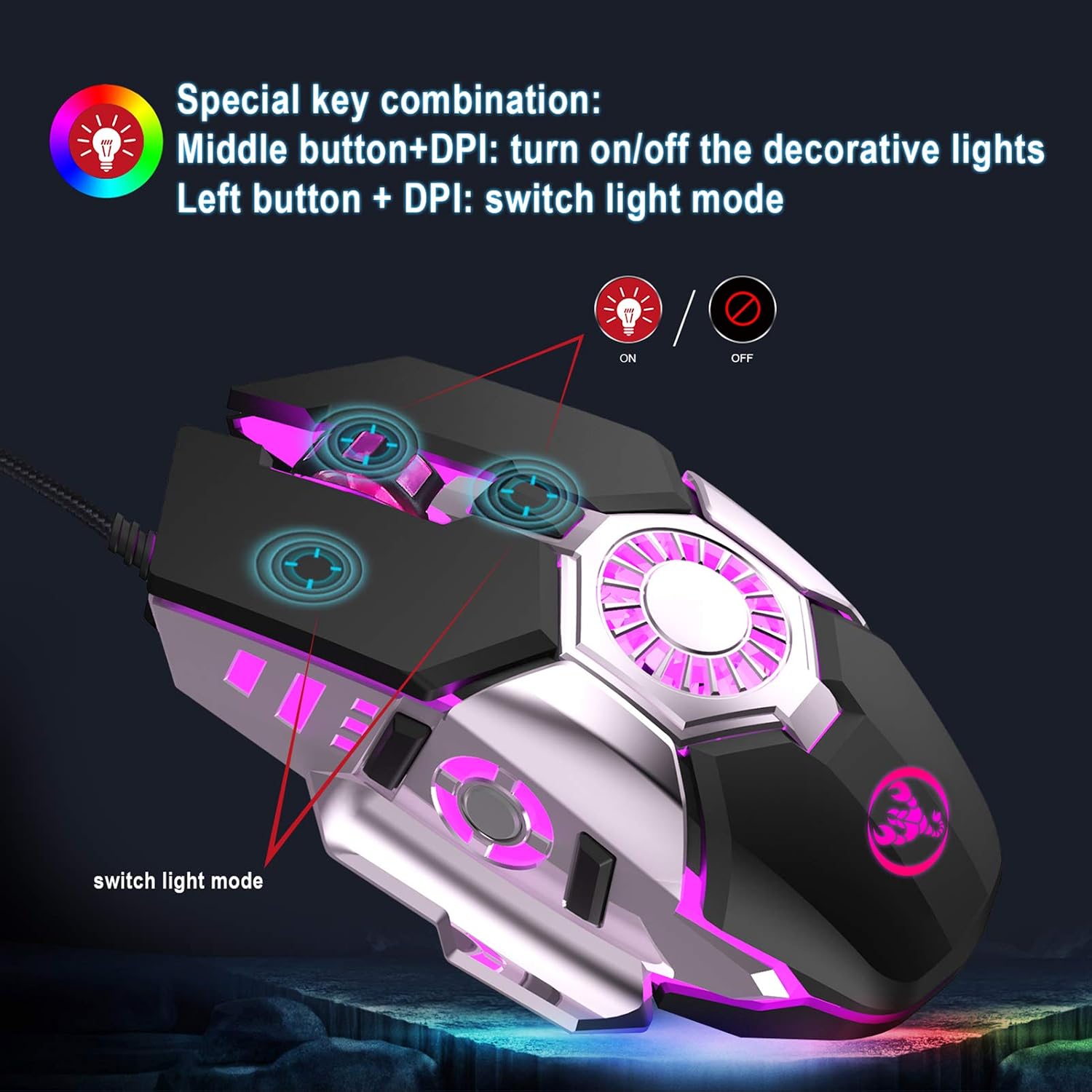
Image: Diagram showing the special key combinations on the Fesjoy HXSJ J700 Gaming Mouse for controlling the decorative lights (on/off) and switching light modes.
Macro Programming
The Fesjoy HXSJ J700 is a programmable gaming mouse. Utilize the dedicated software driver (download link provided in the Setup section) to customize button functions, create macros, and fine-tune performance settings for various games.
Maintenance
- Cleaning: Use a soft, dry cloth to clean the surface of the mouse. For the transparent 3D rubber roller and other crevices, a cotton swab can be used. Avoid using harsh chemicals or abrasive materials.
- Storage: Store the mouse in a clean, dry environment away from direct sunlight and extreme temperatures.
- Cable Care: Avoid bending or twisting the USB cable excessively to prevent damage.

Image: Close-up view of the Fesjoy HXSJ J700 Gaming Mouse's transparent 3D rubber scroll wheel, designed for anti-slip and sweat-proof performance.
Troubleshooting
- Mouse not responding:
- Ensure the USB cable is securely plugged into a working USB port on your computer.
- Try plugging the mouse into a different USB port.
- Restart your computer.
- DPI or lighting not changing:
- Ensure you are pressing the correct button combinations as described in the Operating Instructions section.
- If using the software, ensure it is installed correctly and running.
- Mouse cursor erratic or unresponsive:
- Clean the optical sensor on the underside of the mouse.
- Ensure you are using the mouse on a suitable surface (e.g., a mouse pad).
- Check for any driver conflicts or update the mouse driver.
Specifications
| Feature | Detail |
|---|---|
| Product Name | Programmable Gaming Mouse |
| Model | J700 |
| Brand | Fesjoy |
| Interface | USB |
| Number of Keys | 6 |
| Lighting Mode | Colorful Breathing Lights |
| DPI Switch | 4 levels (1000-1600-3200-6400 DPI) |
| Rated Voltage / Current | DC 5V / 100mA |
| Switch Life | 10 million cycles |
| Cable Length | 140 cm |
| Support Systems | Windows 2000 / XP / Win7 / Win8 / Win10 Vista 32bit, IOS or later |
| Item Size (L*W*H) | 12.8 * 8 * 4 cm (5.04 * 3.15 * 1.57 in) |
| Item Weight | Approx. 142 g (5.01 oz) |
| Color | Black |
| Hardware Platform | PC, Laptop |
| UPC | 791749449693 |
| Manufacturer Model Number | JNNDEC10376 |

Image: The Fesjoy HXSJ J700 Gaming Mouse depicted in a high-action gaming environment, emphasizing its 6400 DPI resolution for precise control. A table of chip specifications is also visible.
Warranty and Support
For warranty information or technical support, please refer to the documentation provided with your purchase or contact the retailer. The manufacturer, Fesjoy, provides support for their products.
Software driver download link: Fesjoy HXSJ J700 Driver