
VEVOR CF55
VEVOR CF55 Portable Refrigerator User Manual
Dual Zone Compressor Freezer Fridge Cooler for Car, Truck, RV, Camping, and Home Use
1. Product Overview
The VEVOR CF55 portable refrigerator is a versatile dual-zone unit designed for efficient cooling and freezing of food and beverages. Its robust compressor technology allows for rapid temperature changes, making it suitable for various environments including vehicles, campsites, and homes. The ample 58-quart capacity provides significant storage space for extended trips or gatherings.

Figure 1.1: VEVOR CF55 Portable Refrigerator with lid open, showcasing its spacious interior filled with various items.
2. What's in the Box
Upon unboxing your VEVOR CF55 portable refrigerator, please ensure all the following components are present:
- 1 x Car Refrigerator (VEVOR CF55)
- 1 x DC Power Cord (12/24V)
- 1 x Adapter for AC Power (110-240V)
- 1 x User Manual
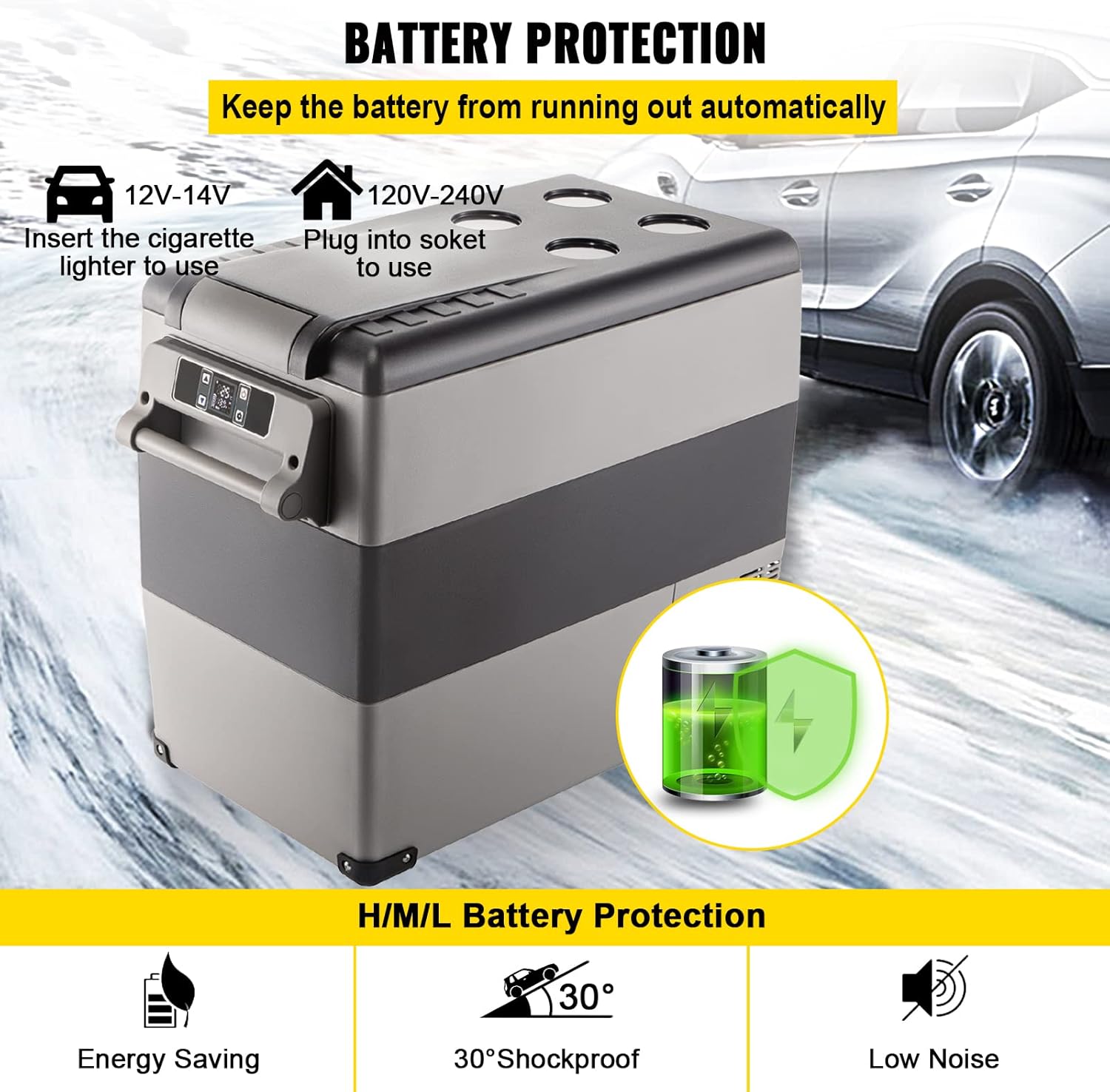
Figure 2.1: The VEVOR CF55 refrigerator comes with both DC (12/24V) and AC (110-240V) power adapters for versatile use.
3. Product Features and Design
The VEVOR CF55 is engineered with user convenience and optimal performance in mind. Key design elements include:
- Dual Zone Capacity: Separate compartments allow for simultaneous refrigeration and freezing.
- Digital Display: An intuitive digital panel for temperature monitoring and adjustment.
- USB Charging Port: Conveniently charge small electronic devices.
- Removable Internal Basket: For organized storage and easy access to contents.
- Detachable Handle: Ergonomically designed for portability.
- Built-in LED Light: Illuminates the interior for visibility in low-light conditions.
- Corner Protectors: Durable protectors to guard against impacts.
- Heat Dissipation Mesh: Ensures efficient cooling and extends compressor life.
- App Control: Manage settings remotely via a mobile application.

Figure 3.1: Explore the thoughtful design features of the VEVOR CF55, enhancing usability and durability.
4. Setup and Initial Use
Before first use, ensure the refrigerator is placed on a stable, level surface. Allow it to stand upright for at least 6 hours before plugging it in to allow the refrigerant to settle.
4.1 Power Connection
The VEVOR CF55 supports both DC and AC power inputs:
- DC 12/24V: Connect the DC power cord to your vehicle's cigarette lighter socket.
- AC 110-240V: Use the provided AC adapter to plug into a standard wall outlet.
Select the appropriate power source using the switch located near the power input port.
5. Operating Instructions
The control panel on the top of the unit allows for easy temperature management and mode selection.

Figure 5.1: The intuitive control panel provides full command over the refrigerator's functions.
5.1 Power On/Off
Press the Power button () to turn the unit on or off. The digital display will illuminate upon activation.
5.2 Temperature Adjustment
Use the Plus (+) and Minus (-) buttons () to set the desired temperature for each zone. The display shows the current temperature of both the left (L) and right (R) compartments. The temperature range is from -20°C to 20°C (-4°F to 68°F).
5.3 Mode Selection
Press the Settings button () to cycle through different operating modes:
- MAX: Provides the quickest cooling, ideal for rapidly chilling contents.
- ECO: Energy-saving mode, suitable for maintaining temperature once desired coolness is reached.
5.4 App Control
The VEVOR CF55 can be controlled via a mobile application. Refer to the included User Manual for detailed instructions on downloading, installing, and pairing the app with your refrigerator.
6. Performance and Cooling Capability
Equipped with a powerful compressor, the VEVOR CF55 offers efficient and rapid cooling. It can reach freezing temperatures quickly, ensuring your items stay fresh or frozen as needed.

Figure 6.1: The VEVOR CF55 demonstrates rapid cooling, capable of reaching 0°F (freezing) from 68°F in approximately 15 minutes.
7. Battery Protection
The refrigerator features a 3-level battery protection system (Low, Medium, High) to prevent your vehicle's battery from being drained. This ensures that your car's power supply remains stable and protected from overload or short-circuiting.

Figure 7.1: The VEVOR CF55 includes advanced battery protection for both vehicle and home use, ensuring power longevity.
8. Wide Application
The VEVOR CF55 is designed for extensive usage across various scenarios, providing reliable cooling wherever you need it.

Figure 8.1: Versatile applications of the VEVOR CF55, including use in cars, boats, homes, and outdoor settings.
9. Specifications
Detailed technical specifications for the VEVOR CF55 portable refrigerator:
| Specification | Value |
|---|---|
| Model | CF55 |
| Capacity | 55 Liters (58 Quarts) |
| Cooling Range | -20°C to 20°C (-4°F to 68°F) |
| Voltage | 12/24V DC, 110-240V AC |
| Power | 60W |
| Item Weight | 16.7 kg (36.8 lbs) |
| Product Dimensions (D x W x H) | 27 x 13.6 x 21 inches (69.3 x 34.5 x 53.1 cm) |
| Freezer Zone Dimensions | 12.8 x 10.5 x 17 inches (327 x 267 x 438 mm) |
| Fridge Zone Dimensions | 6.3 x 10.5 x 10.7 inches (160 x 267 x 273 mm) |
| Special Feature | App Control |
| Color | Black+Gray |
| Certification | CE |
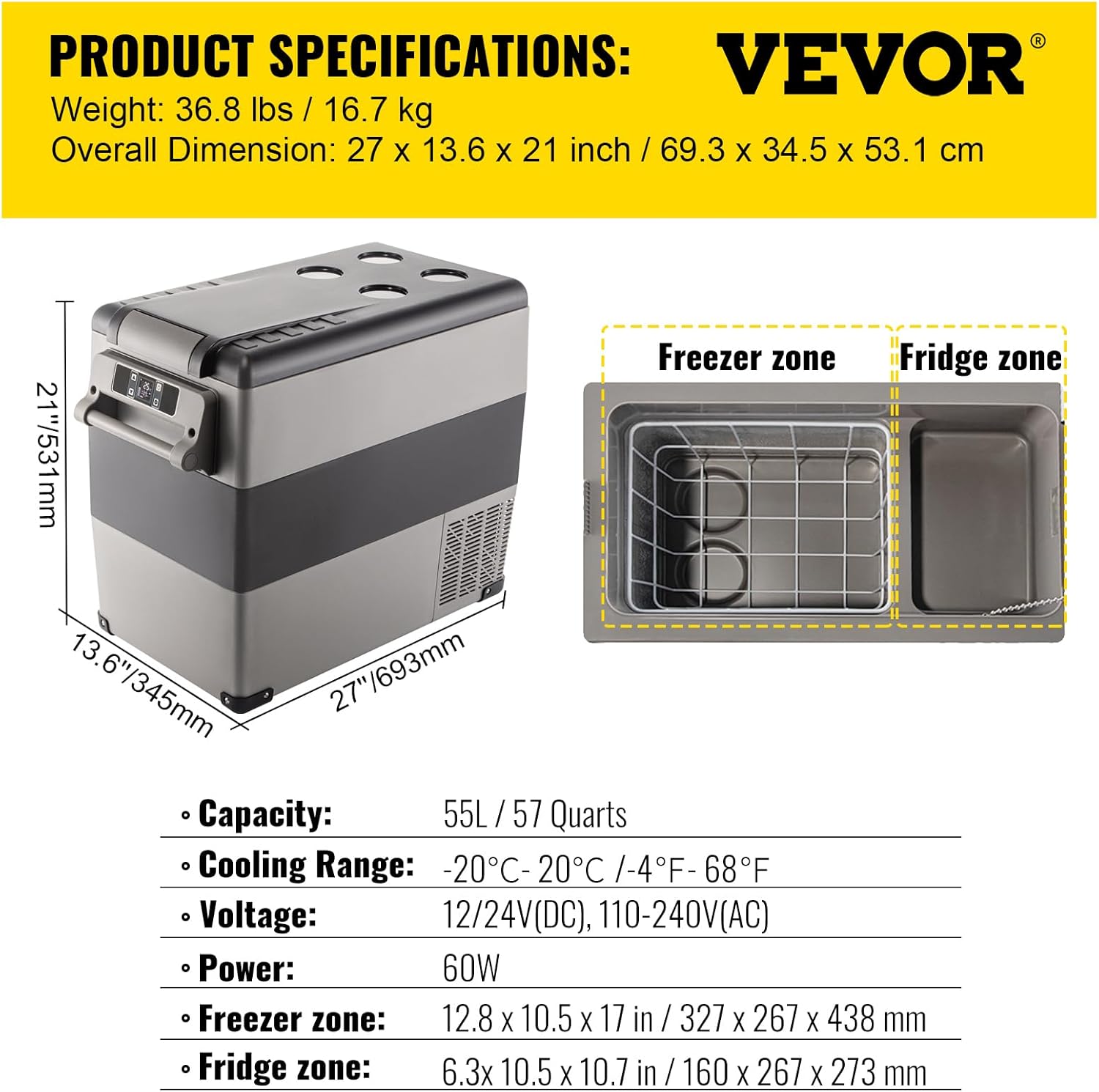
Figure 9.1: Detailed product specifications and dimensions for the VEVOR CF55.
10. Maintenance and Care
Regular maintenance ensures the longevity and optimal performance of your VEVOR CF55 refrigerator.
- Cleaning: Disconnect power before cleaning. Use a damp cloth with mild detergent to wipe down the interior and exterior. Do not use abrasive cleaners or immerse the unit in water.
- Defrosting: The unit features automatic defrost. If excessive ice builds up, manually defrost by turning off the unit and allowing ice to melt. Drain any water through the drain plug if available.
- Ventilation: Ensure the heat dissipation mesh areas are clear of obstructions to allow for proper airflow.
- Storage: When storing for extended periods, ensure the unit is clean and dry. Leave the lid slightly ajar to prevent odors and mold growth.
11. Troubleshooting
This section addresses common issues you might encounter with your VEVOR CF55 refrigerator.
| Problem | Possible Cause | Solution |
|---|---|---|
| Unit not turning on | No power supply; incorrect power connection; blown fuse. | Check power cord connection; ensure power outlet is functional; check vehicle's fuse. |
| Not cooling sufficiently | Lid not closed properly; vents blocked; ambient temperature too high; ECO mode selected. | Ensure lid is sealed; clear vents; move to a cooler environment; switch to MAX mode. |
| Unusual noise | Unit not level; fan obstruction; normal compressor operation. | Place on a level surface; check for obstructions in fan; slight vibration from compressor is normal. |
| App connection issues | Bluetooth not enabled; app not updated; unit not discoverable. | Ensure Bluetooth is on; update app; restart unit and app; refer to app pairing instructions. |
12. Warranty and Support
For technical support and warranty information, please visit the official VEVOR support website. The product includes a user manual with detailed warranty terms and conditions.
Official VEVOR Support: www.vevor.com/support
Ask a question about this manual
Ask about setup, troubleshooting, compatibility, parts, safety, or missing instructions. Manuals+ will review the question and use this page’s manual context to help answer it.