
Ortega Guitars RCE238SN-FT-L
Ortega Guitars Performer Series Left-Handed Acoustic-Electric Nylon Classical Guitar User Manual
Model: RCE238SN-FT-L
Introduction
Welcome to the user manual for your new Ortega Guitars Performer Series Left-Handed Acoustic-Electric Nylon Classical Guitar. This manual provides essential information for the setup, operation, maintenance, and troubleshooting of your instrument. Please read it carefully to ensure optimal performance and longevity of your guitar.
The Performer series combines traditional Spanish heel construction with modern features, offering a versatile and high-quality instrument for musicians.
Product Overview
The Ortega Guitars Performer Series RCE238SN-FT-L is a left-handed acoustic-electric nylon string classical guitar designed for enhanced playability and rich tone. It features a solid top and a slim neck, making it comfortable for various playing styles.

Figure 1: Front view of the Ortega Guitars RCE238SN-FT-L. This image displays the full body of the guitar, highlighting its faded burst natural gloss finish, the soundhole with its signature rosette, and the bridge.
Key Features:
- Model: RCE238SN-FT-L - Solid Top Acoustic/Electric Nylon String Guitar - Performer Series - w/ Bag.
- Construction: Solid Alaskan Spruce Top, Walnut Back & Sides, Faded Burst Natural Gloss Finish.
- Neck: Mahogany Neck with Natural Gloss Finish, Indian Laurel Fretboard & Bridge.
- Hardware: Walnut Binding & Maple/ABS Purfling, Ortega OTMLOCK6L-CR locking machines, Ortega Signature Walnut/Maple/White Pearl Rosette.
- Dimensions: Full Body 650 mm Scale, 102 mm Body Depth, 48 mm Nut Width Slim Neck, 19 Frets.
- Advanced Features: Spanish Heel with 2-Way Truss rod, Fan Bracing, 12-Hole Bridge for improved break angle and faster string replacement.
- Electronics: Ortega MagusPro preamp/pickup system with built-in tuner.
- Design: Venetian Cutaway for easy access to upper frets.
- Accessories: Includes Free Deluxe Gig Bag.
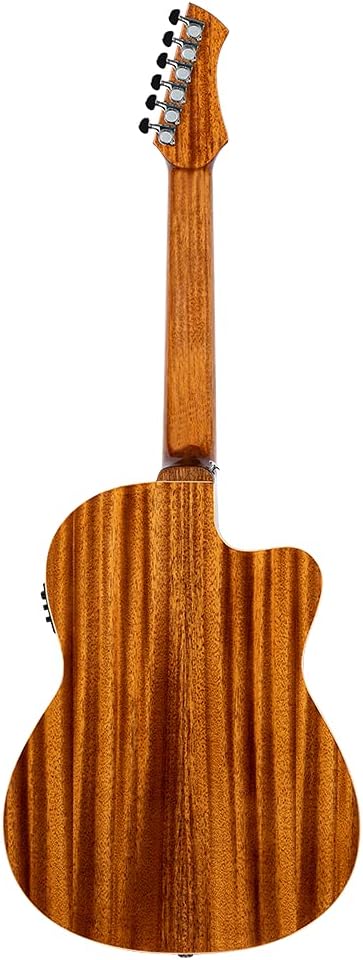
Figure 2: Angled view of the guitar, showcasing the Venetian cutaway and the integrated MagusPro preamp controls on the upper bout.

Figure 3: Close-up of the Ortega MagusPro preamp and pickup system. This image shows the control panel with volume, bass, middle, treble knobs, and the tuner button, along with the output jack and battery compartment.
Setup
1. Unpacking
- Carefully remove the guitar from its packaging and gig bag.
- Inspect the guitar for any signs of damage that may have occurred during shipping.
- Retain all packaging materials for future transport or storage.
2. Initial Inspection
- Check the strings for proper seating and tension.
- Ensure the tuning machines are functioning smoothly.
- Verify the MagusPro preamp battery is installed and functional. The battery compartment is typically located near the output jack.
3. Tuning the Guitar
Your Ortega guitar is equipped with an Ortega MagusPro preamp system that includes a built-in tuner.
- Press the "Tuner" button on the MagusPro preamp to activate the tuner.
- Pluck each string individually. The display will show the note being played and indicate if it is sharp or flat.
- Adjust the corresponding tuning machine head until the tuner indicates the string is in tune (standard tuning for classical guitar is E-A-D-G-B-E, from thickest to thinnest string).
- Press the "Tuner" button again to deactivate the tuner.
4. Connecting to an Amplifier (Optional)
To amplify your guitar's sound, connect a standard 1/4-inch instrument cable from the guitar's output jack (located near the strap button) to your amplifier or PA system's input.
Operating
Playing the Guitar
Hold the guitar comfortably, ensuring proper posture. The slim neck and Venetian cutaway are designed to enhance playability and access to higher frets. Experiment with different strumming and fingerpicking techniques to explore the guitar's tonal range.
Using the Ortega MagusPro Preamp System
The MagusPro preamp allows you to shape your amplified sound.
- Volume Knob: Controls the overall output level of the amplified sound.
- Bass Knob: Adjusts the low-frequency response. Turn clockwise for more bass, counter-clockwise for less.
- Middle Knob: Adjusts the mid-frequency response. This affects the presence and clarity of the sound.
- Treble Knob: Adjusts the high-frequency response. Turn clockwise for brighter sound, counter-clockwise for warmer sound.
- Phase Button: Helps to reduce feedback, especially in live performance settings. Press to toggle the phase.
- Tuner Button: Activates and deactivates the built-in chromatic tuner.
Always start with the volume low and gradually increase it to avoid sudden loud noises. Adjust the EQ (Bass, Middle, Treble) to suit your playing environment and desired tone.
Maintenance
Cleaning
- Wipe down the guitar body, neck, and strings with a soft, lint-free cloth after each use to remove sweat and oils.
- For the gloss finish, use a guitar-specific polish sparingly. Avoid abrasive cleaners.
- Clean the fretboard periodically with a dedicated fretboard cleaner and conditioner to prevent drying and cracking.
String Replacement
Nylon strings should be replaced regularly to maintain optimal tone and playability. Your guitar features a 12-hole bridge, which provides a greater break angle for a cleaner sound and facilitates faster string replacement.
- Loosen the old strings and carefully remove them from the tuning machines and bridge.
- Thread the new strings through the appropriate holes in the 12-hole bridge, ensuring they are securely knotted.
- Thread the other end of the strings through the tuning machine posts and wind them neatly.
- Stretch the new strings gently and tune them to pitch. New nylon strings will stretch significantly and require frequent re-tuning initially.
Humidity Control
Wood instruments are sensitive to changes in humidity. Extreme dryness or humidity can cause damage such as cracking or warping. Store your guitar in its gig bag or case when not in use, and consider using a guitar humidifier/dehumidifier, especially in environments with fluctuating climate conditions.
Truss Rod Adjustment
Your guitar is equipped with a 2-way truss rod, which allows for precise adjustment of neck relief. Truss rod adjustments should only be performed by experienced individuals or qualified guitar technicians. Improper adjustment can damage the neck.
Troubleshooting
| Problem | Possible Cause | Solution |
|---|---|---|
| No sound when plugged in | Dead battery in preamp; faulty cable; amplifier off/incorrect settings. | Replace preamp battery; try a different cable; check amplifier power and input settings. |
| Buzzing sound from strings | Low action; uneven frets; neck relief issues; worn strings. | Check neck relief (truss rod); consult a technician for fret leveling or action adjustment; replace strings. |
| Guitar won't stay in tune | New strings stretching; improper string winding; faulty tuning machines; environmental changes. | Stretch new strings thoroughly; ensure strings are wound correctly on posts; check tuning machines for looseness; maintain stable humidity. |
| Feedback when amplified | High volume; proximity to amplifier; room acoustics. | Engage the "Phase" button on the preamp; reduce volume; move away from the amplifier; use a soundhole cover. |
Specifications
| Feature | Detail |
|---|---|
| Item Weight | 9.02 pounds |
| Product Dimensions | 42.91 x 20.47 x 7.87 inches |
| ASIN | B08M42W149 |
| Item Model Number | RCE238SN-FT-L |
| Date First Available | November 17, 2020 |
| Back Material | Mahogany |
| Body Material | Mahogany |
| Color Name | White |
| Fretboard Material | Laurel Wood |
| Guitar Pickup Configuration | Piezo |
| Scale Length | 650 mm |
| String Gauge | Medium |
| String Material | Nylon |
| Top Material | Spruce |
| Neck Material Type | Mahogany |
| Number of Strings | 6 |
| Guitar Bridge System | Fixed |
| Musical Style | Pop, Rock, Country, Classical, Flamenco, Solo, Folk |
| Proficiency Level | Professional |
| Battery type | Alkaline |
| Hand Orientation | Left |
Warranty and Support
For detailed warranty information regarding your Ortega Guitars product, please refer to the warranty card included with your purchase or visit the official Ortega Guitars website. Warranty terms and conditions may vary by region.
If you encounter any issues not covered in this manual or require technical assistance, please contact Ortega Guitars customer support. You can typically find contact information on their official website or through your authorized dealer.
Online Resources: For additional resources, FAQs, and product registration, please visit the Ortega Guitars Store on Amazon or their official brand website.
Ask a question about this manual
Ask about setup, troubleshooting, compatibility, parts, safety, or missing instructions. Manuals+ will review the question and use this page’s manual context to help answer it.