
MOMAX UD9W
MOMAX Q. Dock 5 Max 15W Fast Convertible Qi Certified Wireless Charger User Manual
Model: UD9W
1. Introduction
Thank you for choosing the MOMAX Q. Dock 5 Max 15W Fast Convertible Qi Certified Wireless Charger. This device provides a convenient and efficient way to wirelessly charge your Qi-compatible smartphones. Its convertible design allows for both flat pad and upright stand charging, adapting to your needs for viewing content while charging. This manual will guide you through the setup, operation, and maintenance of your new wireless charger.
2. Safety Information
Please read all safety instructions carefully before using this product. Failure to follow these instructions may result in electric shock, fire, or other hazards.
- Do not expose the device to liquids, moisture, or extreme temperatures.
- Do not disassemble, repair, or modify the device. This will void the warranty.
- Keep the device away from strong magnetic fields.
- Use only certified power adapters (QC3.0 recommended for fast charging) with the specified input voltage (5V/2A, 9V/2A, 12V/1.5A).
- Ensure proper ventilation around the charger during use.
- Avoid placing metal objects or foreign materials on the charging surface, as this may interfere with charging or cause overheating.
- The device features built-in intelligent overheating protection and automatically powers off after full charge to prevent overcharge.
3. Package Contents
Verify that all items are present in your package:
- MOMAX Q. Dock 5 Max Wireless Charger (Model UD9W)
- Type-C to USB Cable (1M)
- User Manual (this document)
4. Product Overview
Familiarize yourself with the components of your MOMAX Q. Dock 5 Max wireless charger.

Figure 4.1: MOMAX Q. Dock 5 Max Wireless Charger in its flat pad configuration, showing the white charging surface with MOMAX branding and subtle gold trim around the base.
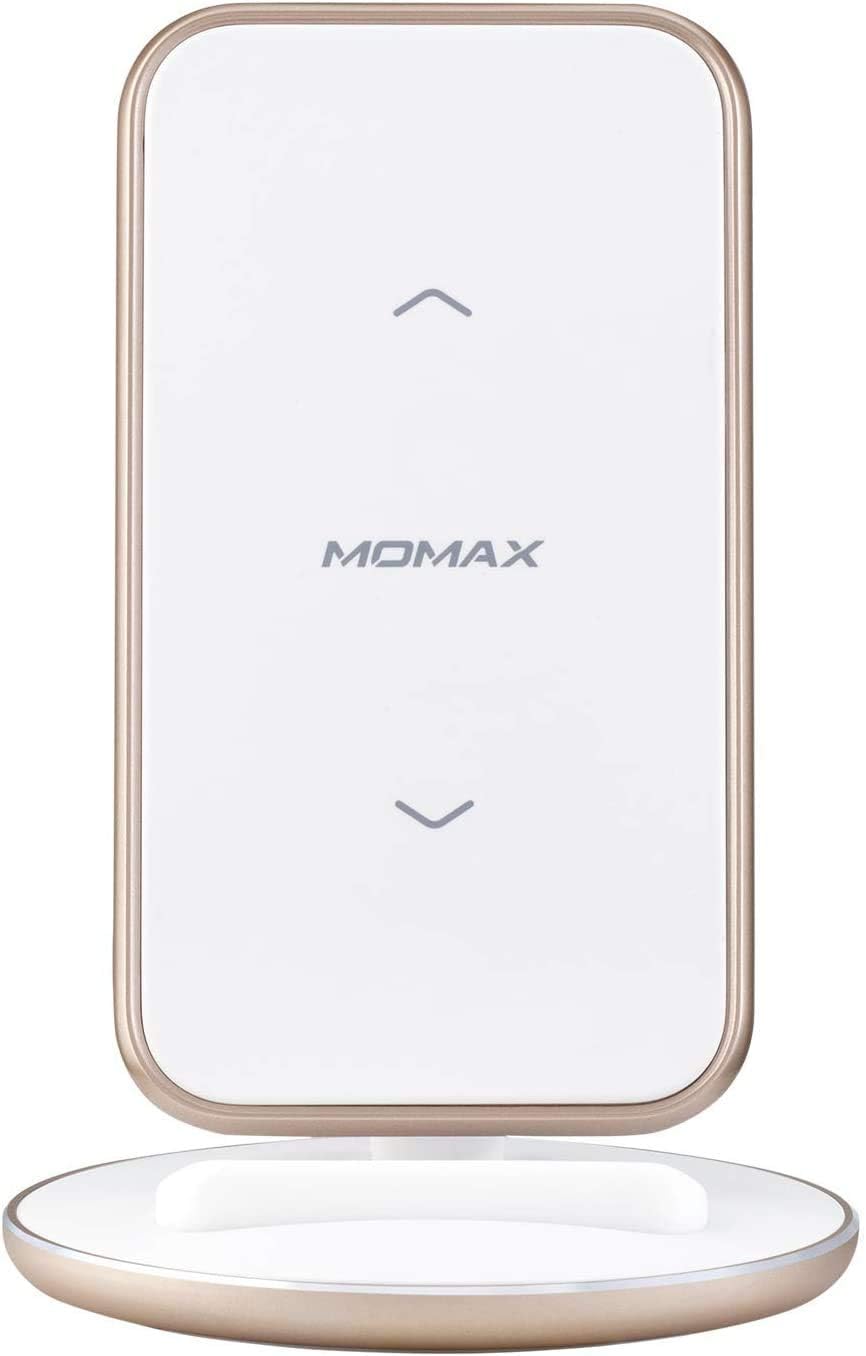
Figure 4.2: MOMAX Q. Dock 5 Max Wireless Charger converted to an upright stand, ready to hold a smartphone for vertical or horizontal charging.

Figure 4.3: The MOMAX Q. Dock 5 Max Wireless Charger in stand mode, actively charging a smartphone. The phone is positioned vertically on the stand, demonstrating its stability and charging capability.

Figure 4.4: Another view of the MOMAX Q. Dock 5 Max Wireless Charger in stand mode, with a smartphone charging. This image highlights the sleek design and how the charger integrates into a desk environment.
Key features include:
- Convertible Design: Easily switch between a flat charging pad and an upright charging stand.
- Dual Coil System: Allows for charging in both vertical and horizontal orientations when in stand mode.
- 15W Fast Wireless Charging: Supports rapid charging for compatible devices (requires QC3.0 adapter).
- Qi Certified: Ensures compatibility with all Qi-enabled smartphones.
- Breath LED Lights: Indicates charging status (ready, charging, fully charged).
- Safety Protections: Built-in over-voltage, under-voltage, short circuit, and overheating protection.
- Type-C Input: Modern and reversible connector for power input.
5. Setup
- Unpack the Charger: Carefully remove the MOMAX Q. Dock 5 Max wireless charger and the included Type-C to USB cable from its packaging.
- Connect Power:
- Insert the Type-C end of the provided cable into the Type-C input port on the back of the MOMAX Q. Dock 5 Max.
- Connect the USB-A end of the cable to a compatible power adapter (not included). For 15W fast charging, a QC3.0 compatible power adapter is required.
- Plug the power adapter into a wall outlet.
- Power On Indication: The LED indicator light on the charger will illuminate briefly, indicating that the charger is powered on and ready for use.
- Choose Charging Mode:
- Flat Pad Mode: For a compact charging surface, keep the charger in its flat configuration.
- Upright Stand Mode: To convert to a stand, gently pull the top section upwards until it locks into the upright position. This mode is ideal for viewing content while charging.
6. Operating Instructions
- Place Your Device:
- In Flat Pad Mode: Place your Qi-enabled smartphone directly onto the center of the charging pad.
- In Upright Stand Mode: Place your Qi-enabled smartphone onto the stand, ensuring it rests securely against the charging surface. The dual coils allow for both vertical (portrait) and horizontal (landscape) charging.
- Charging Indication: The LED indicator light will change to indicate that your device is charging. Refer to the LED status guide below.
- Optimal Charging: Ensure your device is centered on the charging area for optimal charging efficiency. Some phone cases may affect charging; if charging is inconsistent, try removing the case.
- Charging Complete: Once your device is fully charged, the LED indicator will change again (refer to LED status guide), and the charger will automatically stop power output to prevent overcharging.
LED Indicator Status:
| LED Status | Meaning |
|---|---|
| Solid Blue (or similar) | Ready for charging / Fully charged |
| Breathing Blue (or similar) | Device is charging |
| Flashing Blue (or similar) | Foreign object detected / Charging error |
Note: Specific LED colors and patterns may vary slightly. Refer to the product's visual cues for confirmation.
7. Maintenance
Proper maintenance ensures the longevity and optimal performance of your wireless charger.
- Cleaning: Disconnect the charger from power before cleaning. Use a soft, dry, lint-free cloth to wipe the surface. Do not use abrasive cleaners, solvents, or chemical sprays.
- Storage: When not in use for extended periods, store the charger in a cool, dry place away from direct sunlight and extreme temperatures.
- Handling: Avoid dropping or subjecting the charger to strong impacts.
8. Troubleshooting
If you encounter issues with your MOMAX Q. Dock 5 Max, please refer to the following common problems and solutions:
| Problem | Possible Cause / Solution |
|---|---|
| Device not charging. |
|
| Slow charging. |
|
| LED flashing / Foreign Object Detection (FOD). |
|
| Charger or device gets hot. |
|
If the problem persists after trying these solutions, please contact MOMAX customer support.
9. Specifications
| Feature | Detail |
|---|---|
| Product Model | UD9W |
| Input | 5V/2A, 9V/2A, 12V/1.5A (Type-C) |
| Output (Wireless) | 5V/1A, 9V/1A, 9V/1.67A, 15W (max.) |
| Dimensions | 123.5mm x 84.5mm (Product Dimensions: 8.45 x 8.45 x 12.35 cm) |
| Weight | 148.4g (Item weight: 159 g) |
| Material | Plastic |
| Connector Type | USB Type-C (Input) |
| Special Features | Fast Charging, Short Circuit Protection, Over-voltage Protection, Under-voltage Protection, Overheating Protection |
| Compatible Devices | Qi-enabled Smartphones |
10. Warranty and Support
MOMAX products are designed with quality and reliability in mind. For warranty information and customer support, please refer to the warranty card included with your product or visit the official MOMAX website.
Contact Information:
- Manufacturer: Momax Technology (HongKong) Ltd.
- For the most up-to-date support information, please visit www.momax.net.
Please retain your proof of purchase for warranty claims.