
Philips S5587/10
Philips SHAVER Series 5000 Electric Shaver User Manual
Model: S5587/10 | Brand: Philips
1. Introduction
Thank you for choosing the Philips SHAVER Series 5000 Electric Wet & Dry Shaver. This manual provides essential information for the safe and effective use, maintenance, and troubleshooting of your new shaver. Designed for a powerful yet gentle shave, this model features SteelPrecision blades, 360-D flexible heads, and a Power Adapt sensor for an optimized shaving experience.
2. Safety Information
Please read this user manual carefully before you use the appliance and save it for future reference.
- Do not use the appliance if it is damaged.
- Keep the appliance dry. Do not immerse it in water.
- This appliance can be used by children aged from 8 years and above and persons with reduced physical, sensory or mental capabilities or lack of experience and knowledge if they have been given supervision or instruction concerning use of the appliance in a safe way and understand the hazards involved.
- Cleaning and user maintenance shall not be made by children without supervision.
- Only use the original charging cable provided with the appliance.
- Unplug the shaver before cleaning it under running water.
3. What's in the Box
Upon opening your Philips SHAVER Series 5000 package, you should find the following components:
- Philips SHAVER Series 5000 Electric Shaver (Model S5587/10)
- Cleaning Brush
- Pop-up Trimmer attachment
- Charging Cable (EU Plug)
- Travel Pouch

Image: The Philips SHAVER Series 5000 Electric Shaver alongside its grey travel pouch.
4. Setup
4.1 Charging the Shaver
Before first use, fully charge your shaver.
- Ensure the shaver is dry before connecting the charging cable.
- Plug the small end of the charging cable into the shaver's charging port.
- Plug the other end of the cable into a wall outlet (EU plug type).
- The LED display on the shaver will indicate the charging status. A full charge takes approximately 1 hour and provides up to 60 minutes of cordless shaving time.
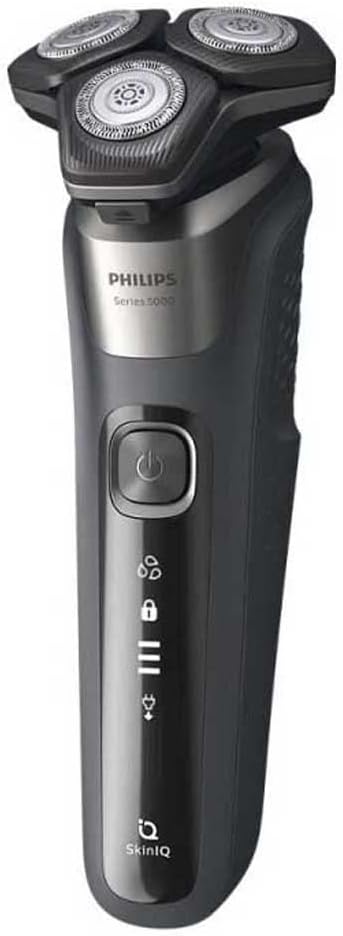
Image: A close-up side view of the Philips SHAVER Series 5000, highlighting its ergonomic design and power button.
5. Operating the Shaver
5.1 Basic Shaving Instructions
The Philips SHAVER Series 5000 is designed for both dry and wet shaving, including use with foam or gel.
- Dry Shaving: For a quick and convenient shave, ensure your face is clean and dry.
- Wet Shaving: For a refreshing shave, you can use the shaver with shaving foam or gel. This also helps protect sensitive skin.
To begin shaving, press the power button. Move the shaver in small, circular motions over your skin. The 360-D flexible heads adapt to the contours of your face, ensuring close contact and a smooth shave. The SteelPrecision blades provide efficient cutting with every pass, while the Hair-Guide precision heads guide hair into the optimal cutting position. The Power Adapt sensor automatically adjusts cutting power for an effortless shave.

Image: A man using the Philips electric shaver for a dry shave, demonstrating the shaver's maneuverability around the jawline.

Image: A man using the Philips electric shaver to shave the neck area, showing the flexible heads adapting to the contours.

Image: The Philips electric shaver being used with shaving foam, illustrating its wet shaving capability.
5.2 Using the Pop-up Trimmer
The integrated pop-up trimmer is ideal for maintaining your mustache and trimming sideburns.
- Locate the pop-up trimmer release button on the back of the shaver.
- Slide the button upwards to activate the trimmer.
- Use the trimmer to precisely shape your facial hair.
- When finished, push the trimmer back down until it clicks into place.
6. Maintenance
6.1 Cleaning the Shaver
Regular cleaning ensures optimal performance and hygiene. The shaver is designed for easy cleaning.
- Turn off the shaver and unplug it from the power outlet.
- Press the release button to open the shaver head unit with a single press.
- Rinse the shaver head unit thoroughly under warm running water.
- You can also use the provided cleaning brush to remove any stubborn hair particles from the shaving heads.
- Shake off excess water and leave the shaver head unit open to air dry.
- Close the shaver head unit once dry.
6.2 Replacing Shaving Heads
For best shaving results, it is recommended to replace the shaving heads every 12 months. Replacement heads can be purchased from authorized Philips retailers.
- Turn off the shaver and unplug it.
- Open the shaver head unit.
- Remove the retaining ring by turning it counter-clockwise.
- Take out the old shaving heads.
- Insert the new shaving heads into the unit, ensuring they are correctly aligned.
- Place the retaining ring back and turn it clockwise until it locks.
- Close the shaver head unit.
7. Troubleshooting
If you encounter any issues with your Philips SHAVER Series 5000, please refer to the following common problems and solutions:
| Problem | Possible Cause | Solution |
|---|---|---|
| Shaver does not turn on. | Battery is empty. | Charge the shaver for at least 1 hour. |
| Poor shaving performance. | Shaving heads are dirty or worn out. | Clean the shaving heads thoroughly. If performance does not improve, replace the shaving heads. |
| Shaver makes unusual noise. | Hair or debris stuck in the shaving unit. | Open and clean the shaving heads. Ensure no foreign objects are present. |
| Skin irritation after shaving. | Incorrect shaving technique or sensitive skin. | Ensure you are using small, circular motions. Try wet shaving with foam/gel. Allow skin to adapt. |
8. Specifications
Key technical specifications for the Philips SHAVER Series 5000 (Model S5587/10):
- Product Name: Rotary Shaver
- Model Number: S5587/10
- Brand: Philips
- Blade Material: Stainless Steel
- Head Type: Rotary
- Power Source: Corded (for charging), Battery (for operation)
- Battery Type: 1 Lithium-ion (included)
- Battery Life: Up to 60 minutes cordless use
- Charging Time: 1 hour for full charge
- Input Voltage: 100-240 V AC
- Color: Grey
- Dimensions (L x W x H): 80 x 60 x 80 cm (approx. 3.15 x 2.36 x 3.15 inches)
- Weight: 400 grams (approx. 0.88 lbs)
- Special Feature: Removable Head
- Recommended Uses: Beard, Body Hair
- Display: LED Display
- Cleaning: Easy to clean, Wet & Dry use
Related Documents - S5587/10
 |
Philips Shaver Series 5000 (S5885/25) Product Overview Overview and specifications for the Philips Shaver Series 5000, featuring SteelPrecision blades, SkinIQ technology, and a 60-minute cordless runtime. |
 |
Philips Shaver Series 5000 (S5898/79) - Wet and Dry Electric Shaver Technical specifications and feature overview for the Philips Shaver Series 5000 (S5898/79), featuring SkinIQ technology, SteelPrecision blades, and a Quick Clean Pod for an efficient grooming experience. |
 |
Philips Shaver Series 5000: Advanced SkinIQ Technology for Efficient and Gentle Shaving Discover the Philips Shaver Series 5000, featuring SteelPrecision blades and SkinIQ technology for an efficient, gentle shave. Learn about its key features, comfortable usage, and detailed specifications. |
 |
Philips Shaver Series 5000 S5885/35: Powerful Shaving, Gentle on Skin with SkinIQ Technology Explore the Philips Shaver Series 5000 S5885/35, designed for a powerful yet gentle shave. Featuring SteelPrecision blades, SkinIQ technology, 360-D flexible heads, and up to 60 minutes of cordless use. Learn about its wet & dry functionality, easy cleaning, and 5-year warranty. |
 |
Philips Shaver Series 5000 S5887/50: Afeitado Potente y Suave con Tecnología SkinIQ Descubre la Philips Shaver Series 5000 S5887/50 para un afeitado potente y suave. Con tecnología SkinIQ, cuchillas SteelPrecision y cabezales flexibles de 360 grados para máxima comodidad. |
 |
Philips Shaver Series 5000 S5885/10: Powerful Wet & Dry Electric Shave with SkinIQ Technology Discover the Philips Shaver Series 5000 (S5885/10) for a powerful, gentle shave with advanced SkinIQ technology. Features SteelPrecision blades, 360-D flexing heads, 60-minute cordless runtime, and USB-A charging. Learn about its wet & dry capabilities, easy cleaning, and sustainability. |
Ask a question about this manual
Ask about setup, troubleshooting, compatibility, parts, safety, or missing instructions. Manuals+ will review the question and use this page’s manual context to help answer it.