
Adjustable Bed Remotes 9de78cec-8f25-45c5-90d2-dac88c0fc36d
Instruction Manual: 3 Piece Replacement Power Cord Kit
Model: 9de78cec-8f25-45c5-90d2-dac88c0fc36d | Brand: Adjustable Bed Remotes
Introduction
This manual provides essential information for the proper setup, operation, and maintenance of your 3 Piece Replacement Power Cord Kit. This kit is designed to replace the power input cord and AC adapter box/plug for compatible adjustable bed bases. Please read this manual thoroughly before installation to ensure correct usage and to avoid any potential issues.
Product Overview
The 3 Piece Replacement Power Cord Kit includes the necessary components to restore power to your adjustable bed base. It consists of an AC adapter box/plug and a power input cord.

Figure 1: Components of the Replacement Power Cord Kit.
Compatibility
This kit is compatible with Tempurpedic Ergo/Extend/Sealy Ease or Ease 2.0 and Serta New Generation (Motion Perfect 2.0 and on, Motion Essentials 2 and on, Plus, Custom) adjustable bed bases. It is NOT compatible with Older Generation Tempurpedic Ergo Advance, Grand, Plus, Premier, or TES Models.
It is crucial to verify compatibility before ordering. If your bed remote buttons do not exactly match those shown in the alternate pictures, this kit may not work with your base. Please contact the seller if you have any questions regarding compatibility.
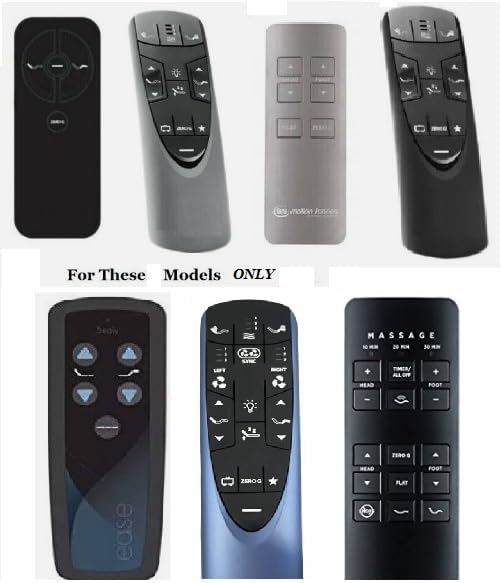
Figure 2: Examples of compatible remote controls for the adjustable bed bases.
Setup Instructions
- Unpack the Kit: Carefully remove all components from the packaging.
- Locate Existing Connections: Identify where the original power cord and AC adapter were connected to your adjustable bed base. This is typically located underneath the bed frame.
- Disconnect Old Components (if applicable): If replacing an existing faulty cord, ensure the bed base is unplugged from the wall outlet. Disconnect the old power input cord and AC adapter from the bed base.
- Connect New AC Adapter: Plug the new AC adapter box/plug into the designated port on your adjustable bed base. Ensure a secure connection.
- Connect Power Input Cord: Connect the power input cord to the AC adapter box.
- Plug into Wall Outlet: Plug the other end of the power input cord into a standard, grounded wall outlet.
- Verify Power: A green indicator light on the AC adapter box should illuminate, indicating power is being supplied. Test your adjustable bed's functions using its remote control.
Note: The installation process is generally straightforward, often described as "plug and play."
Operating Instructions
Once the power cord kit is correctly installed and plugged into a live wall outlet, your adjustable bed base should receive power. Operation of the bed's functions (e.g., head/foot adjustments, massage) is controlled solely by your bed's original remote control. This power cord kit provides the necessary electrical connection for the bed base to function.
Maintenance
- Regular Inspection: Periodically inspect the power cord and AC adapter for any signs of damage, fraying, or exposed wires.
- Keep Clear: Ensure the power cord is not pinched, tangled, or placed under heavy objects. Keep it away from pets that might chew on cables.
- Cleaning: If necessary, gently wipe the AC adapter box and cord with a dry, soft cloth. Do not use liquid cleaners or immerse any part of the kit in water.
- Storage: If the bed base is to be stored or moved, unplug the power cord from the wall outlet and carefully disconnect it from the bed base. Coil the cord loosely to prevent kinks.
Troubleshooting
| Problem | Possible Cause | Solution |
|---|---|---|
| Bed base not receiving power. |
|
|
| Green indicator light on adapter is off. |
|
|
Specifications
- Product Type: 3 Piece Replacement Power Cord Kit
- Brand: Adjustable Bed Remotes
- Model Number: 9de78cec-8f25-45c5-90d2-dac88c0fc36d
- ASIN: B08LZZ25ML
- Package Dimensions: 8 x 6 x 4 inches
- Item Weight: 1.08 pounds
- Color: Grey
- Connector Gender: Male-to-Female
- Voltage: 120 Volts (AC)
- Plug Format: Type A
- Date First Available: April 28, 2018
Warranty Information
Specific warranty details for this product are not provided in the available information. Please refer to the product listing or contact the seller directly for warranty terms and conditions.
Customer Support
For any questions, concerns, or assistance with your 3 Piece Replacement Power Cord Kit, please contact the seller through the platform where you purchased the product. Providing your order details and a clear description of the issue will help expedite support.
It is recommended to contact the seller before ordering if you have any doubts about the compatibility of this kit with your specific adjustable bed base model.
Related Documents - 9de78cec-8f25-45c5-90d2-dac88c0fc36d
 |
How to Pair Your Tempur-Pedic Adjustable Base Remote Step-by-step instructions for pairing your Tempur-Pedic adjustable base remote with models like Ease, Ergo, and Extend. Includes troubleshooting tips. |
 |
Tempur-Sealy Adjustable Base: Self-Service Troubleshooting for Non-Responsive Issues Troubleshoot your Tempur-Sealy, Tempur-Pedic, or Ease adjustable bed base when it becomes non-responsive. Learn how to deactivate the Child Lock feature with step-by-step instructions. |
 |
How to Disable and Enable Child Lock on Tempur-Pedic Adjustable Bases Step-by-step instructions for disabling and enabling the child lock feature on Tempur-Pedic Ease 3.0, Ergo Power Base, Ergo Smart Base with Sleeptracker, and Ergo Extend adjustable bases. Includes troubleshooting tips. |
 |
Tempur-Ergo Smart Base Installation Manual with Sleeptracker AI Comprehensive installation guide for Tempur-Pedic Tempur-Ergo Smart Bases featuring Sleeptracker AI. Covers setup for Split King, Horizontal Split King, and Single Unit configurations, including component identification, assembly steps, and app connectivity. |
 |
Invacare Medley Ergo & Medley Ergo Low Hospital Bed User Manual This user manual provides comprehensive instructions for the Invacare Medley Ergo and Medley Ergo Low electric hospital beds. It covers essential information on safety, setup, operation, maintenance, troubleshooting, and technical specifications to ensure proper and safe use of the product. |
 |
Invacare® Medley® Ergo and Medley Ergo Low Medical Bed User Manual This user manual provides comprehensive instructions for the Invacare® Medley® Ergo and Medley Ergo Low medical beds. It covers essential information on safe operation, setup, maintenance, troubleshooting, and technical specifications for healthcare professionals and caregivers. |