
1. Introduction
The ULANZI DR-02 Drone Strobe Lights are designed to enhance the visibility and safety of your drone, especially during low-light conditions or night flights. These lightweight, anti-collision LED lights offer multiple color and flashing modes to meet various regulatory requirements and personal preferences. Compatible with a wide range of drones, the DR-02 provides a reliable and easy-to-install lighting solution for drone pilots.

Image: Anti-Collision Light for Drone - Know the direction of the drone at night, not afraid of blind flying.
2. Product Features
- Ultra-Lightweight Design: Weighing only 0.014 lbs (6.35g), these lights minimize impact on drone flight performance and battery life.
- Long Battery Life: Equipped with a 110mAh battery, providing up to 8 hours of continuous operation on a single charge.
- Multiple Light Modes: Features RGB LED lights with options for fast flashing and slower flashing in white, green, and red colors.
- Versatile Mounting Options: Can be securely attached using either 3M Velcro pads or durable rubber rings, allowing for flexible placement on various drone models.
- USB-C Charging: Convenient and fast charging via a modern USB-C port.
- Durable Construction: Made from robust rubber material, ensuring longevity and resistance to wear.

Image: The DR-02 strobe light is extremely lightweight, weighing only 0.014 lbs.

Image: The DR-02 features a 110mAh battery, offering up to 8 hours of standby time.

Image: The DR-02 offers red, green, and white light options for various visibility needs.
3. Package Contents
Upon opening your ULANZI DR-02 package, you should find the following items:
- 1 x ULANZI DR-02 Drone Strobe Light
- 1 x USB-C Charging Cable
- 3 x 3M Velcro Pads (for adhesive mounting)
- 2 x Rubber Rings (for strap mounting)
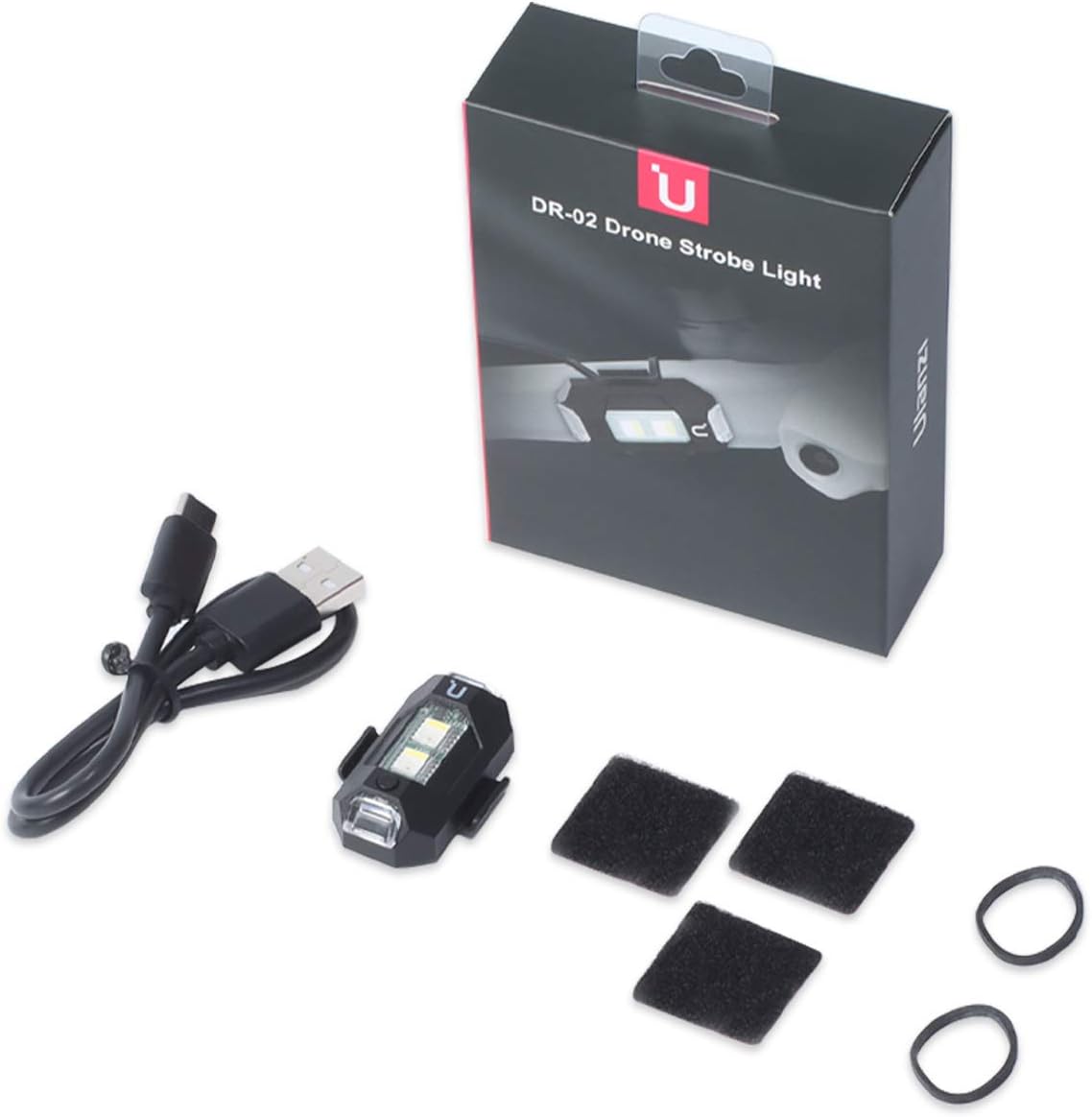
Image: The complete package contents of the DR-02 Drone Strobe Light.
4. Setup and Installation
The DR-02 offers two primary methods for attachment to your drone:
4.1. Velcro Installation
- Clean the desired mounting surface on your drone to ensure it is free of dust and grease.
- Peel the backing from one of the 3M Velcro pads and firmly stick it onto the cleaned surface of your drone.
- Align the Velcro on the bottom of the DR-02 light with the pad on your drone and press firmly to secure.
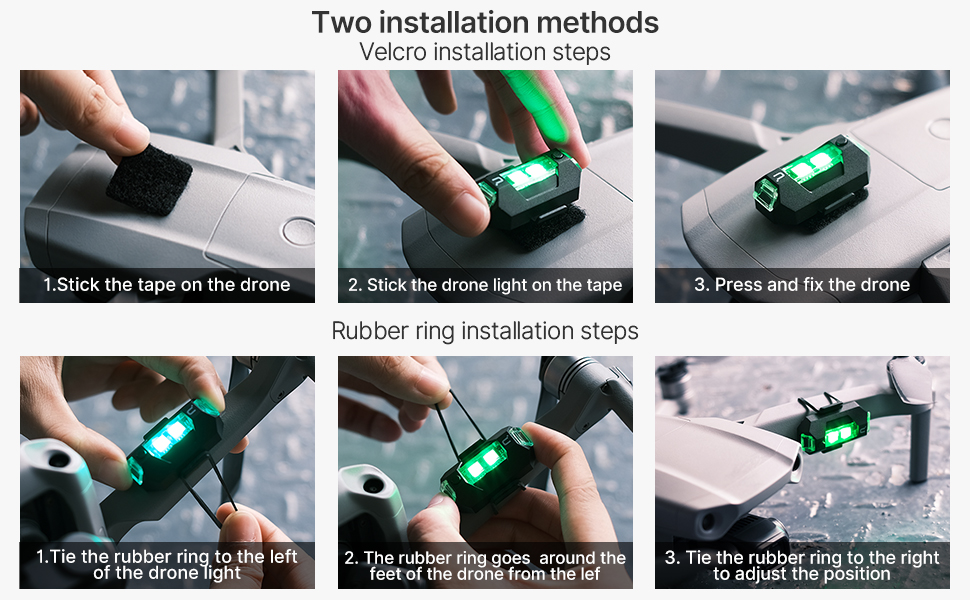
Image: Detailed steps for Velcro installation, ensuring a secure fit.
4.2. Rubber Ring Installation
- Thread one end of a rubber ring through the designated buckle on one side of the DR-02 light.
- Wrap the rubber ring around a drone arm or landing gear.
- Thread the other end of the rubber ring through the buckle on the opposite side of the light and adjust for a snug fit.
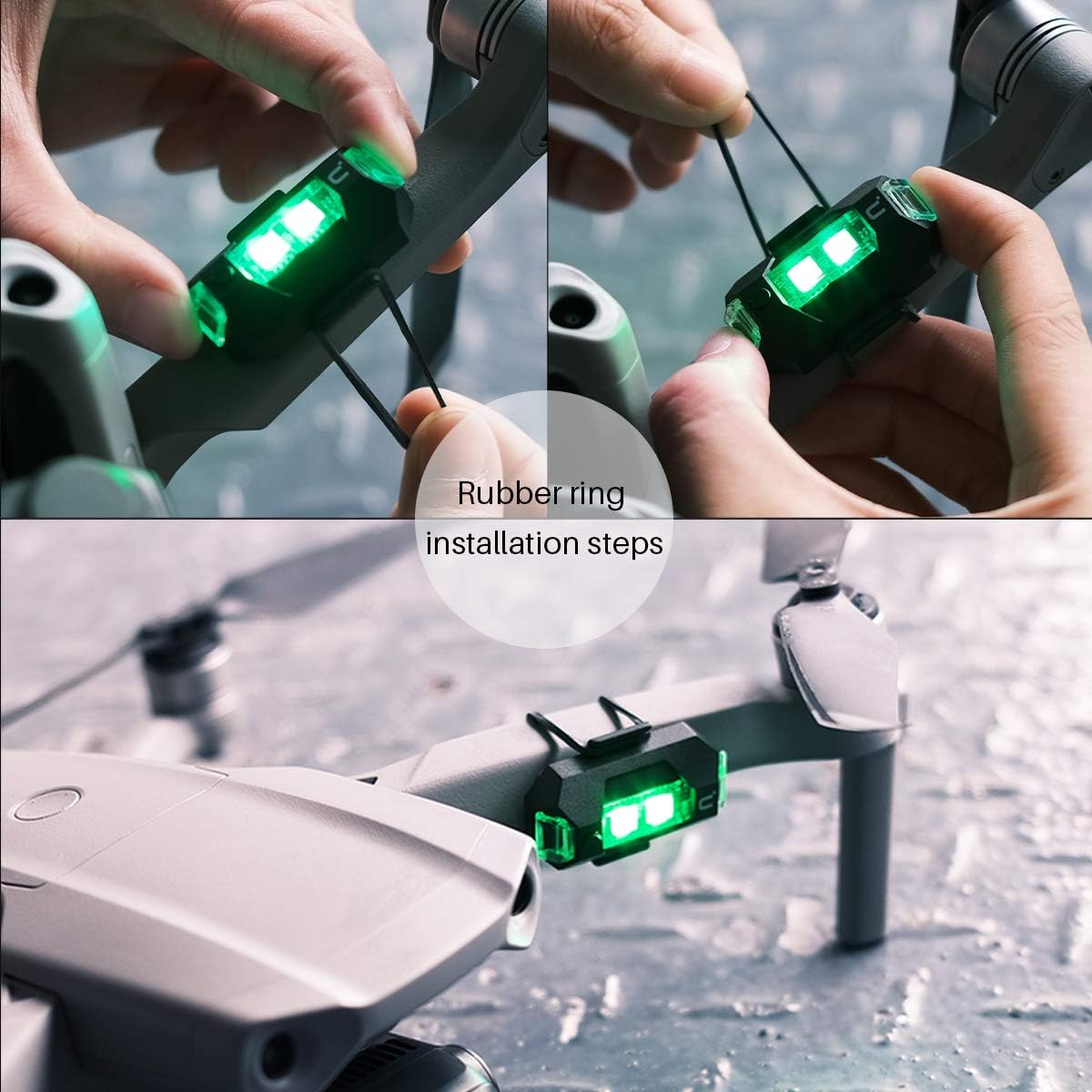
Image: Instructions for installing the light using the provided rubber rings.
The compact design ensures compatibility with virtually all drone models, including DJI Mini 2, Air 2S, Mavic Air 2, Mavic 2 Pro, Mavic Mini, FPV, Phantom, and Holy Stone drones.

Image: The DR-02 is compatible with all drones, showcasing various mounting positions.
5. Operating Instructions
The DR-02 strobe light is operated via a single button located on its side.

Image: Product details highlighting the switch button and charging port.
- Power On/Off: Press and hold the switch button for approximately 2 seconds to turn the light on or off.
- Change Light Mode/Color: Once powered on, short press the switch button to cycle through the available light modes and colors. The sequence typically includes:
- White (Fast Flash)
- White (Slow Flash)
- Green (Fast Flash)
- Green (Slow Flash)
- Red (Fast Flash)
- Red (Slow Flash)
Choose the mode that best suits your visibility requirements and local regulations.
6. Maintenance
- Charging: Connect the supplied USB-C cable to the charging port on the side of the light and to a standard USB power source (e.g., computer, wall adapter). The light will indicate charging status (e.g., solid light while charging, off when fully charged).
- Cleaning: Use a soft, dry cloth to wipe the light clean. Avoid using harsh chemicals or abrasive materials that could damage the casing or LED lenses.
- Storage: Store the light in a cool, dry place away from direct sunlight and extreme temperatures when not in use.
7. Troubleshooting
| Problem | Possible Cause | Solution |
|---|---|---|
| Light does not turn on. | Battery is depleted. | Charge the light using the USB-C cable. |
| Light does not charge. | Faulty cable or power source. | Try a different USB-C cable or power adapter. Ensure connections are secure. |
| Light is not bright enough. | Low battery or environmental factors. | Ensure the light is fully charged. Bright daylight conditions may reduce perceived brightness. |
| Light detaches from drone. | Improper installation or worn adhesive/rings. | Re-apply Velcro pads to a clean surface or replace worn rubber rings. Ensure secure attachment before flight. |
8. Specifications
- Model: DR-02 (Item Model Number: 2155)
- Brand: jusmo
- ASIN: B08LYGV1LR
- UPC: 782902325459
- Item Weight: 0.014 lbs (6.35 g)
- Product Dimensions: 1.5 x 1 x 0.5 inches
- Material: Rubber
- Light Source Type: LED
- Number of Light Sources: 4
- Power Source: Battery Powered (110mAh)
- Color Options: White, Green, Red
- Beam Angle: 15 Degrees
- Manufacturer: JUSMO
- Date First Available: October 27, 2020
9. Warranty and Support
Specific warranty information for the ULANZI DR-02 Drone Strobe Lights is not provided in the product details. For any support inquiries, technical assistance, or warranty claims, please contact the manufacturer, JUSMO, directly through their official channels or the retailer from whom the product was purchased.
You may also visit the official jusmo Store on Amazon for more information and contact options.