
IAMMETER WEM3080-150A
IAMMETER WEM3080 Bidirectional Single-Phase WiFi Energy Meter User Manual
Model: WEM3080-150A | Brand: IAMMETER
Introduction
This manual provides comprehensive instructions for the installation, operation, and maintenance of your IAMMETER WEM3080 Bidirectional Single-Phase WiFi Energy Meter. This device is designed to accurately monitor energy flow in both residential and solar photovoltaic systems, providing detailed data for energy management and cost analysis. Please read this manual carefully before installation and use to ensure safe and optimal performance.
Product Overview
The IAMMETER WEM3080 is a smart energy meter capable of measuring bidirectional energy flow. It features a DIN rail mount for easy integration into existing electrical panels and connects to your home Wi-Fi network for cloud-based data logging and remote monitoring via a web portal or mobile application.

Image: The IAMMETER WEM3080 energy meter, showing the main unit, external WiFi antenna, and the split core current transformer (CT) for current measurement.

Image: Side view of the WEM3080 meter, highlighting its compact design suitable for DIN rail mounting.
Key Features
- Bidirectional Energy Monitoring: Accurately measures energy consumed from the grid and energy exported to the grid.
- Solar PV System Integration: Ideal for monitoring solar production, direct self-consumption, and overall energy flow in photovoltaic systems.
- Real-time Home Energy Tracking: Provides live data on household energy usage.
- Detailed Billing Reports: Generates hourly, daily, and monthly reports to help understand electricity costs and savings.
- Open API for Home Automation: Seamless integration with popular home automation platforms such as Home-Assistant, openHAB, Node-RED, and ioBroker.
- DIN Rail Mount: Compact 2-pole design for easy installation in standard meter boxes.
- Wi-Fi Connectivity: Quick and easy setup to connect to the cloud server via your home Wi-Fi network.
- Mobile App Support: Available on Android and iOS for convenient monitoring.
Technical Specifications
| Manufacturer | Beijing Lewei IOT Technologies Co. Ltd. |
| Model Number | WEM3080-150A |
| Voltage | 240 Volts |
| Current Rating | 150A (with included CT) |
| Dimensions (L x W x H) | 10 x 10 x 7 cm |
| Weight | 263 g |
| Connectivity | WiFi, RS485 |
| Mounting | DIN Rail (2-pole) |
Installation and Setup
Warning: Installation should only be performed by a qualified electrician. Ensure all power is disconnected at the main breaker before beginning installation to prevent electric shock.
1. Physical Installation
- Power Disconnection: Turn off the main power supply to your electrical panel. Verify with a voltage tester that no power is present.
- Mounting: Mount the WEM3080 meter onto a standard DIN rail within your electrical panel.
- Wiring the Meter:
- Connect the live (L) and neutral (N) wires from your main power supply to the corresponding terminals on the meter (typically marked UL and UN or L and N).
- Connect the split core Current Transformer (CT) around the live wire of the circuit you wish to monitor. Ensure the arrow on the CT points in the direction of current flow (e.g., towards the load for consumption, or away from the inverter for solar production).
- Connect the CT's output wires to the CT input terminals on the WEM3080 meter (typically marked CT).
- Antenna Connection: Screw the external WiFi antenna onto the designated connector on the meter.
- Power Restoration: Once all connections are secure and verified, restore power to the electrical panel. The meter should power on.

Image: A schematic diagram illustrating the typical installation of the IAMMETER WEM3080 in a residential solar photovoltaic system, showing connections to the grid, PV panels, inverter, and household loads. It highlights how the meter measures bidirectional energy flow.
2. Network Configuration (Wi-Fi Setup)
After physical installation, configure the meter to connect to your Wi-Fi network and the IAMMETER cloud server.
- Download the App: Download the IAMMETER app from Google Play Store (for Android) or Apple App Store (for iOS).
- Create Account: Open the app and create a new user account or log in if you already have one.
- Add Device: Follow the in-app instructions to add your WEM3080 meter. This typically involves putting the meter into configuration mode (refer to the meter's LED indicators for status) and connecting your phone to the meter's temporary Wi-Fi hotspot, then providing your home Wi-Fi credentials.
- Cloud Connection: Once configured, the meter will connect to your home Wi-Fi and then to the IAMMETER cloud server, where it will begin uploading data.
Operation and Monitoring
The IAMMETER WEM3080 allows you to monitor your energy data through a dedicated web portal and mobile application.
1. Web Portal Monitoring
Access your energy data from any web browser by visiting the IAMMETER cloud platform. The portal provides comprehensive dashboards and reports.

Image: QR code for quick access to the IAMMETER demo platform. Scan this code to explore the monitoring interface without owning a device.
Alternatively, visit the demo directly: IAMMETER Demo Portal

Image: Screenshot of the IAMMETER web monitoring interface for a solar system, displaying yield, consumption, current state, and historical data.

Image: Screenshot of the IAMMETER web monitoring interface for a residential system, showing power consumption trends, daily/monthly/yearly energy usage, and location-based weather information.
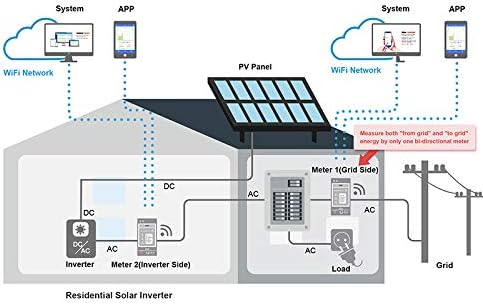
Image: Screenshot of the IAMMETER web interface displaying detailed energy consumption analysis, including overall consumption, daily consumption, consumption by weekdays/weekends, and active power history.
2. Mobile App Monitoring
The IAMMETER mobile app provides convenient access to your energy data on the go.

Image: Three screenshots of the IAMMETER mobile app showing solar PV system monitoring. This includes an overview of power flow, daily/monthly/yearly yield, and detailed billing and income reports.
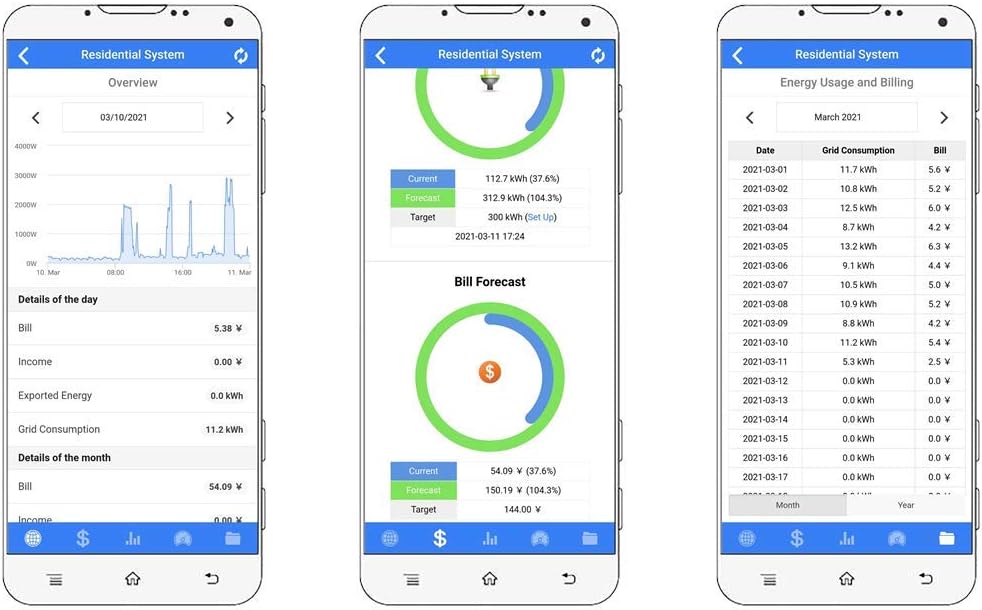
Image: Three screenshots of the IAMMETER mobile app showing residential system monitoring. This includes an overview of power consumption, current and forecast billing, and detailed energy usage and billing reports.
Home Automation Integration
The IAMMETER WEM3080 offers an open API, allowing seamless integration with various third-party home automation platforms. This enables advanced energy management and automation scenarios based on your real-time energy data.
Supported Platforms:
- Home-Assistant: Integrate for comprehensive energy dashboards and automation rules.
- openHAB: Utilize energy data within your openHAB smart home setup.
- Node-RED: Create custom flows and logic based on energy consumption or production.
- ioBroker: Incorporate energy metrics into your ioBroker smart home system.
- PVoutput: Upload solar production data to the PVoutput community.
For detailed API documentation and integration guides, please refer to the official IAMMETER developer resources or the specific documentation for your chosen home automation platform.
Troubleshooting
If you encounter issues with your IAMMETER WEM3080, refer to the following common problems and solutions:
| Problem | Possible Cause | Solution |
|---|---|---|
| Meter not powering on. | No power supply to the meter terminals (UL/UN). | Check wiring connections and ensure the circuit breaker is on. Verify voltage at the meter terminals. |
| Cannot connect to Wi-Fi. | Incorrect Wi-Fi password, meter too far from router, 5GHz network (meter supports 2.4GHz only). | Double-check password. Move router closer or use a Wi-Fi extender. Ensure your Wi-Fi is 2.4GHz. Reset meter and try setup again. |
| No data or incorrect data displayed. | CT installed incorrectly (reversed), CT not connected, meter not connected to cloud. | Verify CT direction (arrow should point towards load/grid). Check CT wiring. Ensure meter has stable Wi-Fi and cloud connection (check LED status). |
| App/Web portal not updating. | Internet connectivity issues, server maintenance. | Check your internet connection. Verify meter's cloud connection status. Check IAMMETER's service status page for any known outages. |
If the problem persists, please contact IAMMETER customer support for further assistance.
Maintenance
The IAMMETER WEM3080 is designed for long-term, maintenance-free operation. However, periodic checks can ensure continued optimal performance:
- Visual Inspection: Periodically inspect the meter and its wiring for any signs of damage, loose connections, or overheating. Ensure the DIN rail mounting is secure.
- Cleaning: If necessary, gently wipe the exterior of the meter with a dry, soft cloth. Do not use liquid cleaners or solvents.
- Firmware Updates: Ensure your meter's firmware is up to date. Updates are typically managed automatically via the cloud or through the mobile app. Refer to the app or web portal for update notifications.
- Data Verification: Occasionally cross-reference the meter's readings with your utility bill or other known consumption figures to ensure accuracy.
Do not attempt to open or repair the meter yourself. Refer all servicing to qualified personnel.
Warranty and Support
Warranty Information
Please refer to the warranty card included with your product packaging or visit the official IAMMETER website for detailed warranty terms and conditions. The warranty typically covers manufacturing defects for a specified period from the date of purchase.
Customer Support
For technical assistance, troubleshooting not covered in this manual, or warranty claims, please contact IAMMETER customer support through their official website or the contact information provided in your product documentation.
Online Resources:
Ask a question about this manual
Ask about setup, troubleshooting, compatibility, parts, safety, or missing instructions. Manuals+ will review the question and use this page’s manual context to help answer it.