
1. Introduction
This manual provides detailed instructions for the installation, operation, maintenance, and troubleshooting of your KOCOM Door Intercom system. Please read this manual thoroughly before installation and use to ensure proper function and safety. Keep this manual for future reference.
2. Safety Information
Observe the following safety precautions to prevent damage to the product and ensure user safety:
- Electrical Safety: The system operates on 220V AC power. Ensure all wiring is performed by a qualified electrician in accordance with local electrical codes. Disconnect power before installation or maintenance.
- Installation Environment: Install the outdoor unit in a location protected from direct heavy rain and extreme temperatures. The indoor unit should be installed in a dry, indoor environment.
- Avoid Moisture: Do not expose the units to water or high humidity.
- Cleaning: Use a soft, dry cloth for cleaning. Do not use abrasive cleaners or solvents.
3. Package Contents
Verify that all components are present in the package:
- 1 x Indoor Handset Unit
- 1 x Outdoor Call Unit (External Microphone with Chime)
- Mounting Screws and Anchors
- User Manual (this document)
4. Product Overview
The KOCOM Door Intercom system consists of an indoor handset unit and an outdoor call unit, designed for two-way communication and door release functionality.
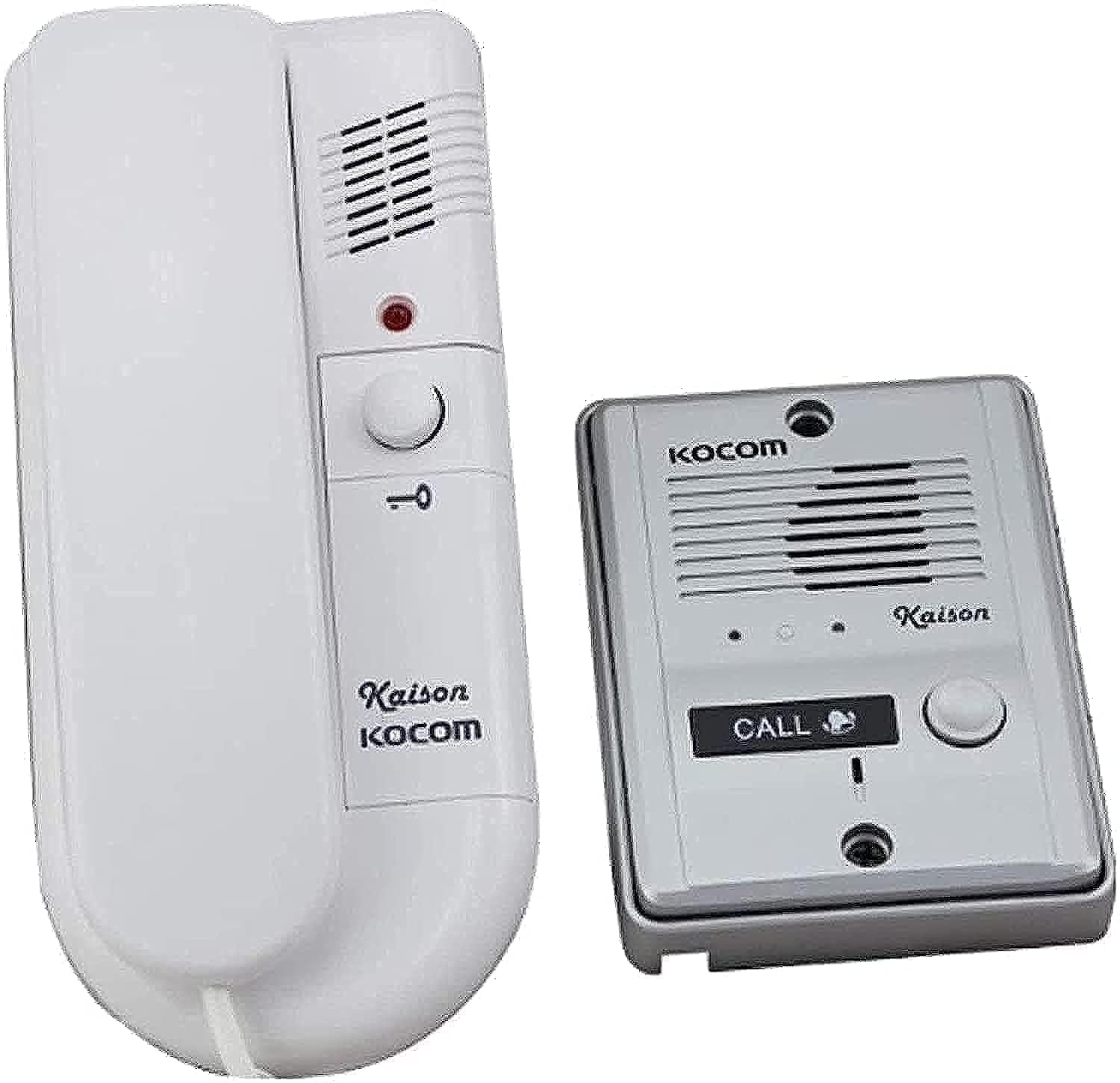
Image 1: The KOCOM Door Intercom system, featuring the white indoor handset on the left and the silver outdoor call unit with a 'CALL' button on the right. Both units display the KOCOM brand logo.
4.1 Indoor Handset Unit
This unit allows you to communicate with visitors at your door and activate the door release mechanism. It typically includes a speaker, microphone, and a button for door release.
4.2 Outdoor Call Unit
Installed at the entrance, this unit features a call button, microphone, and speaker. Visitors press the call button to alert the indoor unit.
5. Setup and Installation
The KOCOM Door Intercom is designed for built-in installation. Professional installation is recommended.
5.1 Wiring Diagram (General)
A typical installation involves connecting the indoor and outdoor units with a multi-core cable. The system requires a 220V AC power supply. Ensure correct polarity and secure all connections.
- Power Supply: Connect the 220V AC power supply to the designated terminals on the indoor unit.
- Intercom Cable: Run a suitable multi-core cable (e.g., 2-wire or 4-wire, depending on model) between the indoor and outdoor units.
- Door Release (Optional): If connecting to an electric door strike or lock, connect the door release wires from the indoor unit to the lock mechanism.
5.2 Mounting the Units
- Indoor Unit: Choose a convenient location inside the property, typically near the entrance. Mount the unit securely to a wall using the provided screws and anchors.
- Outdoor Unit: Install the outdoor unit at the desired entrance height, ensuring it is accessible to visitors. Secure it firmly to the wall or door frame.
Note: Refer to the specific wiring diagram included with your product packaging for precise connection details, as configurations may vary slightly by model.
6. Operating Instructions
6.1 Receiving a Call
- When a visitor presses the 'CALL' button on the outdoor unit, the indoor handset will ring.
- Lift the indoor handset to establish two-way communication with the visitor.
6.2 Communicating with a Visitor
Speak into the handset's microphone and listen through its speaker. The outdoor unit will transmit your voice to the visitor and vice-versa.
6.3 Door Release
If connected to an electric lock, press the designated door release button on the indoor handset to unlock the door for the visitor. The door will remain unlocked for a short period, then automatically re-lock.
7. Maintenance
Regular maintenance ensures the longevity and optimal performance of your intercom system.
- Cleaning: Wipe the surfaces of both units with a soft, dry, or slightly damp cloth. Do not use harsh chemicals or abrasive materials.
- Inspect Wiring: Periodically check visible wiring for any signs of damage or loose connections. Ensure power is off before inspection.
- Environmental Protection: Ensure the outdoor unit remains protected from excessive moisture or direct sunlight, which can degrade its components over time.
8. Troubleshooting
If you encounter issues with your KOCOM Door Intercom, refer to the following common problems and solutions:
| Problem | Possible Cause | Solution |
|---|---|---|
| No sound from indoor/outdoor unit | Loose wiring connection, faulty speaker/microphone, no power. | Check all wiring connections. Ensure the system is powered. If problem persists, contact support. |
| Indoor unit does not ring | Outdoor call button malfunction, wiring issue, no power. | Verify power supply. Check wiring between units. Test the outdoor call button. |
| Door release not working | Wiring to electric lock is incorrect or loose, faulty door strike, insufficient power to lock. | Inspect door release wiring. Ensure the electric lock is functioning correctly. |
| Intermittent operation | Loose connections, power fluctuations, environmental interference. | Secure all connections. Ensure stable power supply. Avoid installing near strong electromagnetic sources. |
| Power frequency issue (e.g., 50Hz vs 60Hz) | Incompatibility with local power grid frequency. | Verify the product's specified operating frequency against your local power supply. Consult a qualified electrician if unsure. |
If the problem persists after attempting these solutions, please contact KOCOM customer support or a qualified technician.
9. Specifications
- Brand: KOCOM
- Model: Door Intercom (ASIN: B08LSR14SF)
- Manufacturer: KOCOM
- Power Requirement: 220V AC (as per product description)
- Installation Method: Built-In
- Item Weight: 1.1 Grams
- Package Dimensions: 6.89 x 4.92 x 2.76 cm
- Date First Available: 24 October 2020
10. Warranty and Support
KOCOM products are manufactured to high-quality standards. For warranty information, please refer to the warranty card included with your purchase or contact your local KOCOM distributor.
For technical support or service inquiries, please contact your product retailer or visit the official KOCOM website for contact details.