1. Introduction
This manual provides essential information for the installation, operation, and maintenance of your Tuzi Qiuge H3 Thermoregulator. This touchscreen thermostat is designed for controlling underfloor or electric heating systems, offering precise temperature regulation and programmable scheduling for enhanced comfort and energy efficiency.
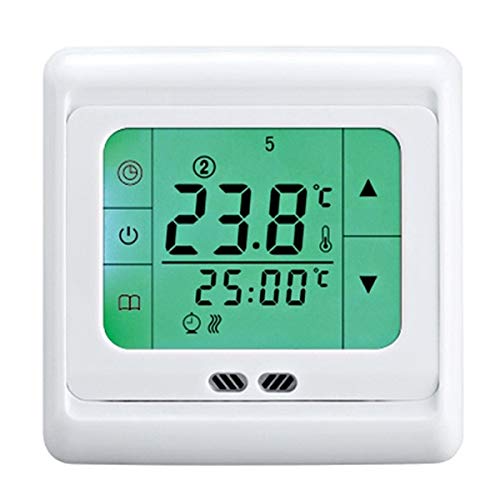
Figure 1: Tuzi Qiuge H3 Thermoregulator with green backlit display.
2. Product Features
- Touchscreen Interface: Easy and intuitive operation.
- Large LCD Display: Clear visibility with selectable blue, white, or green backlight options.
- Programmable Modes: Supports 5+2, 6+1, or 7-day time period modes.
- Daily Scheduling: Allows setting up to 6 time periods and corresponding temperatures per day.
- High Reliability: Designed for strong anti-interference performance.
- Power Failure Memory: The internal clock continues during power outages, preserving time settings.
- Universal Compatibility: Junction box size suitable for various installations.
3. Package Contents
Verify that all items listed below are included in your package:
- 1 x Thermostat with Backlight
- 1 x 3-meter Sensor Cable
- 2 x Mounting Screws
- 1 x User Manual (English)
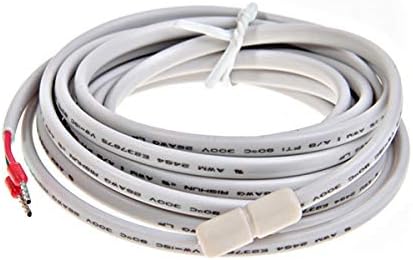
Figure 2: Included 3-meter NTC sensor cable.
4. Installation and Setup
Important: Installation of this thermostat involves high voltage wiring. It is strongly recommended that installation be performed by a qualified electrician to ensure safety and proper functionality. Incorrect installation can lead to electric shock or damage to the device and property.
4.1 Wiring
Refer to the detailed wiring diagrams provided in the physical user manual included in your package. Ensure all connections are secure and comply with local electrical codes. The 3-meter sensor cable should be correctly connected to monitor the floor or ambient temperature as required by your heating system.
4.2 Mounting
Mount the thermostat in a standard electrical junction box using the provided mounting screws. Ensure the thermostat is level and securely fastened to the wall.
5. Operating Instructions
The Tuzi Qiuge H3 Thermoregulator features a user-friendly touchscreen interface for easy control of your heating system.
5.1 Power On/Off
Press the power icon on the touchscreen to turn the thermostat on or off. When off, the display may show 'OFF' or a standby screen.
5.2 Temperature Adjustment
Use the up (▲) and down (▼) arrow icons on the touchscreen to adjust the desired temperature. The current room temperature and the set temperature will be displayed.

Figure 3: Thermostat display with blue backlight.
5.3 Programming Modes
The thermostat supports various programmable modes (5+2, 6+1, 7 days) allowing you to set different temperature schedules for weekdays and weekends, or for each day individually. Consult the detailed programming section in your physical user manual for step-by-step instructions on setting daily time periods and temperatures.
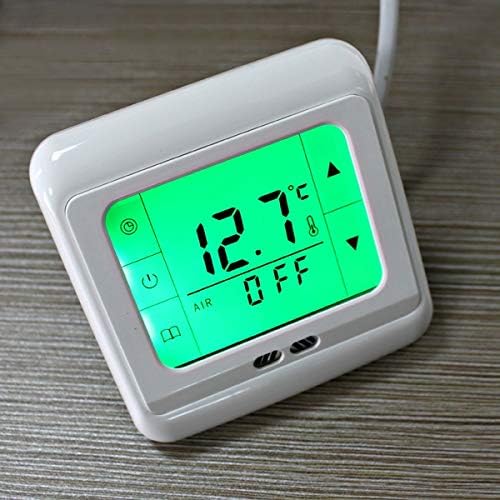
Figure 4: Thermostat display showing 'OFF' status.
5.4 Backlight Control
The LCD display features a backlight that can be set to blue, white, or green. Specific instructions for changing the backlight color can be found in the comprehensive user manual.
6. Maintenance
The Tuzi Qiuge H3 Thermoregulator requires minimal maintenance to ensure optimal performance.
- Cleaning: Gently wipe the touchscreen and casing with a soft, dry cloth. Do not use abrasive cleaners, solvents, or chemical sprays, as these can damage the surface and internal components.
- Avoid Moisture: Keep the thermostat dry. Do not expose it to water or excessive humidity.
- Regular Checks: Periodically check for any loose connections or signs of wear, especially if the device is in a high-traffic area.
7. Troubleshooting
If you encounter issues with your thermostat, refer to the following common troubleshooting steps:
- No Display/No Power: Check the main power supply to the thermostat and ensure all wiring connections are secure. Verify that the circuit breaker for the heating system is not tripped.
- Incorrect Temperature Reading: Ensure the external sensor cable is properly connected and positioned. Avoid placing the thermostat or sensor in direct sunlight or near heat sources that could affect readings.
- Heating Not Activating: Check the set temperature to ensure it is above the current room temperature. Verify that the thermostat is in an active heating mode (not 'OFF' or in a programmed 'OFF' period). Inspect heating elements for functionality.
- Unresponsive Touchscreen: Try restarting the thermostat by cycling its power. If the issue persists, contact customer support.
For more complex issues or if troubleshooting steps do not resolve the problem, please contact customer support or a qualified technician.
8. Specifications
| Feature | Specification |
|---|---|
| Power Supply | 230VAC ± 10% 50/60 Hz |
| Display Type | Touchscreen LCD |
| Display Size | 60 x 45 mm (approx. 1.9 inches) |
| Max Switching Rating | 16A |
| Max Switching Power | 3600W |
| Internal Sensor Setting Range | 5 - 35°C (programmable) |
| Internal Sensor Measurement Range | 0 - 40°C |
| External Sensor Measurement Range | 0 - 90°C |
| Internal Sensor Type | NTC B = 3380 10k @ 25°C |
| Additional Sensor Type | NTC B = 3380 10k @ 25°C (Length = 3M) |
| Indication Accuracy | 0.1°C |
| Setting Unit | 0.5°C / step |
| Certification | CE |
| Product Weight | 253 Grams |
| Model Number | QiuGe3368 |
9. Warranty and Support
Your Tuzi Qiuge H3 Thermoregulator is covered by a standard manufacturer's warranty. Please refer to the warranty card included in your product packaging for specific terms and conditions, including the warranty period and coverage details.
For technical support, troubleshooting assistance, or warranty claims, please contact the retailer where you purchased the product or visit the official Tuzi website for customer service contact information. When contacting support, please have your product model number (H3 / QiuGe3368) and purchase date readily available.