
1. Product Overview
This manual provides essential information for the safe and effective use of your ARyee 18V 6.0Ah Replacement Lithium-Ion Battery. This high-capacity battery is designed to provide long-lasting performance for your compatible Ryobi 18V ONE+ system cordless tools. It features built-in protections for enhanced safety and durability.

Figure 1: ARyee 18V 6.0Ah Replacement Lithium-Ion Battery
2. Setup and Compatibility
The ARyee 18V 6.0Ah battery is designed for seamless integration with a wide range of Ryobi 18V ONE+ cordless tools.
2.1 Initial Charge
Before first use, fully charge the battery using a compatible Ryobi 18V charger. Ensure the charger is clean and free of debris.
2.2 Battery Installation
- Align the battery with the battery port on your Ryobi 18V ONE+ tool.
- Slide the battery firmly into place until it clicks, indicating it is securely locked.
- To remove, press the release button (typically located on the top or sides of the battery) and slide the battery out.
2.3 Compatible Models
This battery is a direct replacement for Ryobi 18V battery models including P102, P103, P104, P105, P107, P108, P109, P190, P100, P122, P191. It also fits a broad range of Ryobi 18V tools such as CCD-1801, CCG-1801M, CCG-180L, CCS-1801/DM, CCS-1801/LM, CCS-1801D, CCS-1801LM, CCW-180L, P200, P2000, P2002, P201, P203, P204, P206, P2060, P208B, P210, P221, P230, P234G, P236, P240, P2400, P241, P246, P250, P2500, P310, P3200, P3300, P3310, P521, P522, P530, P540, P570, P600, P715, P716, P730, P731, P740, P741, P780, P813, P835, and many others within the Ryobi 18V ONE+ system.

Figure 2: Broad compatibility with Ryobi 18V ONE+ tools.
3. Operating Instructions
3.1 Powering Your Tool
Once the battery is securely installed, your Ryobi 18V ONE+ tool is ready for operation. Refer to your specific tool's manual for detailed operating instructions.
3.2 Battery Indicator Lights
The battery features a 4-LED indicator system that allows you to monitor the remaining charge. Press the indicator button to illuminate the LEDs.
- 4 LEDs lit: Full charge (75-100%)
- 3 LEDs lit: High charge (50-75%)
- 2 LEDs lit: Medium charge (25-50%)
- 1 LED lit: Low charge (0-25%), recharge soon

Figure 3: Key features including LED indicator lights for charge status.
3.3 Product Demonstration Video
Video 1: A 30-second demonstration showcasing the ARyee 6000mAh 18V P108 Replacement Battery for Ryobi One+.
4. Maintenance and Storage
4.1 Charging
Always use a genuine Ryobi 18V charger or a compatible charger specifically designed for Ryobi 18V Lithium-Ion batteries. Avoid using damaged chargers or attempting to charge non-rechargeable batteries.
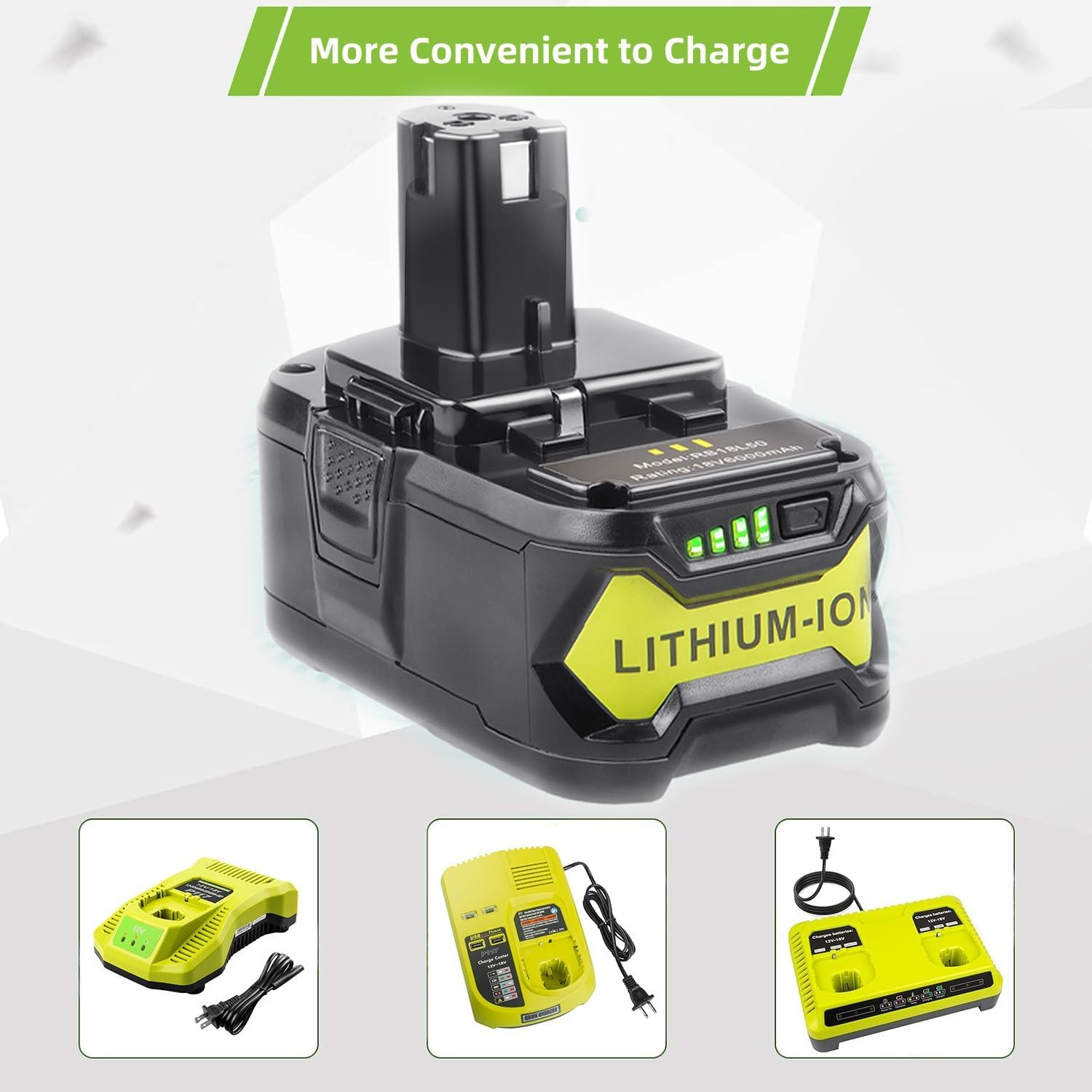
Figure 4: The battery is compatible with various Ryobi 18V chargers.
4.2 Storage
- Store batteries in a cool, dry place away from direct sunlight and extreme temperatures.
- For long-term storage, charge the battery to approximately 50% capacity.
- Avoid storing batteries in a completely discharged state, as this can lead to irreversible damage.
- Keep batteries away from metal objects that could short-circuit the terminals.
4.3 Cleaning
Periodically clean the battery terminals with a dry cloth to ensure good electrical contact. Do not use liquids or solvents.
5. Troubleshooting
- Battery not charging: Ensure the battery is fully seated in the charger. Check if the charger is plugged in and receiving power. Verify the charger is compatible with Ryobi 18V Lithium-Ion batteries.
- Tool not operating: Ensure the battery is fully charged and properly installed in the tool. Check the tool itself for any malfunctions.
- Reduced run time: Over time, all batteries experience some capacity degradation. Ensure the battery is fully charged before use. Extreme temperatures can also affect performance.
- Battery feels hot during charging/use: Some heat is normal. However, excessive heat may indicate an issue. Discontinue use and charging if the battery becomes unusually hot. The battery has built-in protections against over-heating.
This battery is equipped with multiple protection features including protection against overcharging, over-discharge, over-current, short-circuit, and steady voltage circuit to ensure safe operation.

Figure 5: Built-in protection features for reliable quality.
6. Specifications
| Feature | Detail |
|---|---|
| Brand | ARyee |
| Battery Type | Lithium Ion |
| Voltage | 18V |
| Capacity | 6000mAh (6.0Ah) |
| Battery Cell Composition | Lithium Metal |
| Recommended Uses | Power Tool |
| Item Weight | 1.54 pounds |
| Package Dimensions | 6.22 x 5.12 x 3.7 inches |
| Manufacturer | DONGGUAN TENWAY POWER CO. LTD |
| Country of Origin | China |
| Certifications | CE, RoHS, FCC |
7. Safety Information
Lithium-ion batteries are powerful and require careful handling to prevent injury or damage.
- Do not disassemble, open, or shred battery packs.
- Do not expose battery packs to heat or fire. Avoid storage in direct sunlight.
- Do not short-circuit a battery pack. Do not store battery packs haphazardly in a box or drawer where they may short-circuit each other or be short-circuited by other metal objects.
- Do not subject battery packs to mechanical shock.
- In the event of a battery leaking, do not allow the liquid to come into contact with the skin or eyes. If contact has been made, wash the affected area with copious amounts of water and seek medical advice.
- Keep battery packs clean and dry.
- Recharge only with the charger specified by the manufacturer.
- Do not use any charger other than that specifically provided for use with the equipment.
- Do not use any battery pack which is not designed for use with the equipment.
- Keep battery packs out of the reach of children.
- Seek medical advice immediately if a cell or battery pack has been swallowed.
- Dispose of properly according to local regulations. Do not dispose of with household waste.
8. Warranty and Support
ARyee is committed to providing high-performance products. All ARyee batteries undergo rigorous testing by the manufacturer to meet and exceed OEM product specifications. This product has successfully passed CE, RoHS, and FCC certifications, ensuring compliance with international safety and quality standards.
For specific warranty details, technical support, or inquiries, please contact ARyee customer service through their official channels or visit the ARyee Store on Amazon.