
1. Introduction
The Striker z60 Metal Detector is designed for both novice and experienced treasure hunters, offering ease of use, high accuracy, and quick target recovery. Its lightweight and adjustable design makes it suitable for various users, including adults and children. This manual will guide you through the setup, operation, and maintenance of your z60 metal detector to ensure a rewarding experience.
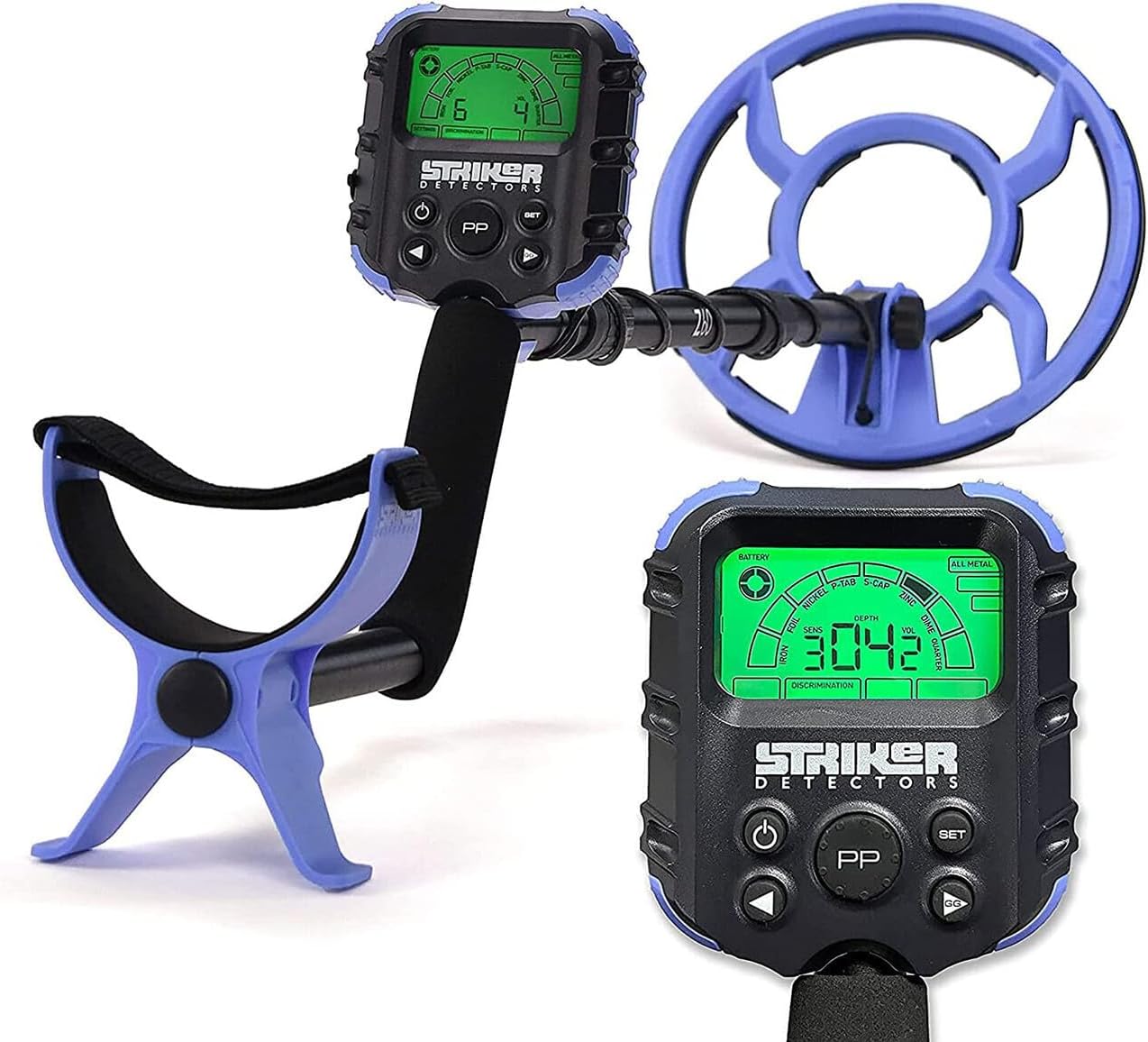
Figure 1: The Striker z60 Metal Detector, showcasing its blue and black control box and search coil.
2. Key Features
- Ultra-Lightweight Design: Weighing approximately 2 pounds 10.6 ounces, designed for extended use without fatigue.
- 10-inch Submersible Search Coil: Equipped with a coil cover, allowing for detection in shallow water, puddles, and beaches.
- Backlit LCD Interface: Provides clear visibility of settings and target information in various lighting conditions.
- Adjustable Discrimination: Features 3 elimination modes to filter out unwanted metals and focus on valuable targets.
- 8 Metal Categories: Accurately categorizes targets such as iron, foil, nickel, pull tabs, bottle caps, zinc, dimes, and quarters.
- Pinpoint Mode: For precise location of detected objects.
- Ground Grab Technology: Easy one-button ground balancing to adapt to varying soil mineralization.
- Adjustable Shaft: 14-inch quick-release extension for comfortable use by different heights.
- 4 HD Audio Tones: Distinct audio signals to help identify target types.
- Ambidextrous Use: Designed for both right and left-handed users.
3. Setup and Assembly
- Unpack Components: Carefully remove all parts from the packaging. Ensure all components are present: control box, upper shaft, lower shaft, search coil with cover, armrest, and securing hardware.
- Attach Search Coil: Align the search coil with the lower shaft and secure it using the provided non-metallic bolt and wing nut. Do not overtighten.
- Connect Shaft Sections: Slide the lower shaft into the upper shaft. The 14-inch quick-release extension allows for length adjustment. Secure the sections by twisting or using the locking mechanism.
- Install Batteries: The z60 requires 6 AAA batteries (not included). Open the battery compartment on the control box, insert the batteries according to polarity markings, and securely close the compartment.
- Attach Control Box and Armrest: Secure the control box to the upper shaft. The armrest should be positioned for comfortable use, allowing your forearm to rest securely.
- Wrap Cable: Wrap the search coil cable snugly around the shaft, leaving enough slack for coil movement, and plug the connector into the control box. Ensure the connection is secure and protected from moisture.

Figure 2: The Striker z60 Metal Detector fully assembled and ready for use.
4. Operating Instructions
4.1. Power On/Off
Press and hold the Power button (usually marked with a circle and vertical line) on the control box to turn the detector on or off. The backlit LCD screen will illuminate upon activation.

Figure 3: The backlit LCD interface of the Striker z60 control box.
4.2. Modes and Discrimination
The z60 offers various modes and adjustable discrimination to help you identify and filter targets:
- All Metal Mode: Detects all types of metal without discrimination.
- Discrimination Modes: Use the SET button and arrow keys to cycle through and adjust the 3 elimination modes. This allows you to ignore unwanted items like iron or foil. The LCD will visually indicate the selected metal categories.
- Metal Categories: The detector can distinguish between 8 types of metal: Iron, Foil, Nickel, P-Tab (Pull Tabs), S-Cap (Bottle Caps), Zinc, Dime, and Quarter. Each category may have a distinct audio tone.

Figure 4: Visual representation of the 8 metal categories the z60 can identify.
4.3. Ground Balance (Ground Grab)
To optimize performance and reduce false signals from mineralized ground, use the Ground Grab feature:
- Hold the search coil parallel to the ground, about 1-2 inches above the surface.
- Press and hold the GG (Ground Grab) button.
- Pump the coil up and down slightly (about 1-6 inches) over the ground.
- Release the GG button once the detector stabilizes and provides a consistent tone. The z60 will automatically adjust to the ground's mineralization.
4.4. Pinpoint Mode
Once a target is detected, use Pinpoint Mode to precisely locate it before digging:
- Center the search coil over the detected target.
- Press and hold the PP (Pinpoint) button.
- Slowly move the coil in a cross-pattern over the target. The audio tone will peak and the depth indicator will narrow as you get closer to the exact location.
- Release the PP button to exit Pinpoint Mode.

Figure 5: The pinpoint function helps to accurately locate targets.
4.5. Sensitivity and Volume
Adjust the detector's sensitivity using the arrow buttons to increase or decrease detection depth and stability. Adjust the volume of the audio tones to your preference using the dedicated volume controls.
5. Maintenance
- Cleaning: After each use, especially in sandy or wet conditions, wipe down the search coil and shaft with a damp cloth. Avoid harsh chemicals.
- Control Box Care: The control box is not fully waterproof (rated IP54, meaning splash-resistant). Avoid submerging it. If used near water, ensure the headphone jack cover is securely closed.
- Battery Storage: Remove batteries if the detector will not be used for an extended period to prevent leakage.
- Storage: Store the detector in a cool, dry place, away from direct sunlight and extreme temperatures.
6. Troubleshooting
- False Signals: If the detector gives erratic signals, try reducing the sensitivity. Perform Ground Grab again to re-balance the detector to the soil. Move away from power lines or other electronic devices that may cause interference.
- No Detection: Ensure batteries are correctly installed and charged. Check all cable connections. Verify that the discrimination settings are not too high, potentially filtering out desired targets.
- Weak Signals: Increase sensitivity. Ensure the search coil is parallel to the ground and being swept at a consistent height.
7. Specifications
| Feature | Detail |
|---|---|
| Brand | Striker |
| Model Number | z60 |
| Operating Frequency | 7.8 KHz |
| Search Coil Size | 10 Inches (Submersible) |
| Power Source | 6 AAA Batteries (not included) |
| Item Weight | 2 pounds 10.6 ounces |
| Adjustable Length | Yes (14-inch Quick-Release Extension) |
| International Protection Rating | IP54 (Splash-resistant; control box not submersible) |
| Material | Plastic |
| Product Dimensions | 25.59 x 11.42 x 5.51 inches |
8. Warranty and Support
For warranty information, technical support, or service inquiries, please refer to the contact details provided with your product packaging or visit the official Striker Detectors website. Keep your proof of purchase for any warranty claims.