1. Introduction
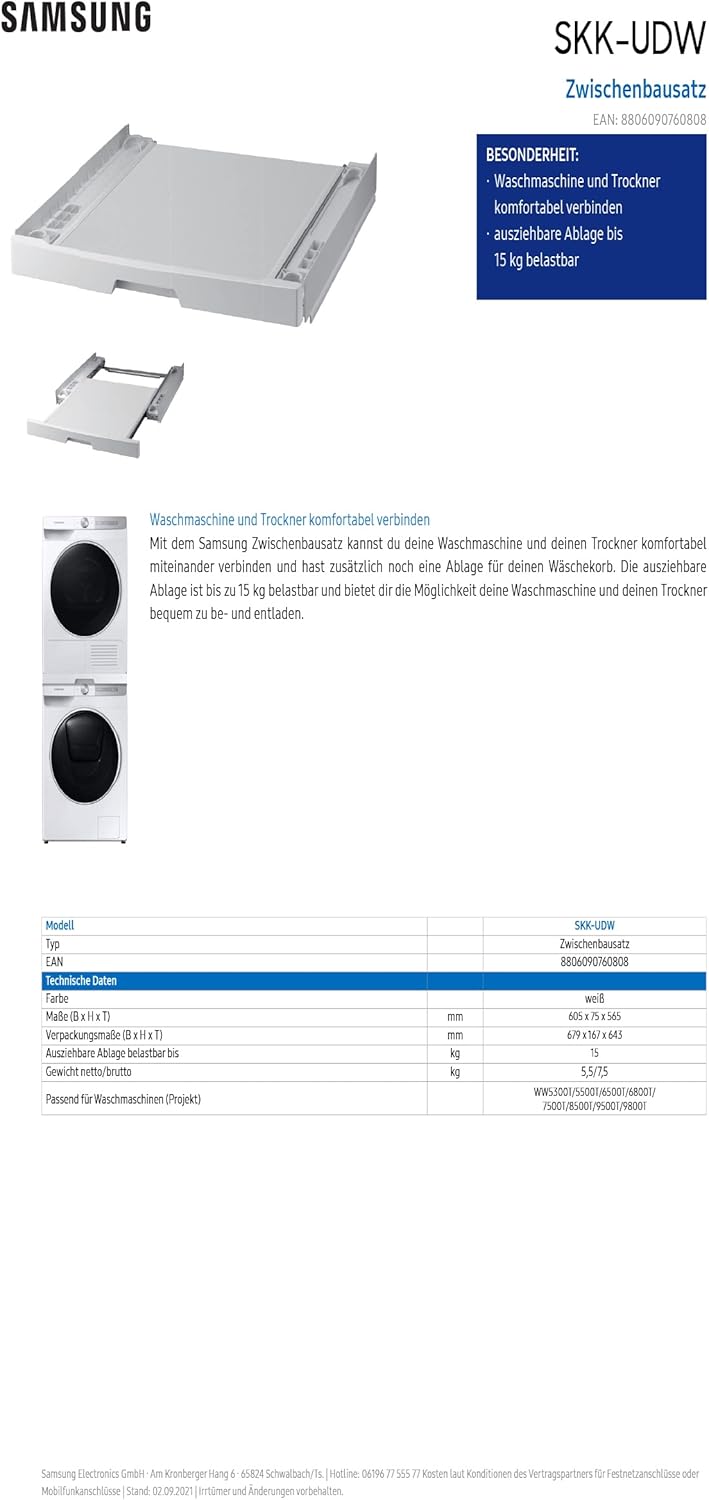
The Samsung SKK-UDW Intermediate Kit is designed to securely connect a Samsung washing machine and a Samsung dryer, allowing them to be stacked vertically. This kit provides a stable platform for the dryer and includes an extendable tray for added convenience during laundry tasks. This manual provides essential information for the safe and correct installation, operation, and maintenance of your SKK-UDW Intermediate Kit.
2. Safety Information
Please read all safety instructions carefully before installing and using the intermediate kit. Failure to follow these instructions may result in injury or damage to property.
- Two-Person Installation: Due to the weight and size of the appliances, installation of the dryer onto the intermediate kit requires a minimum of two people. Attempting to lift heavy appliances alone can cause serious injury.
- Stable Surface: Ensure the washing machine is placed on a stable, level, and solid surface capable of supporting the combined weight of both appliances and the kit.
- Correct Appliance Placement: Always place the washing machine at the bottom and the dryer on top. Do not reverse this order.
- Secure Fastening: Ensure all screws and fasteners are tightened securely according to the installation instructions to prevent movement or instability.
- Load Capacity: The extendable tray has a maximum load capacity of 15 kg. Do not exceed this weight limit.
- Children and Pets: Keep children and pets away from the installation area.
3. Package Contents
Verify that all components are present before beginning installation. The Samsung SKK-UDW Intermediate Kit typically includes:
- Intermediate Stacking Kit Frame
- Extendable Tray
- Mounting Brackets (various types for different washer models)
- Screws and Fasteners
- Anti-vibration rubber feet for the dryer
- Installation Manual (detailed, model-specific instructions)

4. Compatibility
The SKK-UDW Intermediate Kit is compatible with specific Samsung washing machine models. Ensure your washing machine model is listed below to guarantee proper fit and safe operation.
Compatible Samsung Washing Machine Models (Project Series):
- WW5300T
- WW5500T
- WW6500T
- WW6800T
- WW7500T
- WW8500T
- WW9500T
- WW9800T
For other models, please consult your appliance dealer or Samsung's official website for compatibility information.
5. Setup and Installation
Installation of the SKK-UDW Intermediate Kit requires careful attention to detail. Refer to the detailed installation manual included with your kit for model-specific instructions and diagrams. The following steps provide a general overview:
- Prepare the Washing Machine: Ensure the washing machine is unplugged, empty, and positioned on a stable, level surface.
- Identify Correct Brackets: The kit includes different sets of mounting brackets and screws. Consult the included installation manual to identify the correct brackets and screws for your specific Samsung washing machine model. This step is critical for secure installation.
- Attach the Intermediate Kit: Carefully place the intermediate kit onto the top of the washing machine. Align it correctly and secure it using the identified mounting brackets and screws. Tighten all fasteners firmly.
- Prepare the Dryer: Ensure the dryer is unplugged and empty. Attach the provided anti-vibration rubber feet to the bottom of the dryer, if not already installed.
- Lift and Position the Dryer: With the assistance of another person, carefully lift the dryer and place it onto the intermediate kit. Ensure it is centered and sits securely within the kit's guides.
- Final Checks: Verify that both appliances are stable and that the kit is securely fastened. Reconnect power to both appliances.
6. Operating Instructions
The primary operational feature of the SKK-UDW Intermediate Kit is its extendable tray, designed to provide a convenient surface for loading, unloading, or folding laundry.
- Extending the Tray: Gently pull the handle or front edge of the tray outwards until it locks into its extended position.
- Using the Tray: The tray can hold items up to 15 kg. Use it to temporarily place laundry baskets, folded clothes, or other light items.
- Retracting the Tray: Push the tray back into its closed position when not in use. Ensure it is fully retracted to prevent accidental damage or obstruction.


7. Maintenance
Regular maintenance ensures the longevity and proper function of your intermediate kit.
- Cleaning: Wipe the surface of the kit and the extendable tray with a soft, damp cloth. Avoid abrasive cleaners or solvents that could damage the material.
- Check Fasteners: Periodically check all screws and fasteners to ensure they remain tight. Retighten if necessary.
- Tray Operation: If the extendable tray becomes stiff or difficult to operate, clean the tracks and ensure no debris is obstructing its movement. Do not apply excessive force.
8. Troubleshooting
If you encounter issues with your SKK-UDW Intermediate Kit, refer to the following common problems and solutions:
- Instability of Stacked Appliances:
- Ensure the washing machine is level and its feet are properly adjusted.
- Verify that the intermediate kit is correctly installed and all fasteners are tightened.
- Confirm that the dryer is centered and seated correctly on the kit.
- Extendable Tray Not Moving Smoothly:
- Check for any obstructions in the tray's tracks.
- Clean the tray and tracks to remove dust or lint buildup.
- Ensure the tray is not overloaded beyond its 15 kg capacity.
- Kit Does Not Fit Appliances:
- Double-check the compatibility list in Section 4 to ensure your washing machine model is supported.
- Verify that the correct mounting brackets for your specific washing machine model were used during installation.
For persistent issues or concerns not addressed here, please contact Samsung customer support.
9. Specifications
| Feature | Specification |
|---|---|
| Model Number | SKK-UDW |
| Dimensions (W x H x D) | 605 x 75 x 565 mm |
| Item Weight | 5.5 kg |
| Material | Plastic |
| Extendable Tray Load Capacity | Up to 15 kg |
| Color | White |
| Included Components | Intermediate kit, mounting hardware, instruction manual |
10. Warranty and Support
For warranty information, please refer to the warranty card included with your product or visit the official Samsung website for details specific to your region. For technical support, service requests, or further assistance, please contact Samsung customer service through their official channels.


