Product Overview
The Gardena Battery Rainwater Tank Pump 2000/2 18 V P4A is designed for efficient water transfer and garden watering, especially in areas without direct power access. This submersible pump features an integrated filter and dry running protection for enhanced durability.

Image: Gardena Battery Rainwater Tank Pump 2000/2 18 V P4A, showing its compact design and telescopic tube.
Key Features
- High Performance: Capable of pumping up to 2000 liters per hour at a pressure of 2.0 bar, with three adjustable power levels.
- Safe Operation: Equipped with a dry running feature and an integrated pre-filter to protect the pump from damage and debris.
- Telescopic Design: The aluminum tube is height-adjustable from 56 cm to 76 cm. An optional 21 cm extender (article no.: 1420-20) is available for deeper tanks.
- POWER FOR ALL Battery System: Compatible with the 18 V POWER FOR ALL battery system, allowing use with other tools from participating brands. (Battery and charger sold separately).
- Timer Function: Allows setting preferred run times for 5, 10, or 15 minutes.
Setup
Before first use, ensure all components are present and undamaged. The pump requires an 18 V POWER FOR ALL battery, which is not included.
- Battery Installation: Open the battery compartment and insert a charged 18 V POWER FOR ALL battery. Ensure it clicks into place securely.
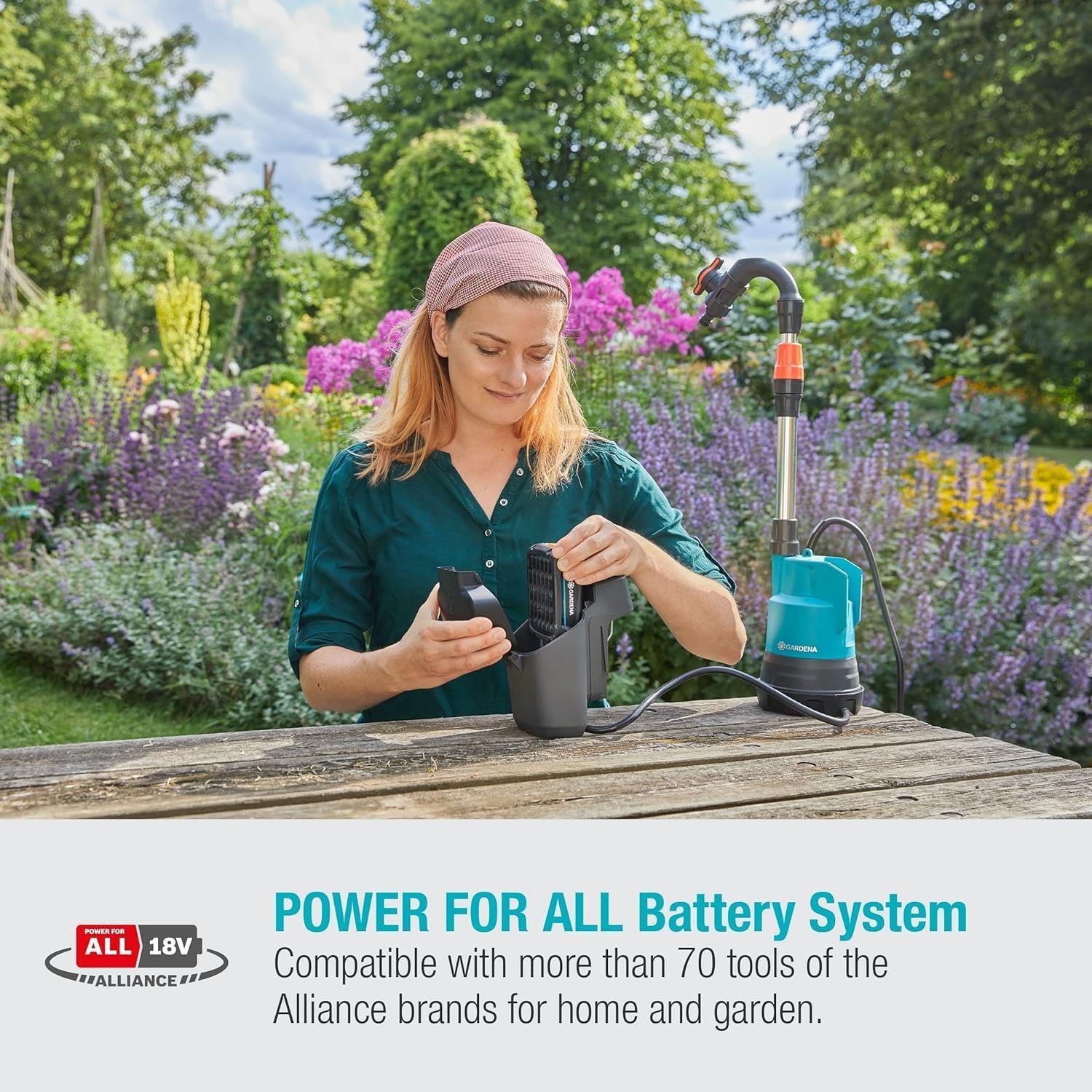
Image: A user installing the battery into the pump's power unit, demonstrating the POWER FOR ALL Battery System compatibility.
- Telescopic Tube Adjustment: Adjust the length of the telescopic aluminum tube to suit the depth of your rainwater tank. Loosen the locking mechanism, extend or retract the tube, and then secure the mechanism.
- Hose Connection: Connect your garden hose or watering accessory (e.g., Gardena nozzle, spray gun, or sprinkler) to the outlet on the telescopic tube. Ensure a tight connection to prevent leaks.
- Placement: Submerge the pump into the rainwater tank. Ensure the pump is fully submerged and resting on a stable surface at the bottom of the tank.
Operating Instructions
The Gardena Battery Rainwater Tank Pump offers flexible operation for various watering needs.
- Powering On/Off: Press the power button to turn the pump on. Press it again to turn it off.
- Adjusting Power Levels: The pump features three power levels. Cycle through them by pressing the mode button to adjust the flow rate and pressure according to your watering requirements.

Image: A user watering plants in a garden, illustrating the pump's adjustable water pressure feature for efficient watering.
- Using the Timer Function: To activate the timer, press the timer button. You can select run times of 5, 10, or 15 minutes. The pump will automatically shut off after the selected duration.

Image: A hand interacting with the pump's control panel, setting the timer function for automated operation.
- Dry Running Protection: The pump is equipped with an AutoStop dry-running feature. If the water level in the tank becomes too low, the pump will automatically switch off to prevent damage.

Image: The pump submerged in a shallow pool, demonstrating its AutoStop dry-running feature that prevents damage when water levels are low.
- Battery Runtime: The battery runtime varies depending on the battery size and selected power level. For optimal performance, ensure your battery is fully charged before extended use.

Image: A user watering plants, highlighting the pump's long runtime capability, which varies based on battery size.
Maintenance
Regular maintenance ensures the longevity and optimal performance of your Gardena pump.
- Cleaning the Pre-filter: The integrated pre-filter should be regularly checked and cleaned to prevent blockages and maintain efficient water flow. Remove the filter, rinse it under clean water, and reinsert.
- Winter Storage: Before the first frost, completely drain the pump of any water. Store the pump in a frost-free environment. Remove the battery and store it separately in a cool, dry place.
- General Cleaning: Wipe down the exterior of the pump with a damp cloth. Do not use harsh chemicals or abrasive cleaners.
Troubleshooting
| Problem | Possible Cause | Solution |
|---|---|---|
| Pump does not start. | Battery not inserted correctly or discharged. | Ensure battery is fully charged and correctly inserted. |
| Low water flow. | Clogged pre-filter or hose. | Clean the pre-filter. Check hose for kinks or blockages. |
| Pump stops unexpectedly. | Dry running protection activated (low water level). | Check water level in the tank. Ensure pump is fully submerged. |
| Pump makes unusual noises. | Air in the system or debris. | Ensure pump is fully submerged and free of air. Check for debris around the impeller. |
Specifications
| Attribute | Value |
|---|---|
| Brand | Gardena |
| Model Number | 14602-55 |
| Power Source | Battery Powered (18V POWER FOR ALL system) |
| Voltage | 18 Volts |
| Maximum Flow Rate | 2000 Liters Per Hour |
| Maximum Pressure | 2.0 bar |
| Product Dimensions (L x W x H) | 10.24" x 7.87" x 11.81" (26 cm x 20 cm x 30 cm) |
| Item Weight | 6.39 pounds (2900 Grams) |
| Material | Aluminium (telescopic tube) |
| Included Components | 1x Gardena Battery Rainwater Tank Pump 2000/2 18 V P4A solo (without battery) |
| Batteries Included? | No |
| Batteries Required? | Yes |

Image: Diagram showing the approximate dimensions and weight of the Gardena Battery Rainwater Tank Pump.
Warranty and Support
For warranty information and customer support, please refer to the official Gardena website or contact their customer service directly. Keep your proof of purchase for any warranty claims.
Online Resources: www.gardena.com
Contact: Refer to the contact section on the official Gardena website for regional support details.