
1. Product Overview
The StylusHome Stylus Pens are designed to provide a sensitive and precise writing and drawing experience on various touchscreen devices. This set includes three stylus pens, each featuring a versatile 2-in-1 design with different sized rubber tips and comes with extra replacement tips to extend the product's lifespan.

Image: StylusHome Stylus Pens (3 Pcs) with replacement tips.
Key Features:
- 2-in-1 Design: Each stylus features two different sizes of rubber tips on both ends, offering versatility for various tasks.
- Sensitive & Precise: Engineered for smooth drawing and sensitive writing, enhancing interaction with touchscreen devices.
- Anti-scratch Tip: The soft rubber tips protect your screen from scratches and prevent fingerprints.
- Universal Compatibility: Compatible with all capacitive touchscreen devices, including iPads, iPhones, Android tablets, and smartphones.
- Replaceable Tips: Both ends of the stylus pens have replaceable rubber tips, allowing for easy replacement without tools. Six extra replacement fiber tips are included (3 small, 3 large).
2. Setup
The StylusHome Stylus Pens are ready for immediate use out of the box. No charging or pairing is required. The primary setup involves understanding and, when necessary, replacing the rubber tips.
Replacing Rubber Tips:
The stylus tips are designed to be easily replaceable to ensure continuous optimal performance. Only the rubber tip needs replacement; the metal part should be retained.
- Unscrew the Stylus Tip: Gently twist the metal part of the stylus tip counter-clockwise to unscrew it from the pen body.
- Remove Old Rubber Tip: Once unscrewed, carefully remove the worn rubber tip from the metal screw component.
- Attach New Rubber Tip: Place a new rubber tip onto the metal screw component. Ensure it is seated properly.
- Screw Tip Back On: Screw the entire tip assembly (metal part with new rubber tip) back onto the stylus pen body by twisting clockwise until secure.
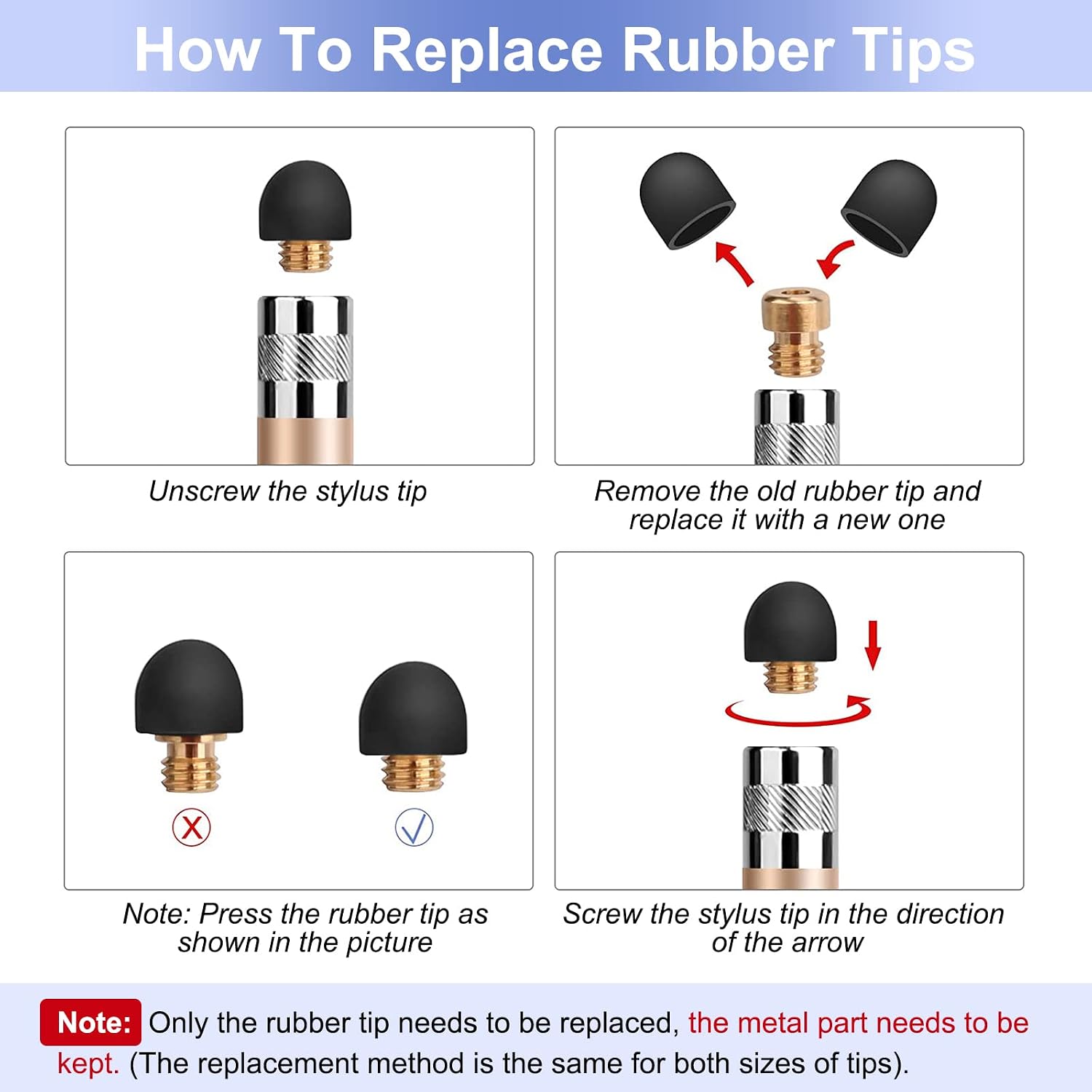
Image: Step-by-step guide for replacing stylus rubber tips.
Note: The replacement method is identical for both the small and large sized tips.
3. Operating Instructions
The StylusHome Stylus Pens are designed for intuitive use across a wide range of touchscreen activities. Simply touch the desired screen area with the stylus tip to interact with your device.
Using the 2-in-1 Tips:
Each stylus pen features two distinct tip sizes to cater to different needs:
- 7mm Tip: Ideal for general navigation, tapping, and broader strokes.
- 5mm Tip: Provides finer precision for detailed drawing, writing, and intricate selections.
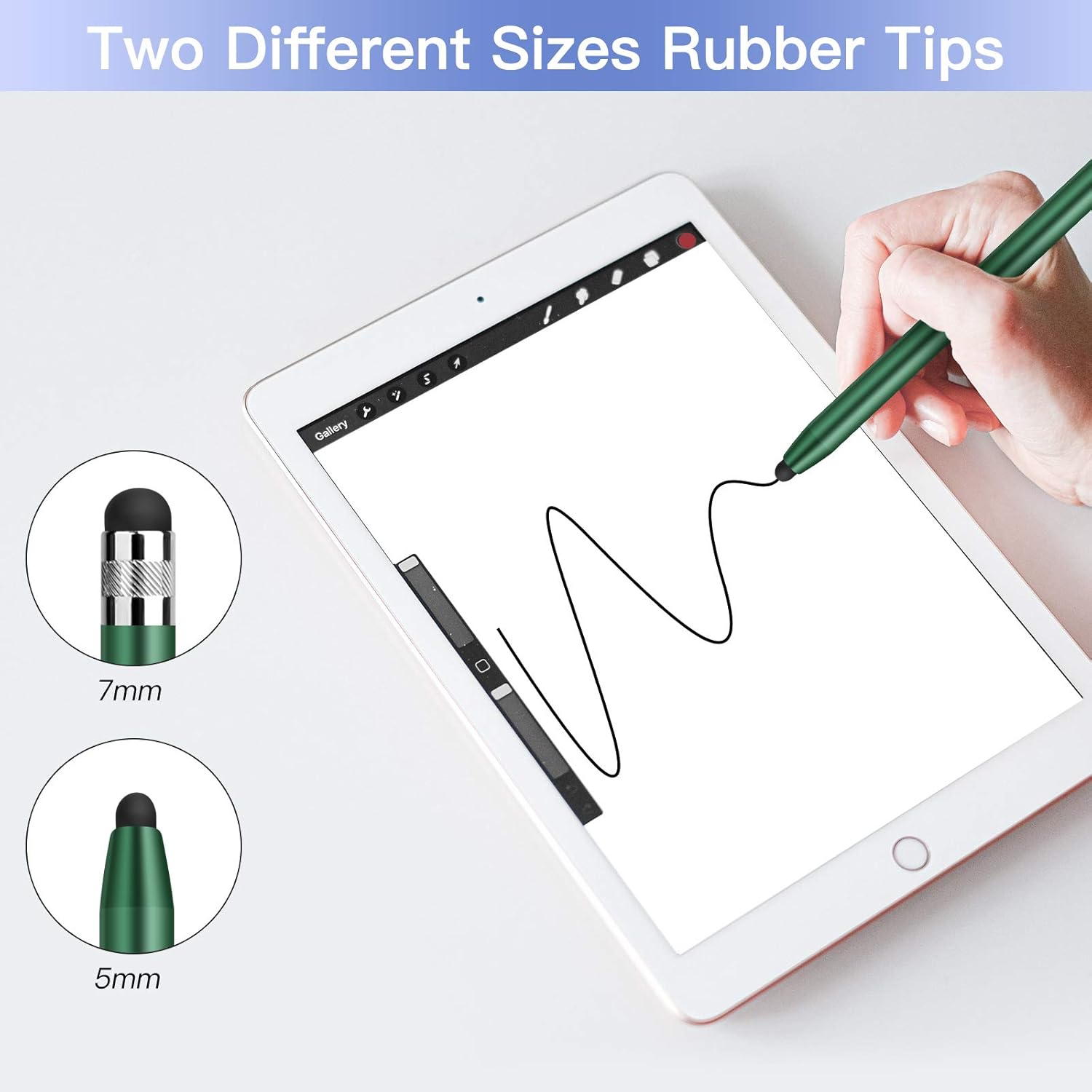
Image: Two different sizes of rubber tips for varied use.
Applications:
The stylus pens are suitable for a variety of daily tasks:
- Note-Taking: Write notes directly on your tablet or smartphone with improved legibility.
- Drawing & Sketching: Create digital art with enhanced precision.
- Gaming: Improve control and responsiveness in touchscreen games.
- Browsing & Navigation: Navigate menus, click links, and type with greater accuracy and speed.

Image: Stylus pens in use for daily activities.
Compatibility:
These stylus pens are universally compatible with all capacitive touchscreen devices. This includes, but is not limited to:
- Apple iPad (all generations)
- Apple iPhone (all models)
- Android Tablets & Smartphones (e.g., Samsung Galaxy series)
- Other Windows-based touchscreen devices

Image: Stylus compatibility with various operating systems and devices.
4. Maintenance
Proper maintenance ensures the longevity and optimal performance of your StylusHome Stylus Pens.
Tip Care:
- Cleaning: To maintain maximum effectiveness and sensitivity, gently wipe the rubber tips with a slightly damp, soft cloth. Ensure the tip is dry before use.
- Replacement: Replace tips as soon as you notice a decrease in sensitivity, accuracy, or any visible wear and tear. Refer to the 'Replacing Rubber Tips' section for instructions.
- Storage: Store the stylus pens in a clean, dry place away from extreme temperatures and direct sunlight.
General Care:
- Avoid dropping the stylus pens, as this can damage the tips or the pen body.
- Do not apply excessive force when using the stylus on your screen.
- Keep the stylus away from sharp objects that could puncture or damage the rubber tips.
5. Troubleshooting
If you encounter any issues with your StylusHome Stylus Pens, please refer to the following common solutions:
Stylus Not Responding or Inaccurate:
- Clean Screen: Ensure your device's screen is clean and free of smudges or debris, which can interfere with stylus detection.
- Clean Stylus Tip: Wipe the rubber tip of the stylus with a clean, damp cloth to remove any dirt or oils that may affect conductivity.
- Check Tip Condition: Inspect the rubber tip for any signs of wear, tears, or damage. A worn tip may need to be replaced.
- Restart Device: Sometimes, a simple restart of your tablet or smartphone can resolve temporary software glitches affecting touchscreen responsiveness.
- Test on Another Device: If possible, test the stylus on a different compatible touchscreen device to determine if the issue lies with the stylus or your original device.
Difficulty Replacing Tips:
- Ensure you are unscrewing the metal part of the tip counter-clockwise. It should detach from the pen body.
- If the tip is stuck, try gripping the metal part firmly with a small piece of rubber or a cloth for better traction while twisting. Do not use excessive force that could damage the pen.
If these steps do not resolve your issue, please contact StylusHome customer support for further assistance.
6. Specifications
| Product Dimensions | 6.3 x 2.56 x 0.62 inches |
| Item Weight | 0.67 ounces (19 Grams) |
| Material | Aluminum Alloy (body), Rubber (tips) |
| Color | Green, Gold, Silver (3-pack) |
| Compatible Devices | All Capacitive Touchscreen Devices (Tablets, Smartphones) |
| Batteries Required | No |
| ASIN | B08LMWYWFM |
| UPC | 303276840012 |

Image: Stylus dimensions and weight.
7. Warranty and Support
StylusHome is committed to providing high-quality products and excellent customer service.
Warranty Information:
StylusHome offers a 12-month warranty on its stylus pens, ensuring peace of mind regarding product quality and performance. This warranty covers manufacturing defects and issues arising from normal use.
Return Policy:
Products purchased from StylusHome are typically eligible for a 30-day return policy for refunds or replacements, subject to the retailer's terms and conditions.
Customer Support:
For any inquiries, technical assistance, warranty claims, or replacement requests, please contact StylusHome customer service. We aim to provide 24-hour service to address your needs promptly.
- Email: sales@stylushomeusa.com
- Online Store: Visit the STYLUSHOME Store on Amazon

Image: StylusHome Customer Service.

