
1. Introduction and Overview
The FiiO BTA30 is a versatile Bluetooth 5.0 receiver and transmitter designed to integrate modern wireless audio capabilities with various audio systems. It functions as a Bluetooth transmitter (TX), a Bluetooth receiver (RX), and a Digital-to-Analog Converter (DAC), offering long-range wireless audio solutions for devices such as PCs, TVs, speakers, laptops, and home audio setups.
2. Package Contents
Please check the package contents upon unboxing to ensure all items are present:
- FiiO BTA30 Unit
- USB Type-C Cable
- RCA Cable
- Quick Start Guide (this manual)

Figure 2.1: FiiO BTA30 and included accessories.
3. Product Overview and Controls
Familiarize yourself with the layout and controls of the FiiO BTA30:
3.1 Front Panel

Figure 3.1: Front view of FiiO BTA30.
- ON/OFF Button: Powers the device on or off.
- PAIR Button: Initiates Bluetooth pairing mode.
- MODE Switch: Selects between Bluetooth Receiver (RX), Bluetooth Transmitter (TX), and DAC modes.
- Volume Knob: Adjusts audio output level.
- Indicators: LEDs for power, pairing status, and active mode.
3.2 Rear Panel

Figure 3.2: Rear view of FiiO BTA30 with input/output ports.
- LINE OUT (RCA): Analog audio output.
- OPT OUT: Optical digital audio output.
- COAX IN/OUT: Coaxial digital audio input/output.
- OPT IN: Optical digital audio input.
- USB IN (Type-C): For power supply and USB DAC functionality.
4. Setup and Initial Pairing
Follow these steps to set up your FiiO BTA30 and connect it to your devices:
- Power Connection: Connect the FiiO BTA30 to a power source using the provided USB Type-C cable. This can be a computer's USB port or a USB power adapter.
- Turn On: Press the ON/OFF button to power on the BTA30. The power indicator will illuminate.
- Select Mode: Use the MODE switch to select your desired operation mode:
- BT RX: Bluetooth Receiver mode (receive audio from phone/tablet).
- BT TX: Bluetooth Transmitter mode (transmit audio to Bluetooth headphones/speakers).
- DAC: Digital-to-Analog Converter mode (use BTA30 as a wired DAC).
- Enter Pairing Mode: In either BT RX or BT TX mode, hold the PAIR button for approximately 3 seconds. The indicator light will flash red and green alternately, indicating the BTA30 has entered pairing mode.
- Connect Device: On your Bluetooth device (e.g., smartphone, Bluetooth headphones), search for "FiiO BTA30" in the Bluetooth settings and select it to connect. Once connected, the indicator light on the BTA30 will turn solid.
5. Operating Modes
5.1 Bluetooth Transmitter (TX) Mode
In TX mode, the BTA30 receives audio via its digital inputs (Coaxial, Optical, or USB) and transmits it wirelessly to Bluetooth-enabled headphones or speakers. This allows you to enjoy audio from non-Bluetooth sources like TVs, CD players, or computers through your wireless audio devices.
Supported Formats: LDAC, aptX HD, aptX LL, SBC. Note: LDAC is supported only through optical/coaxial input, not through USB.
- Set the MODE switch to BT TX.
- Connect your audio source (e.g., TV, CD player, computer) to the BTA30's Coaxial In, Optical In, or USB In port.
- Ensure your Bluetooth headphones or speakers are in pairing mode.
- Hold the PAIR button on the BTA30 for 3 seconds to enter pairing mode. The BTA30 will automatically connect to your Bluetooth audio device.
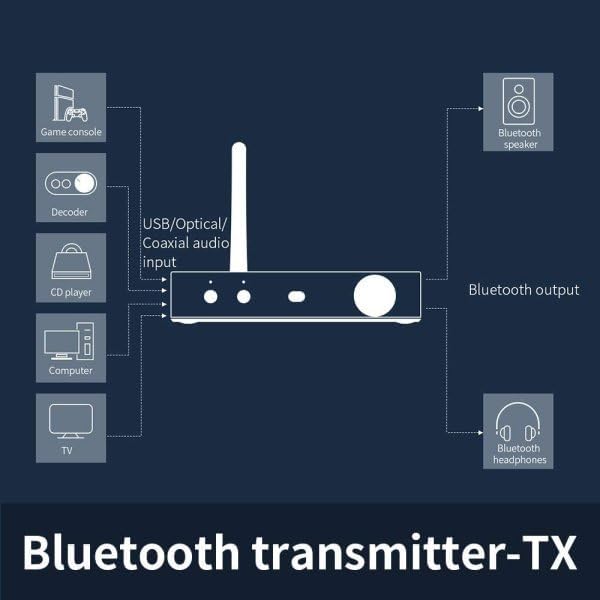
Figure 5.1: Bluetooth Transmitter (TX) Mode Setup.
Video 5.1: How to use the FiiO BTA30 as a Bluetooth transmitter. This video demonstrates connecting the BTA30 to a power source, entering pairing mode, and connecting via coaxial, optical, and USB inputs to transmit audio to Bluetooth headphones.
5.2 Bluetooth Receiver (RX) Mode
In RX mode, the BTA30 receives Bluetooth audio from your smartphone, tablet, or other Bluetooth-enabled device and outputs it to your non-Bluetooth audio system (e.g., vintage speakers, amplifier) via RCA Line Out, Optical Out, or Coaxial Out. This allows you to stream wireless music to your traditional audio setup.
Supported Formats: LDAC, aptX, aptX HD, AAC.
- Set the MODE switch to BT RX.
- Connect the BTA30's RCA Line Out, Optical Out, or Coaxial Out to your amplifier or active speakers.
- On your smartphone or music player, search for "FiiO BTA30" in Bluetooth settings and connect.
- Play music on your device, and the audio will be streamed to your connected audio system.
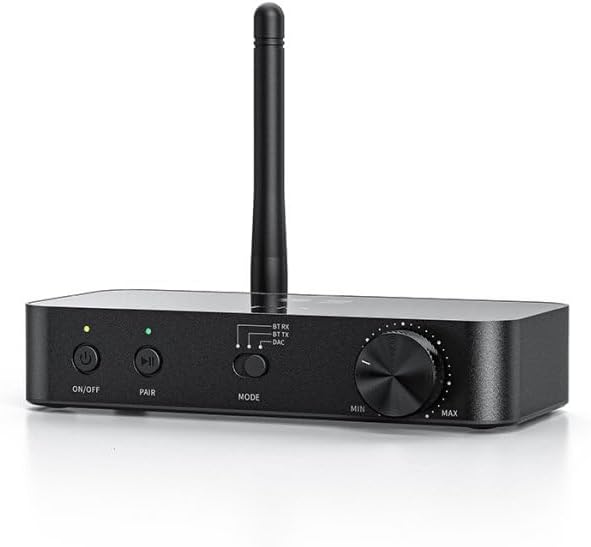
Figure 5.2: Bluetooth Receiver (RX) Mode Setup.
5.3 DAC Mode (Digital-to-Analog Converter)
When not using Bluetooth, the BTA30 can function as a high-quality DAC, converting digital audio signals from your computer or other sources into analog audio. This is ideal for improving the sound quality of your wired audio setup.
- Set the MODE switch to DAC.
- Connect your digital audio source (e.g., computer via USB, CD player via Optical/Coaxial) to the corresponding input on the BTA30.
- Connect the BTA30's RCA Line Out, Optical Out, or Coaxial Out to your amplifier or active speakers.
- The BTA30 will now act as an external sound card or DAC, processing the digital audio and outputting it to your connected audio system.
Input Support:
- Coaxial input supports up to 24 bit/192kHz and DSD64.
- Optical input supports up to 24 bit/96kHz.
- USB input supports up to 16 bit/48kHz.
6. Troubleshooting
If you encounter issues with your FiiO BTA30, please refer to the following common troubleshooting steps:
- No Power: Ensure the USB Type-C cable is securely connected to both the BTA30 and a working power source. Try a different USB port or power adapter.
- Cannot Pair Bluetooth:
- Ensure the BTA30 is in the correct mode (BT RX or BT TX) and the indicator is flashing red and green.
- Make sure your target Bluetooth device (headphones, speaker, phone) is also in pairing mode.
- Move the devices closer to each other to reduce interference.
- Clear previous Bluetooth connections on both the BTA30 and your device, then try pairing again.
- No Audio Output:
- Check all cable connections (RCA, Optical, Coaxial, USB) to ensure they are secure and correctly inserted.
- Verify the BTA30 is in the correct operating mode (TX, RX, or DAC) for your setup.
- Adjust the volume knob on the BTA30 and ensure the volume on your connected audio source/device is not muted or too low.
- If using digital inputs (Optical/Coaxial), ensure the audio format from your source is supported by the BTA30 (e.g., PCM, not Dolby/DTS).
- Poor Sound Quality/Interference:
- Reduce the distance between the BTA30 and the connected Bluetooth device.
- Minimize obstacles (walls, large metal objects) between devices.
- Avoid placing the BTA30 near other wireless devices that may cause interference (e.g., Wi-Fi routers, microwaves).
- Ensure you are using high-quality audio cables.
For more detailed troubleshooting or specific issues, please visit the official FiiO support website or contact their customer service.
7. Specifications
| Feature | Detail |
|---|---|
| Model Number | BTA30 |
| Product Dimensions | 5.51 x 6.26 x 2.24 inches |
| Item Weight | 4.1 ounces (115 Grams) |
| Color | Black |
| Connectivity Technology | Bluetooth, Optical, RCA, USB |
| Compatible Devices | Computer, Game Console, Smartphone, Speaker, Television |
| Audio Output Mode | Stereo |
| Surround Sound Channel Configuration | 2 |
8. Maintenance
To ensure the longevity and optimal performance of your FiiO BTA30, follow these maintenance guidelines:
- Cleaning: Use a soft, dry cloth to clean the exterior of the device. Avoid using harsh chemicals, solvents, or abrasive cleaners.
- Storage: Store the device in a cool, dry place away from direct sunlight, extreme temperatures, and high humidity.
- Handling: Handle the device with care. Avoid dropping it or subjecting it to strong impacts.
- Connections: Periodically check all cable connections for dust or debris and ensure they are securely seated.
9. Safety Information
Please read and adhere to the following safety precautions to prevent damage to the device or personal injury:
- Do not expose the device to water, rain, moisture, or extreme temperatures.
- Do not attempt to disassemble, repair, or modify the device yourself. Refer all servicing to qualified personnel.
- Use only the specified power supply and accessories.
- Avoid placing the device near heat sources or in direct sunlight.
- Keep the device out of reach of children.
10. Warranty and Support
The FiiO BTA30 comes with a standard manufacturer's warranty. For specific warranty terms, conditions, and duration, please refer to the warranty card included in your package or visit the official FiiO website.
For technical support, product inquiries, or service requests, please contact FiiO customer support through their official channels. You can typically find contact information on their website or in the product packaging.
Official FiiO Website: www.fiio.com


