
1. Introduction and Compatibility
This manual provides instructions for the installation, operation, and maintenance of your new Yomoly Carburetor. This carburetor is designed as a direct replacement part for the Craftsman Model 247.795890 Chipper Shredder.
Ensure that your equipment model matches the compatibility listed to guarantee proper fit and function.
2. Safety Information
Always prioritize safety when working with fuel systems and power equipment. Failure to follow these safety guidelines may result in serious injury or damage to equipment.
- Disconnect Spark Plug: Before performing any maintenance or installation, always disconnect the spark plug wire to prevent accidental engine startup.
- Work in a Well-Ventilated Area: Fuel vapors are flammable and hazardous. Ensure adequate ventilation.
- Wear Protective Gear: Use safety glasses and gloves to protect against fuel splashes and sharp edges.
- Handle Fuel Carefully: Drain fuel into an approved container. Avoid spills and keep ignition sources away.
- Allow Engine to Cool: Do not work on a hot engine. Allow sufficient time for the engine to cool down.
3. Package Contents
Please verify that all components are present and undamaged before proceeding with installation.
- 1 x Yomoly Carburetor (for Craftsman Model 247.795890)
- (Gaskets and mounting hardware may be included depending on the specific kit. Please check your packaging.)
4. Setup and Installation
This section outlines the general steps for replacing the carburetor. Specific procedures may vary slightly based on your chipper shredder's configuration. Refer to your Craftsman equipment's service manual for detailed instructions if needed.
Required Tools:
- Socket wrench set
- Screwdriver set
- Pliers
- Fuel-resistant container for draining fuel
- Clean rags
Installation Steps:
- Prepare the Equipment: Ensure the engine is cool. Disconnect the spark plug wire. Turn off the fuel supply valve and drain the fuel tank into an approved container.
- Access the Carburetor: Remove any air filter housing, shrouds, or other components that obstruct access to the carburetor.
- Disconnect Fuel Lines and Linkages: Carefully disconnect the fuel lines, throttle linkage, and choke linkage from the old carburetor. Note their positions for reassembly.
- Remove Old Carburetor: Unbolt the old carburetor from the engine manifold. Be mindful of any gaskets between the carburetor and the engine.
- Inspect and Clean: Inspect the intake manifold and surrounding areas for debris. Clean any dirt or old gasket material.
- Install New Carburetor: Place new gaskets (if supplied) on the manifold. Mount the new Yomoly carburetor, ensuring it aligns correctly. Secure it with the mounting bolts. Do not overtighten.
- Connect Fuel Lines and Linkages: Reconnect the fuel lines, throttle linkage, and choke linkage to their correct positions on the new carburetor. Ensure all connections are secure.
- Reassemble Components: Reinstall the air filter housing, shrouds, and any other components removed earlier.
- Refill Fuel and Reconnect Spark Plug: Refill the fuel tank with fresh, appropriate fuel. Reconnect the spark plug wire.

Figure 1: Front view of the carburetor showing the 22mm intake diameter and 35mm (1.37 inch) mounting hole spacing. This image helps verify the correct fit for your engine manifold.
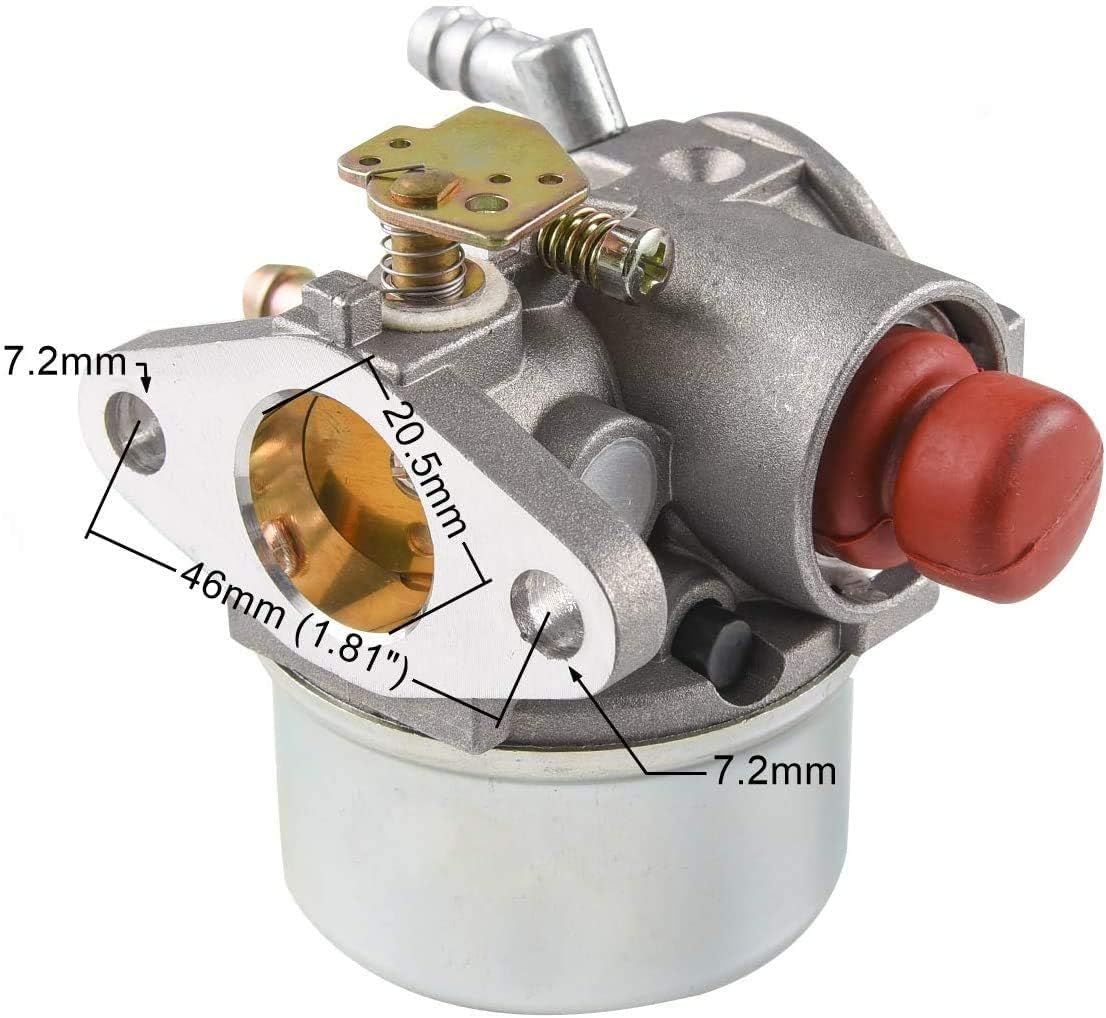
Figure 2: Angled view illustrating additional dimensions including a 20.5mm intake, 46mm (1.81 inch) mounting hole spacing, and 7.2mm hole diameter. These measurements are crucial for ensuring compatibility with your chipper shredder's engine.
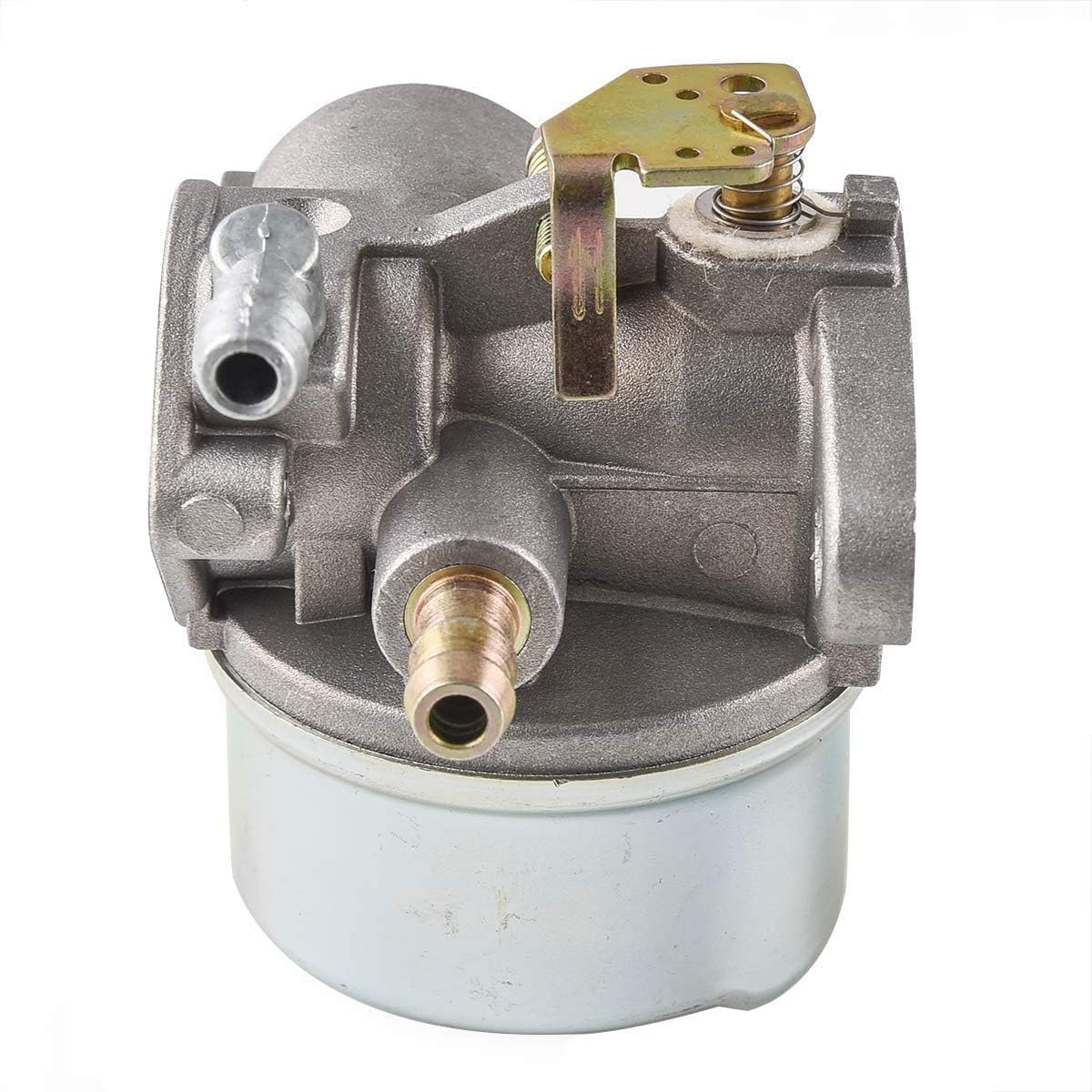
Figure 3: Side view of the carburetor, providing a perspective on the fuel inlet and overall construction. This view can assist in identifying fuel line connections.

Figure 4: View highlighting the red primer bulb on the carburetor. The primer bulb is used to draw fuel into the carburetor for easier starting.
5. Operating (Initial Start-up)
After installation, perform the following steps for initial engine start-up:
- Open Fuel Valve: Ensure the fuel supply valve is in the 'ON' position.
- Prime the Carburetor: Press the primer bulb (if present) several times until fuel is visible in the bulb or fuel lines.
- Set Choke: Move the choke lever to the 'FULL CHOKE' position for cold starts.
- Start Engine: Pull the starter rope or engage the electric starter according to your equipment's instructions.
- Adjust Choke: As the engine warms up, gradually move the choke lever to the 'RUN' position.
If the engine does not start or runs poorly, refer to the Troubleshooting section.
6. Maintenance
Regular maintenance ensures optimal performance and extends the life of your carburetor and chipper shredder.
- Fuel Quality: Always use fresh, clean fuel. Stale or contaminated fuel is a common cause of carburetor issues. Consider using a fuel stabilizer if storing the equipment for extended periods.
- Fuel Filter: Regularly inspect and replace the fuel filter according to your equipment's maintenance schedule. A clogged fuel filter can restrict fuel flow to the carburetor.
- Air Filter: Keep the air filter clean. A dirty air filter can cause the engine to run rich and affect carburetor performance.
- Carburetor Cleaning: If performance issues arise, the carburetor may need cleaning. This typically involves disassembling the carburetor, cleaning jets and passages with carburetor cleaner, and replacing gaskets. This procedure should only be performed by individuals with mechanical experience.
- Storage: Before long-term storage, drain the fuel system or run the engine until it runs out of fuel to prevent gum and varnish buildup in the carburetor.
7. Troubleshooting
If your chipper shredder experiences issues after carburetor replacement, consider the following common problems and solutions:
| Problem | Possible Cause | Solution |
|---|---|---|
| Engine won't start | No fuel, clogged fuel filter, incorrect choke setting, spark plug issue, fuel lines reversed | Check fuel level, replace fuel filter, adjust choke, check spark plug, verify fuel line connections |
| Engine runs rough/stalls | Dirty carburetor, old fuel, air leak, incorrect idle adjustment | Clean carburetor, use fresh fuel, check for air leaks around manifold, adjust idle screw |
| Fuel leaks | Loose connections, damaged gaskets, cracked fuel lines | Tighten connections, replace gaskets, replace fuel lines |
| Engine lacks power | Clogged air filter, partially clogged carburetor jet, incorrect fuel mixture | Clean/replace air filter, clean carburetor, consult service manual for mixture adjustment |
If these steps do not resolve the issue, it is recommended to consult a qualified service technician or your equipment's official service manual.
8. Specifications
Key dimensions for the Yomoly Carburetor compatible with Craftsman Model 247.795890:
- Intake Diameter: Approximately 22mm
- Mounting Hole Spacing (Front): Approximately 35mm (1.37 inches)
- Mounting Hole Spacing (Angled): Approximately 46mm (1.81 inches)
- Mounting Hole Diameter: Approximately 7.2mm
- Material: Metal alloy construction
Note: All measurements are approximate and may vary slightly. Always verify compatibility with your specific equipment before installation.
9. Warranty and Support
For warranty information regarding your Yomoly Carburetor, please refer to the documentation provided with your purchase or contact the seller directly. Warranty terms typically cover manufacturing defects.
For technical support or further assistance, please reach out to the Yomoly customer service department or the retailer from whom you purchased this product.